QR code tickets: how they work and why screenshots matter
A QR code ticket is a unique ID checked at the door, not a picture. Why a screenshot works like the original, how ticketing systems stop it and what a plain QR code can do.
QR code tickets work because the code is only a number: whether the holder gets in is decided by the ticketing system's database at the door, not by the picture. The scanner reads the number, the system checks that the ticket exists, belongs to this event and has not been used, and only then shows a green light. That is why an ordinary QR code generator makes a code, not a ticket — a screenshot of such a code works exactly like the original, as we show below with a code from our own generator. To be clear from the start: DVN Links does not sell tickets or check them at the door. There are no unique codes per attendee, no check-in and no codes that change over time. We make QR codes that sit next to the ticket: on the poster, in the programme, on the badge and for the event app. Below: how a ticket with a code works at the gate, how ticketing systems fight screenshots, which barcodes end up on tickets, and how to decide whether your event needs tickets or just a QR code with information.
How QR code tickets work at the door
A QR code ticket carries an identifier, and validity is decided by the system that checks that identifier — once. Eventbrite's help for organizers shows it well. The check-in app "uses your device's camera to scan tickets"; the organizer aims it "at the QR code on the ticket to check in the attendee", a confirmation appears after the scan, and "an error message will appear if the QR code is already checked-in or not valid for this event" (Eventbrite Help Center, Check in attendees at your event with the Eventbrite app for organizers, read 21 Oct 2026). The code itself does not know whether it has been scanned — the database does.
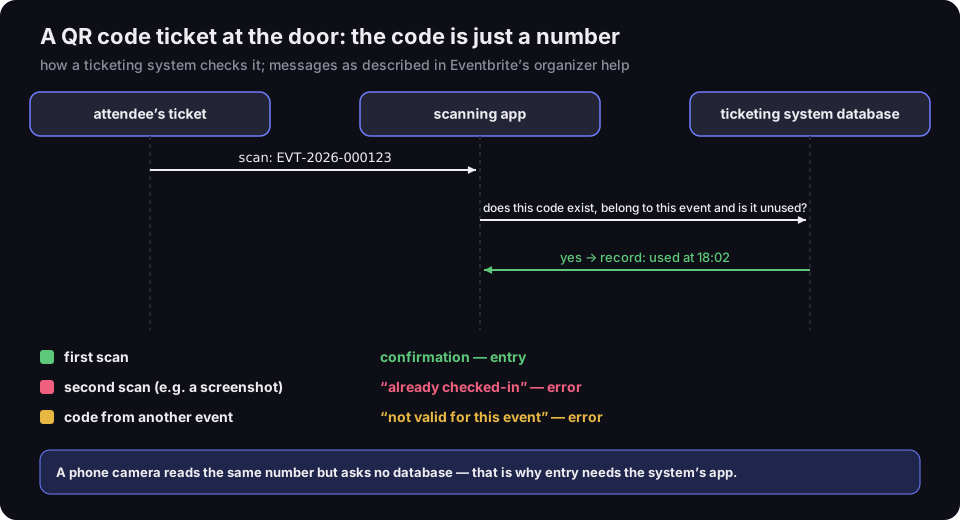
A QR code ticket at the door: the code is just a number
how a ticketing system checks it; messages as described in Eventbrite’s organizer help
Source: DVN Links diagram; messages — Eventbrite Help Center, article 741083, read 21 Oct 2026
Figure description
Sequence diagram with three participants: the attendee's ticket, the scanning app and the ticketing system's database. The app scans the code EVT-2026-000123 from the ticket, asks the database whether this code exists, belongs to this event and is unused, and the database answers yes and records it as used at 18:02. Below, three outcomes: first scan — confirmation and entry; second scan, for example a screenshot — the error already checked-in; a code from another event — the error not valid for this event. A phone camera reads the same number but asks no database.
Three things follow from this, and they are worth knowing before you buy or build tickets:
- The first scan wins. A ticket scanned at the door is marked as used in the database. Every later scan of the same code — from the original, a printout or a screenshot — ends with an error. Whoever arrives first gets in.
- Every person needs a different code. If everyone had the same code, the first entry would "use it up" for all — or, without a record of use, let in anyone with a photo of it. So a ticketing system issues a separate code for every ticket.
- Scanning needs the system's app, not a camera. A regular phone camera reads the same number but does not ask the database and does not record the entry.
There is a fourth point that rarely gets mentioned: the number should not be guessable. If tickets are numbered in sequence — 000123, 000124, 000125 — anyone who sees one ticket can draw a code with the next number, and the system will let it in if the real holder has not arrived yet. That is our own remark, not a quote: DVN Links short links also use random codes rather than sequential ones, so one link does not give away the next. We use EVT-2026-000123 in this article only for readability — a real ticketing system should issue random or signed identifiers.
A ticket code does not have to be a bare number — it can carry data. A boarding pass under the IATA BCBP standard encodes, among other things, the passenger's name and the flight; the example in IATA's guide is the string "M1LEOPOLD/EMR EZQ7O92 GVALHRBA…". The standard also provides for an optional digital signature: the airline holds the private key and verifiers get the public key, so "only an airline can generate a boarding pass with a digital signature and the bar code cannot be tampered with" (IATA, Bar Coded Boarding Pass Implementation Guide, version 7, 2021, §2.2.5, read 21 Oct 2026). A signature stops anyone forging the data, but not copying the whole code: a copy of a signed code carries the same valid signature. Only the record in the system stops a second use.
The same principle applies to public transport and rail tickets bought in an app: the code is a number or a set of data, and validity is decided by the operator's system. Whether a screenshot is enough, or the ticket has to be shown in the app or validated, is up to the operator — check its terms, because the rules differ from city to city.
Ticket screenshots: why a plain QR code can be copied
A screenshot of a plain QR code holds exactly the same data as the original — and every reader decodes it the same way. A QR code has no physical "original": it is a pattern of light and dark modules, and the same pattern appears on a screenshot, a printout and a photo taken with another phone.
We tested this with a code from our generator. We made a QR code with the text EVT-2026-000123 (what a ticket number might look like) using the settings for a visitor without an account — with our logo and caption. Then we simulated two copies: a phone screenshot (the code on a 1080 × 2340 px screen with some app chrome) and a photo of that screenshot taken with a second phone (scaled down to 540 px wide, rotated 7°, blurred, darkened to 0.8 brightness, saved as a low-quality JPEG). We ran all three images through the jsQR decoder. Result: the same content three times, EVT-2026-000123.
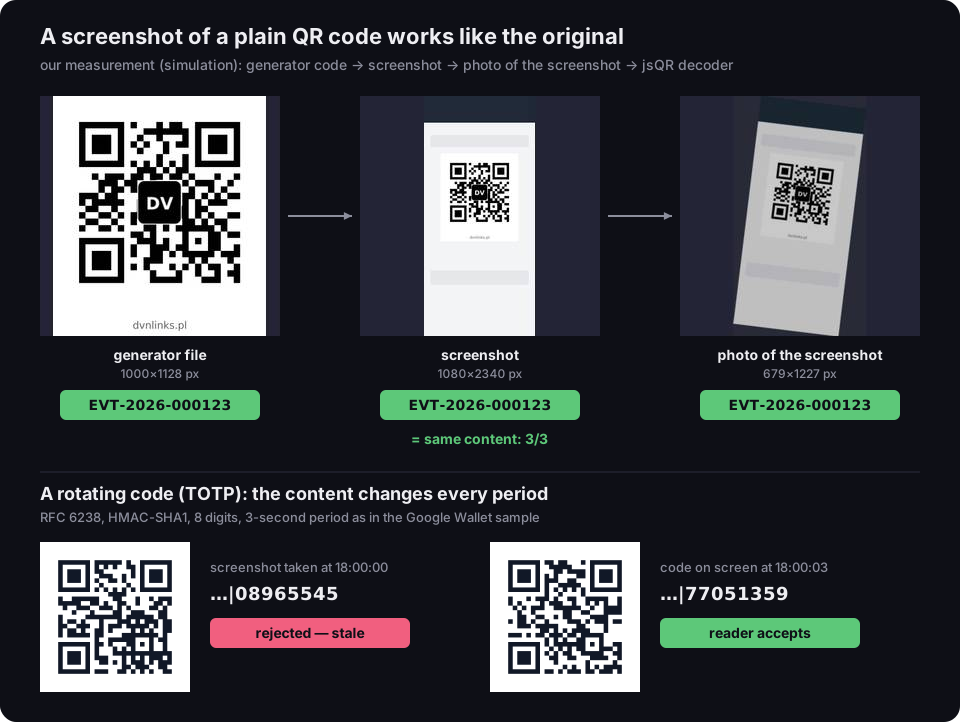
A screenshot of a plain QR code works like the original
our measurement (simulation): generator code, screenshot, photo of the screenshot, jsQR decoder; below, a rotating TOTP code
Source: our measurement — DVN Links generator, simulated screenshot and photo (sharp), jsQR 1.4 decoder, 21 Oct 2026; TOTP — RFC 6238, period from the Google Wallet sample
Figure description
Three images side by side: the QR code file from the DVN Links generator at 1000 by 1128 pixels, a phone screenshot at 1080 by 2340 pixels showing that code, and a photo of the screenshot at 679 by 1227 pixels, rotated and blurred. Under each, the jsQR decoder result: EVT-2026-000123 — the same content in three cases out of three. Below, a rotating code following RFC 6238 with a 3-second period, as in the Google Wallet sample: a screenshot taken at 18:00:00 has the value 08965545 and the reader rejects it as stale; the code on screen at 18:00:03 has the value 77051359 and the reader accepts it.
This is our measurement in simulation, not a test on real phones, but the conclusion does not depend on the hardware: a static code contains nothing that tells a copy from the original. The same goes for the so-called dynamic QR code that generators sell. Such a code contains a short link that redirects to the destination — you can change the destination after printing, but a screenshot of the code leads to the same address as the original. A dynamic code is a redirect, not validation. The difference between static and dynamic codes is covered in our guide to making QR codes.
Ticketing systems have two answers to this. The first is the first-scan record described above: a screenshot works, but only once — if someone sells the screenshot to several people, the first one gets in. The second is rotating codes that change over time.
Google describes them in the Google Wallet documentation: rotating barcodes "look just like regular barcodes but change periodically, typically every minute, and the terminal/reader is programmed to only accept the most recent one", with the aim of reducing "the risks associated with barcode screenshotting, in particular ticket theft or unauthorized ticket resale" (Google Wallet, Rotating barcodes, read 21 Oct 2026). The value comes from TOTP — "Time-based One-Time Password", the same idea as the codes in two-factor authentication apps. RFC 6238 defines it as a time-based variant of one-time passwords that provides "short-lived OTP values, which are desirable for enhanced security" (RFC 6238, read 21 Oct 2026). Google's text says "typically every minute", yet the configuration example on the same page uses a 3-second period (periodMillis: 3000) — the issuer sets the period.
We computed TOTP according to RFC 6238 (checking our implementation against the RFC's test vector) with a 3-second period, as in Google's example. The code shown at 18:00:00 ends in 08965545; three seconds later it ends in 77051359. A screenshot taken at 18:00:00 is stale three seconds later, and a reader that accepts only the latest value rejects it.
Google Wallet also sets an order of entry methods: Smart Tap first (NFC, the phone held to the reader), then the rotating barcode, and the static barcode last — as a fallback, with a note on the "potential security implications of using static barcodes as fallbacks" (ibid.).
Ticketmaster took a similar route. When SafeTix launched in 2019, TechCrunch described tickets tied to the holder's phone through an encrypted barcode that "automatically refreshes every few seconds", with NFC support as well. TechCrunch spelled out the reason: unscrupulous resellers took screenshots or photocopies of tickets and sold them many times over, and "because the barcodes now automatically refresh, a saved photo won't work" (TechCrunch, 16 May 2019, read 21 Oct 2026). That is a press report from the launch, not Ticketmaster's own documentation — details may differ today.
The takeaway for attendees: a screenshot of a ticket with a plain code works once (if nobody used it first); a screenshot of a ticket with a rotating code does not. Always follow the organizer's instructions.
QR, PDF417, Aztec: which ticket barcode is which
Tickets do not only carry QR codes: boarding passes also use PDF417, Aztec and DataMatrix, and phone wallets accept even 1D barcodes. The symbology is chosen by the ticketing system, not the event organizer — but it helps to know what is on the ticket in your hand.
Aviation is the tidiest example. In December 2010 IATA announced the "100% worldwide implementation of 2D bar coded boarding passes (BCBP)" and added that "mobile 2D passes can use the Aztec, Datamatrix or QR codes" (IATA, press release of 15 Dec 2010, read 21 Oct 2026). IATA's implementation guide specifies that the BCBP standard allows PDF417, Aztec, DataMatrix and QR on paper boarding passes, and one of the three matrix codes on a phone. PDF417 was chosen first because it was the first open standard able to hold flight data for multi-leg journeys (IATA, BCBP Implementation Guide v7, §1.2.1 and §2.1.1).
Apple Wallet lets the pass issuer pick one of eight formats: QR, PDF417, Aztec, Code 128, Code 39, Codabar, EAN-13 and ITF (Apple Developer, Pass.Barcodes, read 21 Oct 2026). The same page adds that from iOS 27 a pass can carry several barcodes as fallbacks: in its example, EAN-13 renders on iOS 27 and later and QR on older versions. So a ticket barcode is not necessarily a QR code.
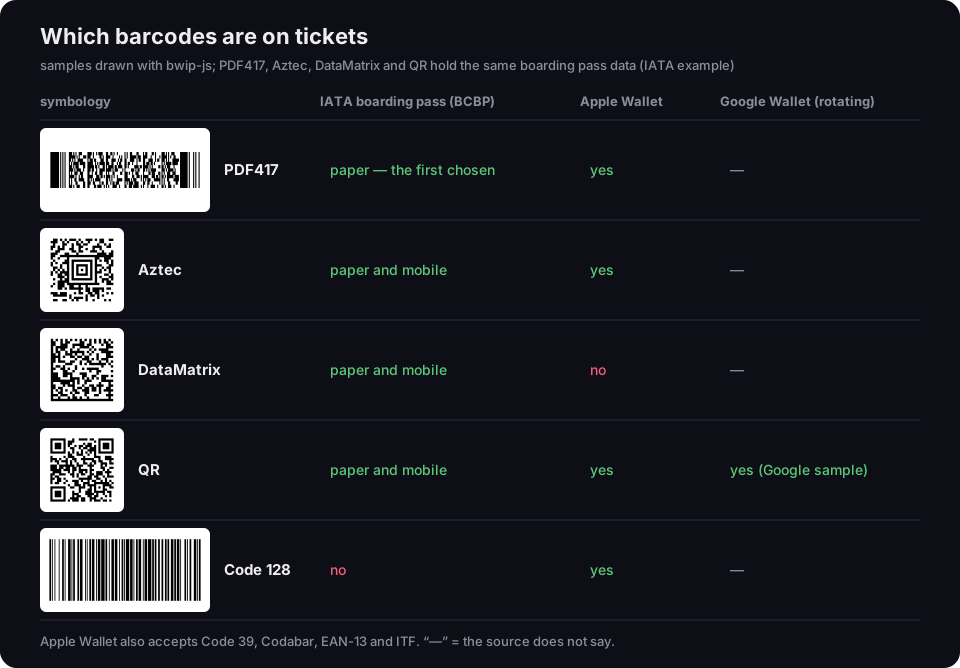
Which barcodes are on tickets
samples drawn with bwip-js; four 2D symbologies holding the same boarding pass data (IATA example)
Source: IATA, BCBP Implementation Guide v7 (2021) and press release of 15 Dec 2010; Apple Developer, Pass.Barcodes; Google Wallet, Rotating barcodes; samples — bwip-js, 21 Oct 2026
Figure description
Table with sample symbols. PDF417: on IATA paper boarding passes, the first chosen; Apple Wallet yes. Aztec: boarding passes on paper and mobile; Apple Wallet yes. DataMatrix: boarding passes on paper and mobile; Apple Wallet no. QR: boarding passes on paper and mobile; Apple Wallet yes; Google Wallet — the rotating barcode example is a QR code. Code 128: not on boarding passes; Apple Wallet yes. Apple Wallet also accepts Code 39, Codabar, EAN-13 and ITF.
The samples show the practical difference: PDF417 stores the same 57 characters of boarding pass data in a wide, flat band (good for linear scanners and narrow spaces on a printout), while Aztec, DataMatrix and QR use a square that fits a phone screen more easily. How 1D and 2D barcodes differ is covered in our guide what is a barcode.
Ticket or information code: what your event needs
If entry is paid, capacity is limited or tickets are named, you need a ticketing system; if the event is open, a QR code with information is enough. In between sits the free event with sign-up — a form and a list of names will do. We offer this frame as a way to decide, not as a standard:
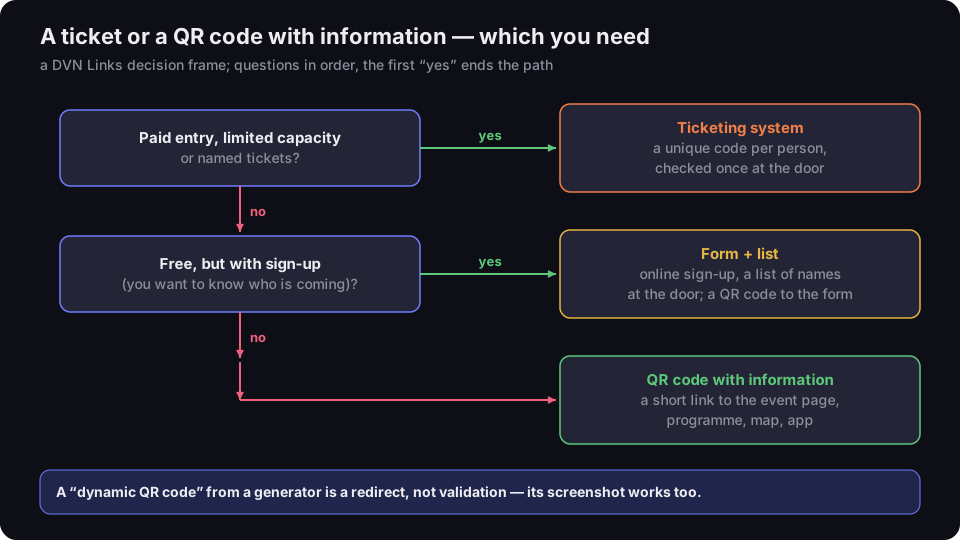
A ticket or a QR code with information — which you need
a DVN Links decision frame; questions in order, the first “yes” ends the path
Source: DVN Links decision frame, 21 Oct 2026
Figure description
Decision tree. First question: paid entry, limited capacity or named tickets? Yes — a ticketing system: a unique code per person, checked once at the door. No — second question: free, but with sign-up, meaning you want to know who is coming? Yes — a form and a list: online sign-up, a list of names at the door, a QR code to the form. No — a QR code with information: a short link to the event page, programme, map, app. At the bottom: a dynamic QR code from a generator is a redirect, not validation — its screenshot works too.
- Paid entry, limited capacity, named tickets → ticketing system. You need three things a plain generator cannot give you: a unique code for every buyer, a database that records entry, and an app to scan at the gate. Add payments, refunds and ticket transfers. That is what dedicated ticketing services do — pick one with a check-in app that flags a repeated scan.
- Free with sign-up → form and list. If you just want to know how many people are coming, an online sign-up form is enough, with a list of names to tick off at the door. The QR code on the poster can lead to the form — how to set one up is covered in our guide to Google Form QR codes. This is not a ticket: a list will not stop someone giving another person's name, but at a free event it usually does not need to.
- Open → QR code with information. A concert in the park, an open day, a fair with no registration: nobody checks entry, so the code only has to lead to information — the programme, a map, the event page.
What to look for in a ticketing system. The mechanisms above give a short list of questions for any provider: does every ticket have a separate, unguessable code; is there a check-in app, and what does it show on a repeated scan; can tickets go into a phone wallet (Apple Wallet, Google Wallet), and does the system use rotating codes if you worry about screenshot resale; can you download the attendee list in case the network fails at the door. The answers are in each service's help pages — we do not compare them here, because they change faster than this article.
The "dynamic code" trap. Some guides to QR code tickets suggest a dynamic code from a generator is enough. Such a code is the same for everyone, records no entries and works from a screenshot. You cannot issue tickets with it.
The "click limit" trap. From the Starter plan, DVN Links lets you set a click limit on a short link. That is not a ticket either: the limit counts every time a person opens the link (bots and link previews do not use it up), whoever that person is — if the code hangs on a poster, a passer-by uses up a click just like an attendee.
Event QR codes a plain generator can make
Everything except the ticket — poster, programme, badge, app, Wi-Fi — can run on a short link and a QR code you can change after printing. This is how it looks in DVN Links:
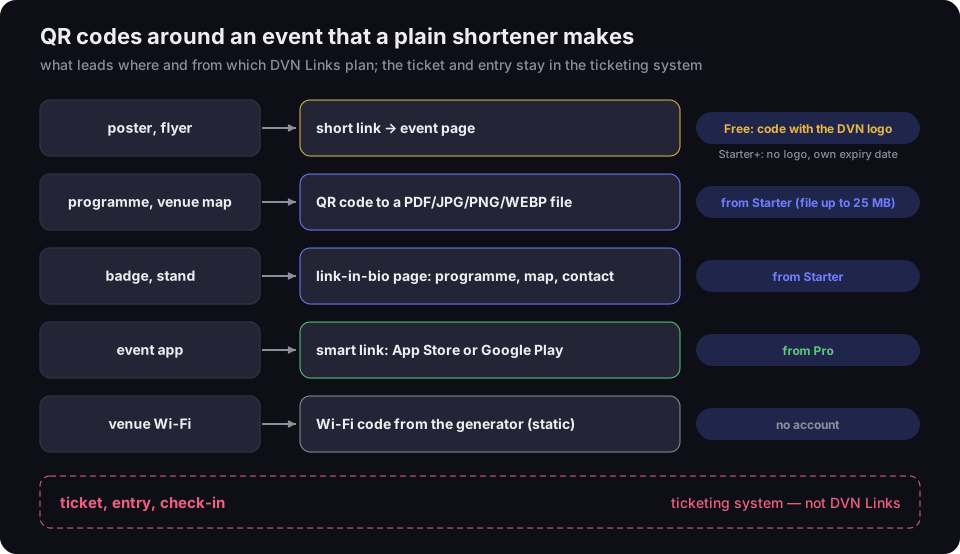
QR codes around an event that a plain shortener makes
what leads where and from which DVN Links plan; the ticket and entry stay in the ticketing system
Source: DVN Links plans (src/seed/plans.ts), as of 21 Oct 2026
Figure description
Diagram of five uses. Poster and flyer: a short link to the event page; on the Free plan the link does not expire but the code carries the DVN logo, from the Starter plan the code has no logo and a custom expiry date. Programme and venue map: a QR code to a PDF, JPG, PNG or WEBP file, from the Starter plan, files up to 25 MB. Badge and stand: a link-in-bio page with programme, map and contact, from the Starter plan. Event app: a smart link to the App Store or Google Play, from the Pro plan. Venue Wi-Fi: a static Wi-Fi code from the generator, no account needed. Separately, in a box: ticket, entry and check-in — a ticketing system, not DVN Links.
- Poster and flyer → short link to the event page. The QR code on the poster goes through a short link, so after printing you can change the destination (say, from the teaser page to the programme) and see the click count; bot traffic is left out of the statistics. Watch out on the Free plan: links there do not expire, but the code carries the DVN logo and the account has 1,000 clicks a month. A poster for a big campaign will use that up quickly. From the Starter plan the code has no logo, and you set an expiry date yourself or none at all.
- Programme and venue map → QR code to a file. From the Starter plan you upload a PDF, JPG, PNG or WEBP (up to 25 MB) and the code opens it directly. Details in our article on QR codes for PDFs.
- Badge and stand → a link-in-bio page. One page with a few buttons: programme, map, contact, post-event survey. From the Starter plan; how to build one is in our link in bio article.
- Event app → smart link. One code that sends iPhones to the App Store and Android phones to Google Play. From the Pro plan; how it works is in our smart link article.
- Venue Wi-Fi → Wi-Fi code. In the QR code generator you can make a code with the network name and password without an account. It is a static code — if you change the password, you reprint it.
If you are planning a wedding rather than a ticketed event, the same rules apply: a code on the invitation, another at the venue, and a link that will not expire before the big day. The details are in our guide to wedding QR codes.
The public generator works without an account: it makes a static PNG code with the DVN logo and caption. Vector SVG and PDF files for print, short-link codes and statistics come with the dashboard after you sign up; plans and prices (net, + VAT) are on the pricing page, and a description of features on the features page.
Putting a QR code on an event poster
Give your event poster one QR code with a short link to the event page, plus one sentence next to it saying what happens after the scan. Three codes on one poster (tickets, programme, Facebook) mean three decisions for a passer-by — one code to a page with buttons works better, and a link-in-bio page suits this well.
Say where the code leads: "Programme and tickets" says more than "Scan me". If tickets are sold through a ticketing system, the poster code leads to your event page or the sales page — but the code on the poster is not a ticket. Keep the event date in the poster text, not just behind the code: some people never scan it.
Posters are read from a distance, so the code's size depends on how far away people stand. How to work that out, and why a code sometimes refuses to scan, is covered in our article on minimum QR code size.
One last thing: posters hang in public places, and a code is easy to cover with a sticker carrying a different one. If a scan takes you somewhere unexpected, do not enter any data — how to check a link before you click is in our article on whether a link is safe.
Frequently asked questions
It depends on the ticket. A screenshot of a plain, static code holds the same content as the original, so the reader decodes it the same way — but a ticketing system only lets it in on the first scan. A screenshot of a rotating code (in Google Wallet or Ticketmaster's SafeTix, for example) goes stale within moments and the reader rejects it. Always follow the organizer's rules.
Through a ticketing system that gives every attendee a unique code and checks it at the door with a check-in app. A QR code generator alone makes a code, not a ticket: it does not issue separate numbers, does not record entries and cannot tell a screenshot from the original.
The app of the ticketing system you sell through — Eventbrite, for example, has a separate app for organizers. A regular phone camera reads the code's content but cannot check the database to see whether the ticket was already used.
Yes. Rotating codes change at set intervals — typically every minute, according to Google — and the reader accepts only the latest one. The value comes from the TOTP algorithm in RFC 6238, the same one used in two-factor authentication apps. Such codes are issued by a ticketing system or a phone wallet, not by a plain generator.
A code with a short link to the event page — you can change the destination after printing and see the click count. On the Free plan the code carries the DVN logo and the account has 1,000 clicks a month, so for a poster expecting more traffic, choose a paid plan. Size the code for the distance people will scan from.
Leave the tickets to a ticketing system. For the poster, programme and badge, use a short link with a QR code — you can change the destination after printing and see the clicks. Make one in the QR code generator.