Is this link safe? How to check before you click
Is this link safe? Read the domain from the right, spot @ signs and lookalike letters, expand short links without opening them, and know what link checkers miss.
Is this link safe? The most reliable test needs no tool at all: before you click, read the domain in the address from the right. The domain is the ending of the address and the one word just before it — everything further to the left says nothing about who owns the page. Link checkers help, but they only know what someone has already reported, and some of them make the address you paste public. The scale is large: the Anti-Phishing Working Group counted 1,069,681 phishing attacks worldwide in the second quarter of 2026 alone, up 10.1 percent on the first quarter (APWG, Phishing Activity Trends Report Q2 2026). Below are four questions you can ask a link in 30 seconds, three tricks that fool the eye, and what to do if you have already clicked.
Why there are so many dangerous links
Dangerous links are built to be numerous. APWG counts phishing sites rather than addresses, because "a single phishing site may be advertised as thousands of customized URLs, all leading to basically the same destination" (APWG, Q2 2026). One fake login page can arrive in your inbox, your text messages and your social feed under a different address each time.
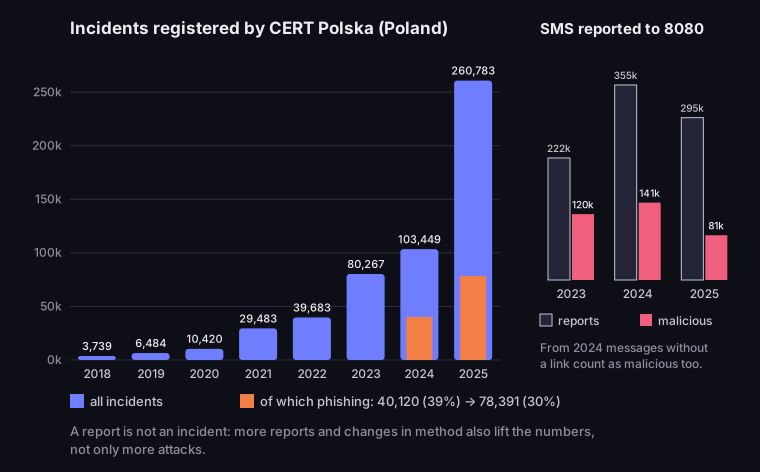
National data shows the same direction. Take Poland, where the national CERT publishes a detailed yearly report: CERT Polska registered 3,739 security incidents in 2018, 103,449 in 2024 and 260,783 in 2025 (CERT Polska, Annual Report 2024, table 9; Annual Report 2025, table 5). Phishing is counted separately in that data: 40,120 incidents in 2024 (39% of the total) and 78,391 in 2025 (30%). The number grows while its share falls, because other kinds of fraud grow even faster.
CERT Polska incidents 2018–2025
incidents per year, of which phishing (2024–2025); text messages reported to 8080 (2023–2025)
Source: CERT Polska, annual reports 2024 and 2025
Figure description
Bar chart of incidents registered by CERT Polska: 2018 3,739, 2019 6,484, 2020 10,420, 2021 29,483, 2022 39,683, 2023 80,267, 2024 103,449, 2025 260,783. Phishing: 40,120 in 2024 (39% of incidents) and 78,391 in 2025 (30%). Side panel, text messages reported to 8080: 2023 221,880 reports and 119,752 malicious; 2024 354,566 and 140,659; 2025 295,169 and 81,395. Note: a report is not an incident; numbers also grow with more reports and method changes.
Read these numbers carefully. An incident is a report that the CERT analysed and confirmed as a real threat; in 2024, 600,990 reports produced 103,449 incidents. The 152% jump in 2025, with only 10% more reports, does not simply mean two and a half times more attacks — the report attributes the growth partly to rising public awareness and the team's monitoring work (Annual Report 2025, p. 117).
Reports of suspicious text messages fell for the first time. In 2025 the Polish reporting number 8080 received 295,169 reports, 16.8% fewer than a year earlier, and messages judged malicious fell from 140,659 to 81,395 (CERT Polska, Annual Report 2025, p. 75). The CERT sees one reason in blocking: it builds patterns that operators use to stop such texts before they reach a phone, and 2025 was the first full year of the system — 790 patterns stopped 1,883,610 malicious messages (Annual Report 2025, p. 76). The problem has not gone away, it has changed shape: according to the same report, more and more texts carry no link and only bait you into a conversation on another messaging app, and the 2024 report describes QR codes on fake parking tickets and stickers on parking meters.
Is this link safe? Read the domain from the right
The domain — not the look of the page, the logo or the message — tells you who owns a site, and you read it from the right. CERT Polska gives the rule in plain steps: find the part between "://" and the first slash "/", because everything between them is the host name; the main domain is the ending (such as .com or .ie) plus the label directly before it, and everything to the left is subdomains or padding that does not show which brand the site belongs to (CERT Polska, 17 September 2025, in Polish).
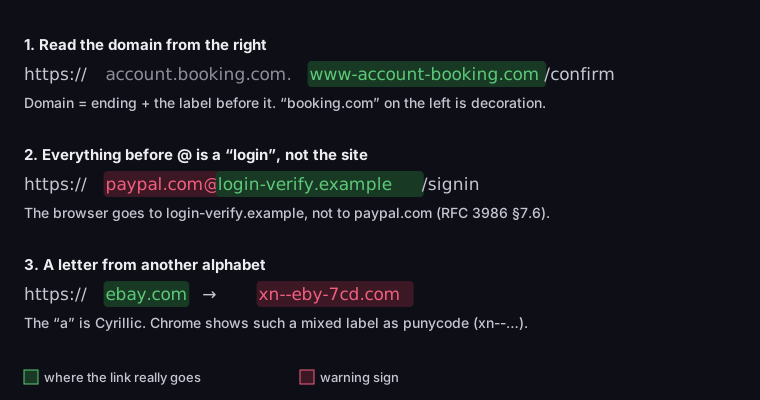
Take the CERT's own example, simplified: https://account.booking.com.www-account-booking.com/confirm. In the original, the dots after "booking.com" are replaced by the Japanese character "ん", which imitates a slash so that your eye thinks the site name has already ended. Read from the left, you see "booking.com" and relax. Read from the right, you find the ending .com, the label www-account-booking before it — and that is the domain. The page belongs to whoever registered www-account-booking.com; "account.booking.com" at the start is decoration added precisely so your eye stops there.
Anatomy of a misleading address
in green, where the link really goes
Source: CERT Polska, 17 Sept 2025; RFC 3986 §7.6; Chromium, IDN in Google Chrome; punycode computed in Node, 17 Oct 2026
Figure description
Three misleading addresses taken apart. 1. https://account.booking.com.www-account-booking.com/confirm — the domain is www-account-booking.com; booking.com on the left is decoration (simplified example from CERT Polska). 2. https://[email protected]/signin — everything before @ is user information, the host is login-verify.example (RFC 3986 section 7.6). 3. ebаy.com with a Cyrillic а — Chrome shows a label that mixes scripts as punycode: xn--eby-7cd.com.
The rule also works the other way and reassures you about genuine addresses. help.booking.com/refunds is the domain booking.com with the subdomain help — a Booking.com page, even though the address is longer than the brand name. booking.com.refund-claim.top is the domain refund-claim.top, even though "booking.com" comes first. Length and the number of dots mean nothing; only what sits on the right, just before the first slash, counts.
One exception: with compound endings such as co.uk or com.pl, the domain has three labels — the CERT lists such endings in the same article. In shop.example.co.uk the domain is example.co.uk, not co.uk. When the ending looks like a second domain, count one label more.
You have to see the address before you can read it, and a message often shows only the link text. On a computer, hover over the link: the browser or mail program shows the real address in a corner of the window. On a phone, press and hold the link instead of tapping it — a menu with the address appears. With a QR code, the camera usually shows the address before opening it; read it before you tap. If the link text says one brand and the address underneath leads somewhere else, you know all you need to.
Three tricks that fool the eye
Reading from the right works until the address contains one of three elements that scammers add precisely to break the rule.
First trick: the @ sign. Everything in an address before @ is, by the standard, login information (a user name), not the site. The URI standard, RFC 3986, warns that this "can be used to construct a URI intended to mislead a human user", with the example ftp://cnn.example.com&[email protected]/top_story.htm, where the host is 10.0.0.1, not CNN (RFC 3986, §7.6). In https://[email protected]/signin the browser goes to login-verify.example; "paypal.com" is just text before the @. Genuine shop and bank pages do not have @ between "://" and the first "/" — if you see one there, read the domain only after it.
Second trick: a letter from another alphabet. Cyrillic has characters that look like Latin ones — "а", "е", "о", "р". Someone can register ebаy.com with a Cyrillic "а", and on screen you will not see the difference. Google Chrome defends against this with rules described in its documentation: when a domain label mixes scripts in a confusing way, it shows punycode — an encoded form starting with xn-- — instead of the letters (Chromium, IDN in Google Chrome). Our Cyrillic ebаy.com becomes xn--eby-7cd.com. So xn-- in the address bar, when you expect a well-known brand, is an alarm signal. It is one browser's policy, not a guarantee: other browsers have their own rules, and Chrome shows a label written entirely in one foreign alphabet normally if the domain ending matches that alphabet (Cyrillic under .ru, for example).
An older version of the same trick is a plain misspelling with no foreign alphabet: paypa1.com with the digit 1 instead of the letter l, paypal-secure.com with a hyphen, paypal.com.co. Read from the right, each gives a different domain from the real one, so the rule catches them all — as long as you read the domain letter by letter instead of glancing at it.
Third trick: the padlock. A padlock next to the address only means the connection is encrypted, not that the site is honest. The Chrome team writes that "the lock icon does not indicate website trustworthiness", that only 11% of study participants correctly understood its meaning, and that "nearly all phishing sites use HTTPS, and therefore also display the lock icon" (Chromium Blog, 2 May 2023). That is why Google announced that Chrome 117 (September 2023) would replace the padlock on desktop with a neutral site settings icon. HTTPS still matters — it protects what you type from being read on the way, for example on public Wi-Fi. It tells you that nobody is listening in, not who you are talking to. The domain answers that second question.
Check URL redirection: short links and QR codes
A short link or a QR code hides the destination domain, so you have to reveal it before you can read it from the right. A link shortener is not dangerous in itself — our article on how to shorten a link covers when shortening makes sense for the sender. For the recipient only one thing matters: where qrln.pl/… or bit.ly/… really goes.
With a QR code this is easy: the phone camera shows the address stored in the code before opening it. If it is a short address you still do not see the destination, but you see whether the code goes to a shortener or straight to a site. Where that preview appears on iPhone and Android, and what to check before tapping, is in our guide on how to scan a QR code. Be especially careful with codes in public places: CERT Polska describes a campaign in which scammers put fake parking tickets with QR codes under windscreen wipers, leading to a page where the fine could supposedly be paid, and in another variant stuck codes on parking meters (CERT Polska, Annual Report 2024, p. 17). Look at the print itself: a sticker over another code, badly cut paper or a code that does not match the rest of the design is a reason to pay another way — in the operator's app or at a till. What sits inside a QR code, and how a static code differs from one that goes through a short link, is in our guide to QR codes.
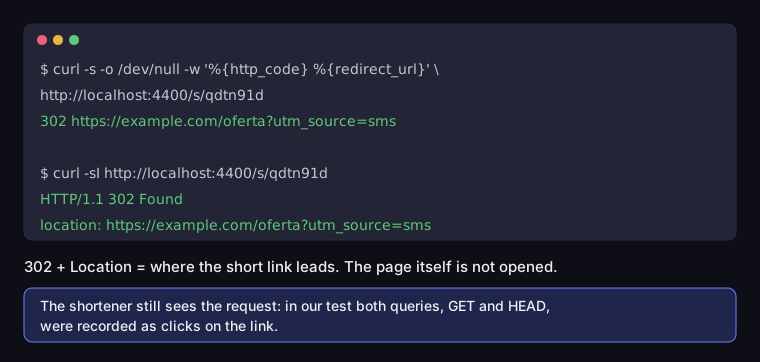
You can expand a short link without opening the page in a browser by running curl in a terminal. A shortener answers with a redirect: status code 302 and a Location header holding the destination. We tested this on a test short link in a local copy of DVN Links:
Expanding a short link with curl
terminal record, test link in a local copy of DVN Links
Source: our own test, DVN Links (local copy), 17 Oct 2026
Figure description
Terminal record of our test on a local DVN Links short link, 17 October 2026. Command curl with -w showing the status code and redirect address returns: 302 https://example.com/oferta?utm_source=sms. The HEAD query, curl -sI, returns HTTP/1.1 302 Found and the location header https://example.com/oferta?utm_source=sms. The page itself is not opened, but both queries were recorded as clicks on the link.
The command prints the status code and the redirect address, and the destination page does not open — you can read its domain from the right in peace. One caveat: the shortener still sees your request. In our test both the normal request (GET) and the headers-only request (HEAD, curl -I) were recorded as clicks. If the link is personalised, the sender will learn that someone checked it.
Link safety checkers: what they see and miss
Every link safety checker compares the address with a list of known threats, so "no threats found" only means nobody has reported it yet. A new phishing page reaches a list after it has been reported and verified, and works until then. A checker is the second line of defence, after reading the domain, not the first.
Google Safe Browsing runs in the background in browsers and warns you before you open a page from its list of dangerous sites. Google says it protects over five billion devices every day (Google Safe Browsing). You can check a particular site by hand in Google's transparency report at transparencyreport.google.com/safe-browsing/search.
National warning lists work the same way locally. CERT Polska's warning list, for example, is used by telecom operators, companies and users to block access to malicious sites automatically (CERT Polska, Lista Ostrzeżeń, in Polish); 244,341 domains were added to it in 2025 (Annual Report 2025, p. 128). As with Safe Browsing, a domain that is not on the list is not therefore safe — it may simply not have been reported and verified yet.
VirusTotal checks an address against more than 70 antivirus scanners and URL blocklists at once and is a common recommendation in guides. One warning rarely comes with it, although VirusTotal puts it in its own documentation: "Scanning reports produced by VirusTotal are shared with the public VirusTotal community", and the contents of submitted pages "may also be shared with premium VirusTotal customers" (VirusTotal, How it works). If a link contains your token — a password reset link, a link to a cloud document, an invoice with a personal number — pasting it shares it with others. Do not check such links on VirusTotal; read the domain from the right and, if in doubt, go to the company's site by typing its address yourself.
Use checkers wisely. Paste only the domain or the address without parameters, not the whole link from the message — the parameters after ? often contain an identifier of the recipient. Treat "dangerous" as decisive and "no threats" as no information, not as a green light.
Link shorteners check addresses too, usually when a link is saved. DVN Links checks the destination address with a content filter and Google Safe Browsing when a link is created and when someone changes its destination, and rejects addresses judged dangerous. That is no guarantee: Safe Browsing only knows threats already detected, and the page at that address can change later while the short link keeps pointing where it pointed. On plans from Pro upwards, link monitoring checks the destination again once a day, Safe Browsing included, and alerts the link's owner, but does not switch the link off; how it tells a missing page from one that blocks bots is covered in our article on 404 errors. A check on saving is a filter at the door, not protection for every click. "Is it down" tools are something else again: they tell you whether a site answers, not whether it is safe — how to use them is covered in our guide is this site down?. What a shortener records when someone clicks is covered in our getting started guide.
30 seconds before you click: four questions
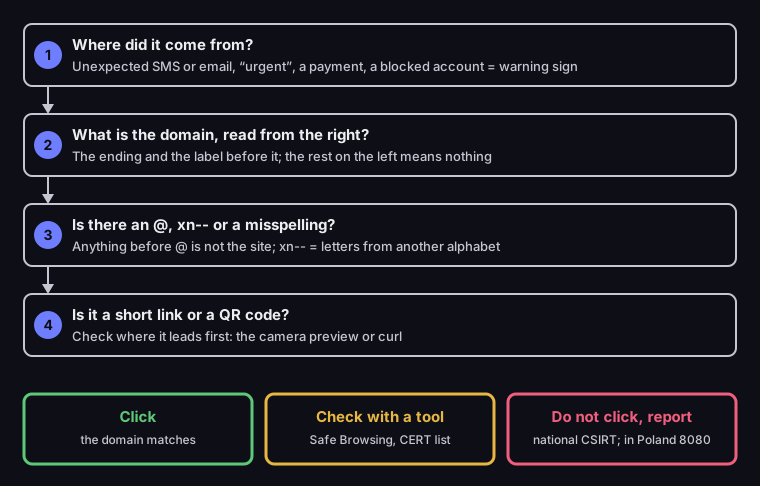
Before you click a link you did not expect, ask it four questions in this order — it takes less time than reading the message.
30 seconds before you click
four questions and three outcomes
Source: our own work based on CERT Polska (17 Sept 2025), RFC 3986, Chromium (IDN, padlock icon)
Figure description
Decision diagram in four questions. 1. Where did it come from? An unexpected SMS or email, urgency, a payment or a blocked account is a warning sign. 2. What is the domain, read from the right? The ending and the label before it; the rest on the left means nothing. 3. Is there an @, xn-- or a misspelling? Anything before @ is not the site; xn-- means letters from another alphabet. 4. Is it a short link or a QR code? Check where it leads first, with the camera preview or curl. Outcomes: click when the domain matches; check with a tool such as Safe Browsing or the CERT warning list; do not click and report to your national CSIRT, in Poland by SMS to 8080.
- Where did it come from? Context says the most: a text about a delivery fee for a parcel you did not order, an email about a blocked account, a message from a friend asking you to "vote" or send money. Urgency plus money in one message is a warning sign whatever the address.
- What is the domain, read from the right? The ending and the label just before it. If it is
paypal.comon a message from PayPal, fine. If it ispaypal-billing.com, it is not PayPal. - Is there an
@,xn--or a misspelling? An@between "://" and the first "/" pushes the domain behind it.xn--means letters from another alphabet. A misspelling (paypa1,paypall) is the oldest trick and still works. - Is it a short link or a QR code? Then reveal the destination first — the camera preview or
curl— and go back to question 2.
If every answer is calm, click. If something does not add up but you are not sure, check with a tool or go to the company's site by typing its address yourself. If the domain is unfamiliar and the message is pushing you, do not click — report it.
Clicked already? What to do and where to report
Opening a phishing page usually steals nothing on its own; the damage comes when you type or download something there. If you entered nothing, close the tab. If you entered a password, change it straight away on the real site, typing the address yourself, and everywhere you used the same password. If you gave card details or approved a payment, call your bank on the number on your card or in its app, not one from the message. If the page told you to download a file or install an app, do not open the file; uninstall any app from outside the official store and tell your bank about it, because such apps can intercept codes sent by text message.
Reporting helps even when you were not fooled, because it protects the next person. Report phishing to your country's national CERT or CSIRT; in Poland, for example, suspicious texts go to the free number 8080. The Polish CERT counted that in 2025 each malicious message reported to it led, on average, to 23 more being blocked before they reached anyone (CERT Polska, Annual Report 2025, p. 76). One forwarded malicious text stopped almost two dozen others.
If you send links to customers, you can make this check easier for them. A short link with a readable alias, and a clear note in the message about which domain your links come from, let recipients read the address before they click. How custom aliases work is described on the DVN Links features page.
Frequently asked questions
No. HTTPS and the padlock only mean the connection is encrypted. According to the Chrome team, nearly all phishing sites use HTTPS, and only 11% of people studied understood what the padlock means (Chromium Blog). The domain counts, not the padlock.
Better not. Clicking opens the page, which may try to download a file or collect data. Check the address before you click: hover over it, press and hold it, and expand a short link with curl.
No. A shortener only hides the destination domain, so you need to reveal it before judging the link. Businesses use short links in texts and on leaflets because they are shorter and count clicks; more in our article on how to shorten a link.
For a general link, yes. For a link with your token, no: VirusTotal shares reports with its community, and page contents may reach premium customers. Do not paste password reset links, document links or invoices there. If you are the one sending a document link, you can give it a password — the password page does not reveal the destination to robots and scanners; more in our one time link guide.
Do not click. Read the domain from the right — if it is not the domain of a courier you know, report the text to your national CERT and delete it. Check the parcel status in the carrier's app or on its site, typing the address yourself, with the tracking number from your order confirmation.
Not always. A friend's account may have been taken over — in its 2024 report CERT Polska lists Facebook, alongside two Polish marketplaces, among the brands scammers impersonate. If a friend suddenly asks for money or a "vote in a contest", ask them through another channel before you click.