Link in bio: what it means and how to build a links page
A link in bio is the clickable address in your profile description. How many links Instagram gives you, when one address is enough, when a page of buttons is better — and what its stats really count.
"Link in bio" is the clickable address in a profile description — on Instagram, TikTok or YouTube. When a creator writes "details — link in bio" under a photo, they are pointing to the one permanent door out of the profile: a story's link sticker disappears after a day, the profile link stays. Since April 2023 Instagram fits up to five links there. When is that enough, and when is a single page of buttons the better choice? And how much of what such a page's counter shows comes from people rather than machines? We measured it on our own test page: of the 21 requests that reached it, 7 came from link-preview bots. They shouldn't count, and they didn't.
Link in bio: what it means and where to find it
A link in bio is the address you put in your profile's link field. On Instagram you set it in your profile settings: according to TechCrunch's write-up of 18 April 2023, you tap "Edit profile", then "Links", then "Add external link", and reorder several links by dragging them (TechCrunch). The link shows under the profile description, between the name and the buttons.
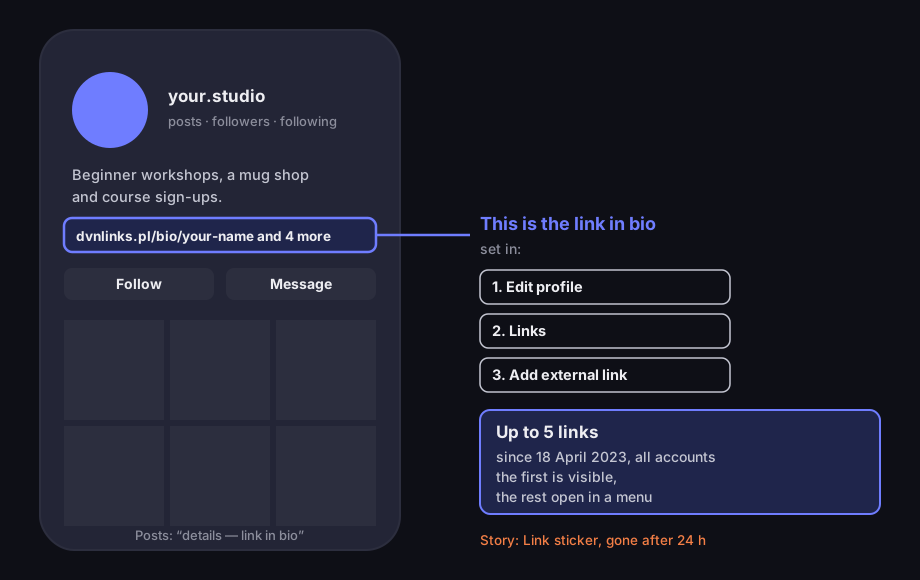
Where the link in bio is
our diagram of an Instagram profile (not a screenshot), as of October 2026
Source: TechCrunch, 18 Apr 2023; 9to5Mac, 18 Apr 2023 — feature description; diagram ours
Figure description
Diagram of an Instagram profile. At the top the profile photo and name, under them the profile description, the bio. Under the description a link row: the first address and the note “and 4 more” — our wording on the diagram, not text from the app — this is the link in bio. An arrow leads to the settings path: Edit profile, Links, Add external link. Next to it a box: up to five links since 18 April 2023; the first is visible, the rest open in a menu. Below, the post grid with a note that posts point to the bio, and that a story can carry a Link sticker for 24 hours.
Where did the whole thing come from? For years the platforms kept people inside and limited links pointing out. TechCrunch puts it plainly: tools like Linktree "came into existence largely because of platform limitations" (TechCrunch). With room for a single address in the profile, that address started leading to a page with several buttons. Hence the two meanings of "link in bio": the profile field itself and the page the field points to.
People who see the phrase under a post often ask where to tap. The answer: tap the account name above the post, then the address under the profile description. If the account has several links, the first is shown straight away and the rest open with a tap — as 9to5Mac described it, "Only the first link will appear directly in the bio, while the remaining are hidden in a pop-up context menu" (9to5Mac).
A link in bio is not a story link. A story has a "Link" sticker, but it disappears after 24 hours; how to add one and count the taps is covered in how to add a link to an Instagram story. The link in bio is permanent: it stays in your profile until you change it.
How many links Instagram gives you, and TikTok
Instagram allows up to five links in the profile, for every account. Tubefilter, reporting the announcement of 18 April 2023, wrote: "Starting today, all users can add up to five clickable links in their bios" (Tubefilter). According to the same report, Instagram scans the links people add for harmful content and spam. Mark Zuckerberg announced the feature on his broadcast channel, calling it "probably one of the most requested features we’ve had" (TechCrunch).
Five links is a lot, but there are two catches. First, a visitor sees only the first address straight away — the rest need another tap and say nothing about where they lead beyond the address itself. Second, those five links exist only on Instagram. If you want the same set on TikTok, in your YouTube channel description and in a QR code on a flyer, you have to repeat it in each place and update each place separately.
TikTok has a website field in the profile, but not for every account. Access depends on the account type and, according to many guides, on follower count and country. TikTok's own help page on bio links loads its content with a script and we could not read it, so we don't quote thresholds — check in the app instead: if your profile editor has a "Website" field, you can add an address. As of October 2026; platforms change these rules without notice, so the app is a better guide than last year's tutorial.
One link, five links or a page with links
A links page isn't always the best choice. Every middle step is one more tap between the profile and the destination, so the rule is: as few middle steps as you actually need.
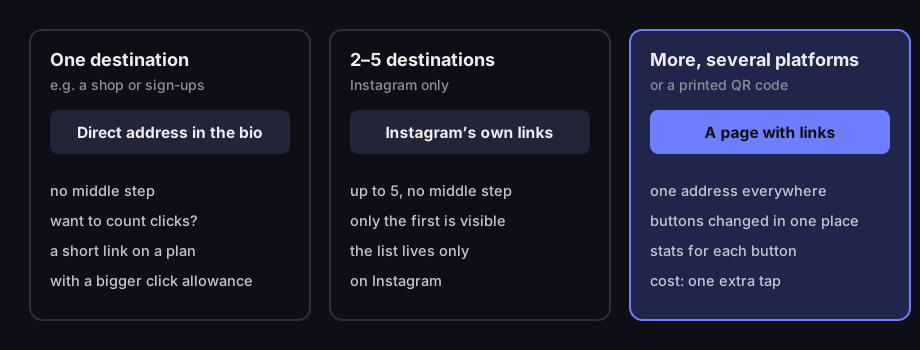
One link, five links or a page with links
what to choose depending on how many destinations and how many platforms
Source: our decision framework; Instagram’s limit — TechCrunch, 18 Apr 2023
Figure description
Decision diagram in three columns. One destination, for example a shop or sign-ups: put the direct address in the bio; to count clicks, use a short link on a plan with a bigger click allowance. Two to five destinations, Instagram only: Instagram’s own links, up to five, no middle step; only the first is visible. More destinations, several platforms or a printed QR code: a page with links — one address everywhere, buttons changed in one place, stats for each button, at the cost of one extra tap.
One destination — one address. Only taking workshop bookings? Put the booking page's address in your bio. One tap and the visitor is there. If you want to know how many people tapped, use a short link with a click counter. Mind the plan: DVN Links' free plan has 1,000 clicks a month per account, while a link in bio stays in the profile for months and gathers traffic — for a permanent spot pick a plan with a bigger click allowance (see the pricing).
Two to five destinations, Instagram only — Instagram's own links. A shop, bookings and a YouTube channel fit into five native links. No middle step, no extra page to maintain. The downsides are the ones above: only the first link shows, and the list lives only on Instagram.
More destinations, several platforms, a QR code — a page with links. A page of buttons has one address that goes into every profile and onto every print. You change the buttons in one place and the change works everywhere at once. Each button has a readable label ("Book a workshop") rather than a bare address. The price is one extra tap: page first, then destination. So put what most people come for at the top.
There's a fourth case: a campaign. If you're pushing one thing for a week, you can put a direct link to it in the bio for the duration, with UTM parameters, and switch back to the links page afterwards. How to name the parameters so you can read them later in GA4 is covered in our piece on UTM parameters.
How to build a link in bio page, step by step
In DVN Links you create a link in bio page in the dashboard, under "Link in bio". It's a paid-plan feature: Starter gives you one page, Pro five, Business twenty, and Enterprise has no limit. On the free plan the dashboard shows a preview with a link to pricing. The Pro trial counts as Pro.
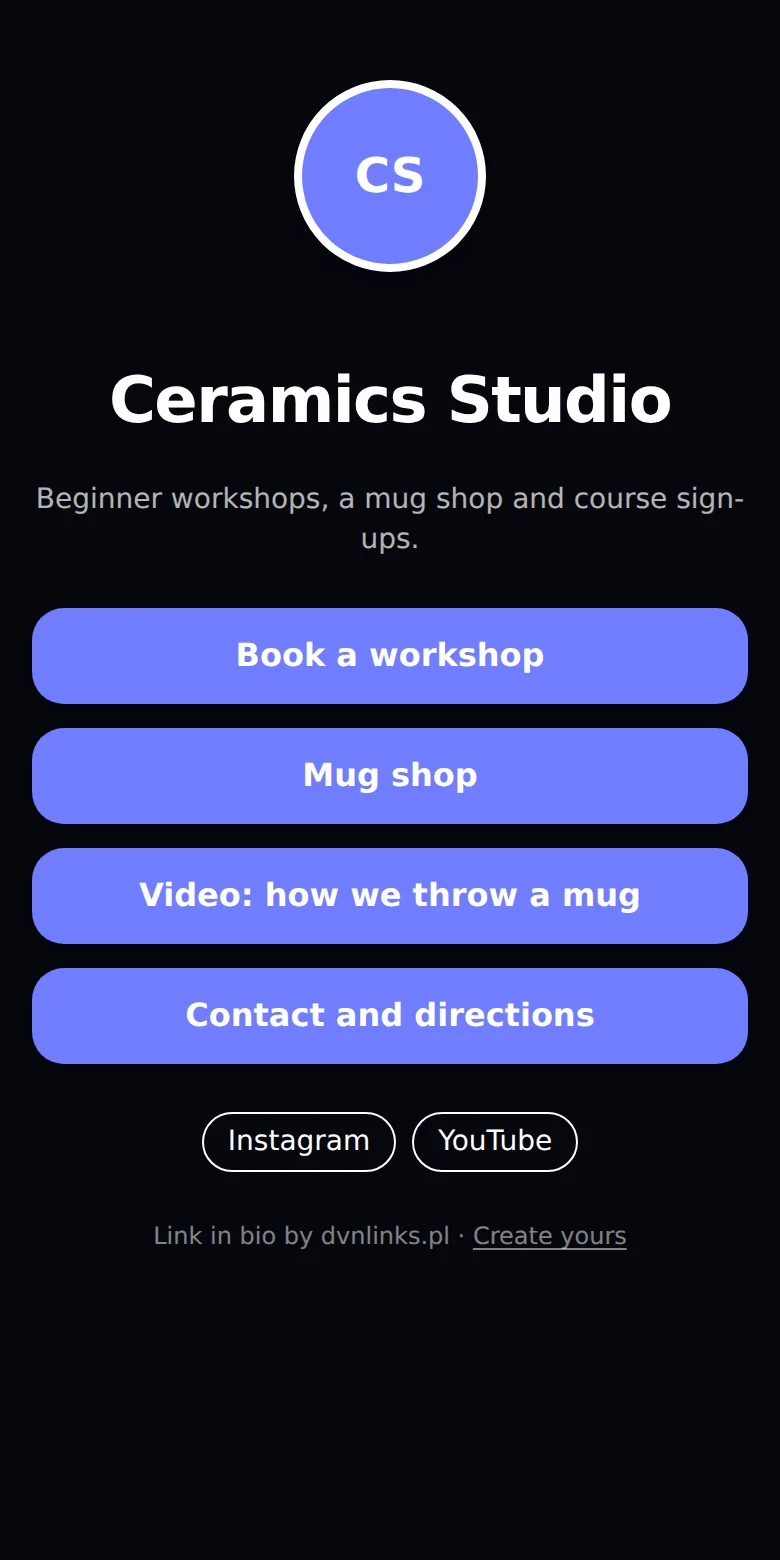
A link in bio page on a phone
our test page with sample content, local DVN Links instance
Source: screenshot of a local DVN Links instance, 19 Oct 2026; sample page content
Figure description
Screenshot of a phone 390 points wide. Dark background. At the top a round avatar with the initials CS in the accent colour, below it the title Ceramics Studio and the description: Beginner workshops, a mug shop and course sign-ups. Below, four wide buttons in the accent colour: Book a workshop, Mug shop, Video: how we throw a mug, Contact and directions. Under the buttons two outlined links: Instagram and YouTube. At the bottom a small line: Link in bio by dvnlinks.pl, Create yours.
There are four steps:
- Name and address. Enter the page title (up to 80 characters) and the name for the address. The page gets an address like
dvnlinks.pl/bio/your-name. You can't change it after creation — which is good, because this is the address that goes into profiles and onto prints. - Description and look. A short description of up to 300 characters, a photo or logo (without one the page shows your initials), the button accent colour and the page language (Polish or English — the small labels on the page use it).
- Buttons. Each button is a label and an address. You can add up to 30, but a page with thirty is a directory, not a menu — a handful is sensible. You set the order with up and down arrows; you can switch a button off without deleting it, and its stats stay. Button addresses get the same checks as short links: a content filter and Google Safe Browsing. A button that opens a WhatsApp chat is an ordinary
wa.melink with your number — how to write one. - Social profiles. Below the buttons you can add links to your profiles: Instagram, TikTok, YouTube, Facebook, LinkedIn, X, GitHub or another address.
Every page gets a QR code pointing to its address right away. Print it on a flyer, menu or poster and change the buttons' destinations later in the dashboard — the code stays the same, because it encodes the page's address, not the individual destinations.
The page is built simply: the server sends a ready list of buttons, and each button is a plain link. At the bottom there is a small "Link in bio by dvnlinks.pl" line. On Starter and Pro you can switch it off in the page editor — the box reads “Show the ‘Link in bio by dvnlinks.pl’ signature on the page and dvnlinks.pl under the QR code” and is ticked by default. Business and Enterprise pages never show it, and on the free plan it's always there. Whether it shows depends on the page owner's current plan (the trial counts as Pro), so it comes back if the account drops to the free plan.
What a DVN Links link in bio page doesn't do: it doesn't take payments, has no shop or forms, and its address always sits on DVN Links. It's a page of buttons with stats, nothing more — if you need to sell, the button should lead to your shop.
What a bio page counts: views, clicks and bots
A link in bio page counts two things: page views and clicks on each button. They're two different numbers and shouldn't be mixed: a view means someone (or something) fetched the page, a click means someone went on.
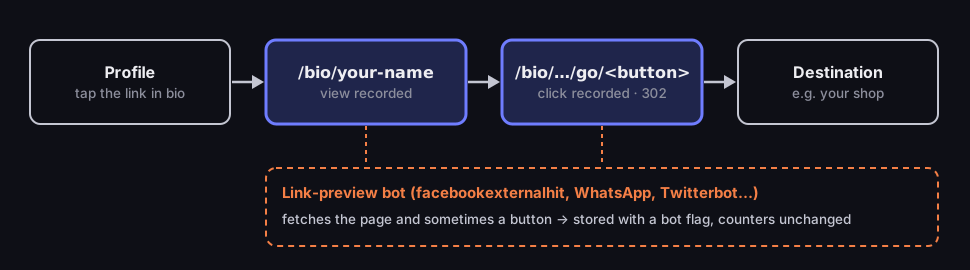
One click through a link in bio page
what is counted, and where
Source: DVN Links code (route /bio/[slug]/go/[buttonId]), as of 19 Oct 2026
Figure description
Diagram in four steps from left to right. Instagram profile: tap the link in bio. Page /bio/your-name: a view is recorded. The button points to /bio/your-name/go/button-id: a button click is recorded and a 302 redirect follows. Destination, for example a shop. Below, a second path: a link-preview bot such as facebookexternalhit, WhatsApp or Twitterbot fetches the page and sometimes a button address; the event is stored with a bot flag, but the view and click counters do not change.
A button click doesn't go straight to the destination. The button points to an intermediate address like /bio/your-name/go/…, which records the click and sends the visitor on with a 302 redirect. It takes a fraction of a second, and it's how you know which button works. The temporary redirect (302) is deliberate: you can change a button's destination at any time, so the browser shouldn't remember the old address for good. If you switch a button off or delete it, its old intermediate address sends people back to the page instead of an error page.
Bots matter most. When someone pastes the page's address into a message, the app fetches the page to show a preview with a title and an image. Meta describes its facebookexternalhit crawler as fetching the content of a page shared in Meta's apps, typically when someone pastes a link on Facebook, Instagram or Messenger, and showing its title, description and thumbnail (Meta for Developers). To the server, such a fetch looks like a view, although no human saw the page.
We checked what our counter does with it. On a local DVN Links instance we created a test page with four buttons and sent it a scenario: 10 people open the page in a phone browser, 4 of them tap a button (the first three times, the second once). We then "pasted" the same address into five apps — five fetches with crawler headers: facebookexternalhit, WhatsApp, Telegram, Twitterbot and LinkedInBot. Two of those crawlers also fetched a button address.
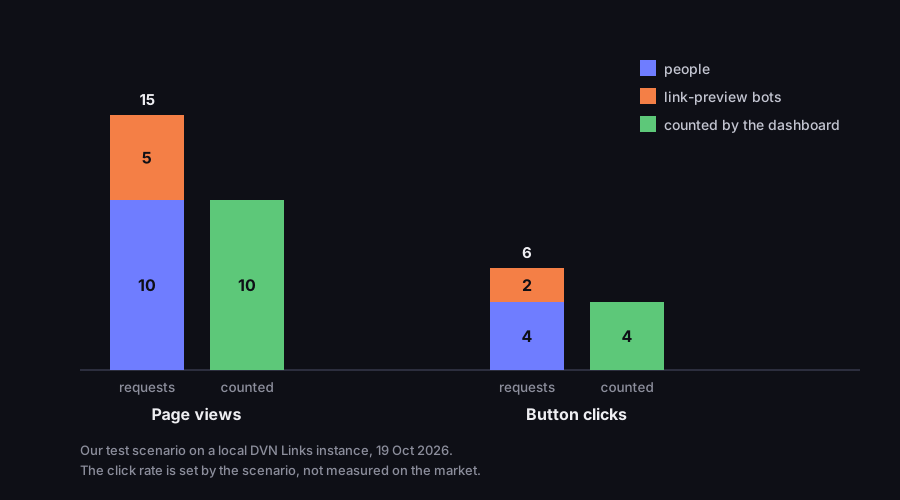
What reached the page and what the dashboard counted
our test scenario, 21 requests, local DVN Links instance
Source: our measurement on a local DVN Links instance, 19 Oct 2026; script docs/redakcja/teksty/link-w-bio/measure-local.sh
Figure description
Bar chart in two groups. Page views: 15 page fetches, 10 by people and 5 by link-preview bots; the dashboard counted 10 views. Button clicks: 6 requests for a button address, 4 by people and 2 by bots; the dashboard counted 4 clicks. 21 requests in total, 7 from bots, a third; all 21 events stored, bots flagged and left out of the counters. The click rate in this scenario, 4 per 10 views, is set by the scenario, not taken from the market.
The result: all 21 events were stored, but the counter showed 10 views and 4 clicks — exactly what the "people" sent. The seven requests from bots, a third of all traffic in this scenario, carry a bot flag in the database and reached neither the counters nor the dashboard stats. The ratio comes from our scenario, not from a market measurement: how many bots your page sees depends on how often people paste its address into messages. The principle is general, though — without filtering bots, a page that gets shared a lot shows inflated views and a deflated click rate.
Two caveats. We recognise bots by the User-Agent header in which a crawler names itself; a bot posing as an ordinary browser counts as a person. And the other way round: if someone opens a link preview in a messenger and then goes to the page, you see one view, not two — as it should be.
The dashboard stats show views (labelled "Views"), clicks on each button and their total over a period that depends on the plan: 30 days on Starter, 90 on Pro, a year on Business, unlimited on Enterprise. Views and clicks tell you how many people go on; the per-button stats tell you which button to move up and which to remove. If you want visits from the bio page to stand apart in Google Analytics 4, add UTM parameters to the button addresses, for example utm_source=link_in_bio&utm_medium=referral. Don't use utm_source=instagram if the same page also sits on TikTok, YouTube or a flyer — GA4 would then credit all those visits to Instagram.
Link in bio, search engines and privacy
A link in bio page is visible to search engines by default. That's deliberate: if someone searches for your studio or channel name, a page with your links can be a good way in. It has a title and description you fill in in the dashboard, and shows your photo as the thumbnail when shared.
If the page should only be reachable by people who have the link — say, a set of links for course participants — turn on "Keep the page out of search engines". The page then gets a noindex, nofollow tag, which asks search engines not to show it. That's not protection: anyone with the address can still open it. Don't put anything on a bio page that strangers shouldn't see.
Buttons carry rel="nofollow", so the bio page doesn't signal to search engines that it endorses the buttons' destinations. It won't move your shop's rankings up or down — it's a door for people, not an SEO tool.
The same link in bio on TikTok, YouTube and a flyer
The biggest advantage of your own links page is one address in many places. The same dvnlinks.pl/bio/your-name goes into your Instagram profile, the website field on TikTok (if your account has it), your YouTube channel description, your LinkedIn profile and your email signature. When the shop or the booking date changes, you fix one button, not five profiles.
Off screen, a QR code shortens the way to the page. Download the bio page's code from the dashboard and print it on a flyer, a business card or by the till; whoever scans it lands on the same buttons as someone from Instagram. The same kind of page also works as a "wedding page" with buttons for RSVP, directions and the photo album — see wedding QR code. A QR code for the Instagram or Facebook profile itself is a different case — see Facebook and Instagram QR codes. If you're weighing a links page against contact details in the code on a business card, we compare them in the piece on the vCard QR code.
Stats help here again: a bio page counts views regardless of where they came from, so to tell flyer scans from Instagram visits you can set up two pages (Pro gives you five) or put a short link leading to the bio page into the flyer's code — its click counter shows how many visits came from the flyer.
Common mistakes on a link in bio page
Most mistakes on links pages need attention rather than tools. These are the ones the per-button stats reveal straight away.
Too many buttons. A page with twelve buttons makes people read a list, and profiles are visited in passing. Start with three to five and add more only when the stats show people are looking for something that isn't there.
The most important button isn't first. Visitors read from the top. If most clicks go to the third button, move it up — two taps on an arrow in the dashboard. Per-button stats are there so the order follows the data, not the order in which you added things.
The label says what it is, not what happens. "Shop" says less than "Buy a mug", and "YouTube" less than "Video: how we throw a mug". A button label takes up to 80 characters — enough for a verb and a thing.
Stale buttons. Bookings for a workshop that has already happened lead nowhere. Instead of deleting the button, switch it off: it disappears from the page and its stats stay for comparison next time.
Changing the profile address for every campaign. If you put a different link in your bio every week, every printed QR code and every old "link in bio" post leads wherever the profile happens to point. A permanent links page address fixes this at the profile end: you change buttons, not the address.
Not testing on a phone. Profiles almost always open in the app, not on a computer. Before you put the address in your bio, open the page on a phone and tap every button — you'll see those clicks in the dashboard right away, which also confirms the counter works.
Link in bio: frequently asked questions
It points you to the link in the profile description. Creators write it under posts because Instagram's permanent link is set in the profile — the address sits under the account description. A link in an ordinary post caption isn't clickable; since March 2026 Meta has been testing clickable caption links only for Meta Verified subscribers (Engadget, 12 Mar 2026).
Up to five, for every account, since April 2023 (Tubefilter). The first shows straight away, the rest after a tap.
No. Link in bio pages are on paid plans: Starter gives you one, Pro five, Business twenty. On the free plan you can put a short link in your bio, but the account has 1,000 clicks a month — for a profile, where the link stays for a long time, a direct address works better.
Yes, on Pro and above. Several pages help if you run several brands or want to count visits from different places separately, for example Instagram and a flyer.
No. The address is permanent because it goes into profiles and printed QR codes. Title, description, look and buttons can be changed freely.
They shouldn't: link-preview crawlers such as facebookexternalhit, WhatsApp or Twitterbot are stored with a bot flag and left out of the counters. In our test, 7 of 21 requests came from bots and none of them moved a counter.
Create a link in bio page in your dashboard
One address for your profile, flyer and QR code, buttons changed in one place and stats without bots — on plans from Starter. If one destination is enough, put the direct address in your bio.