Free QR code generator
A code for a website, WiFi, contact card, SMS, e-mail, phone or location. No sign-up, PNG straight away.
This is a static code — the data lives in the code itself, so it cannot be changed once printed.
What QR codes you can make
The generator has eight code types. Each one stores plain text in a set format, and the phone uses the format to decide what to do: open a page, call, write a message. Below is exactly what goes into the code.
- Website — the page address; if you type it without
https://, the generator adds it:https://yoursite.eu/menu. Tag campaigns with UTM parameters; for reviews, use a Google review link. - Text — any content the phone simply displays, e.g.
Table 12. - Phone — a number to call with one tap:
tel:+48600123456. - E-mail — a message with the address and subject filled in:
mailto:[email protected]?subject=Enquiry. - SMS — a number and the text of the message:
SMSTO:+48600123456:Booking. - WiFi — a network login, described below.
- Location — coordinates the phone opens in maps:
geo:50.0614,19.9372. - Contact card — a contact in vCard format: first and last name, company, job title, phone, e-mail, website and a note. The phone saves it to contacts without internet.
WiFi QR code
A WiFi code stores the network name, the password and the security type: WIFI:T:WPA;S:Cafe-Guests;P:coffee2026latte;;. After a scan the phone offers to join the network, so nobody has to type the password. The password sits in the code as plain text, so anyone who scans the code learns it. Put it up only where you would tell guests the password anyway, ideally for a separate guest network. Print a new code after you change the password.
Static code or a code on a short link
A code from this generator is static: the data lives in the code itself. It never expires, depends on no service and keeps working even if DVN Links disappears. It has two drawbacks: once printed, its content cannot change, and you will not know how many people scanned it.
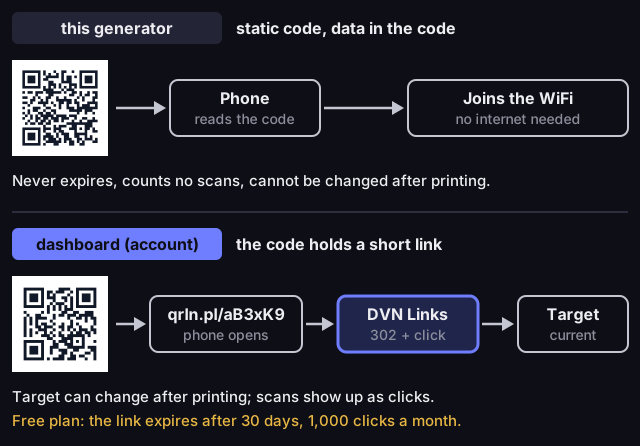
Static code from the generator or a code on a short link
Source: how the DVN Links generator and short links work, October 2026
Figure description
Two lanes. Top: the generator makes a static code; the data, here the WiFi network login, is stored in the code, the phone reads it without internet, the code never expires, does not count scans and cannot be changed after printing. Bottom: in the dashboard the code holds the short link qrln.pl/aB3xK9; the phone opens DVN Links, which records the click and redirects with a 302 to the current target, which can be changed after printing. On the free plan the link expires after 30 days and has 1,000 clicks a month.
A dashboard code holds a short link such as qrln.pl/aB3xK9. The phone opens DVN Links, which records the click and redirects to the link target. You can change the target in the dashboard after printing, and scans show up in the statistics as clicks. On the free plan the link expires after 30 days and clicks above 1,000 a month are hidden from statistics, so long-lived print needs a paid plan (pricing). The article How to make a QR code compares both kinds.
How big to print a QR code
Whether a phone reads a code depends on the size of a single square, the module, not of the whole code. We use the minimum from the GS1 standards for phone scanning: 0.396 mm per module, plus a white border 4 modules wide. Longer content means more modules, so the same kind of code needs a bigger print. The generator does the sum for you: when a code needs more than 3 cm, it shows a warning with the minimum size.
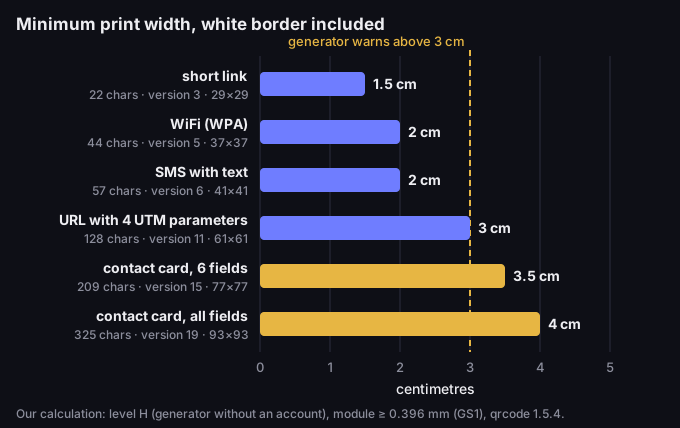
Minimum print size by QR code content
Source: DVN Links calculation, qrcode library 1.5.4, October 2026
Figure description
Bar chart: the smallest print width, white border included, at which every module of the code is at least 0.396 mm (GS1), for codes made in the generator without an account (error correction level H). Short link: 22 characters, version 3, 29 by 29 modules, at least 1.5 cm. WiFi (WPA): 44 characters, version 5, 37 by 37, 2 cm. SMS with text: 57 characters, version 6, 41 by 41, 2 cm. URL with 4 UTM parameters: 128 characters, version 11, 61 by 61, 3 cm. Contact card, 6 fields: 209 characters, version 15, 77 by 77, 3.5 cm. Contact card, all fields: 325 characters, version 19, 93 by 93, 4 cm. Codes above 3 cm get a warning in the generator.
A short link fits in 1.5 cm, while a contact card with every field needs 4 cm. If the code comes out too big for your print, shorten the content, e.g. replace a long address with a short link. Always scan a test print. What to check when a code will not scan is covered in Minimum QR code size.
Logo and colours
Without an account, the code has the DVN Links logo in the middle and the caption dvnlinks.pl underneath. The logo covers some modules, so the generator encodes at the highest error correction level, H, which can restore about 30% of the codewords. You download a PNG file.
In the dashboard every short link has a code to download as PNG (250, 500 or 1000 px) and as SVG. Paid plans from Starter let you change the colours and switch off the DVN logo, and Business and Enterprise let you upload your own logo (pricing). Keep the code darker than the background; the editor warns when the contrast is too low. More: QR code with a logo.
Frequently asked questions
Will a code from the generator expire?
No. A static code carries its data and works as long as it can be scanned. Only a code on a short link from the free plan expires, after 30 days.
Do you store what I put in my codes?
No. The generator makes the image of the code and returns it straight away; we do not store the content. Your IP address is used only for the limit of 30 codes a minute that protects the service from abuse.
Do I need an account?
No. The generator works without sign-up. You need an account for codes whose target should change after printing and that count scans (getting started with DVN Links).
Can I use the code commercially?
Yes, for free, on flyers, packaging and in ads — as long as you keep the DVN Links logo and the dvnlinks.pl caption. A code without them: from the Starter plan (pricing).
Why can I download only a PNG?
Without an account you get a PNG. An SVG, which scales to large formats without losing quality, is in the dashboard for short-link codes.
How do I check that the code works?
Scan it from the screen, then from a test print at the final size, with two different phones. A code that reads from a screen does not always read from paper.