Minimum QR code size: why a code will not scan and how big it must be
Minimum QR code size depends on what the code contains, not on centimetres. Seven causes of a QR code not scanning in the order to check them, and a formula for the smallest print size for your content.
What is the minimum QR code size? There is no single figure in centimetres: it is the number of modules times the smallest module a phone can read, and the number of modules depends on what you encoded. DENSO WAVE, which invented the QR code, recommends printing it as large as the space allows, because a larger module reads more reliably (DENSO WAVE, module size). If your QR code is not scanning, check the code before the phone. It is usually one of seven causes you can test in minutes: wrong distance, a cropped quiet zone, weak contrast, glare, graphics over the modules, inverted colours or a module that is too small. The phone matters too: DENSO WAVE says reading depends largely on the camera (DENSO WAVE, FAQ).
QR code not scanning? Check in this order
Start with the cheapest fix: distance you correct by hand, a module that is too small only with a new print.
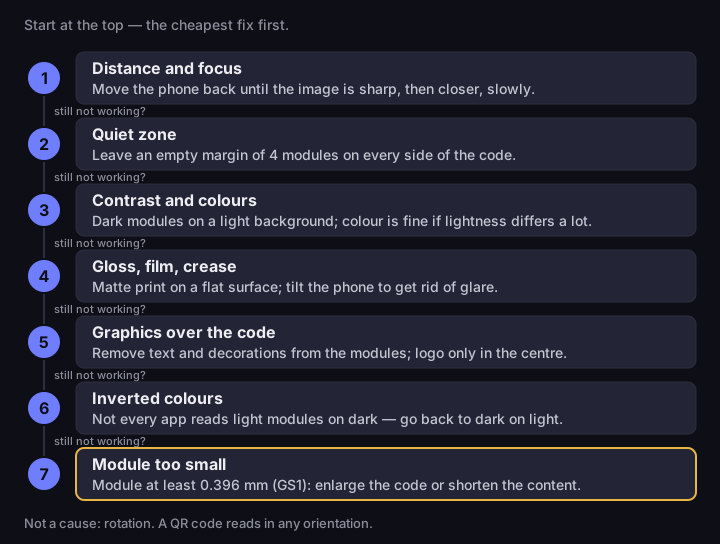
QR code not scanning: what to check
seven causes, from the cheapest fix
Source: DENSO WAVE (FAQ, quiet zone), GS1 General Specifications 26.0 (module), Google ML Kit (orientation); order — DVN Links, 14 Oct 2026
Figure description
Checklist of seven causes in order, from the cheapest fix. 1. Distance and focus: move the phone back until the image is sharp, then closer, slowly. 2. Quiet zone: leave an empty margin of 4 modules on every side of the code. 3. Contrast and colours: dark modules on a light background; colour is fine if lightness differs a lot. 4. Gloss, film, crease: matte print on a flat surface; tilt the phone to get rid of glare. 5. Graphics over the code: remove text and decorations from the modules; logo only in the centre. 6. Inverted colours: not every app reads light modules on dark, so go back to dark on light. 7. Module too small: module at least 0.396 mm (GS1); enlarge the code or shorten the content. Below the list: rotation is not a cause, a QR code reads in any orientation.
- Distance and focus. The code is blurred or fills only a small part of the frame. Move the phone back until the image is sharp, then come closer slowly. Every camera has a minimum focus distance, below which the image blurs (Apple, minimumFocusDistance).
- Quiet zone. Text, a frame or a photo runs right up to the modules. DENSO WAVE requires an empty margin 4 modules wide on every side (DENSO WAVE, code area), so do not crop the white border. We made this mistake ourselves: until 13 Oct 2026 our generator left a 1-module margin in five places in the app; today it is 4 everywhere.
- Contrast and colours. The code is light grey, pastel or close to the background colour. Reading relies on the difference in light reflected by dark and light modules (DENSO WAVE, FAQ), so what counts is the difference in lightness, not the colour. Go back to dark on light.
- Gloss, film, crease. A lamp reflects in the code, or it sits on film, a bottle or a crumpled bag. DENSO WAVE writes that glossy material can interfere with reading and that a code on a bag may be distorted (DENSO WAVE, FAQ). Tilt the phone to lose the glare; next time, print on a matte, flat spot.
- Graphics over the code. Text, a decoration or a logo near the edge overlaps the modules. DENSO WAVE warns that even a small missing or smudged area can make reading impossible or slow it down (DENSO WAVE, FAQ). Clear the modules; if there must be a logo, put it in the centre.
- Inverted colours. Light modules on a dark background. The standard allows this as an option (GS1 General Specifications 26.0, §5.7.2), but the popular ZXing library reads it only with a separate option switched on (ZXing, DecodeHintType). Whether your phone's camera reads it depends on the app, so dark modules are safer.
- Module too small. The code is sharp, clean and well lit, yet the phone reads it only within a narrow range of distances, or not at all. You cannot fix this on the spot: enlarge the code or shorten the content. The only standard we found with a module for phone scanning asks for at least 0.396 mm (GS1 General Specifications 26.0).
One thing you need not check is rotation. Google ML Kit, a library for scanning codes in Android and iOS apps, reads codes "regardless of their orientation" (Google ML Kit), so an upside-down code is not the problem.
Minimum QR code size: count modules, not centimetres
The minimum QR code size is the minimum module size times the number of modules, not a constant in centimetres. A module is a single square of the code. The content sets how many there are per side: more characters mean a higher version and more modules on the same paper.
DENSO WAVE gives the formula with a version 2 code: 25 × 25 modules of 0.5 mm make 12.5 × 12.5 mm, plus a margin of 4 modules on every side (DENSO WAVE, FAQ). Rearranged:
print width = (number of modules + 8) × module size
Eight, because the quiet zone is 4 modules on each side. Which module to assume? DENSO WAVE gives no minimum for phones. The 3.57 mm it quotes is the smallest version 1 code with a 0.17 mm module from an ordinary laser printer: a printing limit, not a size for phones.
The only standard where we found a module defined for phones is the GS1 General Specifications, release 26.0 of January 2026. For a QR code carrying a GS1 Digital Link, Table 5-46 sets a minimum module of 0.396 mm, a target of 0.495 mm and a quiet zone of 4 modules (GS1 General Specifications 26.0, §5.12.3.1), values GS1 says correspond to the "read range typical of mobile device scanning". It is a requirement for retail packaging, not a general QR code standard; for flyers or business cards we found no standard with a dimension, so GS1 is our best reference.
We put both thresholds into the formula for the four kinds of content from our text on types of QR code. The table gives the smallest print width in centimetres, quiet zone included, rounded up to the millimetre: our calculation of 14 Oct 2026 with the qrcode 1.5.4 library our generator uses, not a scanning measurement.
|
What is encoded |
Level |
Modules |
GS1 minimum, 0.396 mm |
GS1 target, 0.495 mm |
|---|---|---|---|---|
|
Short link (22 characters) |
M |
25×25 |
1.4 |
1.7 |
|
Short link |
H |
29×29 |
1.5 |
1.9 |
|
Link with 4 UTM parameters (128 chars) |
M |
49×49 |
2.3 |
2.9 |
|
Link with 4 UTM parameters |
H |
61×61 |
2.8 |
3.5 |
|
Contact card, vCard (221 bytes) |
M |
61×61 |
2.8 |
3.5 |
|
Contact card, vCard |
H |
77×77 |
3.4 |
4.3 |
|
Link with filters, UTM, gclid (312 chars) |
M |
69×69 |
3.1 |
3.9 |
|
Link with filters, UTM, gclid |
H |
93×93 |
4.0 |
5.0 |
M and H are error correction levels. Our free generator always adds a logo, so it encodes at level H, as in the chart below. A business-card code needs 15 mm for a short link but 34 mm for a whole vCard: the content alone decides.
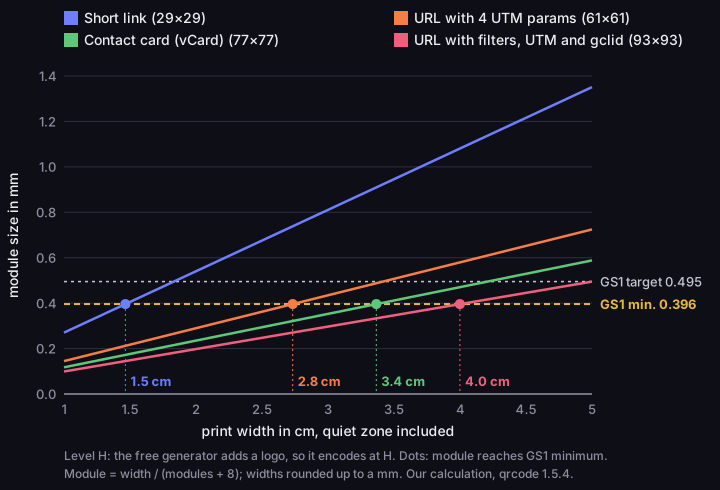
Module size vs print width
error correction level H, print width from 1 to 5 cm with quiet zone, module in mm
Source: our calculation, qrcode library 1.5.4, 14 Oct 2026; module thresholds — GS1 General Specifications 26.0, table 5-46
Figure description
Line chart: module size in millimetres against the print width of the code with quiet zone, from 1 to 5 cm, at error correction level H, which the free generator uses because of the logo. Two horizontal lines: GS1 minimum 0.396 mm and GS1 target 0.495 mm. Short link, version 3, 29 by 29 modules: the module reaches the minimum at 1.5 cm and the target at 1.9 cm. URL with 4 UTM parameters, version 11, 61 by 61 modules: minimum at 2.8 cm, target at 3.5 cm. Contact card (vCard), version 15, 77 by 77 modules: minimum at 3.4 cm, target at 4.3 cm. URL with filters, UTM and gclid, version 19, 93 by 93 modules: minimum at 4.0 cm, target at 5.0 cm. Widths rounded up to a millimetre.
On a low-resolution printer, DENSO WAVE recommends at least 4 printer dots per module, which gives a 0.33 mm module on a 300 dpi thermal printer and 0.5 mm at 200 dpi (DENSO WAVE, module size). On 200 dpi labels the module therefore comes out larger than the table suggests.
QR code on a flyer: size and placement
A QR code on a flyer follows the same rule: find your content in the table above and print the code at least that wide. A flyer adds two traps. The quiet zone of 4 modules must stay empty at the edge of the sheet, so a code placed right against the trim loses part of it when the paper is cut. A fold through the code bends its modules out of one plane; keep the code on a single panel, away from the fold line. Then make a test print of the final flyer and scan it with two phones before ordering the run.
QR code size: why a long link makes a tiny pattern
A long address shrinks the module more than any design decision, because every character takes room in the code. A shop address with four UTM parameters is 128 characters; the short link that redirects to it is 22. At level H the first makes a code of 61 × 61 modules, the second 29 × 29 (our calculation, qrcode 1.5.4, 14 Oct 2026). Our text on UTM parameters explains them; here it only matters that they lengthen the address. The chart in our text on types of QR code shows how the version grows in steps with address length.
So the same 2.5 cm print gives two different codes. The short link has a 0.68 mm module, the UTM link 0.36 mm, below the GS1 minimum of 0.396 mm (GS1 General Specifications 26.0). A 3 mm window spans 4.4 modules of the short link and 8.3 of the UTM link (our calculation for real codes from qrcode 1.5.4).
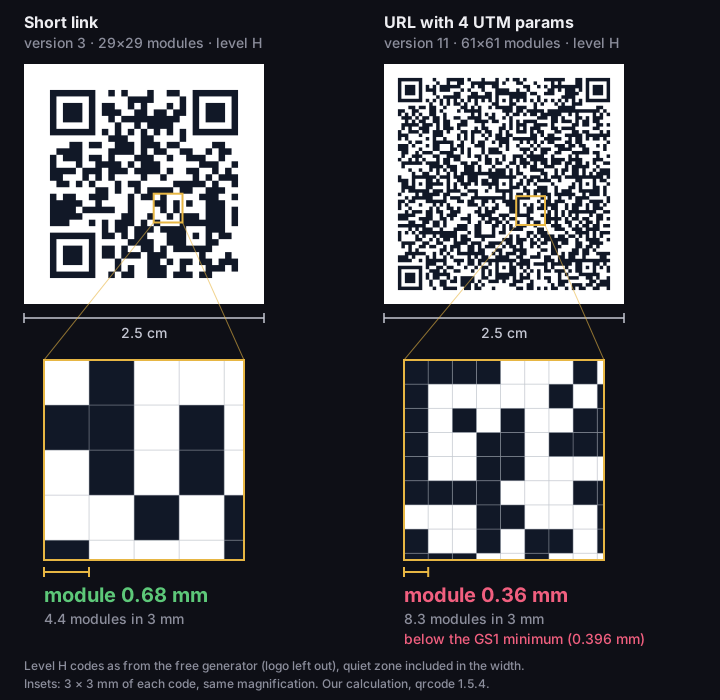
Same print size, different module
two real QR codes, both 2.5 cm wide with quiet zone, level H
Source: our calculation, qrcode library 1.5.4, 14 Oct 2026; minimum module — GS1 General Specifications 26.0
Figure description
Two real QR codes printed at the same width of 2.5 cm, quiet zone included, both at error correction level H. Under each, a magnified 3 by 3 mm window at the same scale. Short link: version 3, 29 by 29 modules, module 0.68 mm, 4.4 modules across a 3 mm window. URL with 4 UTM parameters: version 11, 61 by 61 modules, module 0.36 mm, 8.3 modules across a 3 mm window, marked as below the GS1 minimum of 0.396 mm.
A dense code loses twice, though. We simulated how many camera pixels per module a decoder needs: we sampled an ideal code as a camera sensor does, added blur, noise and the incomplete contrast of print, and fed it to the open-source jsQR 1.4.0 decoder, 40 trials per point. The short link at level H gave at least 38 reads out of 40 from 3.00 px per module. The UTM link reached that threshold at 3.75 px but held it steadily only from 4.50 px, and the longest address, with filters, UTM and a gclid identifier, missed it even at 5 px: 36 out of 40.
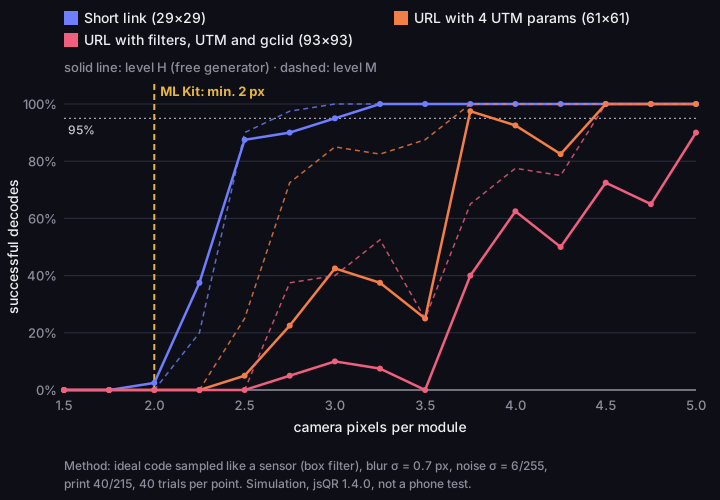
How many pixels per module a decoder needs
successful reads out of 40 trials, from 1.5 to 5 px per module, levels H and M
Source: DVN Links simulation, jsQR 1.4.0 decoder, 14 Oct 2026 (not a phone test); 2 px threshold — Google ML Kit, Input image guidelines
Figure description
Line chart from a simulation: share of successful decodes against camera pixels per module, from 1.5 to 5.0 px in steps of 0.25. Solid line is level H, dashed line is level M. Short link: 95 percent of reads from 2.75 px at M and from 3.00 px at H, 40 out of 40 at 5 px. URL with 4 UTM parameters: 95 percent from 3.75 px at both M and H; at 5 px 40 out of 40 at both levels. URL with filters, UTM and gclid: at M 95 percent from 4.50 px, 40 out of 40 at 5 px; at H below 95 percent up to 5 px, 36 out of 40. A vertical line at 2 px marks the Google ML Kit guideline of at least 2 pixels per module. Method: blur sigma 0.7 px, noise sigma 6/255, print 40/215, 40 trials per point.
The simulation has limits. jsQR is not a system camera's decoder, so its pixel thresholds do not carry over to a phone; Google ML Kit recommends at least 2 px per module (Google ML Kit). Perspective, glare and autofocus are missing too, but the proportions hold: a dense code needs more pixels per module, and its module is smaller anyway.
A short link solves both problems and takes nothing away. In DVN Links the code of a short link contains the short address, for example https://qrln.pl/aB3xK9, not the long target. UTM parameters stay in the target address, so they still reach your analytics after the redirect. On paid plans you can also enter them in the link fields to see clicks by campaign in the dashboard. The QR generator shows density straight away: when a code needs more than 3 cm of print, it warns that the code is getting dense and gives the minimum print width.
Too far or too close: what the camera sees
A phone reads a code within a distance window with two limits: focus sets the near one, pixels per module the far one. A dense code has a narrower window.
Google's ML Kit guidelines describe the far limit: the smallest element of a code should be at least 2 pixels wide and 2 pixels high in the image (Google ML Kit, Input image guidelines, page updated 8 Oct 2026). The further away the phone, the fewer pixels per module. Google also recommends a higher resolution, such as 1280 × 720 or 1920 × 1080, for scanning from further away, and ML Kit can tell the app that codes are "too distant for decoding". It is a library guideline for apps, not a camera specification: we found nothing from Apple or Google on the resolution at which a phone's camera analyses the image.
The minimum focus distance sets the near limit. Apple exposes it in its API in millimetres, and a WWDC21 session shows a code 20 mm wide: to fill the scanning frame, the phone has to come closer than the camera can focus, so the image blurs and the code does not scan (Apple, WWDC21; Apple, minimumFocusDistance). The demo used a 2020 iPhone 12 Pro Max, but every lens has a minimum focus distance. Hence the paradox: a small code often reads once you move the phone away.
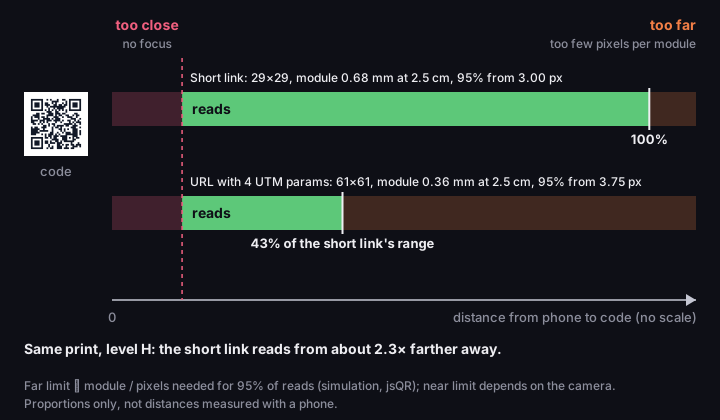
The distance window
short link and UTM link at the same print size, level H, proportions not to scale
Source: proportions from a DVN Links simulation, jsQR 1.4.0, 14 Oct 2026; mechanism — Google ML Kit (pixels per module), Apple WWDC21 (minimum focus distance)
Figure description
Diagram of the reading distance window, on an axis of phone-to-code distance, not to scale. On the left, the too-close zone: the camera cannot focus, because each camera has a minimum focus distance. On the right, the too-far zone: too few camera pixels per module. Short link, level H: 29 by 29 modules, module 0.68 mm at 2.5 cm, 95 percent of simulated reads from 3.00 px per module; its reads bar reaches 100 percent of the range. URL with 4 UTM parameters: 61 by 61 modules, module 0.36 mm, 95 percent from 3.75 px; its reads bar ends at 43 percent of the short link's range. Caption: at the same print size the short link reads from about 2.3 times farther away. Proportions from a jsQR simulation, not distances measured with a phone.
The far limit grows with the module and shrinks as the decoder needs more pixels. At level H and 2.5 cm, the short link has a 0.68 mm module and needed 3.00 px in our simulation; the UTM link has 0.36 mm and needed 3.75 px. The short link therefore reads from about 2.3 times further away, at any print width. A simulated proportion, not a distance measured with a phone (pixel guideline: Google ML Kit).
We deliberately give no distances in centimetres or metres. Converting pixels to distance needs the camera's field of view and the resolution of the image the app analyses, and we found neither in manufacturers' documentation. Measure it yourself in a few minutes: print the code at its final size, put it where it will hang, and step back with the phone until it stops reading. Repeat with a second phone and a second app. The shortest of those distances is your limit.
"2 × 2 cm" and the 10:1 rule: where they come from
Popular size rules have no measurement behind them: they are rules of thumb copied from blog to blog.
The oldest source of the 10:1 rule ("scanning distance is ten times the width of the code") that we found is a QRStuff blog post updated on 18 January 2011. Its author calls it a "rule of thumb" for a well-lit, black-and-white code scanned head-on, suggests 8:1 in poorer conditions and describes no test (QRStuff). It concerns phones of fifteen years ago, yet a QR code vendor's guide still repeats its billboard example. QRStuff also gives a module of at least 0.4 mm: close to the GS1 minimum, but a coincidence, not a confirmation.
Nielsen Norman Group's guidelines of 9 February 2024 mention an "official minimum size" of 1 × 1 cm and recommends 2 × 2 cm (NN/g). It cites no source, and neither DENSO WAVE nor GS1 has an official minimum in centimetres; GS1's minimum applies to the module, not the whole code. Scanova attributes to the ISO/IEC 18004 standard a module of at least 0.25 mm, a print from 2.5 × 2.5 cm and 115 × 115 px on screen, with no chapter or edition (Scanova). We can neither confirm nor rule this out: ISO/IEC 18004:2024 is paid and we have not read it. DENSO WAVE gives 0.17 mm for a laser printer, not 0.25 mm (DENSO WAVE, FAQ).
What is left of these rules? The direction: a larger code reads from further away. Not the number, because each rule silently assumes one kind of content. The same 2 × 2 cm square at level H gives a 0.54 mm module for a short link and 0.24 mm for a vCard contact card, below the GS1 minimum (our calculation, qrcode 1.5.4; threshold: GS1).
Colour, logo and surface
Colour, logo and material spoil a code for one reason: they reduce the difference between dark and light modules, or they take modules away.
Colour. DENSO WAVE recommends a black code on a white background and names two combinations its scanners cannot read: red on white and blue on green (DENSO WAVE, FAQ). For a phone the lesson is the same: the code must be clearly darker than the background. On paid DVN Links plans you can change the code's colours, but the editor does not check contrast, so always test a coloured code on a printout.
Logo. Level H error correction restores about 30% of the codewords, not 30% of the area you can cover (DENSO WAVE, Error correction). A logo uses part of that reserve; the rest is left for dirt and glare. Our generator places the logo in the centre (20% of the image width) and therefore encodes at level H. With a short link, the logo patch covers about 7% of the symbol's area in the 1000 px download by our calculation (about 9% in the 250 px preview). Keep the logo off the corner finder patterns: error correction will not restore them.
Surface. Film, a transparent bag or glossy vinyl either lacks light areas or reflects light (DENSO WAVE, FAQ). DENSO advises printing a white background under the code or sticking on a label, and flattening the code. GS1 adds that strong reflections around the code can interfere with reading (GS1 General Specifications 26.0, §5.7.4.5).
File and test print
Codes are often spoiled between file and printer: print from a vector or large file, and always test-print.
The free generator gives a 1000 px PNG to download; the on-page preview is 250 px. In the downloaded file a short link's module is 27 or 28 px (our measurement, qrcode 1.5.4), so the file stays sharp when scaled down to a few centimetres. Printed unscaled at 300 dpi it is about 85 mm wide, and a UTM link at level H gets a module of about 1.2 mm, well above the GS1 minimum (GS1 General Specifications 26.0); this is our calculation, not a test. Do not print a screenshot of the preview: it is only 250 px. In the dashboard you can download every short link's code as a 500 or 1000 px PNG or an SVG, which scales without loss of quality; for print, choose the SVG or the 1000 px PNG. Code colours start with the Starter plan, and on the free plan a link expires after 30 days; details on the pricing page.
Make the test print at the final size on the final paper, then scan it with two phones from your audience's distance, in the light where it will hang. If only one phone reads it, try another app: decoders differ, and ZXing has a mode that trades speed for accuracy (ZXing, DecodeHintType).
QR code not scanning — frequently asked questions
How small can a QR code on a business card be?
A short link at level H reaches the GS1 minimum at 15 mm wide with quiet zone, and the 0.495 mm target at 19 mm. A vCard with name, company, job title, phone, e-mail and website needs 34 and 43 mm at the same level (our calculation, qrcode 1.5.4; thresholds: GS1). If space is tight, encode a short link to a contact page.
Can a QR code be too big?
Yes. DENSO WAVE writes that a code made too big may no longer be readable by a scanner (DENSO WAVE, FAQ). With a phone, just step back until the whole code fits in the frame.
Will a light code on a dark background work?
It may, but not everywhere: the standard allows inverted colours (GS1 General Specifications 26.0), yet ZXing reads them only with a separate option (ZXing). We found nothing in manufacturers' documentation on iPhone or Android cameras, so test on several phones or stay with a dark code.
Does a logo spoil a QR code?
It can. DENSO WAVE warns that graphics laid over a code deform it (DENSO WAVE, FAQ). Even a centred logo at level H with the corners untouched uses some of the reserve meant for dirt, so check the code on a printout.
Why does one phone read the code and another not?
According to DENSO WAVE, it depends largely on the camera (DENSO WAVE, FAQ), and also on the app analysing the image. If only some phones read the code, it is at the limit: enlarge it or shorten the content.
Shorten the address before you make a code of it
A short link gives a code with larger modules at the same print size, and UTM parameters stay in the target address. You can check how dense a code is in the generator before printing.