What is a barcode? How scanning works and the main types
A barcode is bars and spaces that a scanner turns back into data. How scanning works, 1D vs 2D, and which symbol to use on a product, a carton or a warehouse shelf.
A barcode is data written as dark bars and light spaces of different widths, which a scanner turns back into digits or characters. It helps to separate two things from the start: the number (or text) the barcode carries, and the picture that encodes it. Any generator can draw the picture — including our barcode generator, which shows a preview and gives you a PNG without an account. The number is a different matter: for a product sold in shops it comes from GS1. Below: how a scanner reads the bars, how 1D and 2D barcodes differ, which symbol is for what — and how much room the same number takes in six different symbols, measured on files from our generator.
What is a barcode
A barcode is a machine-readable symbol: it carries an identifier, and a database — not the bars — gives it meaning. GS1, the organisation that manages the numbers on traded products, describes barcodes as symbols "that can be scanned electronically using laser or image-based technology", used to encode key identifiers (product, shipment, location) and attributes such as serial numbers, batch numbers and dates (GS1, Barcodes, read 19 Oct 2026). GS1 Poland adds that 1D barcodes mark not only products but also logistic units, locations, fixed assets, documents and returnable packaging, and that scanners "read barcodes and turn them into data in the system" (GS1 Poland, Barcodes, read 19 Oct 2026, our translation).
That second point is the key to the whole topic. The EAN on a yoghurt pot holds neither the product name nor the price — only 13 digits. The till sends them to the shop's database, and only the database knows the product and its price. So "what does this barcode mean?" has two answers: what is encoded in it (a number any phone app can read), and what that number means in somebody's database (which the barcode alone can't tell you).
How scanning works: bars, modules and the quiet zone
A scanner doesn't "read digits" — it measures the widths of light and dark stripes along a scan line and matches them against the symbol's character table. Every width is a multiple of one unit, the module. GS1 calls its width the X-dimension: "the specified width of the narrowest element of a barcode" (GS1 General Specifications, Release 26.0, glossary, read 19 Oct 2026). In an EAN-13 at nominal size the module is 0.33 mm.
Each symbol has its own "font" built from modules. In EAN/UPC barcodes one character takes seven modules and consists of two bars and two spaces, each one to four modules wide — as the GS1 General Specifications put it in the EAN/UPC chapter (§5.2.1). The digit 9 in the left half of the barcode, for instance, is a three-module space, a one-module bar, a one-module space and a two-module bar.
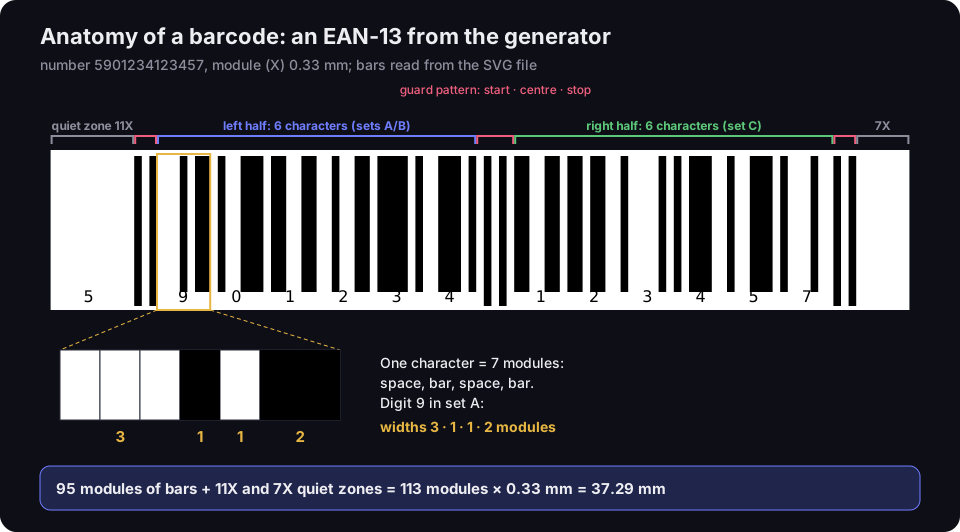
Anatomy of an EAN-13 barcode from the generator
number 5901234123457, 0.33 mm module; bars read from the SVG file
Source: DVN Links generator file, bars read by script, 20 Oct 2026; character structure — GS1 General Specifications R26.0, §5.2
Figure description
An EAN-13 barcode for 5901234123457 from the DVN Links generator with its parts labelled. On the left an 11-module quiet zone holding the first digit 5. Then the start guard pattern, the left half with six characters from sets A and B, the centre guard pattern, the right half with six characters from set C, the stop guard pattern and a 7-module quiet zone. A close-up of the first character: seven modules — space 3, bar 1, space 1, bar 2 — the digit 9 in set A. Summary: 95 modules of bars plus 11 and 7 modules of quiet zone make 113 modules, or 37.29 mm at a 0.33 mm module.
The scanner sweeps a laser beam or looks with a camera along the barcode and records how much light comes back: a lot from the light spaces, little from the dark bars. The result is a signal of peaks and troughs, which the decoder turns into a list of widths. GS1 grades barcode quality on exactly this kind of profile along the scan line (the Scan Reflectance Profile, a method from ISO/IEC 15416), and its symbol specification tables give 660 nm as the measuring light (GS1 General Specifications R26.0, §5.4.6 and §5.12). That is red light — which is why red or orange bars on a white background may not give the scanner enough contrast.
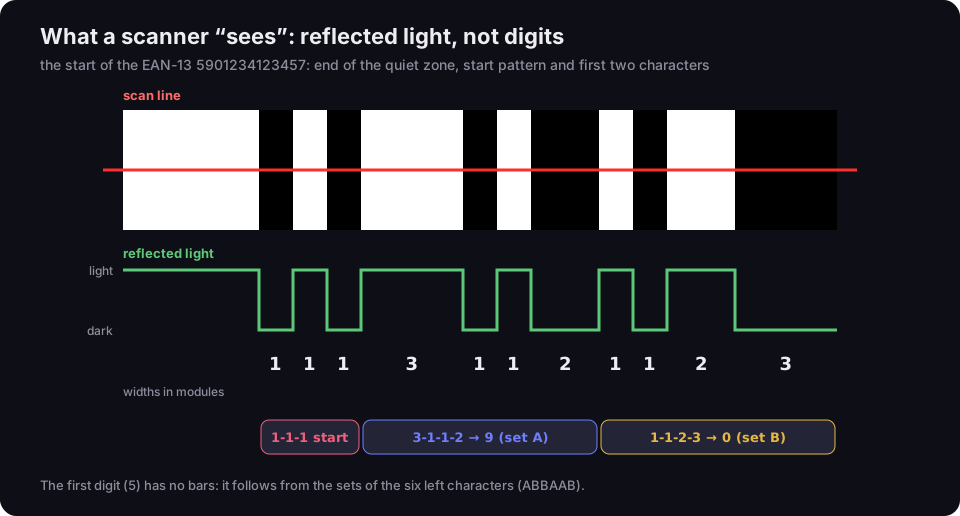
What a scanner sees: reflected light, not digits
the start of the EAN-13 5901234123457, widths in modules
Source: DVN Links generator file, decoded by script, 20 Oct 2026; number sets — GS1 General Specifications R26.0, Table 5-5
Figure description
A close-up of the start of the EAN-13 5901234123457 with a red scan line. Below it the reflected light signal: high on light spaces, low on dark bars. Under the signal the element widths in modules: 1, 1, 1 is the start pattern; 3, 1, 1, 2 is the digit 9 from set A; 1, 1, 2, 3 is the digit 0 from set B. Caption: the first digit 5 has no bars of its own; it follows from the sets of the six left characters, ABBAAB.
The figure also shows an EAN-13 quirk: the barcode encodes 13 digits but has only 12 characters. The first digit has no bars of its own — it follows from which of two sets (A or B) the six characters in the left half are drawn from. For the digit 5 the pattern is A, B, B, A, A, B (GS1 General Specifications R26.0, §5.2.2.1 and Table 5-5). The script that drew the figure read the bars of the generator file back this way and got 5901234123457 — which is what the decoder in a scanner does.
To know where the barcode starts, the scanner needs a quiet zone before the first bar and after the last one: a clear area with nothing printed in it. GS1 defines it as "a clear space which precedes the start character and follows the stop character", and for EAN-13 requires 11 modules on the left and 7 on the right (GS1 General Specifications R26.0, glossary and the symbol specification tables in §5.12). A barcode cropped to the bars, or pushed against the edge of a label, is the most common reason a valid number won't scan. The same rule applies to QR codes — we cover it in our piece on minimum print size.
The check digit: what it is for
A check digit or check character, calculated from the rest, lets the scanner reject a misread instead of passing a wrong number to the till. In EAN/UPC barcodes the check digit is mandatory: "one mandatory check digit" (GS1 General Specifications R26.0, §5.2.1). It is calculated with weights of 3 and 1 — we walk through it step by step in our piece on the EAN code. Code 128 has a mandatory check character calculated modulo 103 (ibid., §5.4.3.6 and §5.4.7.5.1), while in Code 39 the check digit is optional — the BWIPP library our generator uses only adds it when the includecheck option is on (BWIPP, Code 39, read 19 Oct 2026).
Types of barcode: 1D and 2D
1D barcodes store data in a single row of bars and are read across; 2D barcodes store data in a grid and fit more of it into less space. That is GS1's split: linear barcodes, like the U.P.C. on consumer goods, "use a series of variable-width lines and spaces to encode data", while 2D barcodes use patterns of squares, dots or hexagons, so they "can hold more data than 1D barcodes while still appearing physically smaller" (GS1, Barcodes). A QR code is a barcode too — a two-dimensional one. GS1 has standards for five 2D barcodes, including GS1 DataMatrix and QR codes with GS1 Digital Link (GS1, 2D barcodes, read 19 Oct 2026).
Each symbol is specified by its own ISO/IEC standard, and GS1 adds the rules for what goes into it. Here are the main types of barcode and whether our generator draws them.
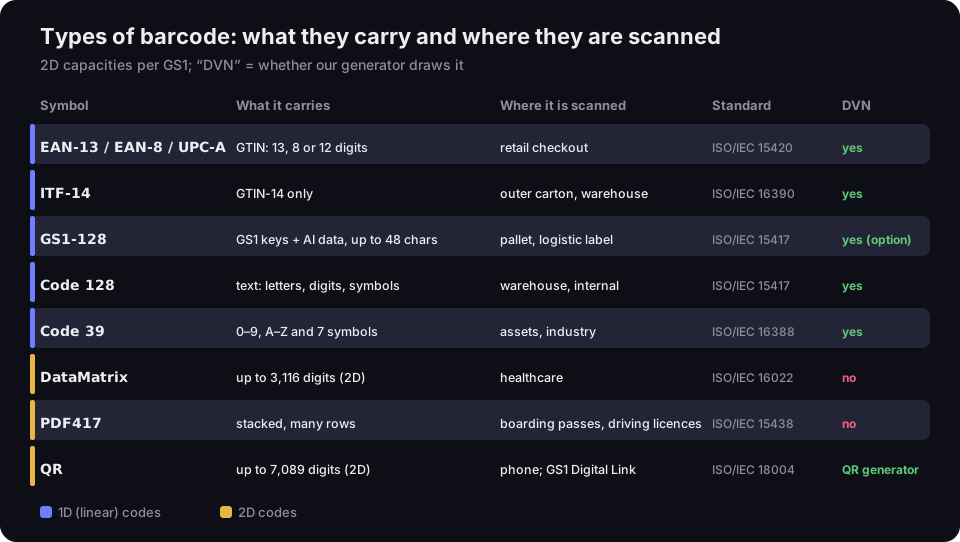
Types of barcode: what they carry and where they are scanned
eight symbols, ISO/IEC standards, 2D capacities per GS1
Source: GS1 (1D and 2D barcodes, capacities), IEC Webstore (ISO/IEC standards), BWIPP (Code 39 and PDF417 uses), read 19–20 Oct 2026; DVN column — generator code
Figure description
A table of eight barcode types. EAN-13, EAN-8 and UPC-A: a GTIN of 13, 8 or 12 digits, retail checkout, ISO/IEC 15420, DVN generator yes. ITF-14: GTIN-14 only, outer carton and warehouse, ISO/IEC 16390, yes. GS1-128: GS1 keys and Application Identifier data, up to 48 characters, pallet and logistic label, ISO/IEC 15417, yes as an option. Code 128: text with letters, digits and symbols, warehouse and internal use, ISO/IEC 15417, yes. Code 39: digits, capital letters and 7 symbols, assets and industry, ISO/IEC 16388, yes. DataMatrix: up to 3,116 digits, healthcare, ISO/IEC 16022, no. PDF417: stacked, many rows, boarding passes and driving licences, ISO/IEC 15438, no. QR: up to 7,089 digits, phone and GS1 Digital Link, ISO/IEC 18004, in the separate QR generator.
EAN-13, EAN-8, UPC-A
These are retail product barcodes. GS1 says EAN/UPC barcodes "are printed on virtually every consumer product in the world" and are the longest-established GS1 barcodes (GS1, EAN/UPC, read 19 Oct 2026). They encode only the digits of a GTIN: 13 in EAN-13, 8 in EAN-8 and 12 in UPC-A, used in the US and Canada. The symbol is specified in ISO/IEC 15420:2025, which leaves the content rules — what may be encoded — to GS1: "they are defined in GS1 General Specifications" (IEC Webstore, ISO/IEC 15420:2025, read 19 Oct 2026). Where to get a number, what the prefix means and how to calculate the check digit is the subject of our piece on the EAN code.
Code 128 and Code 39
These encode text, not just digits, and are used outside retail: order numbers, warehouse locations, SKUs, fixed assets. Code 128 (ISO/IEC 15417:2007) encodes all ASCII characters and is dense — it packs pairs of digits into a single character. Code 39 (ISO/IEC 16388:2023) knows 43 characters: digits, capital letters, space and - . $ / + %; the BWIPP library lists asset and inventory labels, LOGMARS military markings and vehicle identification numbers (VINs) among its typical uses (BWIPP, Code 39). Code 39 is wider for the same data — the measurement below shows by how much. Code 128 in detail, with its code sets and measurements in millimetres, is covered in our piece on EAN 128 and Code 128.
ITF-14 and GS1-128
These go on cartons and pallets — for the warehouse, not the till. GS1 draws a clear line: GS1-128 "can carry any of the GS1 ID keys, plus information like serial numbers, expiration dates and more", while ITF-14 "can only hold the Global Trade Item Number (GTIN) and is suitable for printing on corrugated materials" (GS1, 1D barcodes for general distribution, read 19 Oct 2026). ITF-14 is the GS1 form of Interleaved 2 of 5, a digits-only symbology. GS1-128 is a variant of Code 128: it begins with a start character followed by FNC1, a character that in this position GS1 reserves exclusively for the GS1 system (GS1 General Specifications R26.0, §5.4). Then come Application Identifiers (AIs), such as (00) for a pallet's SSCC or (17) for an expiry date. It used to be called EAN-128 or UCC-128 — how exactly it differs from plain Code 128 and how to enter AI data is shown in our piece on GS1-128. Our generator draws GS1-128 as an extra option next to the other six types.
DataMatrix, PDF417 and QR
These are 2D barcodes. DataMatrix (ISO/IEC 16022:2024) holds up to 3,116 digits according to GS1 and "is already widely adopted in the Healthcare industry" (GS1, 2D barcodes). PDF417 (ISO/IEC 15438:2015) is a stacked barcode: several rows of bars on top of one another; BWIPP lists airline boarding passes and North American driving licences among its uses (BWIPP, PDF417, read 20 Oct 2026). QR (ISO/IEC 18004:2024) holds up to 7,089 digits according to GS1 and is the barcode a phone camera opens. Retail is moving to 2D: GS1 Poland writes that global trade is moving to two-dimensional barcodes, "in particular QR with GS1 Digital Link" (GS1 Poland, 2D barcodes, read 19 Oct 2026, our translation).
Which of these end up on boarding passes and tickets is shown in our article on QR code tickets. We describe DataMatrix and PDF417, but our barcode generator doesn't draw them. A QR code with a web address, contact details or Wi-Fi network comes from the separate QR code generator — our guide on how to make a QR code covers doing it well. That is an ordinary QR code, not a GS1 Digital Link QR for the till.
Which barcode to use
The symbol follows from two questions: what you are encoding, and where the barcode will be scanned. The rest is detail.
|
What you encode |
Where it is scanned |
Symbol |
|---|---|---|
|
a product GTIN from GS1 |
shop till, marketplace |
EAN-13 (small pack: EAN-8; US and Canada: UPC-A) |
|
the GTIN of an outer case |
warehouse, loading bay |
ITF-14 or GS1-128 with AI (01) |
|
a pallet SSCC, batch, expiry date |
warehouse, supply chain |
GS1-128 |
|
your own text: SKU, location, order |
your own warehouse, your own system |
Code 128 |
|
text for an older system that only reads Code 39 |
a scanner set up for Code 39 |
Code 39 |
|
a web address, contact, Wi-Fi |
the customer's phone |
QR |
The barcode on a retail product is almost always an EAN-13 carrying a GS1 number — without that number a retailer won't list the product, however correct the picture is. When the number stays inside your company (a shelf, a tool, a file binder), you don't need a GS1 number: Code 128 with your own numbering is enough. Code 39 makes sense when an existing system or an industry specification requires it — for a new setup, Code 128 takes less room.
The same number in six symbols: how much room it takes
The same number, 5901234123457, takes 37 to 86 mm of width as a 1D barcode from our generator and under 10 mm as a QR code — density depends on the symbol, not the number. We measured SVG files from the generator (20 Oct 2026); the 2D barcodes, which the barcode generator doesn't draw, we drew with the same bwip-js library to keep the comparison fair.
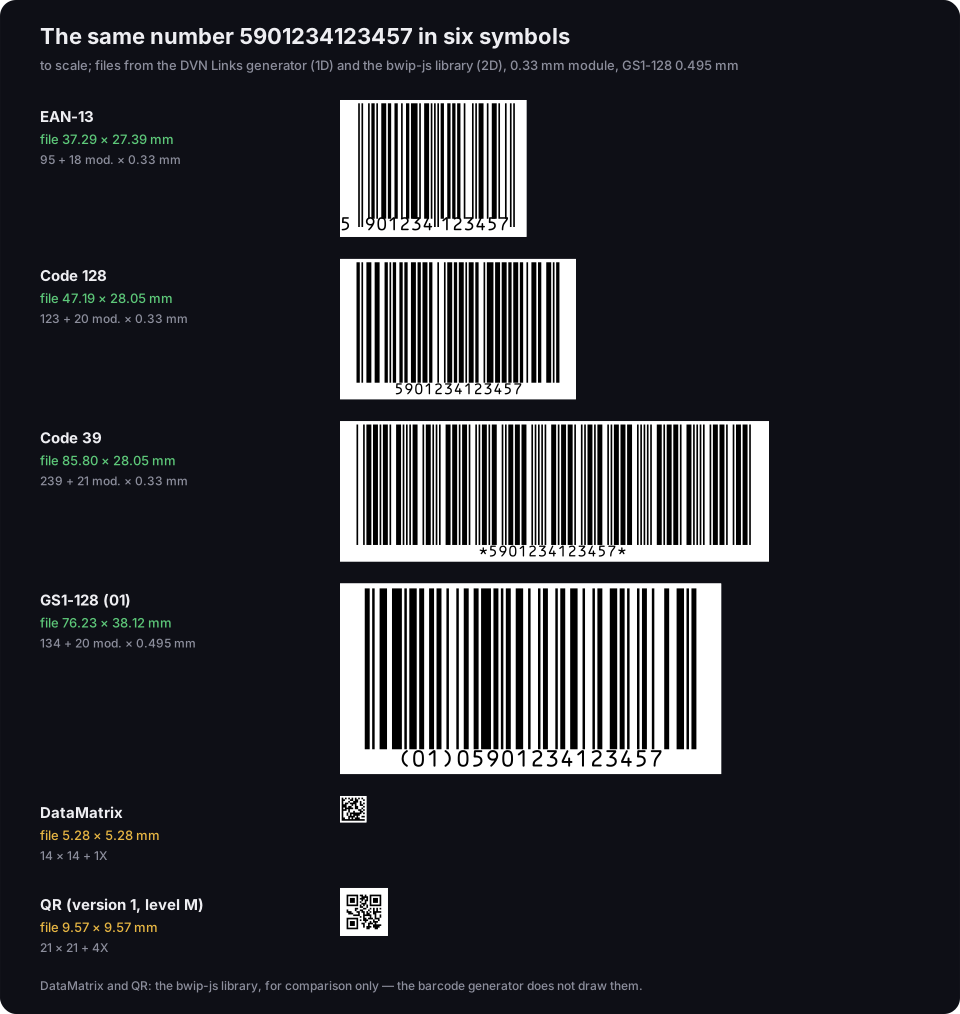
The same number 5901234123457 in six symbols, to scale
files from the DVN Links generator (1D) and the bwip-js library (2D); 0.33 mm module, GS1-128 0.495 mm
Source: our measurement of DVN Links generator files and the bwip-js 4.11.4 library, 20 Oct 2026
Figure description
Six barcodes with the same number 5901234123457 drawn at the same scale. EAN-13: file 37.29 by 27.39 mm, 95 modules of bars and 18 modules of quiet zones. Code 128: 47.19 by 28.05 mm, 123 modules of bars. Code 39: 85.80 by 28.05 mm, 239 modules of bars. GS1-128 with the identifier (01) and 05901234123457: 76.23 by 38.12 mm at a 0.495 mm module. DataMatrix: 14 by 14 modules, with a 1-module quiet zone 5.28 by 5.28 mm at a 0.33 mm module. QR version 1 with error correction level M: 21 by 21 modules, with a 4-module quiet zone 9.57 by 9.57 mm. DataMatrix and QR drawn with the bwip-js library for comparison; the barcode generator does not draw them.
What follows from it:
- EAN-13 is the narrowest 1D barcode for this number (37.29 mm with margins), because it knows only digits and has a fixed length: 12 characters of 7 modules plus the guard patterns.
- Code 128 is 10 mm wider (47.19 mm), even though it packs digits in pairs. It pays for flexibility: a start character, a check character, a stop, and an odd number of digits, so one digit has to go on its own.
- Code 39 is more than twice as wide as EAN-13 (85.80 mm). It has no code set for digit pairs, so every digit is a separate, wide character; add the start and stop characters, which show as asterisks in the text under the bars.
- GS1-128 with (01) is long for a different reason: our generator draws it at the GS1 dimensions for logistic units — a 0.495 mm module and 31.75 mm bars (GS1 General Specifications R26.0, Table 5-51), because it has to read from a distance on a pallet.
- 2D barcodes fit the same number into a few millimetres. At the same 0.33 mm module, DataMatrix is 5.28 mm and QR 9.57 mm with the quiet zone. In practice 2D barcodes are printed larger — especially QR codes scanned by phones, whose minimum size depends on the content and the camera.
The takeaway for a pack or label design: choose the symbol first, then reserve space based on the file dimensions. Squeezing a Code 39 into space designed for an EAN-13 ends with trimmed margins or a smaller module, and both make scanning worse.
Barcodes on products and packaging: where the number comes from
A product in a shop usually carries an EAN-13 with a GTIN; GS1 assigns the number, and you can draw the barcode yourself. So "what does the barcode on a pack mean?" comes down to the number: who issued it and for which product. The first digits are the prefix of the GS1 member organisation that issued the number to the company — not the country of manufacture. Numbers from GS1 Poland usually start with 590, for example, but a product with such a barcode may have been made elsewhere. Everything about the number, prefixes and getting a number for your own product is in our piece on the EAN code.
How to make a barcode in the generator
In our generator you pick a symbol, type a number or text and see a preview straight away; the PNG downloads without an account. Step by step:
- Choose the type. The barcode generator draws seven: EAN-13 (the default), EAN-8, UPC-A, ITF-14, Code 128, Code 39 and GS1-128.
- Type the data. For an EAN-13 you can type 12 digits and the generator adds the check digit, or all 13 and it checks it. Code 128 takes printable ASCII characters, without accented letters; Code 39 turns lower case into capitals. GS1-128 is typed the way the text under the barcode reads: the AI in brackets followed by its value, e.g.
(01)05901234123457(17)271231. - Download the file. PNG is free and needs no account. Vector SVG and PDF files for print come with the Starter plan and above, and up to 100 barcodes of one type at once (a single PDF or a ZIP of SVG files) with Pro. Details and prices (excluding VAT) are on the pricing page.
Three print rules that get broken most often:
- Keep the quiet zone. The generator file includes it (11 and 7 modules for EAN-13); don't crop it, and don't place the barcode against an edge or a fold.
- Dark bars on a light background. Black on white works best — the scanner measures contrast in red light.
- Test print. Scan a print at the final size before the run. Send the printer a vector file, which scales without blurring the bar edges. How SVG, PDF and PNG files differ is compared in our article on SVG, PDF or PNG for print.
A short history of the barcode
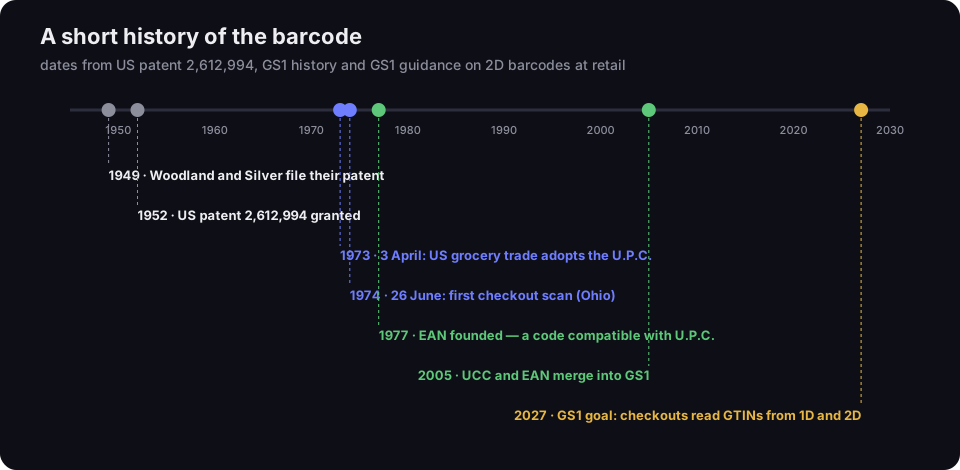
The barcode is more than 70 years old, and checkout scanning more than 50. The patent "Classifying apparatus and method" by Norman Woodland and Bernard Silver was filed on 20 October 1949 and granted on 7 October 1952 (Google Patents, US 2,612,994, read 19 Oct 2026). Shops followed two decades later: according to GS1, on 3 April 1973 the US grocery industry chose the U.P.C. symbol, and on 26 June 1974, in a Marsh supermarket in Ohio, a pack of Wrigley's gum became the first product in the world to be scanned (GS1, How we got here, read 19 Oct 2026). In 1977 the European Article Numbering Association (EAN) was founded with a barcode compatible with U.P.C., and in 2005 UCC and EAN merged into a single organisation, GS1 (ibid.).
A short history of the barcode
from the 1949 patent to the GS1 goal for the end of 2027
Source: Google Patents US 2,612,994; GS1, How we got here; GS1, 2D Barcodes at Retail Point-of-Sale Implementation Guideline 1.1.0; read 19 Oct 2026
Figure description
A timeline from 1945 to 2030. 1949: Woodland and Silver file their patent. 1952: US patent 2,612,994 granted. 1973, 3 April: the US grocery trade adopts the U.P.C. 1974, 26 June: the first checkout scan in Ohio. 1977: EAN founded, a code compatible with U.P.C. 2005: UCC and EAN merge into GS1. 2027: the GS1 goal for checkouts to read GTINs from both 1D and 2D barcodes.
The next change is already under way. GS1's goal is for checkouts worldwide to read the GTIN from both linear and 2D barcodes by the end of 2027, which requires software upgrades and sometimes new scanners (GS1, 2D Barcodes at Retail Point-of-Sale Implementation Guideline, §1.2, read 19 Oct 2026). Under the same guideline, until 90% of checkouts can read at least the GTIN from a 2D barcode, any product with a 2D barcode on pack must also carry a linear one. So the EAN-13 isn't going away overnight. What this shift, known as Sunrise 2027, means for a brand owner is covered in our article on the GTIN QR code.
Frequently asked questions
A 1D barcode is a single row of bars and spaces, read across; it holds little data, usually just a number. A 2D barcode stores data in a grid of modules, so according to GS1 it holds more in less space (GS1, Barcodes). 2D barcodes are read by imaging scanners or phone cameras.
Yes — a two-dimensional one. It is specified in ISO/IEC 18004, and GS1 has its own QR variants for retail, including QR with GS1 Digital Link. An ordinary QR code with a web address is a barcode too; it just doesn't carry a GTIN.
Usually it is an EAN-13 with a GTIN that identifies a specific product in retail databases. The first digits are the prefix of the GS1 organisation that issued the number — not the country of manufacture. Details in our piece on the EAN code.
The picture, yes — in the barcode generator, free as a PNG. A number for selling in shops must come from GS1; a made-up one may already belong to another product. For internal labels you don't need a GS1 number: Code 128 with your own numbering is enough. All the generator's features are on our features page.
A digits-only 1D symbology that encodes digits in pairs: each digit is five elements, two wide and three narrow, drawn either as five bars or as the five spaces between them — so one digit of the pair sits in the bars and the other in the spaces (GS1 General Specifications R26.0, §5.3.1). In the GS1 system it is used as ITF-14, which carries only a GTIN-14 and is meant for printing on corrugated cartons (GS1, 1D barcodes for general distribution). Our generator draws ITF-14 with a bearer bar around it.