Smart link: one link to the App Store, Google Play and the web
A smart link is one address that sends iPhones to the App Store, Android to Google Play and everyone else to your website. How the server recognises the phone and country, how A/B tests work and what such a link cannot do.
A smart link is one short address that picks a different destination for each visitor: an iPhone goes to the App Store, Android to Google Play, a computer to your website and a visitor from Germany to the German version of the site. The same address can also split traffic between two versions of a page in an A/B test. It earns its keep wherever one link or QR code reaches many people at once and cannot be swapped: on packaging, a poster or a profile bio. Below we show on real requests what the server sees on a click, in which order it decides, how an A/B test behaves after 500 clicks and where device detection gets it wrong. In DVN Links, rules by device and country come with the Pro plan, and A/B tests with the Business plan.
Smart link: what it is (and what else goes by the name)
A smart link is a short link with rules: instead of one destination it holds a list of conditions and an address for each. The server checks the conditions on every click and sends the browser to the address of the first one that matches. Anyone who matches none goes to the default address. To the visitor it looks like an ordinary link: they click or scan, and a moment later they are on the right page.
The name means at least three different things online, and it helps to tell them apart before reading any advice.
- A link to apps and pages by device and country — the subject of this article. Link shorteners usually describe it as targeting by device and country — Dub calls the feature "device targeting" and says it lets you "personalize the destination URL for your links based on the user's device type" (Dub, Device targeting).
- A music smart link — a single page with buttons to Spotify, Apple Music or YouTube for a new release. On the site of Linkfire, one of the providers, a client from the Deckdisc Records label sums it up as "Artists can promote their releases with just one link" (Linkfire). That is a different product: a page listing services, not a redirect.
- An affiliate smartlink — an ad-network link that picks the offer itself. Trackier defines it as "a tracking URL that can redirect visitors to different eligible offers according to predefined conditions" (Trackier). Similar mechanics, different purpose: there the network decides the destination, here the link owner does.
What they share: the visitor gets a redirect chosen for them. What differs is who sets the rules and what is on the other side. In DVN Links you set the rules yourself, and the destination is always an address you typed in.
One QR code for the App Store and Google Play
The most common reason people look for a smart link is an app. You have an app on iOS and Android, and the leaflet, box or shop sticker has room for one QR code. Two codes side by side ("iPhone" and "Android") take twice the space and leave the choice to the customer. One code with rules makes it for them.
The setup looks like this:
- Default address — the app page on your website. Computers, and anything the server cannot recognise, land here.
- Rule 1: iPhone / iPad → the app's App Store address (it starts with
apps.apple.com). - Rule 2: Android → the Google Play address. Google spells out the format:
https://play.google.com/store/apps/details?id=<package_name>, ending with the app's package name, for examplecom.google.android.apps.mapsfor Google Maps (Android Developers, Linking to Google Play).
The QR code then holds only the short link. The rules live on the server, so you change them in the dashboard without reprinting the code — just like the destination of an ordinary short link.
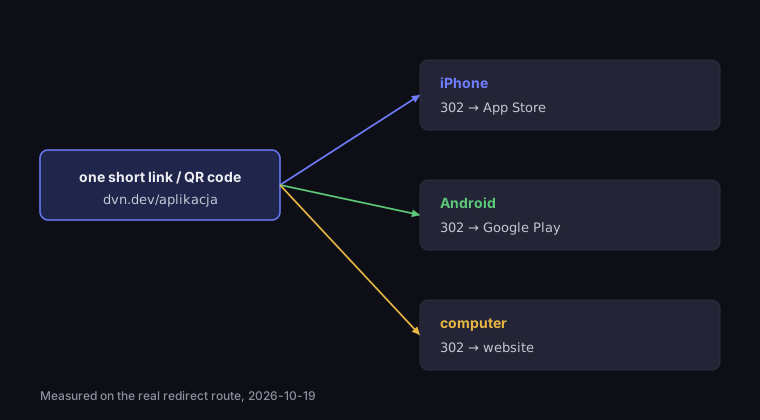
One short link, three destinations
the same address opened on three devices
Source: DVN Links measurement on a local instance (the real redirect route), 19 Oct 2026
Figure description
Diagram: one short link or QR code leads to three destinations. An iPhone gets a 302 redirect to the App Store, Android a 302 redirect to Google Play, a computer a 302 redirect to the website. Measured on a local DVN Links instance on 19 October 2026.
We checked this on the real DVN Links redirect route, running locally, with a test link set up as above. A request from an iPhone browser got a 302 to the App Store, Chrome on Android a 302 to Google Play, and Chrome on Windows a 302 to the default address. The rules also work for browsers built into apps: a request from Instagram's in-app browser on Android went to Google Play too, because its description contains the word "Android".
One code for two stores has a cost worth knowing before you print: a code on a short link only works while the redirecting service works. A code with the Google Play address typed in directly will survive anything, but it will not take an iPhone to the App Store. We explain the difference between a static code and a code on a short link in the guide How to make a QR code.
How the server recognises the phone and the country
A smart link has no access to the phone. On a click the server sees only what the browser sends with the request, and two things matter for rules: the browser description and the country.
Device — from the User-Agent header. Every browser sends a line of text describing itself, for example Mozilla/5.0 (iPhone; CPU iPhone OS 18_0 like Mac OS X) …. The server looks for the system name in it: iPhone, iPad and iPod mean iOS, "Android" means Android, everything else counts as a computer. MDN, the web documentation maintained by Mozilla, warns against treating this as certain: "A common misuse of UA sniffing (and client hints) is to detect if the client is a mobile device" (MDN, Browser detection using the user agent). For choosing an app store it is good enough, because we ask about the system, not the screen size — but there are exceptions, and one of them matters.
An iPad pretends to be a Mac. Since Safari 13, an iPad in its default mode identifies itself like a computer: "With the exception of iPad mini, Safari on iPad will now send a user-agent string that is identical to Safari on macOS" (WebKit, New WebKit Features in Safari 13). WebKit says this happens "most of the time": iPad mini sends an iOS description, and so does a page loaded or reloaded while Safari takes up one third of the screen during multitasking. In our measurement, a request with that description went to the default address, not the App Store — the server saw a Mac. The "iPhone / iPad" rule catches an iPad only when its browser sends a description containing "iPad". So the default address should not be a dead end: a page with two buttons ("Download on the App Store", "Get it on Google Play") serves both computers and iPads.
Country — from a header added by the CDN. Traffic to DVN Links passes through Cloudflare, which adds a country header to requests: "The CF-IPCountry header contains a two-character country code of the originating visitor's country" (Cloudflare, HTTP headers). The code is two ISO 3166-1 letters, such as IE or DE. Cloudflare also uses special codes, including XX for clients without country data and T1 for the Tor network — our route treats both as no country. Without Cloudflare in the path the header is simply absent, and country rules do not apply. The country comes from the IP address, so someone in Dublin using a VPN set to Germany gets the German page. That is true of any rule by country, not a flaw of one particular tool.
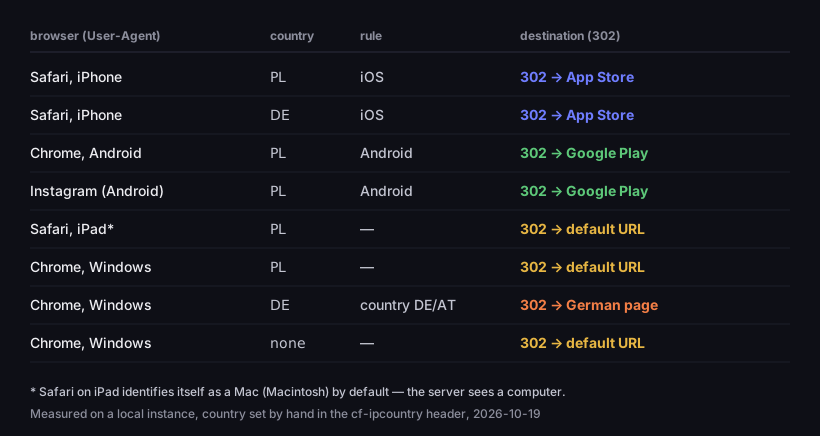
What the server sees on a click, and where it sends it
eight requests to a link with iOS, Android and DE/AT rules
Source: DVN Links measurement on a local instance, country set by hand in the cf-ipcountry header, 19 Oct 2026
Figure description
Table of eight requests. Safari on an iPhone from Poland and from Germany: iOS rule, 302 to the App Store. Chrome on Android from Poland: Android rule, 302 to Google Play. Instagram's in-app browser on Android: Android rule, 302 to Google Play. Safari on an iPad identifying as a Mac: no rule, 302 to the default URL. Chrome on Windows from Poland: default URL. Chrome on Windows from Germany: DE/AT country rule, 302 to the German page. Chrome on Windows without a country header: default URL.
The table shows one more thing: an iPhone from Germany got the App Store, not the German page. Not because the country check failed, but because the iOS rule sits higher on the list than the country rule. Order is the subject of the next section.
Rules in order: how to set up a smart link
Rules are checked from top to bottom, and the first match wins. A rule matches when everything you ticked in it agrees: the device (if you picked devices) and the country (if you picked countries). A rule with the device "Android" and the country "DE" catches only Android phones in Germany. A rule with neither device nor country cannot be saved — it would swallow all traffic.
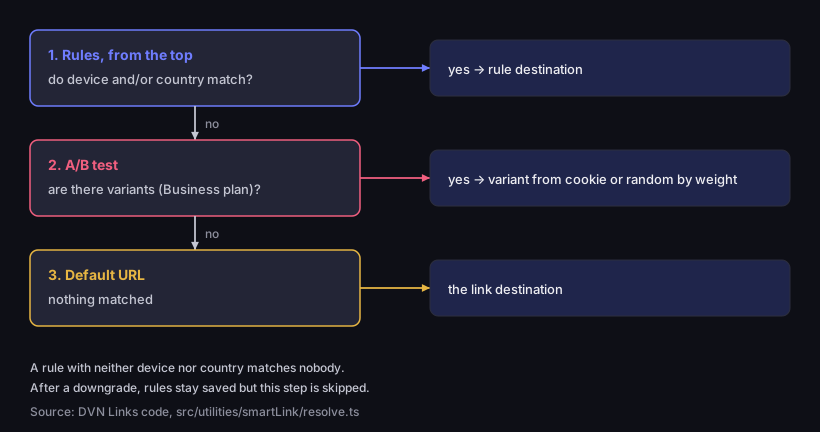
The order in which a smart link picks a destination
rules first, then the A/B test, the default URL last
Source: DVN Links code (src/utilities/smartLink/resolve.ts), as of 19 Oct 2026
Figure description
Three-step decision diagram. Step one: rules from the top — if device or country match, the visitor goes to the rule's destination. If not, step two: A/B test — if the link has variants (Business plan), the visitor gets the variant from their cookie or a random one by weight. If not, step three: the link's default URL. Below: a rule with neither device nor country matches nobody, and after a downgrade rules stay saved but the step is skipped.
The order gives a simple rule for building the list: narrowest rules first, broadest last. An example for an online shop with an app that sells at home and in Germany and Austria:
|
Order |
Device |
Country |
Destination |
|---|---|---|---|
|
1 |
Android |
DE, AT |
the app on Google Play (DE) |
|
2 |
iPhone |
DE, AT |
the app on the App Store (DE) |
|
3 |
— |
DE, AT |
the shop in German |
|
4 |
Android |
— |
the app on Google Play |
|
5 |
iPhone |
— |
the app on the App Store |
|
default |
|
|
the shop in English |
If rule 3 ("all of Germany and Austria → German page") sat at the top, German phones would never reach the app store. In the DVN Links dashboard you move a rule with the "Move up" and "Move down" arrows; a link can have up to 10 rules.
A few things follow from how the system works:
- You change rules without a new code. The QR code holds the short link, not the rules.
- Every destination goes through the same safety check as an ordinary link — an address on a malicious list will not be saved.
- A file link cannot be saved with rules or an A/B test. A link to an uploaded PDF always opens that file.
- After a downgrade, rules do not disappear. They stay saved but stop working: everyone goes to the default address, and the dashboard shows them as inactive. Back on Pro, they work again straight away.
As with an ordinary short link, the server answers with a temporary 302 redirect. Why that matters for campaigns and tests is covered in our guide on how to shorten a link.
A/B testing a link: splitting traffic and keeping returning visitors on one variant
An A/B test in a smart link splits traffic between two to five versions of a page by the shares you set — 50/50 or 80/20, for instance. A share is a whole number from 1 to 99, and together they must add up to 100. Typical uses: two versions of a product page, two offers, or the old and new landing page of a campaign. The link and the QR code stay the same, and the statistics show how many clicks went to each variant. A/B tests are on the Business plan and up.
Two things matter: the randomness and the memory.
The randomness is only fair in large numbers. We sent 500 requests to a local instance with a 50/50 link, each as a new visitor (no cookie). After 500 clicks the result was exactly 250 to 250, but along the way the share of variant A wandered: around clicks 20–30 it reached 60%, and from click 100 onwards it stayed within 5.9 percentage points of 50% (our measurement, 19 Oct 2026). The practical lesson: do not judge a test after one day and a few dozen clicks — at that volume the difference between variants can be pure chance.
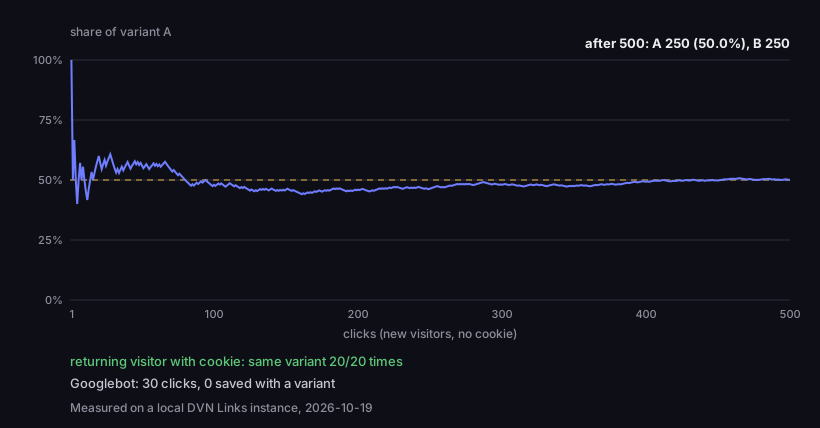
A 50/50 A/B test — share of variant A as clicks add up
500 clicks from new visitors, the dashed line is 50%
Source: DVN Links measurement on a local instance (500 requests through the redirect route), 19 Oct 2026
Figure description
Line chart of variant A's share in a 50/50 test as clicks add up. At first the line jumps between 100% and about 40%, around clicks 20–30 it reaches 60%, from click 100 it stays between about 44 and 51%, and after 500 clicks it ends at 50.0% — 250 clicks for variant A and 250 for variant B. Below the chart: a returning visitor with a cookie got the same variant 20 times out of 20, and 30 Googlebot clicks were saved without a variant.
The memory protects the result from returning visitors. Someone who scans the code twice should see the same page — otherwise they get lost and the statistics count them in both variants. So after the first click the server stores a cookie with the chosen variant in the browser, valid for 30 days. In our measurement the visitor with the cookie got the same variant 20 times out of 20. The cookie lives in one browser: the same person on a phone and on a laptop is two people to the server.
Tests and Google. If the test involves pages you want in search results, Google's guidance is worth knowing. First, the redirect to a variant should be temporary: "use a 302 (temporary) redirect, not a 301 (permanent) redirect" — a smart link always answers with a 302. Second, Google's crawler must not get different addresses from people: "Don't show one set of URLs to Googlebot, and a different set to humans. This is called cloaking". Third, Google notes that "Googlebot generally doesn't support cookies" (Google Search Central, Minimize A/B testing impact in Google Search). In an A/B test, a smart link treats the crawler like any visitor without a cookie: it draws a variant by the same shares. In our measurement, 30 requests identifying as Googlebot got variant A 15 times and B 15 times — not a single address from outside the test.
Bots do not skew the result. Those 30 Googlebot clicks were saved in the database as bot traffic, with no variant attached, and the server sent them no cookie. Variant statistics therefore count people only. Other automated visitors that open links — link previews in messaging apps, for example — are treated the same way. One difference concerns device rules: the server recognises a bot as a bot, not as a phone, so the "iPhone / iPad" and "Android" rules do not catch it — it goes where a computer goes. Country rules and the A/B test work for it just as they do for people.
How to check a smart link before printing
Rules are easy to set up and just as easy to get wrong — one rule too high on the list or a typo in a store address is enough. You can fix the code on the box in the dashboard, but for a few days a print run with the wrong destination will send people to the wrong place. So before the file goes to the printer, run a short test:
- Scan the code with an iPhone and an Android phone. Each should land on its own app page in the store, not on the store's home page or an error message.
- Open the short link on a computer. The default address should open. If you have an iPad, check it separately — you will see whether it goes where the computer goes.
- Check the country rule with a VPN set to a country from the rule. Without a VPN you only see your own country.
- Look at the link statistics. Every test click should show up with the rule that handled it. If everything went to the default address, a rule does not match the way you assumed.
- For an A/B test, open the link in two different browsers or a private window. One browser remembers its variant for 30 days, so in it you will always see the same one.
Repeat the test after every change to the rules. A change takes effect from the next click, and so does a mistake.
A smart link is not always needed. If a link leads everyone to the same place — an article or a form, say — rules only add things that can break. They make sense where your audience really needs different destinations: an app in two stores, an offer in several countries, or two versions of a page to compare.
What a smart link will not do
A smart link chooses the address the browser should go to. That is where its job ends, and it is worth knowing before a campaign:
- It does not open a specific screen inside an app. It leads to the app's store page or to a web page. What happens next depends on the store and the phone, not the link.
- It does not carry information through the install. Once installed from the store, the app does not know which QR code the person came from. Where users came from, you see in the link statistics and the store's own reports.
- It does not guess the language. A country rule looks at the IP address, not the browser language. An Irish visitor in Berlin gets the German page.
- It will not recognise the device every single time. The browser description can be changed, and Safari on an iPad presents itself as a Mac by default — which is why the default address should work for everyone.
- It does not issue tickets. Everyone who scans the code gets the same link, and a screenshot of the code works like the original — what a ticket with a code really is, see our article on QR code tickets.
- Link monitoring checks only the default address. If your plan includes monitoring, you get an alert when the link's main address stops working. Check rule and variant addresses yourself after every change, even just by opening each one once in a browser. How monitoring tells a dead page from one that merely keeps bots out is explained in our article on 404 errors.
Smart links, statistics and UTM
Every click on a smart link is saved with the rule or variant that handled it. Next to the total, the link statistics in the dashboard therefore show a separate row for each rule and each variant: how many clicks the App Store rule handled, how many the Google Play rule, and in an A/B test how many each variant got and what share that is against the share you set. The default address has no row of its own: it is the rest, the total minus the clicks handled by rules. In our local measurement all 521 human clicks in the A/B test were saved with a variant, and clicks on the link with rules were saved with the rule wherever one applied.
UTM parameters set on the link are appended to every destination — the default address, the rule addresses and the test variants. Google Analytics attributes to the campaign the traffic that landed on your site — from the default address, the test variants and rules leading to your site. Visits to the App Store and Google Play never reach your analytics; you see their numbers in the link statistics and the store's own reports. How to name the parameters so that reports stay consistent is covered in UTM parameters: what they are.
Frequently asked questions
No. In DVN Links, rules by device and country are on the Pro plan and up, and A/B tests on the Business plan and up. Ordinary short links and QR codes work on every plan. Current prices and limits are on the pricing page.
Up to 10 rules and up to 5 A/B test variants. Rules are checked in order, the first match wins, and anyone who matches none goes to the default address.
No. The QR code holds the short link, and the rules are stored on the server. A rule change takes effect from the next click.
Yes, as long as the in-app browser reports the system name (we tested Instagram's browser on Android). In our measurement, Instagram's browser on Android went to Google Play just like Chrome.
A bot is treated like a computer: country rules and the A/B test work for it just as they do for people, device rules do not. Its clicks do not count in the statistics, and the server sends it no variant cookie.
Google gives guidelines for such tests: the redirect should be temporary (302), and the crawler must not get different addresses from people. The A/B test in a smart link meets both. On variant pages, Google recommends rel="canonical" pointing to the original page rather than noindex — that is set on your site, not in the link. Google also warns against running a test for longer than necessary (Google Search Central). How a 302 differs from a 301 for Google and browsers is covered in our article on HTTP 302 vs 301.
You can set up Smart link rules in the dashboard, in the link settings — from the Pro plan.