UTM builder — campaign URL builder for GA4
Paste an address, add source, medium and campaign — get a ready link and see straight away which GA4 channel the traffic will land in.
Your link
Enter the address the link should lead to.
- Missing: utm_source, utm_medium, utm_campaign. Google recommends always setting source, medium and campaign — without them reports get gaps and (not set).
The link is built in your browser — nothing is sent or stored.
Want to count clicks before GA4 does and get a shorter link for print or SMS? Shorten this link in DVN Links
What each UTM parameter means
UTM parameters are additions after the ? in a page address that Google Analytics 4 reads to tell where a visit came from. The link still leads where it did — only your report changes. GA4 recognises nine parameters; Google's help page Collect campaign data with custom URLs lists them all. The builder covers the six GA4 reports for manual tagging:
utm_source— the source, "where from":newsletter,facebook,google.utm_medium— the type of traffic:email,social,cpc. The GA4 channel depends on it, so the builder suggests values.utm_campaign— the campaign name, e.g.2026-11-black-week.utm_term— the paid keyword.utm_content— the creative variant: two buttons in one e-mail, two images in a post.utm_id— the campaign ID, if you keep a register of campaigns and want to join it with GA4 data.
Google says you "should always use" utm_source, utm_medium and utm_campaign. Leaving one out shows as (not set) in reports — which is why the builder keeps a warning up until all three are filled in.
How GA4 assigns a channel
The channel — Email, Organic Social, Display and the rest — is worked out from source and medium by the fixed rules of the default channel group. Google states that channel definitions "can't be edited" (Default channel group). A medium outside the rules usually ends up as Unassigned: the link works and the visit is in GA4, just in no channel.
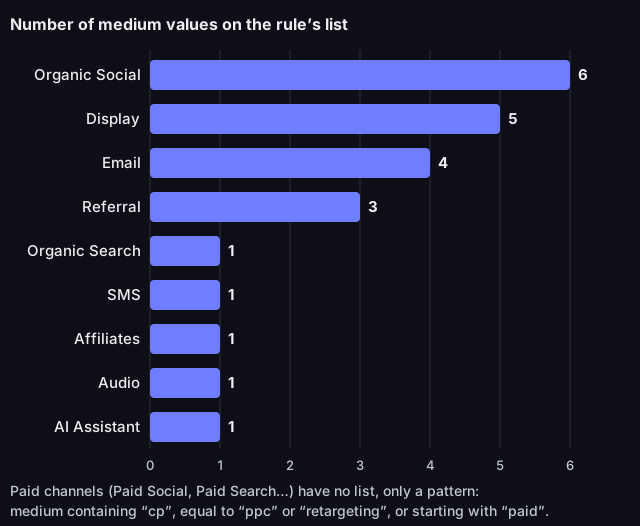
How many utm_medium values each GA4 channel recognises literally
Source: Google Analytics Help, Default channel group (answer 9756891), read on 13 October 2026; count ours
Figure description
Bar chart. Organic Social: 6 medium values, Display: 5, Email: 4, Referral: 3, Organic Search: 1, SMS: 1, Affiliates: 1, Audio: 1, AI Assistant: 1. 23 values in total. The paid channels have no list, only a pattern: medium containing cp, equal to ppc or retargeting, or starting with paid.
The dictionary is short. email, social, banner and cpc land in channels; newsletter, mail, sponsored, qr or print do not. The builder checks the medium against the same rules and shows the channel under the link. It does not settle the paid channels, because they also depend on the source: cpc with google is Paid Search, with facebook it is Paid Social.
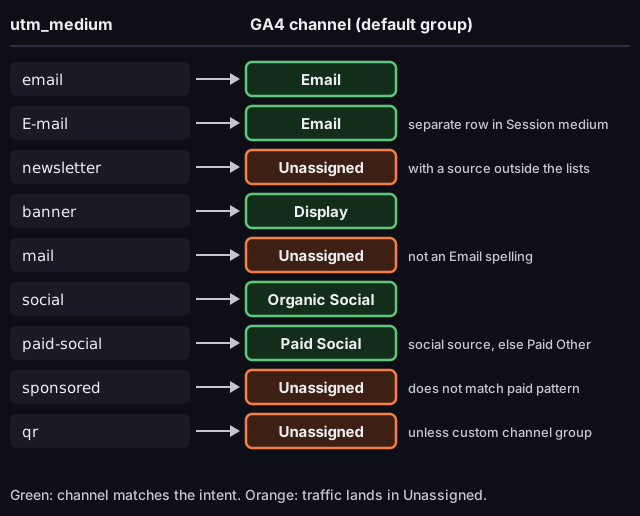
utm_medium value and the resulting GA4 channel
Source: Google Analytics Help, articles 9756891 and 10917952, read on 13 October 2026
Figure description
Diagram of medium value and the channel it lands in. email: Email. E-mail: Email, but a separate row in the Session medium dimension. newsletter: Unassigned with a source outside the lists. banner: Display. mail: Unassigned, not an Email spelling. social: Organic Social. paid-social: Paid Social when the source is on the list of sites, otherwise Paid Other. sponsored: Unassigned, does not match the paid pattern. qr: Unassigned unless you build a custom channel group.
Naming convention and common mistakes
- Lower case only. Values are case sensitive ("Parameter values are case sensitive", Google), channels are not.
Emailandemailland in one channel but show as two rows in the Session medium dimension. - No spaces or accented letters. In an address they turn into percent codes (
%20,%C3%A9) that are hard to read and easy to retype wrongly. Use hyphens:black-week. - Campaign with a date:
yyyy-mm-topic, e.g.2026-11-black-week— campaigns sort chronologically and do not merge across years. - No personal data. UTM values end up in reports and in an address anyone can see, so never put a recipient's e-mail in them.
- Parameters before `#`. Anything after the
#never reaches GA4. The builder puts UTM before the fragment and replaces old UTM parameters in the address instead of duplicating them. - No UTM on internal links. A tagged link between pages of your own site credits later visits to an "internal campaign" — Google walks through an example in its article on traffic source dimensions. Measure clicks on your own banners with GA4 events.
More examples, the full table of channel rules and how to check a link before it goes out are in the article UTM parameters: what they are.
UTM, short links and QR codes
A link with a full set of parameters gets long — a problem in a text message, on a flyer or in an Instagram bio. A short link leads to the tagged address, so GA4 gets the same parameters while the shortener counts the click before the landing page loads. The two tools need not agree, and that is normal: the shortener counts clicks, GA4 counts visits. Details in the article how to shorten a link.
For print, turn such a link into a code in the QR code generator. Mind the medium: qr and print belong to no GA4 rule, so without a custom channel group flyer traffic lands in Unassigned. You will still spot print by its source, e.g. utm_source=flyer, in the source report; a separate channel for print needs a custom channel group.
Frequently asked questions
Does the builder store my links?
No. The link is built in your browser and sent nowhere. Copy it into a campaign sheet so you still know a year later what it meant.
Which parameters are required?
Technically none — the link works without them. Google still recommends always setting utm_source, utm_medium and utm_campaign, because a missing one shows as (not set) in reports.
Why does my traffic land in Unassigned?
Most often because of a medium outside GA4's default channel rules, such as newsletter instead of email. The builder warns about such a medium and suggests values GA4 recognises.
Does letter case matter?
Not for the channel, but it does for values. Facebook and facebook become two sources in a report that you have to add up by hand. Write everything in lower case.