Wedding QR code: guest photos, RSVP, directions and seating
What to put behind a wedding QR code, how many codes to make, how guest photo albums on Google and Apple really work, and why the code on the invitation has to outlast the months before the day.
A wedding QR code saves guests from typing addresses: one scan to RSVP, open directions to the venue, check their table or add photos to a shared album. Codes have become a wedding staple — in a survey of 2,800 couples by the US wedding site The Knot, 59% used them at their wedding in 2026, up from 7% in 2021 (The Star, reprinting The New York Times, August 2026). We found no comparable European figures. Wedding QR codes rarely fail at the printer, though; they fail over time. Invitations are printed months before the day, guest photos trickle in for weeks after it, and in between the seating plan, the RSVP deadline and sometimes the album change. Below: what codes are good for, how many to make, how guest photo albums on Google and Apple actually work, and how to keep the invitation code alive until the wedding.
What a wedding QR code is for
A wedding QR code does five jobs, and each happens at a different time — before the wedding, on the day or after it. That matters, because it decides how long the code has to keep working.
- RSVP (before). The code on the invitation leads to a form where guests say whether they are coming, with a plus-one or not, and what they eat. It has to work from the day invitations go out until the RSVP deadline.
- Directions and parking (before and on the day). A link to the venue in Google Maps opens navigation on the phone — useful at the church, at the venue and on a note in the hotel for guests travelling in.
- Guest photo album (on the day and after). A code on the tables or at the entrance leads to a shared album where guests add their own photos. Collection usually runs longer than the party: phone photos keep arriving for days and weeks.
- Seating plan and menu (on the day). The seating board stands at the entrance anyway, but a code on a place card or table lets guests find their seat without queuing in front of the board.
- Venue Wi-Fi (on the day). A code with the network name and password connects a phone without typing; see WiFi QR code.
The common thread: the code is a shortcut to something that runs elsewhere — Google Forms, Google Maps, Google Photos, iCloud. A code stores no photos and no replies; it only leads to the service that does. Nor is it a ticket — a code that has to let people in at the door works differently, as we explain in our guide to QR code tickets.
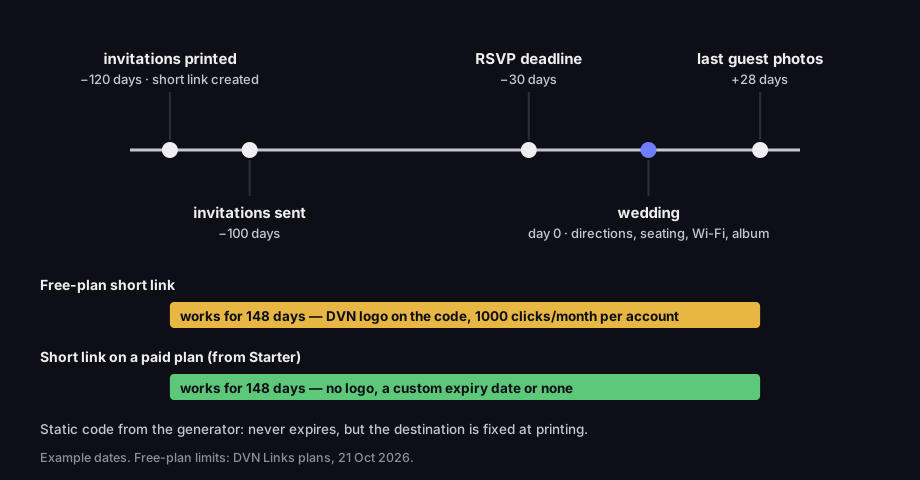
A wedding QR code has to last months, not days
example timeline in days relative to the wedding; Free-plan link vs a paid-plan link
Source: example dates; Free-plan link lifetime — DVN Links plans, 21 Oct 2026
Figure description
Timeline: invitations printed and the short link created 120 days before the wedding, invitations sent 100 days before, RSVP deadline 30 days before, the wedding on day 0, last guest photos 28 days after. A Free-plan short link works for all 148 days, but the code carries the DVN logo and the account has 1,000 clicks a month. A short link on paid plans from Starter works the same way, without the logo, with a custom expiry date or none, and lets you change the destination. A static code from the generator never expires, but the destination is fixed at printing.
One code or several: how to decide
Put one code on the invitation, leading to a page where guests pick what they need; at the venue, use a separate code for each task. An invitation is a small card a guest holds at home. Two or three codes side by side invite mistakes: which one was the RSVP, which one the directions? A single code captioned "Everything about the day: RSVP, directions, photos" is simpler, and the list of buttons after the scan explains the rest.
At the venue it is the other way round. A guest at the table wants to do one thing: add a photo or join the Wi-Fi. The table code goes straight to the album; the card at the bar goes to the network.
Then ask one question for every code: can the destination change between printing and the end of photo collection? Seating plans change until the last week. RSVP deadlines move. Albums get recreated when the first one turns out to be temporary or capped. Make those codes from a short link — you change the destination in the dashboard and the printed code stays the same. Some destinations never change: the venue's Wi-Fi password and its coordinates. For those, a static code from the QR code generator is enough — the "WiFi" or "Location" type.
A "wedding page" in practice is a page of buttons. In DVN Links you build it as a link-in-bio page: a title, a short description and buttons to the services you use — the RSVP form, the venue in Google Maps, the album, the seating-plan file. The page has its own QR code and stats showing how many people opened it and which button they tapped, and there is a setting that asks search engines not to index it. Two things to know before printing: you choose the page address once, when you create it, and cannot change it afterwards; and there is a single look — you pick the button colour, but it is a simple list of links, not a wedding website with a gallery and a schedule. Link-in-bio pages come with the Starter plan (one page, up to 30 buttons). Buttons only lead to web addresses, so Wi-Fi needs its own code.
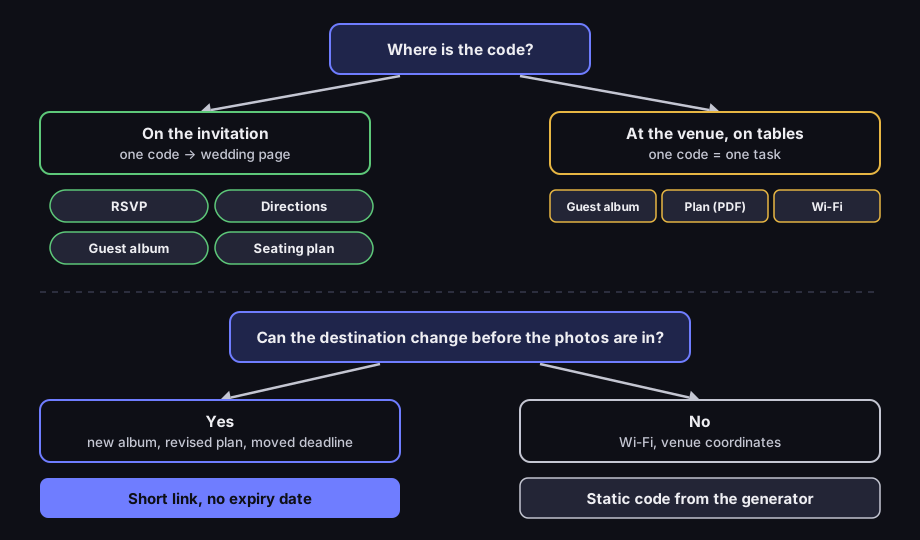
One wedding QR code or several
where the code sits and whether its destination can change
Source: DVN Links, 21 Oct 2026
Figure description
Decision diagram. Where is the code? On the invitation: one code to a wedding page with buttons RSVP, Directions, Guest album, Seating plan. At the venue, on tables: one code per task — guest album, seating plan PDF, Wi-Fi. Second question: can the destination change before the photos are in? Yes — new album, revised plan, moved deadline: short link with no expiry date. No — Wi-Fi, venue coordinates: static code from the generator.
QR code for wedding photos: an album guests can add to
A guest album only works if the service lets people add photos through a link, does not delete the album after the wedding and holds every photo — and Google and Apple differ on each of these. The code is the easy part. Picking an album that survives the wedding is the hard part.
Google Photos. Google's help: "When you share a link to your album, anyone with the link can view the photos and add to the album" (Google Photos Help, read 21 Oct 2026). You can stop others from adding photos by turning off "Collaborate" under the album's options (Google Photos Help, shared album controls). The Google Photos app on Android and iPhone also has its own album QR code: Share → "Show QR Code"; to print it, Google suggests taking a screenshot.
Two things the help does not say, or says elsewhere. First, whether a guest without a Google Account can add a photo through the link: the sharing page does not spell it out, and we have not tested it. Before printing, check it yourself — open the link on a phone that is not signed in to a Google Account and try adding a photo. Second, a photo limit: the only one we found in that help page, 20,000 photos, applies to "Conversations," not albums, so do not carry it over. There is also a trap on the owner's side: you reset an album link by turning link sharing off and back on, and then, in Google's words, "The old link will no longer work." Neither will the code on your invitations.
Apple shared albums. Here the answer depends on the system version the album was created in. From iOS 27, Apple says friends and family "will be able to join and contribute their own photos on the web, even without an Apple Account or Apple device" (Apple Support, shared albums, page dated 6 Oct 2026), and such an album can be shared with a link. In the sharing options the owner chooses whether anyone with the link joins without approval or has to request access — with a code on the tables, the latter means approving a request from every guest during the party. The limits (Apple Support, shared album limits):
- Album created in iOS 27 or later: no cap on photos "beyond the owner's available iCloud storage" — and photos added by guests count towards that storage too. Up to 100 participants including the owner. The limits page does not say whether guests contributing through the web count towards those 100; with 150 guests, that is worth checking before you print.
- Album created in iOS 26 or earlier: 5,000 photos and videos per album, 100 subscribers, and one person can add at most 1,000 items an hour and 10,000 a day.
- Temporary album (iOS 27): 5,000 photos and videos and — the key part — "it will be deleted in 30 days." For a wedding that is a trap: guest photos disappear before anyone has saved them.
One more sentence from Apple worth reading before the day: "Deleting a shared album permanently deletes all of its photos."
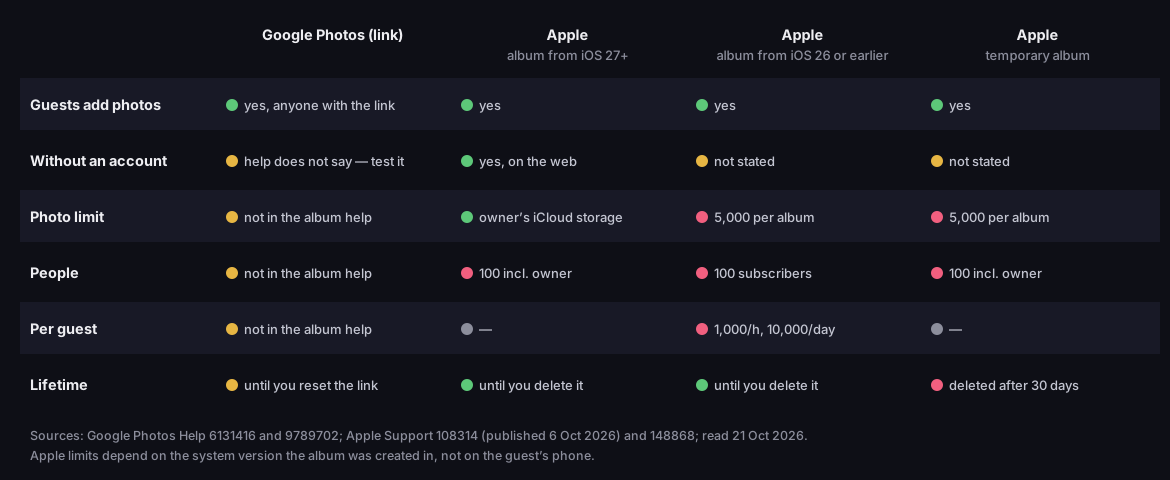
Guest photo albums: what Google and Apple allow
guest uploads, accounts, limits and how long the album lives
Source: Google Photos Help (6131416, 9789702), Apple Support (108314, 148868); read 21 Oct 2026
Figure description
Table of four albums. Google Photos via link: guests add photos — yes, anyone with the link; without an account — help does not say, test it; photo, people and per-guest limits not in the album help; works until you reset the link. Apple album from iOS 27 or later: guests add — yes; without an account — yes, on the web; photo limit — owner's iCloud storage; 100 people including the owner; until you delete it. Apple album from iOS 26 or earlier: guests add — yes; without an account — not stated; 5,000 per album; 100 subscribers; 1,000 per hour and 10,000 per day per person; until you delete it. Apple temporary album: guests add — yes; without an account — not stated; 5,000 per album; 100 people including the owner; deleted after 30 days. Apple limits depend on the system version the album was created in.
That leads to a simple plan for after the wedding. Set an end date for collection — say four weeks after the day — and print it next to the code: "Add your photos by 15 July." On that day, one person downloads a copy of the whole album to their own drive. Only then close uploads — in Google Photos, turn off "Collaborate"; the viewing link can stay — so your own copy protects the photos from an accidental deletion or an expiring temporary album.
Make the album code from the album link — in the generator as "Website," or as a short link. The short link has one advantage here: if halfway through the party the album stops accepting photos, you create a new one and change the link's destination, and the codes on the tables keep working. Do not upload guest photos to DVN Links — the QR code for a file takes single PDF, JPG, PNG and WEBP files, not an album. A single photo or PDF behind a code is a different case, covered in QR code for PDF.
RSVP and directions behind one code
RSVP and directions work best as two buttons on the wedding page that one invitation code leads to. Each has its own trap.
RSVPs are most often collected with Google Forms. Publish the form before making the code — Google's help says plainly: "If the form is unpublished, responders with the link can't access it" (Google Forms Help). Watch out for "Limit to 1 response," too: it makes guests sign in to a Google Account, and a grandparent scanning the invitation with a grandchild's phone may not. How to build the form, publish it, set a closing date and what someone sees after the deadline is covered step by step in Google Form QR code. One wedding-specific tip: put a phone number for the couple or the best man in the closing message — latecomers will turn up anyway.
Directions are a link to the venue in Google Maps, copied from the place's share option. Test it before printing on two phones — one with the Google Maps app and one without — because guests will open it both ways. On a hotel note or at the church you can use a static "Location" code from the generator with the venue's coordinates instead; that destination will not change. How a coordinates code differs from a link to the place, and how to build a link straight to directions, is covered in our Google Maps link guide.
Wedding seating plan and menu as a file behind a code
The seating plan hangs on a board at the entrance anyway — a code on a place card or table adds a phone version you can correct until the last minute. The simplest route is to export the plan and menu to a PDF and put a code on it.
In DVN Links this is a QR code for a file: instead of an address you upload the file and get a short link with a code. When two guests cancel on the Thursday before the wedding and a table has to be reshuffled, click "Replace file" — the link and the printed code stay the same, and every scan opens the new version straight away. Limits: PDF, JPG, PNG and WEBP, up to 25 MB per file, and on the Starter plan 5 files and 50 MB in total. The Free plan does not include files. How replacement works, and how it compares with a file on Google Drive, is in QR code for PDF.
Two practical tips. A seating plan on a phone is read on a small screen, so an alphabetical list of names with table numbers works better than a floor plan that needs zooming. And shrink the file before uploading: guests scan at the venue, where reception is often weak, and a file of several megabytes then takes a long time to open.
Invitations with QR codes: size, placement, print
A code on an invitation works if guests know why to scan it and their phone reads it from a card held in the hand — and the second part depends on how dense the code is, not just how big. Start with the caption. A bare square says nothing; "Scan to RSVP by 30 May" says what happens and by when.
Density depends on how long the address in the code is. We measured three typical addresses at the same 2 cm width — often all that is left in the corner of an invitation — at error correction level H, which our generator uses for every code with a logo. The long form link (110 characters) gives a version 10 code, 57×57 modules, and a 0.31 mm module. The album link (43 characters): version 5, 37×37, 0.44 mm. The short link (23 characters): version 3, 29×29, 0.54 mm. As the smallest module for phone scanning we use 0.396 mm, from the GS1 standard for codes read by mobile devices (GS1 General Specifications 26.0, Table 5-46); the width includes the four-module margin required by DENSO WAVE, the inventor of the QR code (qrcode.com). At 2 cm, the long form link falls below that threshold. Size, distance and contrast are covered in can't scan a QR code.
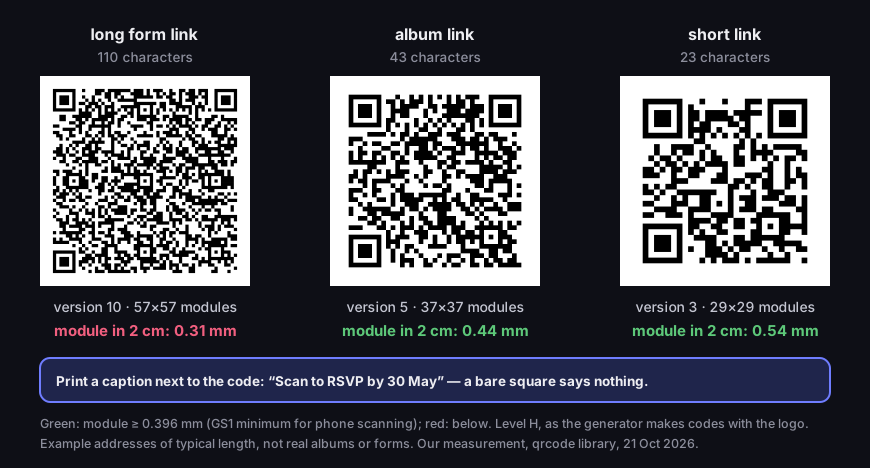
The same 2 cm on an invitation, three different codes
real codes at level H; module size at a 2 cm print with the quiet zone
Source: our measurement, 21 Oct 2026 — qrcode library, 4-module quiet zone, threshold 0.396 mm (GS1 General Specifications, Table 5-46); example addresses
Figure description
Three QR codes printed 2 cm wide with a 4-module quiet zone, error correction level H. Long form link, 110 characters: version 10, 57 by 57 modules, module 0.31 mm — below the 0.396 mm threshold. Album link, 43 characters: version 5, 37 by 37 modules, module 0.44 mm. Short link, 23 characters: version 3, 29 by 29 modules, module 0.54 mm. Below the codes, a tip: print a caption such as Scan to RSVP by 30 May. Example addresses.
Give the printer a vector file — SVG or PDF — because it scales without blurring; in the DVN Links dashboard, vector export comes with the Starter plan. The formats are compared in QR code SVG, PDF or PNG. Before ordering the full run, ask for a single proof on the same paper, in the same colour and with the same finish — foil and gloss can spoil contrast. Scan the proof with two different phones, including an older one.
Will a wedding QR code expire?
A static code never expires, and a code built on a short link works as long as the link does — which is exactly where free wedding QR codes most often fail. A static code holds the address itself. It works as long as that address works, but you cannot change the destination. A "dynamic" code is really a code holding a short link that redirects to the destination — change the destination, keep the code; see how to make a QR code. Such a link lives by the rules of the service that issued it, and those rules for free dynamic codes differ between services. Read the terms before printing a code on an invitation.
Our rule is simple and we state it plainly. On the Free plan a short link does not expire, but the code carries the DVN logo and the account has 1,000 clicks a month — and you cannot change that. Invitations are usually printed months ahead, and a free link on an invitation lasts until the wedding; with a bigger guest list, clicks over the limit are hidden in statistics. You can set an expiry date from the Starter plan — and after that date guests land on our "This link has expired" page, which advises: "If the link was on a flyer, sticker or business card, let the company that printed it know." Without a date set, links do not expire on any plan.
If you would rather not pay, there is an honest alternative: a static code from the QR code generator, free and without an account. It never expires, but it has two drawbacks. You cannot change the destination after printing — if the album has to be recreated, the invitation code still leads to the old one. And a code made without an account or on the Free plan carries the DVN Links logo in the middle and a dvnlinks.pl caption, which many couples will not want on an elegant invitation. A code without the logo and caption starts with the Starter plan.
When is a paid plan worth it? When the invitation carries a code to something that may change (album, seating plan, deadline), when you want a wedding page with buttons or a seating-plan file, and when the code should not carry someone else's logo. If all you need is Wi-Fi and the venue's coordinates, a static code is enough. Compare plans on the pricing page.
Frequently asked questions
Create an album guests can add to — a Google Photos album shared by link, or an Apple shared album — and make the code from the album link. Check beforehand that the album is not temporary, how many photos it holds and whether a guest without an account can add one.
A static code does not. A code built on a short link works as long as the link: in DVN Links a link does not expire on any plan unless you set a date (from the Starter plan); on the Free plan the code carries the DVN logo. With other services, check the terms for free dynamic codes.
One on the invitation, leading to a page with buttons: RSVP, directions, album. At the venue, one per task: the album on the tables, Wi-Fi at the bar, the seating plan at the entrance. The fewer codes on one card, the fewer mix-ups.
That depends on how long the address in the code is. In our measurement, a 2 cm code holding a short link has a 0.54 mm module, while one holding a long form link has 0.31 mm — below the 0.396 mm threshold. Shorten the address and run a proof on the final paper.
For an Apple album created in iOS 27 or later, no: Apple says guests can contribute on the web without an Apple Account. For Google Photos the help does not spell it out; test it on a phone that is not signed in before printing. Printing invitations? Create an account and give the code a short link with no expiry date — you can change the album or seating plan without reprinting.