How to make a QR code: types of codes and what goes inside
How to make a QR code in a few minutes, which type to pick, what exactly is stored inside the code and when a static code is enough and when you need a code on a short link.
How to make a QR code? First you decide what should happen after the scan — open a web page, join a Wi-Fi network, save a contact — then you enter the data in a generator and download the file with the code. You pay nothing for it: DENSO WAVE, which invented the QR code, says in its FAQ that using it requires neither a fee nor a licence agreement (DENSO WAVE, FAQ). You can make one in the DVN Links QR generator without an account. Before you print it, check what exactly is stored inside the code and whether you can change it once it is on a flyer.
How to make a QR code in 4 steps
Making a QR code takes four steps, and the last matters most: a test with a phone before printing. In the QR generator it goes like this:
- Pick the code type. There are eight: Website, Text, Phone, E-mail, SMS, WiFi, Location and Contact card. The type decides the format in which the content is stored.
- Enter the data. A web address, a phone number, a network name and password, or contact details. For a website, give the full address; if you type just a domain, the generator adds
https://. - Check the preview. The code appears next to the form as you type. When the code would need more than 3 cm of print, the generator warns that it is getting dense and may not scan on a small printout.
- Download the PNG and scan the code. First from the screen, then from a test print at the final size.
The code from the generator is static: the data sits in the code itself, so it cannot be changed after printing — the generator says so under the form. Without logging in, as on the free plan, you download a PNG 1000 px wide (the on-page preview is 250 px) with the DVN Links logo in the middle and the caption dvnlinks.pl underneath. The logo covers some modules, so the generator stores the content at the highest error correction level, H, which makes the code denser (more on that below). Around the code it leaves an empty frame 4 modules wide, as DENSO WAVE requires.
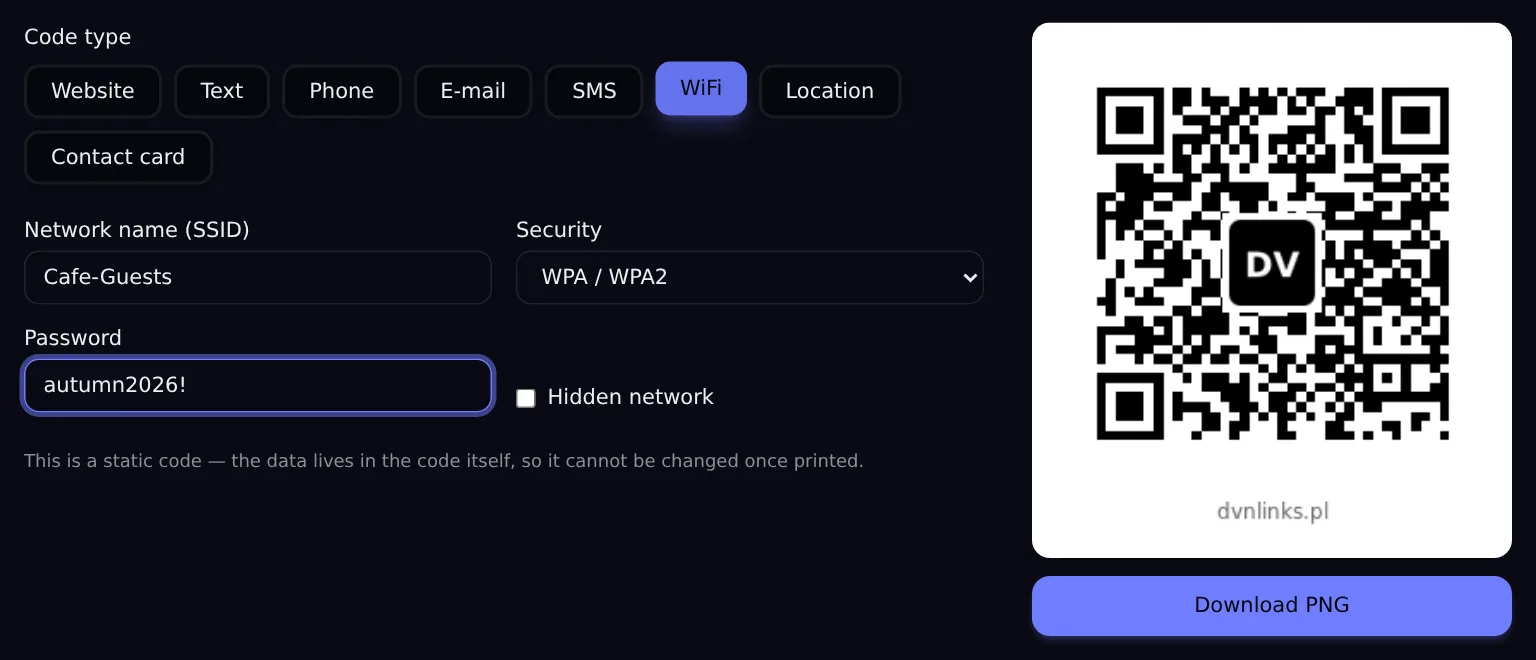
DVN Links QR generator — a Wi-Fi code
Source: dvnlinks.pl/qr-generator, local build, 13 Oct 2026
Figure description
Screenshot of the DVN Links QR code generator. The WiFi code type is selected out of eight: Website, Text, Phone, E-mail, SMS, WiFi, Location, Contact card. The form shows the network name Cafe-Guests, the security setting WPA / WPA2, the password autumn2026! and a Hidden network checkbox. Under the form is a notice: this is a static code, the data lives in the code itself, so it cannot be changed once printed. On the right is the code preview with a DV logo in the middle and the caption dvnlinks.pl, and a Download PNG button.
Types of QR codes: what you can encode
The type of a code is, in practice, the format of the text stored in it — and the length of that text decides how dense the code is. The table shows what goes inside for each type in the generator and how large a code that produces. Size is measured in modules, the single squares; the more modules per side, the smaller each one is at the same print size.
|
Type in the generator |
What is stored in the code (example) |
At H: version, modules |
At M: version, modules |
|---|---|---|---|
|
Phone |
|
2 — 25×25 |
1 — 21×21 |
|
Location |
|
3 — 29×29 |
2 — 25×25 |
|
Website, short link |
|
3 — 29×29 |
2 — 25×25 |
|
SMS |
|
3 — 29×29 |
2 — 25×25 |
|
WiFi |
|
5 — 37×37 |
3 — 29×29 |
|
|
|
6 — 41×41 |
4 — 33×33 |
|
Website, long link with UTM |
a shop address with four UTM parameters, 128 characters |
11 — 61×61 |
8 — 49×49 |
|
Contact card |
vCard 3.0: name, company, job title, phone, e-mail, website (221 B) |
15 — 77×77 |
11 — 61×61 |
|
Text |
any text, no format |
depends on the length |
depends on the length |
The versions and module counts are our measurement from 13 Oct 2026 on the qrcode 1.5.4 library, the one the generator uses, with contents built by the same functions. H and M are error correction levels; the generator without login uses H, because it adds the logo.
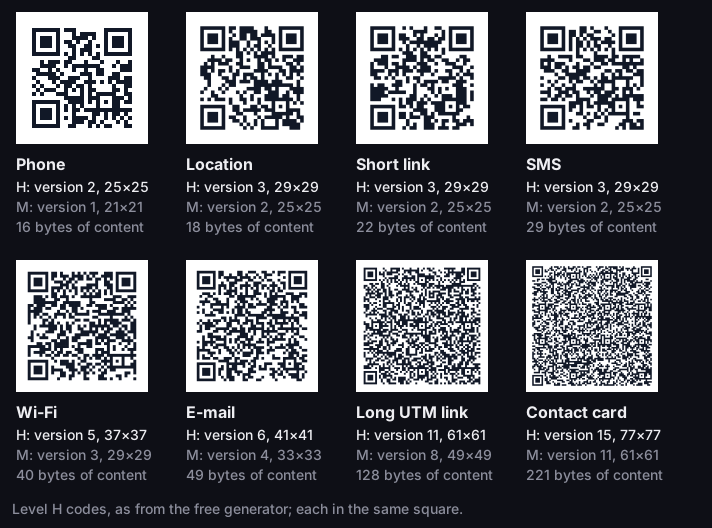
Types of QR codes — same size, different content
real codes at error correction level H, each in the same square
Source: DVN Links measurement, qrcode library 1.5.4, 13 Oct 2026
Figure description
Eight real QR codes at the same size, from the sparsest to the densest. Phone: 16 bytes, at H version 2, 25 by 25 modules, at M 21 by 21. Location: 18 bytes, H 29 by 29, M 25 by 25. Short link: 22 bytes, H 29 by 29, M 25 by 25. SMS: 29 bytes, H 29 by 29, M 25 by 25. Wi-Fi: 40 bytes, H 37 by 37, M 29 by 29. E-mail: 49 bytes, H 41 by 41, M 33 by 33. Long link with UTM: 128 bytes, H 61 by 61, M 49 by 49. Contact card vCard: 221 bytes, H 77 by 77, M 61 by 61. The longer the content, the smaller the modules at the same print size.
Three things follow from the table.
Content length is code size. A contact card at level M has 61 modules per side, a phone number 21, so at the same print size a module of the card is almost three times smaller (our measurement above). The same shows with addresses: a long link with UTM parameters is 49 modules per side, the short link redirecting to it 25.
With web addresses it grows fast, because an address easily collects several hundred characters: shop filters, UTM parameters, a click identifier from an ad. The chart shows how the code moves up through the versions as the address gets longer. An address with four UTM parameters (128 characters) is 49 modules per side at M and 61 at H. A longer address on the same shop, with filters, UTM and a gclid identifier (312 characters), is already 69 and 93 — at that size the generator shows a warning about a dense code. A short link (22 characters) stays at 25 and 29 modules no matter how long the address it leads to is. This is our calculation, not a scanning test: it tells you how many modules must fit on the printout, not from what distance a phone reads them.
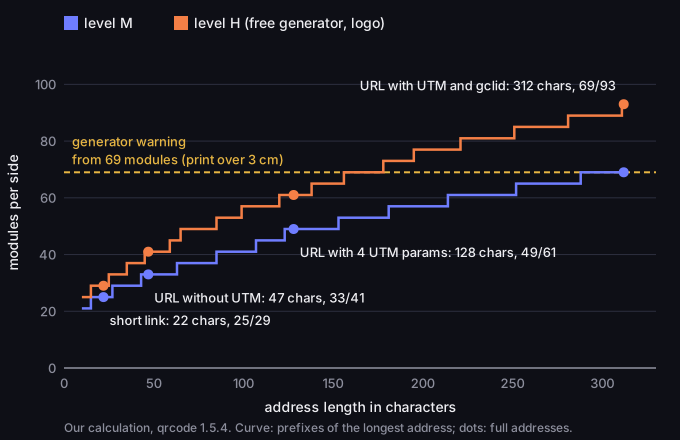
URL length and QR code size
modules per side at error correction levels M and H, addresses from 10 to 312 characters
Source: our calculation, qrcode library 1.5.4, 13 Oct 2026
Figure description
Step chart: the number of modules per side of a QR code grows in steps with the length of the address, faster at level H than at M. Short link, 22 characters: 25 modules at M, 29 at H. Shop address without UTM, 47 characters: 33 and 41. Address with four UTM parameters, 128 characters: 49 and 61. Address with UTM, filters and gclid, 312 characters: 69 and 93. A horizontal line at 69 modules marks the threshold from which the generator warns about a dense code: such a code needs more than 3 cm of print.
A Wi-Fi password is in the code as plain text. The WIFI: format is a proposal from the ZXing project, not a standard (ZXing, Barcode Contents): T is the security type, S the network name, P the password. The password is not encrypted — anyone who scans the code will learn it, for instance with an app that shows the raw content. The same specification says the characters \, ;, ,, " and : in the network name and password must be preceded by a backslash; our generator does that for you.
A code for a website needs `https://`. ZXing recommends storing the address together with the protocol, so that the reader recognises it as a web address (ZXing, Barcode Contents). A bare domain such as example.com is plain text to the reader, so nothing guarantees it opens the page. That is why the generator adds https:// when it is missing.
The other types have formats of their own. A phone number is stored as tel:, and an SMS as SMSTO:number:text — ZXing describes this as observed in the wild, not as a standard (ZXing, Barcode Contents). A location is geo:latitude,longitude, defined in RFC 5870, by default in WGS-84 coordinates. A contact card is a vCard: version 4.0 (RFC 6350, 2011) replaced 3.0 (RFC 2426, 1998), but we chose 3.0 for the generator because we assume iOS, Google and Outlook contacts read it without special handling. The form has a first name (required), last name, job title, company, phone, e-mail and website; no address or note.
Three meanings of "types of QR codes"
"Types of QR codes" can mean three different things. The first is the content type — website, Wi-Fi, contact card — which is the table above. The second is the split into static and dynamic codes, covered next. The third is the variants of the symbol itself. DENSO WAVE lists several (DENSO WAVE, Types of QR Code): Model 1 and Model 2 ("Model 2 is an improvement on Model 1"), Micro QR with one finder pattern instead of three, rMQR, a rectangular code for narrow spaces, and SQRC, a code with a read-restriction feature. The DVN Links generator makes regular Model 2 codes; it does not create Micro QR, rMQR or SQRC.
Static or dynamic QR code
One question decides it: can what the code points to change before the code is withdrawn? If yes, you need a dynamic code. If not, a static one is enough.
A dynamic QR code is an ordinary code with a short link stored in it instead of the page address, for example https://qrln.pl/aB3xK9. The phone opens the short link, and the shortener redirects to wherever the link currently points. In DVN Links every short link gets such a code straight away. You change the target in the link details in the dashboard, on every plan, and the code on the flyer stays the same, because it holds the address of the short link, not of the destination page. The code is also smaller: at level M a short link is 25 modules per side, a long address with UTM 49 (our measurement above).
For the shortener a scan is an ordinary visit to the link. DVN Links sends a 302 redirect and records the click: country, device, browser, system and UTM parameters. It does not tell scans from clicks, so if you also send the same short link by e-mail, the statistics show the sum. To count scans separately, make a separate short link for the code.
A dynamic code has one price: it works as long as the short link does. On the free plan a link expires after 30 days and this cannot be switched off; then the code leads to a page saying that the link has expired. The free plan also allows 1,000 clicks a month for the whole account — after that, links keep working and clicks over the limit are hidden in statistics until you upgrade. For print, pick a paid plan, where a link does not expire unless you set a date, or use a static code (see pricing).
A static code depends on nobody: it does not expire, has no scan limit and works even if the service disappears. It will not count scans, and every change of content means a new print run.
|
Question |
Static code |
Short-link (dynamic) code |
|---|---|---|
|
Can you change the target after printing? |
No — a new code and a new print run |
Yes — in the dashboard, the code stays the same |
|
Can you see how many people scanned it? |
No |
Yes — as clicks, with country and device |
|
What does the code depend on? |
Nothing apart from the code itself |
On the service working and on your plan |
|
How dense is the code? |
Depends on the content length |
Small: a short link is 29×29 at H with the logo, 25×25 at M (our measurement) |
|
What content is it suitable for? |
All types, including Wi-Fi and vCard |
Web addresses — a short link always leads to an address |
The last row matters: a short link can only lead to a web address, so a code for Wi-Fi, an SMS or a vCard is always static. To keep a contact card up to date, turn it into a web page and encode that page's address.
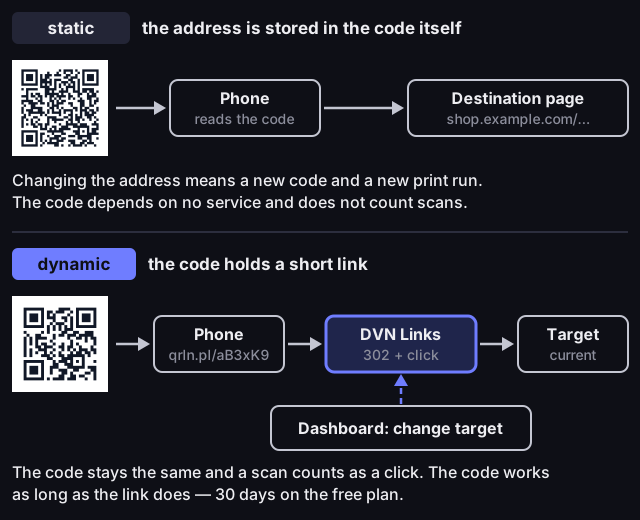
Static and dynamic QR codes
Source: how DVN Links short links work and plan limits, as of 13 Oct 2026
Figure description
Diagram in two lanes. Static code: the code holds the full page address shop.example.com, the phone reads the content of the code and opens the destination page; changing the address means a new code and a new print run, the code depends on no service and does not count scans. Dynamic code: the code holds the short link qrln.pl/aB3xK9, the phone opens it in DVN Links, which records the click and redirects with a 302 to the current link target; the target is changed in the dashboard without changing the code. A scan counts as a click, and the code works as long as the link does — 30 days on the free plan.
What a QR code is made of (and why it matters for print)
A QR code has a built-in reserve for damage and needs an empty frame — whether a printout with a logo or on a coloured background scans depends on both. DENSO WAVE announced the code in 1994, and in 2000 ISO approved it as an international standard (DENSO WAVE, History of QR Code). DENSO WAVE kept the patent rights but declared it would not exercise them, hence the free use. The current standard is ISO/IEC 18004:2024; it is paid, so we give the technical details after DENSO WAVE's pages.
Every code has three finder patterns in the corners; according to DENSO WAVE they let the reader read the code from any direction and keep the background from interfering (DENSO WAVE, What is a QR Code). The rest holds data modules and helper elements, marked in the figure below according to the qrcode library the generator uses. The size of a code is described by its version: from version 1 (21×21 modules) to version 40 (177×177), and each next version adds 4 modules per side (DENSO WAVE, versions and capacity). The generator picks the smallest version that fits.
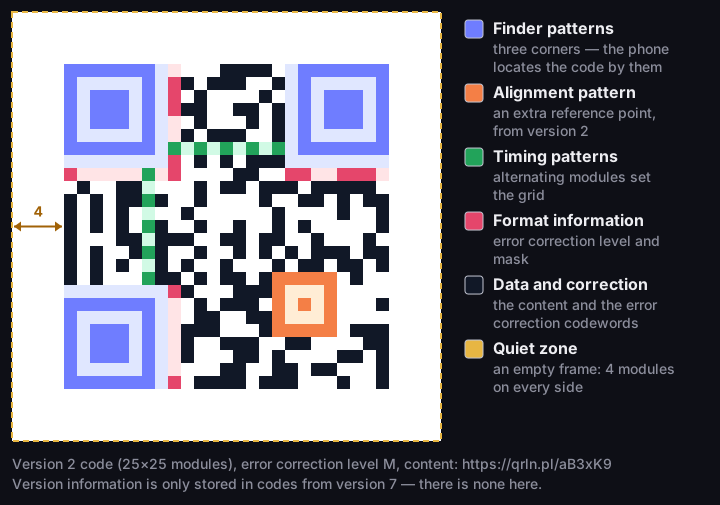
What a QR code is made of
a real version 2 code, 25×25 modules, error correction level M
Source: code and layout of elements — qrcode library 1.5.4; finder patterns and quiet zone — DENSO WAVE
Figure description
A version 2 QR code, 25 by 25 modules, with the address https://qrln.pl/aB3xK9, with its elements marked. Three finder patterns in the corners. An alignment pattern in the lower right area. Timing patterns made of alternating modules between the finder patterns. Format information next to the finder patterns, holding the error correction level and the mask. The data and error correction area. Around the code a quiet zone 4 modules wide on every side. There is no version information — it is only stored in codes from version 7.
Error correction lets a code be read even when part is dirty or covered. DENSO WAVE gives four levels: L — about 7%, M — about 15%, Q — about 25% and H — about 30% (DENSO WAVE, Error correction feature). That is the share of codewords that can be restored, not 30% of the area you may cover. According to DENSO WAVE, level M is chosen most often, and higher levels suit codes that may get dirty or damaged. The higher the level, the more room the reserve takes, so the same content needs a larger code.
A logo in the middle covers data modules and uses up part of that reserve — which is why our generator switches to level H when there is a logo. DENSO WAVE warns that an illustration over a code can deform it (DENSO WAVE, FAQ). The logo should not overlap the corner finder patterns either: error correction restores codewords from the data area, not the patterns by which the reader finds the code. The cost shows in our measurement: a contact card at level M has 61 modules per side, at level H, which the free generator uses with the mandatory logo, 77. How much logo a code can take and what not to cover, we measured in the article on the QR code with a logo.
The quiet zone is the empty margin around the code. DENSO WAVE puts it plainly: "QR Code requires a four-module wide margin at all sides of a symbol" — 4 modules on every side (DENSO WAVE, Points for generating QR Code). The generator, its preview and the downloaded files have a 4-module frame.
Before you print a QR code
A code that scans from a screen may not scan from paper — check five things before printing.
- Contrast. Dark code on a light background. DENSO WAVE recommends black on white and warns that a red code on white cannot be read (DENSO WAVE, FAQ). Always test coloured codes (from the Starter plan) on a printout.
- Quiet zone. Do not crop the white frame or push text or photos up against the code — you need 4 modules of empty space on every side.
- File. The free generator gives a 1000 px PNG. In the dashboard every short link has a PNG at 250, 500 or 1000 px or an SVG that scales without loss — pick SVG for large formats.
- Test. Scan a test print at the final size, on two phones, from the distance your audience will use. If it does not scan, the causes in the order to check them and the formula for the minimum print size are in Minimum QR code size.
- Expiry date. If the code leads through a short link, check that the link has no expiry date — on the free plan it expires after 30 days.
What a dashboard code looks like depends on the plan: the free plan always adds the DVN Links logo and caption, paid plans add your own colours and let you switch the logo off, and Business and Enterprise give you your own logo (see the pricing page). When the code needs more than 3 cm of print, the generator warns you; shorten the content or replace the long address with a short link.
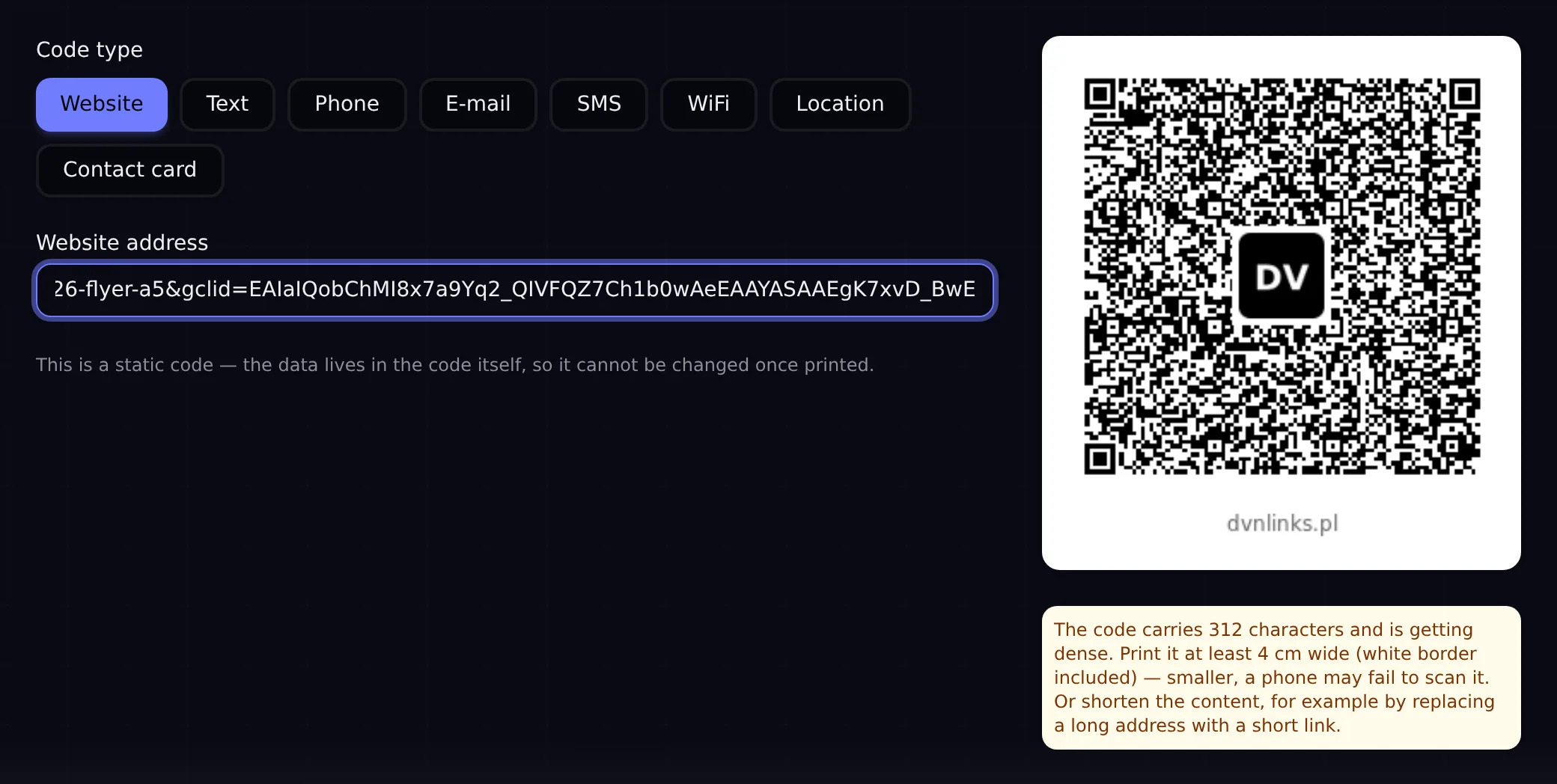
Dense code warning in the QR generator
Source: dvnlinks.pl/qr-generator, local build, 14 Oct 2026
Figure description
Screenshot of the DVN Links QR generator with the Website type and a long address with UTM parameters and a gclid identifier. The preview shows a very dense code with a DV logo in the middle. Under the preview is a yellow warning: the code carries 312 characters and is getting dense; print it at least 4 cm wide, white border included, because smaller a phone may fail to scan it — or shorten the content, for example by replacing a long address with a short link.
QR code ideas for business: where and which code
You choose the code type by what may change after printing, and the size by the distance people will scan from. The most common places:
|
Place |
Code type |
Static or short link |
Watch out for |
|---|---|---|---|
|
Flyer |
Website |
short link, so you can change the target after printing |
quiet zone at the edge and the fold; minimum size calculated for the content |
|
Packaging |
Website |
short link, as instructions get new versions |
test a code on a curved surface on the finished pack |
|
Poster, shop window |
Website |
short link |
size grows with scanning distance; test print from the real spot |
|
Counter, receipt (reviews) |
Website linking to the Google review form |
short link, or Google's own link directly |
a free link expires after 30 days |
|
Business card |
Contact card (vCard) or a link to a page with your details |
vCard is static, a page link is dynamic |
a vCard is dense (77×77 modules at H in our measurement) |
|
Guest Wi-Fi |
WiFi |
static |
anyone who scans learns the password, so guest network only |
|
Trade fair stand |
Website |
short link, a separate one per fair |
paid plan, so the link does not expire before the event |
How to tell which place works. Give each medium its own short link or its own UTM fields on the link; DVN Links statistics then show a campaign row and the click count for each link. Two limits: a scan looks the same as a click in the statistics, and UTM parameters typed by hand onto the short address do not reach the destination page, because only the UTM fields saved on the link are passed on. How to read campaigns, and what only your site's analytics can count, is covered in UTM parameters: what they are.
Frequently asked questions
Is making a QR code free, and do I need a licence?
Yes, it is free, and no, you do not need a licence. DENSO WAVE answers the question about fees in its FAQ with "No." — even commercial use needs no licence agreement (DENSO WAVE, FAQ). Only the word "QR Code" is a registered trademark of DENSO WAVE; the trademark covers the name, not the pattern.
Does a QR code expire?
A static code does not expire. A code on a short link works as long as the link does: in DVN Links on the free plan it expires after 30 days, and then the code leads to a page saying that the link has expired; on paid plans it does not expire unless you set a date.
Can I change the link in a QR code after printing?
Only if the code leads through a short link: you change the target in the dashboard and the code stays the same. In a static code the address is fixed — changing it means a new code.
Is the password in a Wi-Fi QR code safe?
It is not hidden: the password is stored as plain text and anyone who scans the code learns it. Put a Wi-Fi code only where you would give guests the password anyway, preferably for a separate guest network.
How do you make a QR code for a website?
Pick the Website type in the generator and enter the full address with https://. If the address is long, for example with UTM parameters, the code comes out dense — in our measurement a 128-character address is 61×61 modules at level H. Then shorten the address with a short link and make the code from that. How to name campaign parameters is covered in our text on UTM parameters.
Make a code you can change after printing
A code on a short link — you change the target in the dashboard and see the scans in your statistics as clicks. For print, pick a paid plan, because on the free one the link expires after 30 days.