WhatsApp link: wa.me format, QR codes and group links
A WhatsApp link that opens a chat with you or invites people to a group. How to write the number in a wa.me link, add a pre-filled message, keep the QR code from turning into a dense blur, and count the scans WhatsApp does not show you.
A WhatsApp link is a wa.me address that opens a chat with your number — the person tapping or scanning it does not have to save you as a contact first. Put it in a QR code with the QR code generator, no account needed, and a flyer or shop window becomes a way to start a conversation. Getting the link right comes first, though. Below: how WhatsApp says the number must be written and what the wa.me server does when it is written differently (we tested it), what a pre-filled message with accented letters costs in code size, how a chat code differs from a group invite, and how to count scans when WhatsApp does not. If you are after the code that logs you in to WhatsApp Web on a computer, skip to the last section — that is a different code altogether.
WhatsApp QR code: a chat, a group or a login?
Three different codes go by the name “WhatsApp QR code”, and each does something else. Before you print anything, check which one you have — the easiest way is the address your phone shows after scanning.
The first is a chat code. It holds a https://wa.me/ link with your number and opens a chat with you. WhatsApp calls the feature “click to chat”: it lets someone start a chat with you without having your number in their address book, as long as you have an active WhatsApp account, and it works both on the phone and in WhatsApp Web (WhatsApp Help Center, How to use click to chat). You make this code yourself — in a generator or in the WhatsApp Business app.
The second is a group invite code. It holds a chat.whatsapp.com/… link, and anyone who scans it can join the group. A group admin creates it in the app; the steps are further down.
The third is the WhatsApp Web login code. The WhatsApp Web page shows it on your computer screen and you scan it with your own phone to link the computer to your account. It is not for printing and not for sharing.
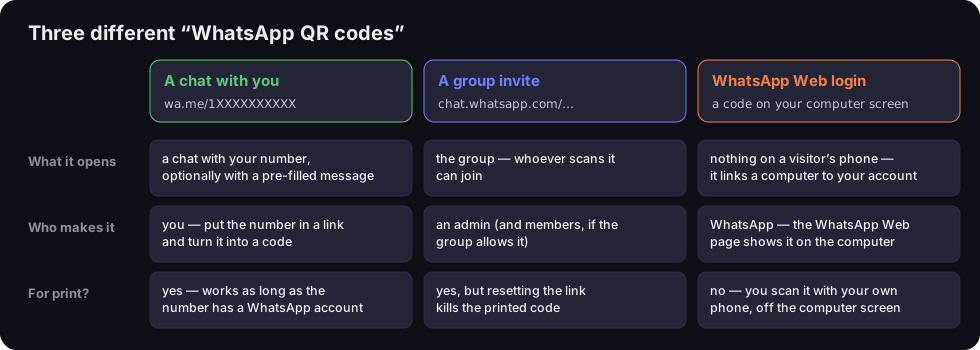
Three different “WhatsApp QR codes”
what the code opens, who makes it and whether it belongs in print
Source: WhatsApp Help Center (click to chat, groups, linked devices), read 20 Oct 2026
Figure description
Table with three columns. A chat with you, address wa.me/1XXXXXXXXXX: opens a chat with your number, optionally with a pre-filled message; you make it by putting the number in a link; fine for print, works as long as the number has a WhatsApp account. A group invite, address chat.whatsapp.com: opens the group and whoever scans it can join; an admin makes it, and members if the group allows; fine for print, but resetting the link kills the printed code. WhatsApp Web login, a code on your computer screen: opens nothing on a visitor's phone, it links a computer to your account; the WhatsApp Web page shows it; not for print.
If you would rather customers e-mail you than message you on WhatsApp, you need a different link — one that starts with mailto:, covered in our guide to the mailto link.
WhatsApp link (wa.me) step by step
A chat link has one format, and WhatsApp documents it. You write https://wa.me/ followed by the full phone number in international format. WhatsApp's help is explicit: omit any zeroes, brackets or dashes. Its correct example is https://wa.me/1XXXXXXXXXX; its wrong one is https://wa.me/+001-(XXX)XXXXXXX (WhatsApp Help Center, How to use click to chat). The same link also works as a chat button on a link in bio page.
The number: country code and digits, nothing else
Take an Irish mobile number written locally as 087 XXX XXXX. In a link it becomes https://wa.me/35387XXXXXXX: country code 353, the trunk zero dropped, no plus, no 00, no spaces. That is what “omit any zeroes” means in practice — the leading zero you dial for domestic calls in many European countries goes. WhatsApp's page on international numbers says the same: remove any leading 0s or special calling codes, as they can cause errors during registration (WhatsApp Help Center, About international phone number format).
Mind the difference between a link and a contact. In your address book an international number is saved with a plus, such as +353 87 XXX XXXX. In a wa.me link the plus is not needed — digits only.
What the wa.me server does with a badly written number
We checked what happens when the number in the link is written differently from the help page. On 20 October 2026 we sent requests to wa.me with a dummy Polish number (country code 48) and recorded where the server redirects — without opening a chat or sending a message. The script is in our repository, so the test can be repeated.
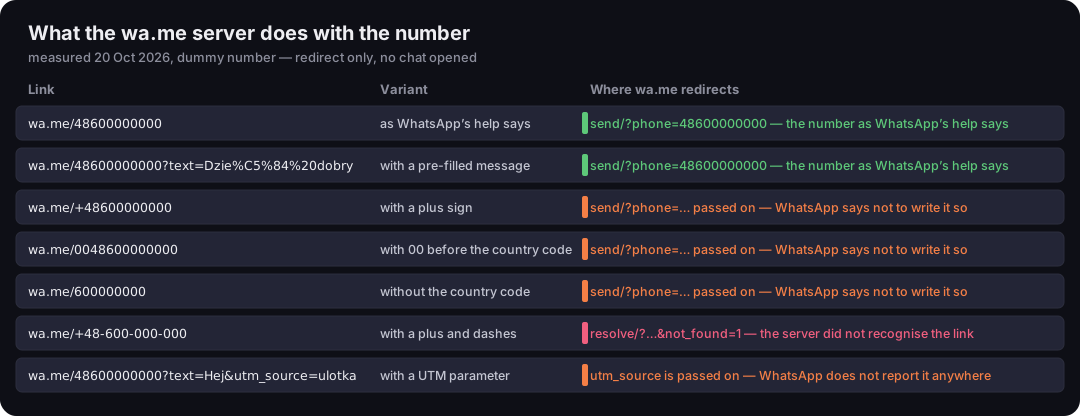
What the wa.me server does with the number
seven link variants, redirect read on 20 Oct 2026
Source: DVN Links measurement, requests to wa.me on 20 Oct 2026, dummy number
Figure description
Table of seven links with the dummy number 48600000000. wa.me/48600000000 and the variant with ?text=Dzień dobry redirect to api.whatsapp.com/send/?phone=48600000000, as the help page says — green. The variants with a plus (+48600000000), with 00 before the country code (0048600000000) and without the country code (600000000) are passed on to send/?phone=…, just like a correct link — orange, because WhatsApp says not to write them that way. The variant with a plus and dashes (+48-600-000-000) goes to resolve/?…¬_found=1, meaning the server did not recognise the link — pink. The variant with utm_source=ulotka passes the parameter on, but WhatsApp does not report it anywhere — orange.
The result is worth a look. A link written as the help page says lands on api.whatsapp.com/send/?phone=48600000000. A link with a plus and dashes (wa.me/+48-600-000-000) is rejected straight away: the redirect carries not_found=1. The in-between variants are the risky ones. A plus without dashes, 0048… and a number without its country code are all redirected on to the chat page, just like a correct link. So the link “works” in the sense that something opens — but nobody guarantees the app finds the right person. A number without its country code may be read as a number in a different country. We did not test this in the app, as that would take real numbers. The practical rule is simple: write the number exactly as WhatsApp's help says and open the link on two phones before you print.
A pre-filled message: the text parameter
You can add a message that appears in the chat's text box. The person sees it before sending and can edit or delete it. The format from WhatsApp's help: https://wa.me/<number>?text= followed by URL-encoded text. WhatsApp's own example writes spaces as %20: ?text=I'm%20interested%20in%20your%20car%20for%20sale (WhatsApp Help Center).
URL encoding swaps characters that cannot appear in an address for % and two hexadecimal digits — %20 is a space (RFC 3986, §2.1). An accented letter takes two bytes in UTF-8, so once encoded it is six characters long: the German ü becomes %C3%BC, the French é becomes %C3%A9, the Polish ą becomes %C4%85. You do not have to do it by hand — type the message into the browser's address bar or use any URL-encoding tool. There is more on special characters in addresses in our piece on what a URL is.
A detail from our test: the wa.me server itself turns %20 into + (text=Dzie%C5%84+dobry). Under the WHATWG URL Standard a plus in a query string is read as a space (WHATWG URL Standard), so to a parser both spellings are the same text. We did not check it in the app — open the link on a phone before printing anyway.
A link with no number: the person picks the recipient
There is also a message-only variant: https://wa.me/?text=…. WhatsApp then shows a list of contacts to send the text to (WhatsApp Help Center). That is not a code for contacting you but for passing something on: “send your friend a link to our offer”. On a poster it is rarely useful; on a website it works as a “share on WhatsApp” button.
How to make a WhatsApp QR code in the generator
Our generator has no separate “WhatsApp” type, and it does not need one: a wa.me link is an ordinary web address. Four steps:
- Build the link:
https://wa.me/<number>, optionally with?text=and an encoded message. - Open the link on your phone. It must open a chat with the right number, with your message in the text box.
- In the QR code generator pick the Website type and paste the link into “Website address”.
- Download the PNG and scan the code with two phones — ideally an iPhone and an Android — before it goes to print.
A code from the generator without an account carries the DVN Links logo in the middle. The logo covers some modules, so the generator encodes the data at the highest error correction level, H, and the code has more modules than the same link at the default level, M. With a bare wa.me link that makes no difference; with a long message it does, as the next section shows. A code without our logo, and SVG or PDF files for print, come with the Starter plan.
A long message makes a dense code
Every character of the message goes into the code, and more characters mean more modules — a finer pattern. We measured it with the same library our generator uses, for a dummy number and three messages (in Polish, so you can see what accented letters do).
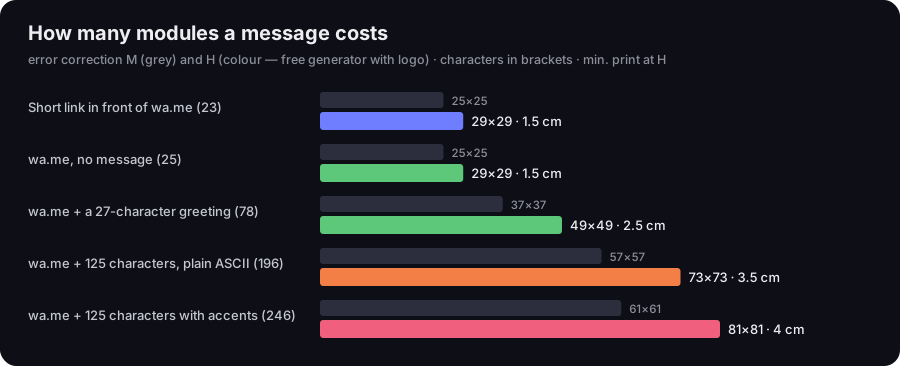
How many modules a message costs
error correction M and H, characters in the code, minimum print width at H
Source: DVN Links calculation, qrcode library 1.5.4, minimum module 0.396 mm per GS1, 20 Oct 2026
Figure description
Bar chart. A qrln.pl short link in front of wa.me, 23 characters: 25×25 modules at M, 29×29 at H, print from 1.5 cm. wa.me with no message, 25 characters: 25×25 and 29×29, 1.5 cm. wa.me with a 27-character greeting, 78 characters: 37×37 and 49×49, 2.5 cm. wa.me with a 125-character message in plain ASCII, 196 characters: 57×57 and 73×73, 3.5 cm. The same message with accented letters, 246 characters: 61×61 and 81×81, 4 cm.
The bare link https://wa.me/48600000000 is 25 characters and gives a 29×29 code at error correction H — what you get from the generator with its logo. A short greeting of 27 characters stretches the code's content to 78 characters, and the code grows to 49×49. A 125-character message with accented letters (asking for an appointment and a price) comes to 246 characters and an 81×81 code. The same sentence without accents is 196 characters and 73×73 modules — each accented letter costs six characters instead of one.
Module count sets the minimum print size. Following GS1, we take 0.396 mm as the smallest module for codes read by phones — the same rule our generator uses to warn about dense codes. The link with no message fits in 1.5 cm; the code with the long message needs 4 cm, white border included. On a business card that is the difference between a code that scans and one the phone reads after a few tries.
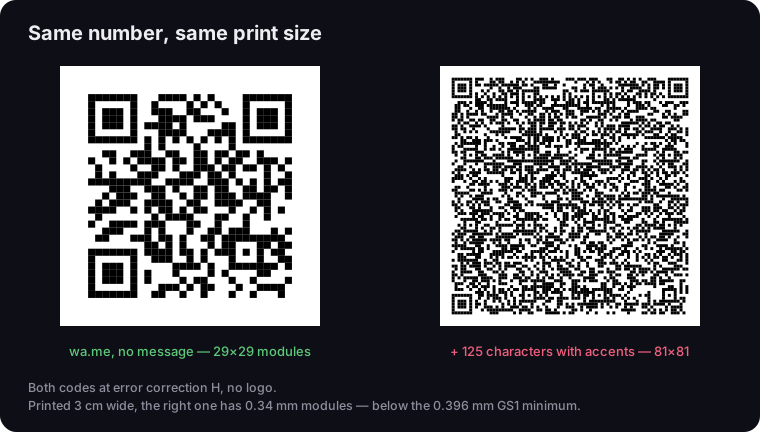
Same number, two messages
real QR codes, error correction H, no logo
Source: codes generated with the qrcode library 1.5.4, dummy number, 20 Oct 2026
Figure description
Two real QR codes side by side at the same size. Left, a wa.me link with no message: 29×29 modules, large clear squares. Right, the same number with a 125-character message with accented letters: 81×81 modules, a fine dense pattern. Caption: printed 3 cm wide, the right one has 0.34 mm modules, below the 0.396 mm GS1 minimum.
You have two ways out. One: cut the message to a few words, such as “Booking question”, and let the person type the rest. Two: put a short link in the code and have it redirect to wa.me with the full message. A short-link code is 29×29 modules however long the message is, because the message lives in the link's target, not in the code. How density translates into scanning distance and print size is covered in our piece on QR codes that will not scan.
WhatsApp group link and QR code
You make a group code in the WhatsApp app, not in a generator — WhatsApp creates the invite link. According to WhatsApp's help, admins can create invite links, and in groups with fewer than 33 members so can members by default; an admin can change that in the group permissions (WhatsApp Help Center, How to create and invite into a group).
On Android the help page gives these steps:
- Open the group chat and tap the group name.
- Tap Invite via link or QR code.
- Tap Copy link to copy it, or QR code to show a scannable code.
The copied WhatsApp group link looks like https://chat.whatsapp.com/ followed by a string of characters. You can print the code from the app or paste the link into our generator as a Website code — the result is the same, and the generator gives you a file at print resolution.
Two things to know before printing. First, a group code is public. WhatsApp says plainly that anyone with a group link can join the group and forward the link to others, so you should only share it with people you trust (WhatsApp Help Center). A code on a school gate gets scanned by every passer-by. If the group is meant to stay closed, an admin can turn on approval of new members — people with the link then send a request and wait to be let in (WhatsApp Help Center, Can't join group).
Second, resetting. An admin can deactivate an invite link and create a new one, and once reset, the old link cannot be restored. A printed code with the old link stops working for good. The same help page lists a reset link and a full group — WhatsApp groups can have up to 1,024 members — among the reasons someone cannot join.
A short link helps here. If the poster carries a code with a short link that redirects to chat.whatsapp.com/…, after a reset you change the short link's target in the dashboard and the poster stays on the wall.
A QR code from WhatsApp or from a generator?
WhatsApp has its own QR codes, and for some jobs they are enough. For others, a code with a wa.me link or a short link does better.
Your personal WhatsApp QR code
Every WhatsApp account has its own QR code. According to WhatsApp's help, friends can add you as a contact by scanning it, and it does not expire unless you reset it or delete your account. WhatsApp advises sharing it only with people you trust, since anyone can forward it (WhatsApp Help Center, About WhatsApp QR codes). It is a code for adding a contact, not for a campaign — there is no pre-filled message in it.
WhatsApp Business short link and QR code
The WhatsApp Business app generates a short link automatically when you create an account. You find it under Tools > More > Short link, where you can also set a default message customers see when they open the link. If the link opens in a web browser rather than the app, they get a web page with your business information and a button to continue to the chat (WhatsApp Help Center, How to create short links). The same screen shows your business QR code.
You can reset the Business code — the previous one then stops working when scanned, and you have to share the new one again (WhatsApp Help Center, How to reset your QR code). WhatsApp presents this as a defence against spam; for printed material it means a reprint. For print, WhatsApp offers a sticker template, and its help says a printed code must be 8 × 8 cm (WhatsApp Help Center, How to print your QR code). The suggested route is a screenshot or sharing the image from your phone, then cropping it in the gallery.
One trap: the camera inside WhatsApp only scans official WhatsApp QR codes (WhatsApp Help Center, How to share your WhatsApp Business QR code). So WhatsApp's camera will not open a code from a generator. Customers should use the phone's ordinary camera — worth printing a line saying so under the code.
When your own code wins
Your own code with a wa.me link wins when you want control over the message and the design — and above all when you want to know how many people scanned it.
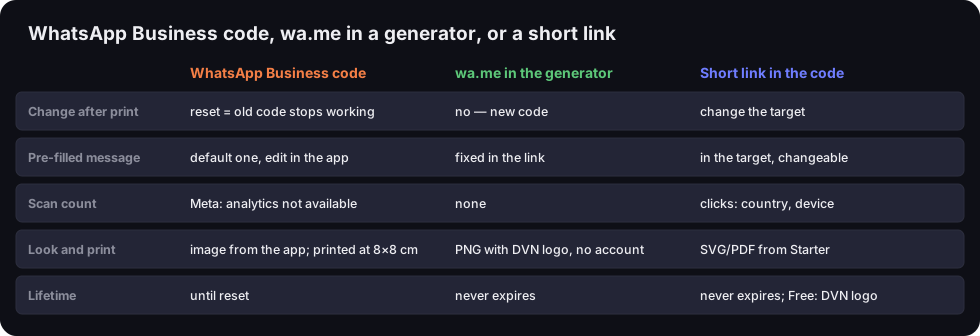
WhatsApp Business code, wa.me in a generator, or a short link
changes after print, message, scan count, print and lifetime
Source: WhatsApp Help Center and Meta for Developers (read 20 Oct 2026), DVN Links plans
Figure description
Comparison table of three codes. WhatsApp Business code: change after print only by resetting, which kills the old code; default message edited in the app; scan count — Meta says analytics are not available; image from the app, printed at 8×8 cm; valid until reset. wa.me in the generator: change only with a new code; message fixed in the link; no scan count; PNG with DVN logo, no account; never expires. Short link in the code: change the target in the dashboard; message in the target, changeable; counts clicks with country and device; SVG and PDF from the Starter plan; never expires, on the Free plan the code carries the DVN logo and 1,000 clicks a month.
Be careful with logos. The WhatsApp logo is a Meta trademark with its own brand rules — what those rules mean for a logo next to a QR code, we cover using Facebook as the example in our piece on the Facebook QR code. Your own company logo in the middle of a code is a separate topic: how much logo a code can take and which error correction to choose is explained in QR code with a logo.
How many people scanned it? Counting scans
WhatsApp will not tell you how many scans a code got. In its documentation for WhatsApp Business QR codes and short links, Meta says outright that analytics are not available for QR codes and short links, as it limits the data it logs to protect user privacy (Meta for Developers, QR codes). The same page says a code can open a pre-filled message of up to 140 characters and that one business number can have at most 2,000 QR codes and short links — limits for codes created through the WhatsApp Business API, not for a plain wa.me link.
UTM parameters do not help either. Our test showed that wa.me/48600000000?text=Hej&utm_source=ulotka passes utm_source on to api.whatsapp.com — and that is where it ends. UTM tags are read by the analytics tool on your own website, such as Google Analytics, and a WhatsApp chat does not happen on your website. What you do get is a longer link and a denser code. When UTM tags do make sense is covered in our guide to UTM parameters.
A short link works. The code points to your short link, our server records the click and redirects the phone on to wa.me, and from there to the chat. A scan is an ordinary click to us: in the dashboard you see the number, the day, the country, the device type and the operating system — see the DVN Links features. Make one short link for the flyer and another for the sticker at the till, and you will see which one brings people in.
Three details from building that counter. When you paste a short link into a WhatsApp chat, the app fetches it to build a preview. We recognise WhatsApp by its User-Agent header and record that visit as a bot — it shows up separately in the statistics and does not use up your monthly click allowance. Next, if you set UTM fields on a short link in the dashboard, we append them to the target, writing spaces in the message as +. Our test shows wa.me writes spaces the same way itself, and under the WHATWG standard a + in the query is a space — though UTM tags sent to WhatsApp still measure nothing. Finally, we count clicks, not conversations: we do not know whether the person sent the message.
Check your plan before printing. On the Free plan a short link does not expire, but the code carries the DVN logo and the account has 1,000 clicks a month — clicks over the limit are hidden in statistics. Material without the logo, or with more traffic, needs a paid plan; compare them on the pricing page.
Looking for the WhatsApp Web login code?
If you want to log in to WhatsApp on a computer, you do not need a generator — WhatsApp shows the code itself. Open WhatsApp Web (web.whatsapp.com) in your computer's browser, or the WhatsApp desktop app. A QR code appears on screen.
According to WhatsApp's help, on Android you then open WhatsApp on your primary phone, tap the three-dot menu and go to Linked devices > Link a device. The phone may ask you to verify it is you — with biometrics or the PIN you use to unlock it. Finally, point the phone at the computer screen and scan the code (WhatsApp Help Center, How to link a device). On an iPhone the same options sit under WhatsApp Settings or your profile picture: Linked devices > Link device.
Two numbers from that help page: one phone can link up to four devices, and you have to log in to WhatsApp on the primary phone at least every 14 days to keep linked devices connected. You scan the code from within WhatsApp's linked-devices screen — not from a generator and not from print. Ordinary QR codes, on a poster, a flyer or in a photo, you read with the phone camera — see our guide on how to scan a QR code.
Frequently asked questions
It is WhatsApp's short domain for links that open a chat with a given number. Our test shows that wa.me redirects with a 302 to api.whatsapp.com/send/, with the number and message as parameters, and WhatsApp takes it from there. The link format is in WhatsApp's help: https://wa.me/ and the full number in international format.
In the app, open the group chat, tap the group name and choose Invite via link or QR code. From there you copy the link or show the code. Admins can create the link, and in smaller groups members can too. Resetting the link invalidates the old one, along with every printed code that carries it.
In the WhatsApp Business app, under Tools > More > Short link. It is created automatically when you set up the account. On the same screen you set the default message and show your business QR code.
A wa.me link does not open a website, only a WhatsApp chat. The risk lies elsewhere: you may be talking to a number you do not know. Before you write, check the number at the top of the chat, and if a code leads anywhere other than wa.me, check it like any link — see how to check if a link is safe.
No. In a wa.me link you write digits only: the country code and the number, without a plus, without the leading zero, spaces or dashes. The plus belongs in your phone's contacts, not in the link. In our test the wa.me server let a number with a plus through but rejected one with a plus and dashes — so stick to the format from WhatsApp's help.
Make a code for your WhatsApp chat
Paste your wa.me link into the QR code generator as a Website code — download it without an account. Want to know how many people scanned it? Turn the link into a short link in the dashboard.