What is a URL? Parts, length limits and URL vs URI
What is a URL? The six parts of a web address, which part never reaches the server, how long a URL can really be (not 2,048 characters) and how URL, URI and URN differ.
What is a URL? It is the text in your browser's address bar, such as https://dvnlinks.pl/en/pricing, and it tells a program two things: how to fetch a resource (here, https) and where from (the server dvnlinks.pl, at the path /en/pricing). When a form, an ad platform or a support agent asks for "the URL", they want that text. Click the address bar, select everything and copy it; on a phone, use Share → Copy link. Below we take one real address apart into its six parts as the standard defines them, explain how a URL differs from a URI, show what accented letters do to an address, settle how long a URL can really be (not 2,048 characters) and measure what a long address costs in a text message or a QR code.
What does URL stand for?
URL stands for Uniform Resource Locator. URLs were first specified on the Internet standards track in December 1994, in RFC 1738, edited by Tim Berners-Lee, the inventor of the web, with Larry Masinter and Mark McCahill. Even then a URL had the form <scheme>:<scheme-specific-part> — first the access method, then whatever that method needs (RFC 1738).
Today's syntax is defined by RFC 3986 from January 2005, Internet Standard 66 (RFC 3986). Browsers, however, follow a different document in practice: the WHATWG URL Standard, written to "Align RFC 3986 and RFC 3987 with contemporary implementations and obsolete the RFCs in the process" (WHATWG URL Standard). The differences it lists include spaces and other "illegal" characters, query encoding and how addresses are compared; for an ordinary web address they rarely matter.
The inventor himself finds one part of the syntax clumsy. In his FAQ, Berners-Lee writes: "I have to say that now I regret that the syntax is so clumsy." He borrowed the double slash after https: from the Apollo workstation file system, and the shorthand //www.example.com/foo "is rarely used and so we could dispense with the "//"" (Tim Berners-Lee, FAQ). It was too late to change.
The address bar does not always show the full URL. Chrome's guidelines say it often removes the subdomains "www" and "m" to simplify the address (Chromium, URL Display Guidelines), and browsers usually hide https:// too. When you click the bar or copy the address, you get the complete version. Paste that into a form rather than retyping what you see on screen.
What is a URL made of? The six parts
A URL has up to six parts: scheme, host, port, path, query and fragment. The standard illustrates them with the model example foo://example.com:8042/over/there?name=ferret#nose (RFC 3986, §3); we will take apart an address that could arrive in a shop's newsletter.
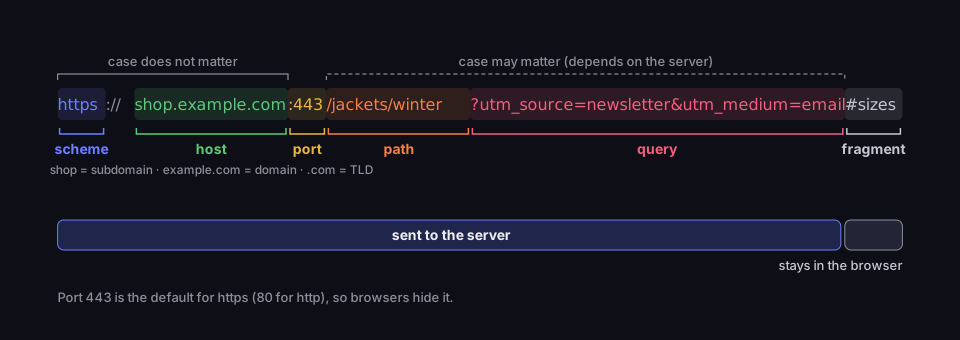
Anatomy of a URL
six parts of one address, and which of them reach the server
Source: RFC 3986 §3, §3.5, §6.2.3; WHATWG URL Standard, accessed 17 Oct 2026
Figure description
The URL https://shop.example.com:443/jackets/winter?utm_source=newsletter&utm_medium=email#sizes split into parts: scheme https, host shop.example.com (shop is the subdomain, example.com the domain, .com the TLD), port 443, path /jackets/winter, query ?utm_source=newsletter&utm_medium=email and fragment #sizes. Everything before # is sent to the server; the fragment stays in the browser. Scheme and host are case-insensitive; path and query may be case-sensitive, depending on the server. Port 443 is the default for https (80 for http), so browsers hide it.
Scheme (https) says which protocol to use. On websites today it is almost always https, HTTP with encryption; http without the "s" is an unencrypted connection. The same scheme: form serves other purposes too: mailto: opens your email program and tel: starts a phone call. How to add a subject and body to a mailto: link is covered in our guide to the mailto link.
Host (shop.example.com) is the server's name. You read it from the right: .com is the top-level domain (TLD), example.com is the domain the owner registered, and shop is a subdomain the owner set up. A host can also be an IP address.
Port (:443) is the server's "door" number. Every scheme has a default port: 80 for http and 443 for https (WHATWG URL Standard). The standard states that http://example.com and http://example.com:80/ are the same address (RFC 3986, §6.2.3), so browsers hide the default port. You only see one when a server runs on another, such as :8080.
Path (/jackets/winter) points to a particular page or file on the server. It looks like folders but does not have to match any; the server decides what to show at each path.
Query (?utm_source=newsletter&utm_medium=email) begins with a question mark and carries extra data as key=value pairs joined by &. There is a section on it below.
Fragment (#sizes) points to a place on the page, such as a heading the browser should scroll to. It is the only part that never reaches the server: the standard says the fragment is handled "solely by the user agent" (RFC 3986, §3.5), and MDN puts it plainly — the fragment "is never sent to the server with the request" (MDN, What is a URL). In practice, anything you add after # is invisible to the server and to any analytics that run there.
Is a URL case-sensitive? It depends on the part. Scheme and host are not: HTTPS://SHOP.EXAMPLE.COM goes to the same place. For the other parts, the standard assumes the opposite — they are "assumed to be case-sensitive unless specifically defined otherwise by the scheme" (RFC 3986, §6.2.2.1). Google gives an example: it treats /APPLE and /apple as two distinct URLs with their own content (Google Search Central, URL structure). Whether a given server shows the same page at both is up to the server, so copy paths exactly, letter for letter.
URL vs URI (and URN): what is the difference?
A URL is a subset of URIs. The standard defines a URI (Uniform Resource Identifier) as any identifier of a resource, and URLs as the URIs that, "in addition to identifying a resource, provide a means of locating the resource by describing its primary access mechanism" (RFC 3986, §1.1.3). A URN (Uniform Resource Name), by contrast, is a name: an identifier meant to stay unique and persistent even when the resource no longer exists.
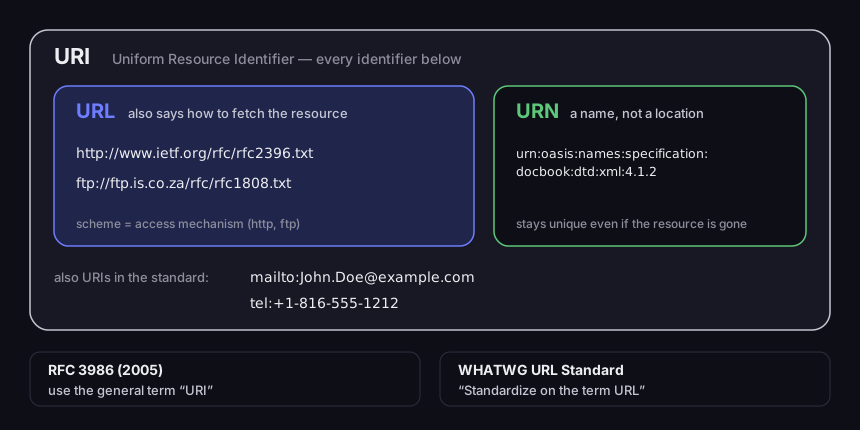
URI, URL and URN
examples from RFC 3986 and two positions on the name
Source: RFC 3986 §1.1.2, §1.1.3; WHATWG URL Standard, accessed 17 Oct 2026
Figure description
Nested sets. URI contains URL (http://www.ietf.org/rfc/rfc2396.txt, ftp://ftp.is.co.za/rfc/rfc1808.txt — the scheme is the access mechanism) and URN (urn:oasis:names:specification:docbook:dtd:xml:4.1.2 — a name that stays unique even if the resource is gone). mailto:[email protected] and tel:+1-816-555-1212 are also URIs in the standard. Below: RFC 3986 (2005) recommends the general term URI; the WHATWG URL Standard says: standardize on the term URL.
The standard's own examples show the difference better than the definitions. http://www.ietf.org/rfc/rfc2396.txt and ftp://ftp.is.co.za/rfc/rfc1808.txt are URLs: the scheme says which protocol fetches the file. urn:oasis:names:specification:docbook:dtd:xml:4.1.2 is a URN — it names a specification but does not say where to get it. mailto:[email protected] and tel:+1-816-555-1212 are URIs, although nobody would call them web addresses (RFC 3986, §1.1.2).
The most common shortcut online is "a URI identifies, a URL locates". That is close, but the standard goes further and advises against the narrower names altogether: "Future specifications and related documentation should use the general term "URI" rather than the more restrictive terms "URL" and "URN"" (RFC 3986, §1.1.3). The WHATWG, whose standard browsers implement, takes the opposite view: "Standardize on the term URL. URI and IRI are just confusing" (WHATWG URL Standard). The dispute is unresolved, and you do not need to resolve it. In everyday speech "URL", "web address" and "link" mean the same thing: text that starts with https://.
Accented letters in a URL: percent-encoding and Punycode
A URL sent over the network may contain only a limited set of ASCII characters, so letters such as é, ü or ż are encoded — one way in the path, another in the domain. The browser shows you the readable version, but what goes to the clipboard, a text message or a QR code is usually the encoded one.
In the path and query, percent-encoding applies: each byte of a character is written as % followed by two hexadecimal digits (RFC 3986, §2.1). Most accented Latin letters take two bytes in UTF-8, so one character becomes six. Google recommends the same for links on your pages: "characters in the non-ASCII range should be percent encoded" (Google Search Central).
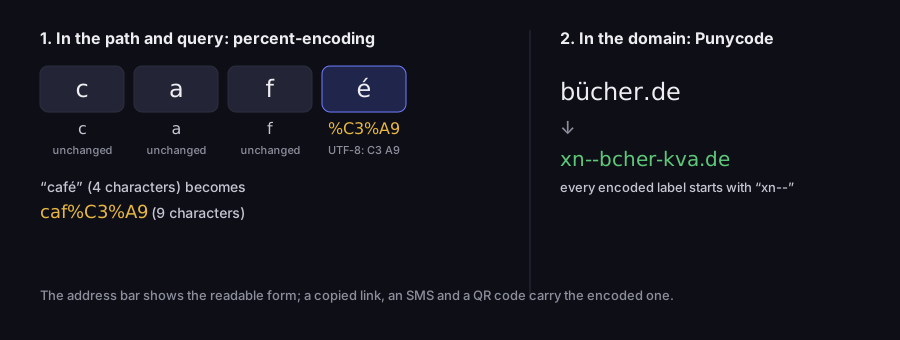
What non-ASCII letters do to a URL
percent-encoding in the path, Punycode in the domain
Source: RFC 3986 §2.1, RFC 3492, RFC 5890; our calculation, WHATWG URL in Node, 17 Oct 2026
Figure description
In the path, café (4 characters) is percent-encoded byte by byte in UTF-8: c, a and f unchanged, é becomes %C3%A9 — together caf%C3%A9, 9 characters. In the domain, bücher.de becomes xn--bcher-kva.de (Punycode; every encoded label starts with xn--). The address bar shows the readable form; a copied link, an SMS and a QR code carry the encoded one.
The word café has four letters; encoded, it becomes caf%C3%A9, nine characters. A word with several accented letters grows faster: the Polish żółta ("yellow") turns from five characters into twenty. We computed both with the WHATWG parser in Node, the same algorithm browsers use. That is why a link to a page with accented letters in the path, pasted into a text message, looks like a string of percent signs that the recipient cannot read before clicking.
Domains work differently. Domain names with non-ASCII letters are written with Punycode, which, according to its standard, "uniquely and reversibly transforms a Unicode string into an ASCII string" (RFC 3492). The encoded label starts with xn-- (RFC 5890, §2.3.2.5). The example domain bücher.de travels as xn--bcher-kva.de — again our calculation. The browser usually displays the accented letters, but a form that does not support such domains will only accept the xn-- version.
The lesson for site owners is simple. In paths on your site, use letters without accents (cafe-menu), and separate words with hyphens, not underscores — Google's advice too: "we recommend using hyphens (-) instead of underscores (\_)" (Google Search Central). The address will be shorter, readable when copied and identical in a text message and in the address bar.
URL parameters: what the part after the question mark does
Parameters are key=value pairs after the ? that pass extra data to a page: a search term, a page number, a sort order or where a visit came from. Pairs are joined with &. The server or a script on the page reads them and decides what to show or record. In https://shop.example.com/search?q=jacket&sort=price&page=2 there are three parameters: the search term, the order and the results page. Change page=2 to page=3 and the server shows the next page of the list. A parameter can carry text, too: in the WhatsApp link https://wa.me/1XXXXXXXXXX?text=Hello%20there the text parameter is a pre-filled message WhatsApp puts in the chat box — more in our guide to the WhatsApp link.
Parameters are also often a trace of where you came from. A link copied from a search engine, a newsletter or a social network frequently carries campaign or click identifiers. Before you share such a link, try removing everything from the ? onwards — if the page opens the same way, the parameters were not needed, and the link is shorter and no longer carries someone else's tags. If the page changes without them, for example showing a different product or an empty search, keep them.
The best-known example in marketing is UTM parameters. Google Analytics help gives a model: https://www.example.com/?utm_source=summer-mailer&utm_medium=email&utm_campaign=summer-sale — the page is the same, and GA4 records that the visit came from the "summer-sale" mailing. Values are case-sensitive: "utm_source=google is different from utm_source=Google" (Google Analytics Help), so your reports will show two sources instead of one. What each parameter means and how to name them is covered in our article on UTM parameters.
Order matters in one place: parameters must come before #. The fragment never reaches the server, so a parameter added after it — …/jackets#sizes?utm_source=newsletter — never reaches your analytics. It is a common mistake when UTM tags are added by hand to a link that already has a fragment. How to encode parameters, what happens to repeated keys and what survives a redirect is covered in our article on the query string.
That is why our UTM builder does not glue text together but assembles the address with a parser: it puts the parameters before the fragment, replaces old utm_* values if the pasted link had them, leaves other parameters in place and warns you when the address has a #. Add UTM tags to your own URL in the builder — no account needed.
Do not multiply parameters. Google advises: "Whenever possible, shorten URLs by trimming unnecessary parameters (meaning, parameters that don't change the content)" (Google Search Central). Each one makes the address longer, and a long address has a price. Never put anything secret in parameters either: the whole address, including the part after ?, ends up in server logs and browser history — which is why an API key goes in a header, not in the URL, as our guide to API keys explains.
How long can a URL be?
The popular answer "2,048 characters at most" gets the source wrong: 2,048 is the limit for a URL in a sitemap, not in browsers or in HTTP. The sitemap protocol says of the <loc> field: "This value must be less than 2,048 characters" (sitemaps.org, Protocol). The rule applies only to the file in which you submit pages to search engines.
HTTP itself sets no upper limit. The standard says "HTTP does not have specific length limitations for many of its protocol elements" and recommends that software support URLs of at least 8,000 octets (bytes) (RFC 9110, §4.1). Those 8,000 are a minimum servers and browsers should accept, not a maximum you must not exceed. Chrome accepts URLs up to 2 MB, a cap set for practical reasons so that very long addresses do not overload communication between the browser's processes (Chromium, URL Display Guidelines).
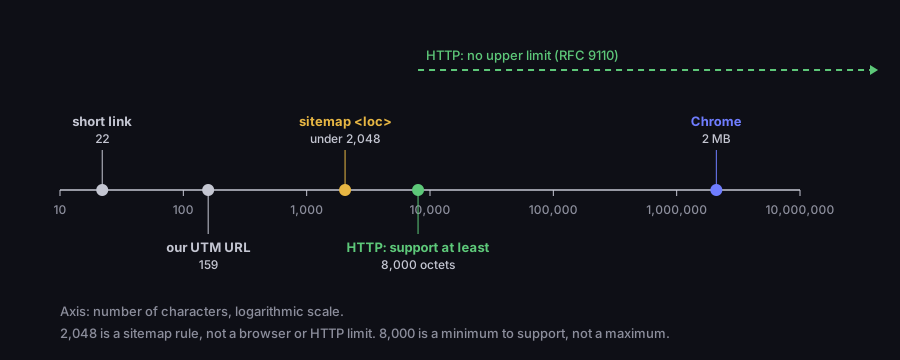
How long can a URL be?
limits on a logarithmic scale, with our own URL for comparison
Source: sitemaps.org; RFC 9110 §4.1; Chromium, URL Display Guidelines; accessed 17 Oct 2026
Figure description
Log scale of URL lengths: short link 22 characters, our URL with UTM tags 159, sitemap <loc> under 2,048 characters (sitemaps.org), HTTP recommends supporting at least 8,000 octets and sets no upper limit (RFC 9110), Chrome accepts up to 2 MB (Chromium). 2,048 is a sitemap rule, not a browser or HTTP limit.
In practice the limit is set not by the browser but by wherever you paste the address. A form field may have its own character limit, a long link in an email can break across two lines and stop working, and a text message with a long address is split into several messages. On print a long address has to be typed by hand, and in a QR code it means a denser code.
DVN Links sets no limit on the length of the destination URL; it accepts destinations that start with http:// or https://. You can shorten an address with a full set of UTM tags without trimming it.
Long URLs in text messages and QR codes
The longer the address, the denser the QR code, because the code has to hold every character. We tested five versions of an address for the same page, from a short link to a shop page with accented letters in the path and four UTM parameters. We generated the codes with the same library our generator uses.
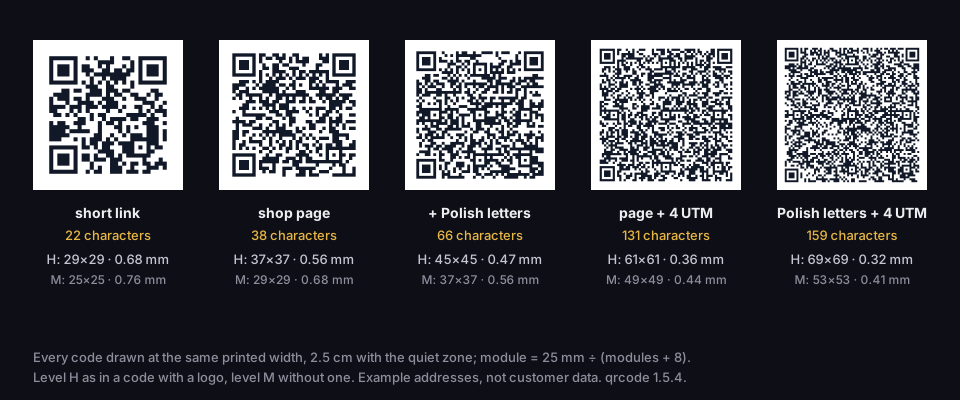
One destination, five URLs, five QR codes
real codes at one printed size, 2.5 cm including the quiet zone
Source: our calculation, qrcode 1.5.4, 17 Oct 2026
Figure description
Five real QR codes at the same printed size. Short link, 22 characters: level H 29×29 modules, module 0.68 mm; level M 25×25, 0.76 mm. Shop page, 38 characters: H 37×37, 0.56 mm; M 29×29, 0.68 mm. With Polish letters in the path, 66 characters: H 45×45, 0.47 mm; M 37×37, 0.56 mm. Page + 4 UTM tags, 131 characters: H 61×61, 0.36 mm; M 49×49, 0.44 mm. Polish letters + 4 UTM tags, 159 characters: H 69×69, 0.32 mm; M 53×53, 0.41 mm. Module = 25 mm ÷ (modules + 8). Level H as in a code with a logo, M without one. Example addresses.
The short link https://qrln.pl/aB3xK9 has 22 characters. The full page address with the Polish word żółta in the path and four UTM parameters has 159 — more than seven times as many. A code with a logo, which is what our free generator produces, uses the highest error correction level, H. At that level the short link fits in a 29×29 grid, while the long address needs 69×69. Printed in the same 2.5 cm square, the modules measure 0.68 mm and 0.32 mm — less than half the size. Without a logo (level M) the grids are 25×25 and 53×53.
A smaller module means the phone has to come closer and copes worse with poor light or a creased flyer. How many centimetres to print for given content is worked out step by step in our article on minimum QR code size.
The fix is a short link that redirects to the full address with its parameters: the code or the text message holds 22 characters, and the UTM tags still reach your analytics, because the redirect leads to the full address. How to do it and when it makes sense is in our guide on how to shorten a link. One caveat: on the free plan a short link expires after 30 days, so it is not suitable for print that has to work for months. Links without an expiry date come with the paid plans — see pricing.
How to read a URL before you click
The domain decides who owns a page, not the address as a whole — and you read it from the right, before the first slash. Chromium's guidelines explain that for security what matters is the "registrable domain", the domain the owner registered; the other parts of the address — subdomain, path, query — are entirely under the site's control and can imitate another brand. Their example: https://not-really-paypal.com does not belong to PayPal, even though it ends in "paypal.com" (Chromium, URL Display Guidelines). The domain here is not-really-paypal.com, not paypal.com.
The same rule applies to subdomains: in paypal.com.account-check.example the domain is account-check.example, and "paypal.com" at the start is decoration. Traps such as an @ sign in the address, letters from another alphabet and the padlock icon are covered in our article Is this link safe?
Frequently asked questions
Almost. A link is an element on a page or in a message that you click; a URL is the address it leads to. In everyday speech the two mean the same, and a form asking for "the URL" simply wants text that starts with https://.
A domain is only the server's name, such as dvnlinks.pl. A URL is the complete recipe for a particular page: scheme, domain, path and any parameters, such as https://dvnlinks.pl/en/pricing. If a form asks for a domain, enter just the name; if it asks for a URL, enter the whole thing with https://.
In the address bar you do not need to type it — the browser adds the scheme itself. Forms and tools differ: some reject an address without one. Our UTM builder adds https:// when it is missing and shows a warning, so you know the address was changed.
In the browser, tap the address bar at the top or bottom of the screen to see the full address and copy it. In apps without an address bar, use the Share button and choose Copy link.
The scheme and the domain are not. The path and parameters can be: the standard assumes they are, and Google treats /APPLE and /apple as two different URLs. Copy paths exactly.
HTTP sets none and recommends supporting at least 8,000 characters; Chrome accepts up to 2 MB. The 2,048-character limit applies only to addresses in a sitemap. In practice the limit is set by the text message, form or QR code you paste the address into.