Facebook QR code: which link to encode, and why
Make a Facebook QR code from your Page link in a minute. Which address to use, why a username change can break a printed code, and what Meta's brand rules say about the Facebook logo.
A Facebook QR code is an ordinary QR code holding the address of your Page or profile. It takes a minute: copy the address from your browser, paste it into the QR code generator and download a print-ready file. The tool is the least important part. What matters is which address you paste, because that decides whether the code on your shop sign or packaging still works in a year. A Facebook Page address contains its username, which you can change and which Facebook can remove if the Page is inactive. Below: making the code, choosing the address, "built-in" codes, Instagram, the Facebook logo and counting scans.
How to make a Facebook QR code in 3 steps
- Copy your Page address. Open your business Page on Facebook in a browser on a computer and copy the address from the address bar. If the Page has a username, it looks like
https://www.facebook.com/username. If not, it looks likehttps://www.facebook.com/profile.php?id=followed by a long number. Both work; the difference is explained below. - Paste it into the generator. In the QR code generator, choose the "Website" type and paste the address into the "Website address" field. No account needed.
- Download the PNG and scan it. The generator gives you a PNG 1,000 pixels wide. Before sending the design to print, scan the code with two different phones — ideally an Android and an iPhone — both from the screen and from a test print at the final size.
It is also worth opening the address once in a private browser window, logged out of Facebook. Your phone knows your account; a customer holding your flyer may not. If the Page opens properly there, the address is right before you pay for printing.
To be clear about what you get without an account: a code from the free generator has the DVN Links logo in the middle and uses the highest error-correction level (H), so the logo does not get in the way of scanning. The code is static — the address lives inside the code itself and cannot be changed after printing. How that differs from a code whose destination you change in a dashboard is covered in our guide to making QR codes.
Which address to encode
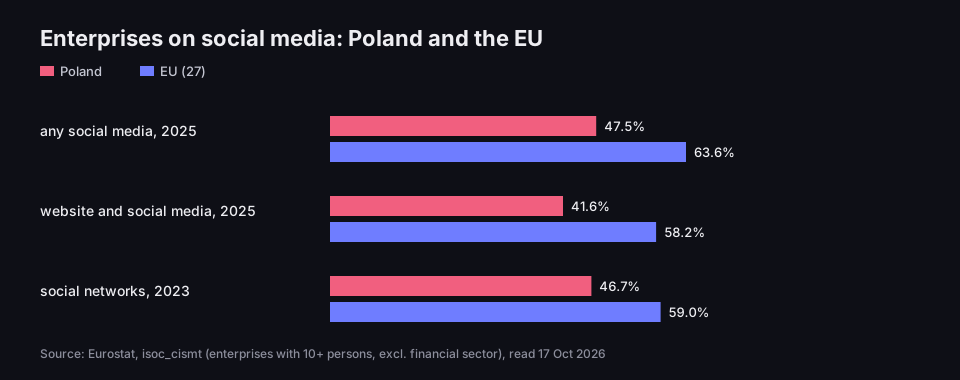
For many businesses, a Facebook Page is their main presence online. According to Eurostat, in 2025 63.6% of EU enterprises with at least 10 people used social media (Eurostat, Social media — statistics on the use by enterprises). In Poland the share was 47.5%, and 41.6% of enterprises had both a website and social media (58.2% in the EU). In 2023 Eurostat asked directly about social networks such as Facebook or LinkedIn: 46.7% of enterprises in Poland and 59.0% in the EU used them (Polish, website and 2023 figures: Eurostat, isoc_cismt dataset). If a Facebook QR code is sometimes the only route from a flyer to a business, the address inside it should be as durable as possible.
Enterprises on social media
Poland and the EU, enterprises with at least 10 persons
Source: Eurostat, isoc_cismt dataset, read 17 Oct 2026
Figure description
Bar chart, share of enterprises. Any social media, 2025: Poland 47.5%, EU 63.6%. Website and social media together, 2025: Poland 41.6%, EU 58.2%. Social networks such as Facebook and LinkedIn, 2023: Poland 46.7%, EU 59.0%. Enterprises with at least 10 persons, excluding the financial sector.
Facebook lets people reach the same Page through several addresses. These are the ones that actually end up in codes:
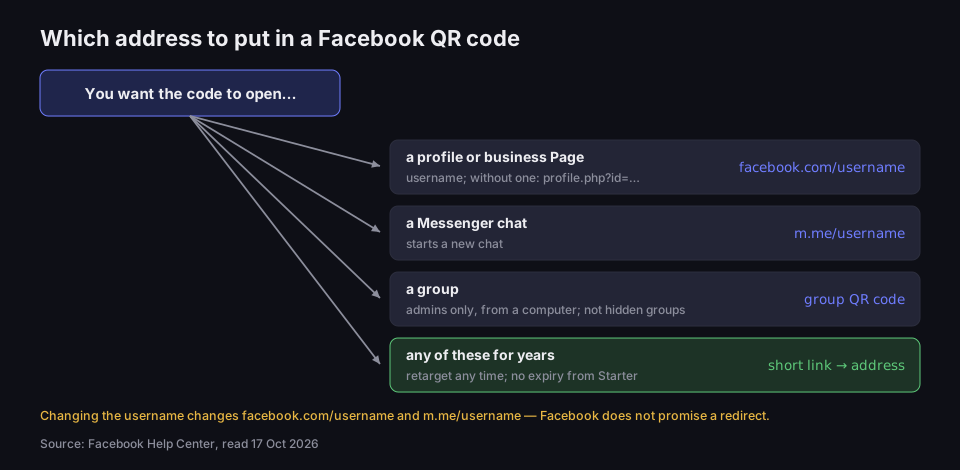
facebook.com/username— the address with your username. Short, readable, easy to type from a flyer. The best choice if your username is settled.facebook.com/profile.php?id=…— the address of a Page without a username. It works just as well but cannot be remembered.- The link from the "Copy link" button in the app — the app may give you an address with extra parameters, for example shaped like
facebook.com/share/…?mibextid=…. Meta does not document how such links are built or how long they last, so keep them off print. Copy the address from a browser on a computer instead. m.facebook.com/username— the mobile address you get when copying from a phone browser. Same Page, but change the start towww.facebook.com— the form Facebook's Help Centre gives.fb.com/username— Facebook's shorter domain. We checked: it answers with a 301 redirect to the fullwww.facebook.com/username. It works, but the code is barely sparser and there is an extra hop.m.me/username— a Messenger conversation address. It does not open the profile, but a chat with your Page. Good for a "Message us" code by the till or on packaging, if you actually answer messages.
Which address to put in a Facebook QR code
it depends on what should open after the scan
Source: Facebook Help Centre, read 17 Oct 2026
Figure description
Decision diagram. You want the code to open a profile or business Page: encode facebook.com/username; if the Page has no username, the profile.php?id= address. A Messenger chat: m.me/username, which starts a new chat. A group: the group QR code, available to admins only and only from a computer, not for private hidden groups. Any of these for years: a short link redirecting to the address, which you can retarget at any time and which does not expire from the Starter plan. At the bottom: changing the username changes facebook.com/username and m.me/username, and Facebook does not promise a redirect.
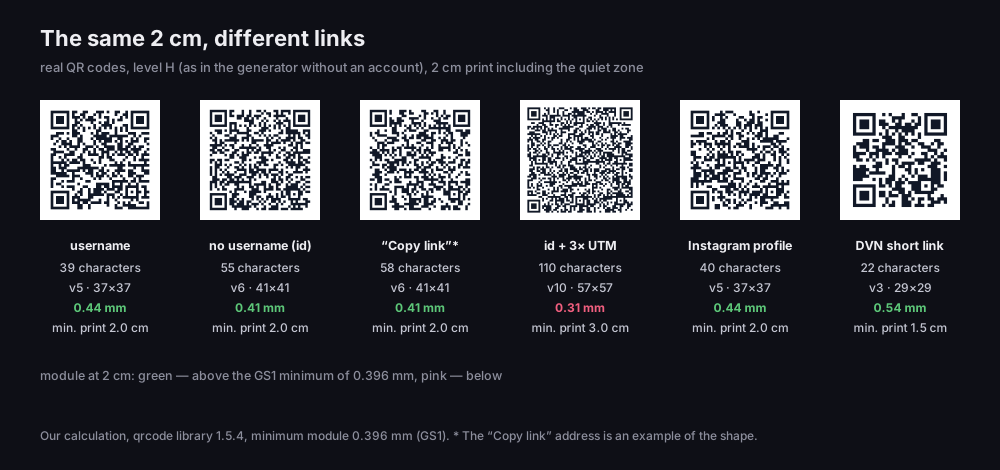
Address length affects code density, but with ordinary Facebook addresses less than you might expect. We measured six addresses with the same library our generator uses, at level H and for a 2 cm print. The username address (39 characters) gives a 37×37-module code; the profile.php?id= address (55 characters) gives 41×41. Both fit in 2 cm with room to spare. The real difference comes from UTM parameters: the same address with three campaign parameters has 110 characters, the code grows to 57×57 modules, and a single module at 2 cm drops to 0.31 mm — below the 0.396 mm minimum given by GS1. A code like that needs at least 3 cm.
The same 2 cm, different links
real QR codes at level H, as in the generator without an account
Source: our calculation, qrcode library 1.5.4, minimum module 0.396 mm per GS1, 17 Oct 2026
Figure description
Six real QR codes side by side, each printed at 2 cm including the quiet zone. Username: 39 characters, version 5, 37 by 37 modules, module 0.44 mm, minimum print 2.0 cm. Page without a username, id address: 55 characters, version 6, 41 by 41, module 0.41 mm, minimum 2.0 cm. Link from the Copy link button, example address: 58 characters, version 6, 41 by 41, module 0.41 mm, minimum 2.0 cm. Id address with three UTM parameters: 110 characters, version 10, 57 by 57, module 0.31 mm, below the GS1 minimum, minimum 3.0 cm. Instagram profile: 40 characters, version 5, 37 by 37, module 0.44 mm, minimum 2.0 cm. DVN short link: 22 characters, version 3, 29 by 29, module 0.54 mm, minimum 1.5 cm.
The takeaway is simple: encode the username address, with no parameters, and use m.me/username only when the code should open a conversation. How many centimetres a code needs depending on scanning distance is covered in our article on what to do when a QR code will not scan.
Your username: why the code can stop working
A username is not decoration; it is part of the address. Facebook says so directly: your username helps people find you and is used in the web address of your profile or Page, as facebook.com/username (Facebook Help Centre, Page username). A QR code encoding that address is exactly as durable as the username.
The rules are short. A username must be at least 5 characters long, can contain only letters, numbers and full stops, and Facebook ignores full stops and capital letters — cafe.market, CafeMarket and cafemarket count as the same username (Facebook Help Centre, username guidelines). That is good news for your code: if you type the username with different capitals from your settings, the address still works.
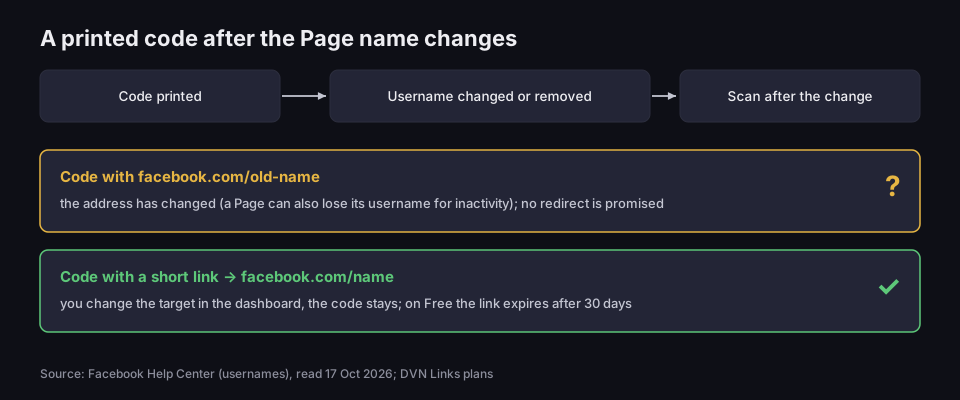
There are two pieces of bad news. First, changing your username also changes your profile address at facebook.com/username and your Messenger address at m.me/username, and Facebook warns that you may not be able to reclaim the original username afterwards (Facebook Help Centre, changing your username). The Help Centre does not say whether the old address redirects to the new one. We are not claiming it will stop working — but Facebook does not promise a redirect. Second, a Page's username can be removed because of inactivity. The Help Centre says so twice, but not after how long.
You can only change your Page's username when logged in to Facebook on a computer (Facebook Help Centre, changing a Page's username). Button names vary between interface versions, so look for the username field in your Page settings rather than an exact path.
A printed code after the Page name changes
an address stored in the code versus a short link
Source: Facebook Help Centre, read 17 Oct 2026; DVN Links plans
Figure description
Timeline: code printed, username changed or removed, scan after the change. First path, in yellow with a question mark: a code with facebook.com/old-name. The address has changed, a Page can also lose its username for inactivity, and no redirect is promised. Second path, in green with a tick: a code with a short link pointing to facebook.com/name. You change the target in the dashboard and the code stays the same; on the Free plan the link expires after 30 days.
What does this mean in practice? Think about how long the code will be on display. A flyer for one event, a poster for one season — encode the Facebook address directly and do not change your username while the flyers are in circulation. A shop sign, a door sticker, packaging produced for years — here a short link is better: the code leads to your link, which redirects to Facebook. When you change your Page's username, you change the link's target in the dashboard and the printed code stays as it is. One caveat: a short link on the free plan expires after 30 days and this cannot be switched off, so printing for years needs a paid plan.
Facebook's built-in QR code: what the Help Centre says and what guides claim
Many guides tell you Facebook has its own Page QR code and you just need to download it. Yet the path to it is different in every guide: through transparency settings, through editing Page info, through publishing tools — and some say the feature was removed long ago. None of these descriptions links to Facebook's Help Centre.
We checked at the source. In Facebook's Help Centre we found two documented QR codes: the group code and the Messenger code (as of 19 October 2026). There is no article about a Page or profile code. The group code has specific rules: only an admin can get it, only from a computer, it is not available for private hidden groups, and anyone who scans it sees the group's About page and can then request to join (Facebook Help Centre, group QR code).
The second documented code is the Messenger code. Accounts owned by people aged 18 and over have one — although, according to the Help Centre, the feature is not yet available to everyone — and scanning it starts a new chat with that person (Facebook Help Centre, Messenger QR codes). It belongs to a person, not a business. If you want a code that opens a conversation with your business Page, encode your Page's m.me/username.
That is why we give no step-by-step path to a "built-in" Page code: it cannot be checked at the source, and Facebook's interface changes more often than the guides describing it.
If you see a QR code option for your Page in the app, you can use it — but before printing, scan the code and check where it actually leads. A feature the Help Centre does not describe can change without notice, and you have no say in which address is inside. With a code made from an address copied from your browser, at least you know what it contains.
Instagram QR code
You make an Instagram QR code the same way: paste your profile address, https://www.instagram.com/username, into the generator as a website. The code is as sparse as a Facebook username code — in our measurement 40 characters, 37×37 modules, 2 cm minimum. The short instagr.am domain answers with a 301 redirect to the full address, so on print it gives you nothing but an extra hop.
Instagram also has its own profile code in the app. You can share it to help people find your account and customise how it looks; Instagram also notes that you cannot log in with a QR code (Instagram Help Centre, profile QR code). We have not scanned it, so we do not say which address it contains.
Use your own code instead of the app's when you need a file for professional printing or a count of scans from a particular piece of print. Instagram's Help Centre describes sharing the app's code and changing its colour, but not downloading a print file or counting scans. A short link's code can be downloaded from the DVN Links dashboard — from the Starter plan also as SVG and PDF, which a printer can enlarge without losing quality. The same lesson as with Facebook applies: the address contains the account name, so changing the name changes the address stored in a printed code. For a code meant to work for years, a short link is the better choice. And if the code should lead to several places at once — your profile, shop and menu — use a links page (from the Starter plan) instead of a single address, as described in Link in bio.
A code for a chat on WhatsApp, Meta's third service, works differently: it holds a wa.me link with a phone number rather than a profile address — see our guide to the WhatsApp link.
Facebook and Instagram logos on a code: what Meta's rules say
"QR code with Facebook logo" is a popular search, and many generators let you put the Facebook logo in the middle of a code. Meta's brand rules say nothing about QR codes, but they do talk about the logo itself — and those rules are hard to square with a logo inside a code.
You may use the "f" logo to point people to your presence on Facebook. The conditions are strict, though. The logo must be complete and unaltered: no outline, shadows or effects, in its original colour — Meta forbids recolouring it to your own brand colours, so you cannot match it to the colour of your code. You must leave clear space around it equal to a quarter of its width, a requirement that applies to all uses, and the logo should be at least half its width away from any other content. In print, the logo must be at least 6 mm wide. Download the file from Meta Brand Resources: Meta notes that logos found elsewhere on the web are not approved for use (Meta Brand Resources, Facebook logo).
Now our reading, not Meta's words: a logo placed in the middle of a code has the code's modules — other content — right at its edge instead of empty space. If you add the required gap, you cover a bigger part of the code, and the bigger the covered part, the closer you get to the point where the code stops scanning. The safer option is the logo next to the code, at least half its width away from the code and from any text. Print a caption such as "Find us on Facebook" separately, for example under the code, not beside the logo itself: Meta forbids connecting other words to the logo and writing the word "Facebook" next to it.
Under the code, it is also worth printing the address itself, for example facebook.com/cafemarket. Some people will not scan — an old phone, poor light, or they prefer typing. A short username without full stops or numbers helps here more than any graphic, and it is one more reason to settle the username before the first print run and then leave it alone.
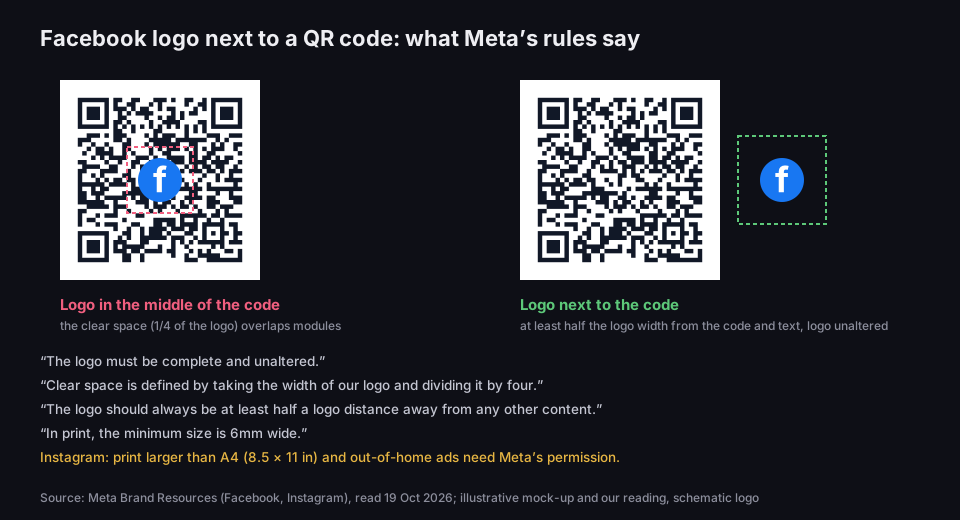
Facebook logo next to a QR code
logo in the middle of the code versus next to it
Source: Meta Brand Resources, Facebook logo and Instagram brand, read 19 Oct 2026
Figure description
Two mock-ups with the same QR code. Left, in pink: the f logo in the middle of the code; a dashed frame showing clear space of a quarter of the logo width overlaps the code modules. Right, in green: the logo next to the code; a dashed frame at half the logo width does not touch the code, logo unaltered. Below, quotes from Meta's rules: The logo must be complete and unaltered; Clear space is defined by taking the width of our logo and dividing it by four; The logo should always be at least half a logo distance away from any other content; In print, the minimum size is 6mm wide. For Instagram: print larger than A4 and out-of-home ads need Meta's permission. Illustrative mock-up and our reading, schematic logo.
Instagram adds one more condition. Anyone planning to use Instagram's assets in broadcast, radio, out-of-home advertising or print larger than A4 needs to request permission from Meta (Meta Brand Resources, Instagram brand). An A5 flyer does not need it; an A2 poster in a shop window does.
And merchandise: Facebook does not permit or license its assets for use on products such as clothing, hats or mugs. A mug with a QR code to your Page is fine; a mug with the Facebook logo is not. This is a summary of Meta's published rules, not legal advice. If you are wondering how much of your own logo a code can take and which error-correction level to choose, read our article on how to make a QR code with a logo.
How many scans? Counting visits from a code
How many people scanned the code on your flyer? If the code leads straight to Facebook, the answer is usually: you do not know. In the QR code features described in its Help Centre, Meta does not show scan counts — the Help Centre simply does not mention it.
Two seemingly obvious routes do not work. The first is the fbclid parameter. Meta adds it to the address when someone clicks an ad on Facebook or Instagram and goes through to the advertiser's website (Meta for Developers, fbp and fbc parameters). Scanning a code is not clicking an ad — no fbclid will appear. The second is UTM parameters added to a facebook.com address. UTM tags are read by an analytics tool on your own website, such as Google Analytics, and on Facebook you have no analytics of your own to read them. What you do get is a denser code: from 41×41 to 57×57 modules, as in the chart above. What UTM tags are for and where they make sense is explained in our article on UTM parameters.
A short link works. The code leads to your link, our server records the click and redirects the phone on to Facebook. In the dashboard you see the number of scans, the day, country, device type and operating system. If you make one link for the flyer and another for the sticker by the till, you can see which one works better. Say a café hands out flyers at a street fair and has a sticker on its door, both leading to its Page through two different short links. After a week it knows whether anyone scanned the flyers and whether to reprint them. A code holding only the Facebook address cannot tell you that. When you paste a short link into a post, Facebook fetches it to build a preview — the dashboard marks that visit as a bot, separately from scans by phones. What exactly we record on each click is described in our getting started with DVN Links guide.
Two free-plan limits to know before printing. A link expires 30 days after it is created and you cannot change that date — after a month the code on your flyer stops leading to Facebook. The plan also has 1,000 clicks a month for the whole account; above that, links keep working, but clicks over the limit are hidden in your statistics until you move to a higher plan, and from four times the limit, people who scan the code confirm the redirect on our interstitial page. For print that has to work longer than a month, choose a plan whose links do not expire — compare them on the pricing page. If you do not need to count scans, stick with a code holding only the Facebook address.
Frequently asked questions
Facebook's Help Centre describes a group QR code, available to admins from a computer, and a Messenger code, which belongs to a person. There is no Help Centre article about a business Page code. The most reliable option is a code made from your Page address copied from a browser.
A static code does not expire — the address is stored in it permanently. It can, however, stop leading where it should if you change your Page's username or Facebook removes it for inactivity. A short link on the free plan expires after 30 days.
Meta's rules require the logo to be unaltered, with clear space equal to a quarter of its width and at least half its width between the logo and any other content. That is hard to achieve in the middle of a code, so it is safer to place the logo next to the code, with free space around it, and to print a caption with the word "Facebook" separately, not beside the logo.
Encode https://m.me/username, where "username" is your Page's username. Scanning it opens a conversation with your Page. Remember that changing the username changes this address too.
Yes. Paste https://www.instagram.com/username into the generator as a website. Instagram also has its own profile code in the app, which you can share and customise.
Make a QR code for your Facebook Page
Paste your Page address into the generator — no account, print-ready PNG. If the code has to last for years, or you want to count scans from the flyer and the till separately, use a short link on a paid plan.