QR code with logo: how big the logo can be and what not to cover
A QR code with a logo works thanks to error correction, but its "30%" counts codewords, not area. How much logo our code survived, what not to cover and how to check it before printing.
A QR code with logo in the middle works because the code carries a reserve for damage. DENSO WAVE, which invented the QR code, says that error correction restores the data when the code is dirty or damaged (DENSO WAVE, error correction). To the decoder, a logo is simply damage to be repaired. The catch is what the reserve is counted in: codewords, not square centimetres. So the limit is not fixed. In our measurement of 14 October 2026 (ideal image, jsQR decoder), the same logo that a short link at level H survives with room to spare makes the same link unreadable at level M.
QR code with logo: how big can the logo be?
There is no single number: not from the inventor, not in the standards and not in our measurement. The DENSO WAVE FAQ gives no limit for a logo. It warns that an illustration laid over a code can deform it, and that "even a tiny missing or smeared part" can make the code unreadable or slow to read; for a design with graphics it advises consulting DENSO WAVE (DENSO WAVE, FAQ). The GS1 General Specifications 26.0, the GS1 standard for packaging codes, give no limit for a logo in a QR code (GS1 General Specifications 26.0, §5.7). We did not read ISO/IEC 18004, because it is paid.
So we measured it ourselves. On 14 October 2026 we generated two codes with the library our generator uses, qrcode 1.5.4: a short link, https://qrln.pl/aB3xK9 (22 characters), and a shop address with four UTM parameters (128 characters), each at level M and level H. In the centre we placed a light square, the logo patch, from 0 to 50% of the image width in 1-point steps, and each time gave the image to the open-source jsQR 1.4.0 decoder. We always measure the patch against the whole image including the quiet zone, because that is how our generator sizes a logo. On an ideal image the short link at level M was readable up to a patch 18% of the image width including the quiet zone, and at level H up to 32%. The UTM link survived 28% at M and 43% at H. At all 204 points the decoder agreed with the codeword arithmetic of the next section.
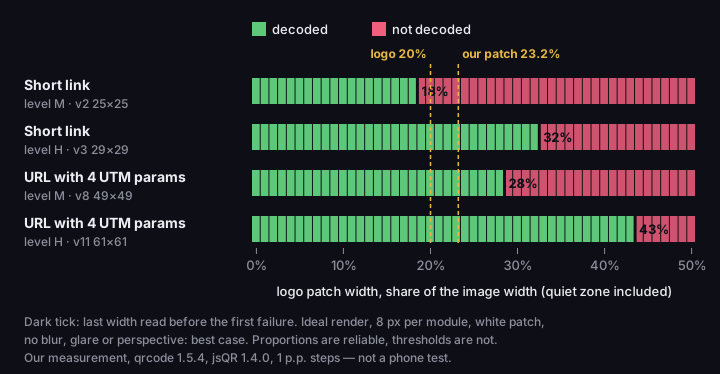
How wide a logo the code survives
logo patch from 0 to 50% of the image width including the quiet zone, 1-point steps; jsQR reads it or not
Source: our measurement, qrcode 1.5.4 and jsQR 1.4.0, ideal image at 8 px per module, 14 Oct 2026
Figure description
Chart from our measurement: for each logo patch width from 0 to 50% of the image width, in 1-point steps, whether jsQR decoded the code. Short link at level M (version 2): decoded up to 18%, first failure at 19%; Short link at level H (version 3): decoded up to 32%, first failure at 33%; URL with 4 UTM params at level M (version 8): decoded up to 28%, first failure at 29%; URL with 4 UTM params at level H (version 11): decoded up to 43%, first failure at 44%. Our generator puts a 20% logo on a 23.2% patch and switches to level H whenever there is a logo. Ideal render, 8 pixels per module, no blur or glare: the proportions are reliable, the thresholds are not safe limits. qrcode 1.5.4, jsQR 1.4.0.
These thresholds mark the limit of the mechanism, not a safe limit for print. The image was ideal: 8 pixels per module, no blur, perspective or glare, and a uniformly white patch. A phone sees a code worse, and the reserve a logo uses up is the same reserve that is meant to save the code from dirt (DENSO WAVE, error correction). What you can rely on is the proportions: H leaves clearly more room than M, and short content at M has the least. Do not treat 32% as a promise.
Our generator puts a logo 20% of the image width including the quiet zone on a light backdrop 4 px wider on each side, so the patch's share depends on the file size: 23.2% of the width in the 250 px preview, 20.8% in the 1000 px download; in the PNG from the panel the patch is 24% (our reading of the generator code, 14 and 16 October 2026). At level H both fit with room to spare in both codes; at level M with the short link they do not, hence the switch to H. One coincidence to watch: the short link at level H is 29 modules wide, 37 with the quiet zone, so a patch of 23.2% of the preview's width is 29.6% of the width of the symbol itself (26.5% in the 1000 px file). That "almost 30%" is chance: the "30%" of level H, discussed next, counts codewords, not width.
"30%" counts codewords, not area
The common advice "the logo can cover up to 30% of the code" confuses two numbers. The 30% belongs to level H, and DENSO WAVE says what it refers to in the footnote under its table of levels: "Data restoration rate for total codewords", where one codeword is 8 bits (DENSO WAVE, error correction). GS1 says the same: level H can recover "30% of the symbol codewords" (GS1 General Specifications 26.0, §5.7.2). It is the share of words the decoder can rebuild, not an area you may cover.
Where does the ceiling come from? Reed–Solomon error correction needs two correction words for every word it repairs. DENSO WAVE gives an example: 100 data words and 100 correction words make 200 words in total, of which 50 can be repaired, or 25% (DENSO WAVE, error correction). The same text adds that Reed–Solomon copes well with damage concentrated in one place, which is what a logo is.
One more detail that tables do not show: words are split into blocks, and each block is repaired separately. The code stops reading when any block has more changed words than half of its correction words (the two-word rule from DENSO WAVE). The worst block decides, not the average over the whole code. We counted a word as changed when the patch whitened at least one of its dark modules. The numbers for the same logo, 20% of the image width including the quiet zone (ideal image, 14 October 2026):
- Short link, level M (25 × 25 modules, one block, 16 correction words): the logo covers 7.8% of the modules and changes 9 of 44 codewords. A block can repair 8, so the code is unreadable.
- Short link, level H (29 × 29, two blocks of 22 correction words each): the logo covers 5.8% of the modules and changes 10 of 70 words; the worst block has 6 changed against a limit of 11, so the code reads.
- UTM link, levels M and H (49 × 49 with four blocks, and 61 × 61 with eleven): 5% and 4.5% of the modules, worst block 6 of 11 and 4 of 12; both read.
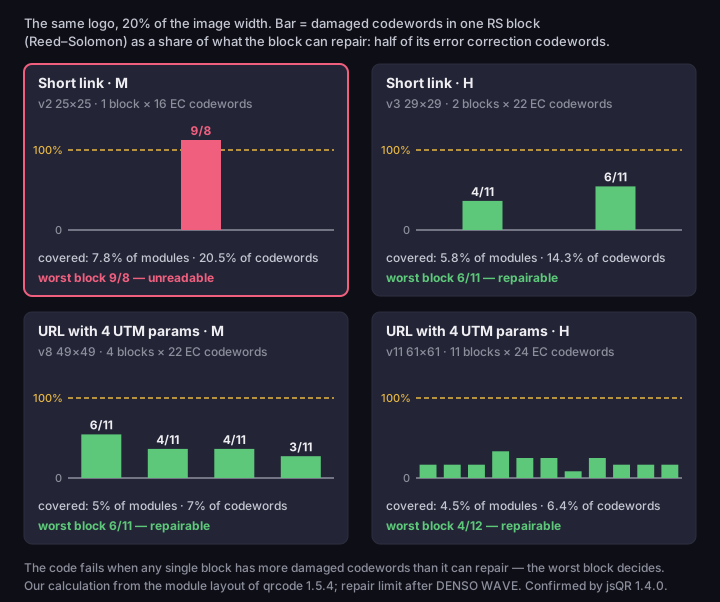
Codewords, not area
the same logo, 20% of the image width; each bar is the changed words in a block as a share of its repair limit
Source: our calculation from the module layout of qrcode 1.5.4, checked with jsQR 1.4.0, 14 Oct 2026; repair rule from DENSO WAVE
Figure description
Four bar charts, one per code, with the same centred logo of 20% of the image width. Each bar is one Reed–Solomon block: damaged codewords as a share of what the block can repair, which is half of its error correction codewords; the dashed line is 100%. Short link at level M (version 2, 1 block of 16 error correction codewords): the logo covers 7.8% of the modules and changes 9 of 44 codewords (20.5%); worst block 9 of 8 repairable — unreadable; Short link at level H (version 3, 2 blocks of 22 error correction codewords): the logo covers 5.8% of the modules and changes 10 of 70 codewords (14.3%); worst block 6 of 11 repairable — readable; URL with 4 UTM params at level M (version 8, 4 blocks of 22 error correction codewords): the logo covers 5% of the modules and changes 17 of 242 codewords (7%); worst block 6 of 11 repairable — readable; URL with 4 UTM params at level H (version 11, 11 blocks of 24 error correction codewords): the logo covers 4.5% of the modules and changes 26 of 404 codewords (6.4%); worst block 4 of 12 repairable — readable. The share of covered area stays small, yet the code fails as soon as one block passes its limit. Our calculation from the module layout of qrcode 1.5.4, checked with jsQR 1.4.0.
The code that fails has the fewest modules covered; the paradox disappears once you look at blocks. The short link at M has one block, so every changed word lands against the same limit. Longer content or a higher level means more blocks, so "up to 30% of the code" describes none of these cases. Hovercode, for example, advises that the logo cover "no more than 30% of the QR code" and does not say whether it means width or area. TrueQRCode puts the typical recommendation at "not bigger than 15-20% of the QR code", again with no definition and no source.
What a logo must not cover
Error correction repairs codewords, and part of a code is not codewords: it is the patterns that let the decoder find the code and read its settings. If the logo covers them, level H does not help. The general anatomy is in our text on types of QR codes; this must stay untouched:
- Finder patterns in three corners: the large squares by which the decoder recognises a code. GS1 describes a QR code as a square of modules "including a unique finder pattern located at three corners" (GS1 General Specifications 26.0, §5.7.1).
- Timing patterns: rows of alternating dark and light modules between the corners that set the coordinates of the modules (KEYENCE).
- Format information: strips by the corners holding the correction level and the mask (KEYENCE).
- Alignment patterns: smaller squares that help the decoder when the code is distorted, for example curved or photographed at an angle (KEYENCE).
- Version information: in codes from version 7 up, two extra fields by the corners. We read their position from the module layout of
qrcode; KEYENCE does not describe this element, and Berisso lists it (next paragraph). - The quiet zone: an empty margin 4 modules wide on every side, in which "nothing is printed" (DENSO WAVE, code area). A logo sticking out beyond the code, or a caption running into the margin, spoils it as surely as a logo on a corner.
We take the part names from KEYENCE, a maker of industrial readers: a secondary source to the ISO standard, which we did not read; we found no description of the structure on the DENSO WAVE pages. Kevin Berisso of the AIDC lab at Ohio University gives the same list, and says destroying those places "will result in the inability to decode the symbol" (Berisso, Designer QR Codes, 2013). It is a 2013 white paper, not a peer-reviewed article, but it agrees with the mechanism above.
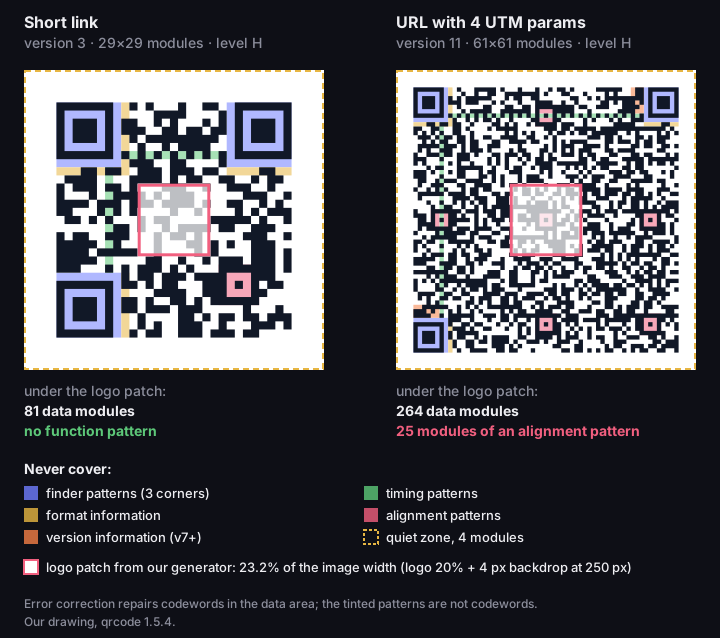
What a centred logo covers
two real codes at level H, logo patch 23.2% of the image width
Source: our drawing, qrcode 1.5.4, 14 Oct 2026; part names from GS1 General Specifications 26.0, KEYENCE, Berisso 2013
Figure description
Two real QR codes at level H with the function patterns tinted: finder patterns in three corners, timing patterns, format information, alignment patterns and, from version 7, version information; the quiet zone of 4 modules is outlined. A square marks the logo patch of our generator, 23.2% of the image width. Short link, version 3, 29×29 modules: the patch covers 81 data modules and no function pattern; URL with 4 UTM params, version 11, 61×61 modules: the patch covers 264 data modules and 25 modules of the central alignment pattern. A longer content gives a larger version with an alignment pattern in the middle, right under the logo. Error correction repairs codewords, not these patterns. Our drawing, qrcode 1.5.4.
One item on that list is invisible to the naked eye: in a larger code the alignment pattern sits exactly in the centre, under the logo. In the figure, the short link (version 3) has only 81 data modules under our generator's patch, while the UTM link (version 11) has 264 data modules and 25 modules of the central alignment pattern. On an ideal image jsQR read that code regardless. KEYENCE describes the alignment pattern as a reference point when modules are shifted by distortion (KEYENCE), so in our view losing it may hurt with a crooked photo. We did not measure this; it is our conclusion, not a test result.
In practice: put the logo in the centre, square or round, away from the edge patterns, and not beyond the code or into the margin.
Error correction level: why a logo means H
With any logo, choose level H. H is the highest of the four correction levels (DENSO WAVE, error correction). The first section shows why: the logo our generator inserts, 20% of the image width including the quiet zone, killed the short link stored at level M, while the same link at H read with room to spare (our measurement on an ideal image, 14 October 2026). So our generator gives no choice here: with any logo it stores the content at H, and without a logo at M.
H has a price: DENSO WAVE states that a higher correction level increases robustness but also the size of the code (DENSO WAVE, error correction). In our calculation the short link grows from 25 × 25 modules at M to 29 × 29 at H, and the link with four UTM parameters from 49 × 49 to 61 × 61 (qrcode 1.5.4, 14 October 2026). At the same print width more modules mean a finer module, and a module that is too small is the most common reason a sharp, clean code will not scan. Our text Minimum QR code size shows how to work out the minimum print size at level H.
The long UTM link survived a wider patch, but that is no reason to encode long addresses: the long code has a finer module at the same print width and an alignment pattern under the logo. Better to encode a short link that redirects to the address with UTM parameters.
If you add a logo yourself to a code from another generator, check its level first. A code at M or L lacks the reserve assumed here, and even a small logo can break it.
Colour and background of the logo
Put the logo on a light, uniform backdrop, not directly on the modules. Our measurement is the best case: a white patch spoils only dark modules. A logo with dark elements also flips light modules, so it changes more codewords and passes a block's limit sooner (our method; repair rule from DENSO WAVE).
Colour matters too. DENSO WAVE says that scanners capture the image of a code in red light, and that a red code on a white background is unreadable; it recommends black on white (DENSO WAVE, FAQ). GS1 grades the print quality of a QR code at 660 nm, which is also red (GS1 General Specifications 26.0, §5.7.4.5). Berisso, studying "designer" codes in 2013, noted that the worst performers had a damaged finder pattern and too little contrast, and that a red centre of a corner pattern can simply vanish for the decoder (Berisso, 2013). An inverted code, light on dark, adds more risk: in his test only a handful of apps read it. The editor in the panel warns you when the code is lighter than the background or the contrast between them drops below 3:1, the WCAG minimum for graphics; it does not block saving. Colours and contrast are covered in Minimum QR code size.
QR code generator with logo in DVN Links
Logo options depend on the plan (app code as of 14 October 2026). In the QR generator without an account, the code gets the rules of the Free plan: the DVN Links logo in the middle and the caption dvnlinks.pl underneath. That generator has no logo choice; you choose the logo in the panel, on a short link. On the Free plan the panel lets you choose only between the "DV Links" logo and the "DV Icon" icon; this plan gives no code without a logo or without the caption.
From the Starter plan you can also choose the "dvnlinks.pl" mark as the logo, or "No logo", which is the default; the caption is optional. Business and Enterprise add "Custom logo", your own upload: a PNG or JPG file up to 500 KB and at least 100 × 100 px; by default these plans have no caption under the code. A logo that is not square is fitted into a square with its proportions kept, so a wide logo comes out low. See the pricing page for the current split.
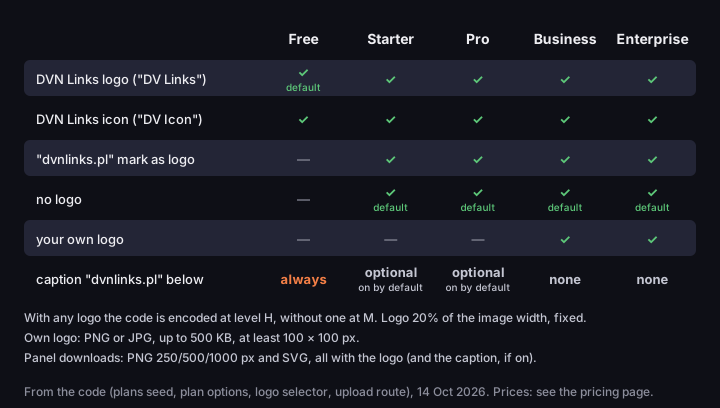
Logo in a QR code by plan
logo and caption options in the DVN Links generator, read from the app code
Source: DVN Links app code (plans and generator options), 14 Oct 2026
Figure description
Table of QR logo options by plan, read from the code. Free: DVN Links logo ("DV Links"), DVN Links icon ("DV Icon") (default DVN Links logo ("DV Links")), caption always; Starter: DVN Links logo ("DV Links"), DVN Links icon ("DV Icon"), "dvnlinks.pl" mark as logo, no logo (default no logo), caption optional, on by default; Pro: DVN Links logo ("DV Links"), DVN Links icon ("DV Icon"), "dvnlinks.pl" mark as logo, no logo (default no logo), caption optional, on by default; Business: DVN Links logo ("DV Links"), DVN Links icon ("DV Icon"), "dvnlinks.pl" mark as logo, no logo, your own logo (default no logo), no caption; Enterprise: DVN Links logo ("DV Links"), DVN Links icon ("DV Icon"), "dvnlinks.pl" mark as logo, no logo, your own logo (default no logo), no caption. With any logo the code is encoded at level H, without one at M. Logo 20% of the image width, fixed. Own logo: PNG or JPG, up to 500 KB, at least 100 × 100 px. Panel downloads: PNG 250/500/1000 px and SVG, all with the logo, and with the caption if it is on.
Three things are the same on every plan. The generator, not you, sets the level: H with any logo, M without. The logo size is fixed at 20% of the image width including the quiet zone, so you cannot enlarge it, even if your content would take it. And from the panel you download a PNG 250, 500 or 1000 px wide or an SVG file, all with the logo, and with the caption if it is on. In the SVG the code is vector, but the logo inside is a raster image, so in a large print it may come out less sharp than the modules.
On 14 October 2026 we also took the short link from the generator itself in three variants, and jsQR 1.4.0 decoded every file: a Free plan code with the DVN Links logo and caption (level H, 29 × 29 modules), the no-logo code that Starter gives by default (level M, 25 × 25) and a Business plan code with a neutral placeholder as the own logo (level H, 29 × 29). That tests a perfect file, not a phone.
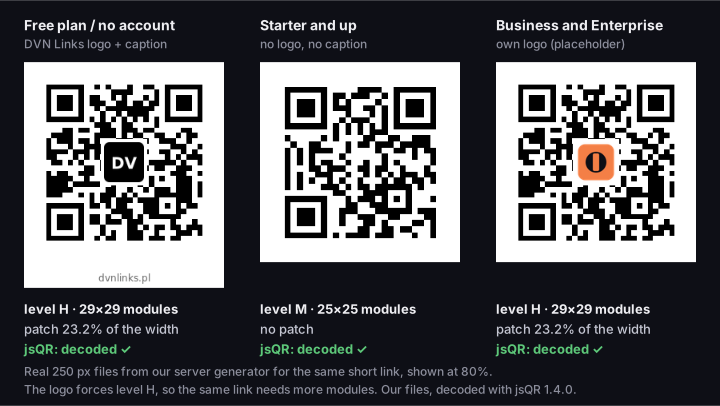
What the generator gives you
three real 250 px PNG files (measured 14 Oct 2026; today that is the preview size, the download is 1000 px) for a short link, each decoded by jsQR
Source: files from the DVN Links generator, decoded with jsQR 1.4.0, 14 Oct 2026
Figure description
Three real files from our QR generator for the short link https://qrln.pl/aB3xK9. Free plan / no account (DVN Links logo + caption): level H, version 3, 29×29 modules, 250×282 px, decoded by jsQR; Starter and up (no logo, no caption): level M, version 2, 25×25 modules, 250×250 px, decoded by jsQR; Business and Enterprise (own logo (placeholder)): level H, version 3, 29×29 modules, 250×250 px, decoded by jsQR. With a logo the generator encodes at level H, which needs more modules than level M without a logo. The third logo is a neutral placeholder. Measured on 14 Oct 2026 on 250 px files; today that is the preview size, and the download is 1000 px.
How to check a QR code with a logo before printing
No percentage replaces a test print, because the read depends on what our measurement does not cover: paper, ink, glare, lighting and the camera. DENSO WAVE warns that even a small defect in a code with an illustration can make it unreadable or slow (DENSO WAVE, FAQ).
- Print the code at its final size and on the final material; an office printout on plain paper will not show how it behaves on a glossy leaflet.
- Scan with two different phones, ideally with different apps, because each analyses the image differently.
- Scan from a typical distance and at an angle, as someone walking past a poster would.
- Watch how long the read takes. If the code reads only from close up or after several seconds, the logo is too big for that content or the module too small. Shrink the logo, shorten the content or enlarge the print.
- Check that the code leads where it should, especially if a designer added the logo.
QR code with logo: frequently asked questions
How big can the logo in a QR code be?
There is no universal number; neither DENSO WAVE nor GS1 gives one (DENSO WAVE, FAQ). In our measurement on an ideal image (jsQR 1.4.0, 14 October 2026) the limit depended on content and level: from 18% to 43% of the image width including the quiet zone. That is the limit of the mechanism, not a safe limit for print. A logo 20% of the image width at level H fitted with room to spare in both codes; check anything larger on a printout.
Does a logo reduce the number of scans?
We found no reliable study. Claims that a logo raises scans by tens of per cent appear at generator vendors without a source. The only independent study we found, Berisso's 2013 survey (Berisso, 2013), covered "designer" codes in general on old phones and did not isolate logo size.
Can I add a logo for free?
The DVN Links logo, yes: it is in every Free plan code and in the generator without an account. Your own logo needs Business or Enterprise; see the pricing page.
Can I put the logo in a corner of the code?
No. The corners hold the finder patterns by which the decoder finds the code (GS1 General Specifications 26.0, §5.7.1), and destroying them makes the code unreadable (Berisso, 2013). The logo goes in the centre only.
Does the SVG file have the logo?
Yes. The SVG from the panel has the logo in the same place as the PNG, and the caption if it is on. The code in the SVG is vector, so it scales without loss, while the logo is an embedded raster image — for a large print, upload it at the highest resolution you can. Test the code on a printout before the run.
Make a code with a logo and test it in print
The generator sets level H itself. Without an account the code gets the DVN Links logo; your own logo is available on the Business and Enterprise plans. Print the file at its final size and scan it with two phones before you order the run.