UTM parameters: what they are and how GA4 reads them
What each of the nine UTM parameters means, which rules GA4 uses to assign a channel, why letter case splits your report and how UTM tags work with a short link and a QR code.
UTM parameters are short tags added to a web address after the ?, for example ?utm_source=newsletter&utm_medium=email, from which Google Analytics 4 (GA4) reads where a visit came from: the source, the medium and the campaign. The link goes where it always went; only the report changes. They are also called UTM tags, and reading them is called UTM tracking. This article is about parameters in links, not about UTM appliances (Unified Threat Management), the firewalls that share the abbreviation. The name goes back to Urchin Software, the analytics company whose acquisition Google announced on 28 March 2005 (Google's announcement, reprinted by Battelle Media); Google's own documentation does not spell the abbreviation out. Which channel a campaign lands in depends on the word you type into utm_medium.
UTM parameters explained: utm_source, utm_medium, utm_campaign and six more
Most guides list five UTM parameters; GA4 recognises nine. Google lists them on its help page Collect campaign data with custom URLs (read on 13 October 2026). Each reported parameter goes into its own session dimension, where you later filter and group by it (GA4 dimensions and metrics):
|
Parameter |
What it means according to Google |
GA4 dimension |
|---|---|---|
|
|
“Referrer”, e.g. |
Session source |
|
|
“Marketing medium”, e.g. |
Session medium |
|
|
“Product, slogan, promo code”, e.g. |
Session campaign |
|
|
“Campaign ID”: identifies a specific campaign or promotion |
Session campaign ID |
|
|
the platform responsible for directing traffic |
Session source platform |
|
|
“Paid keyword” |
Session manual term |
|
|
“Use to differentiate creatives” |
Session manual ad content |
|
|
creative format; according to Google “isn't currently reported” in GA4 |
none |
|
|
marketing tactic; according to Google “isn't currently reported” in GA4 |
none |
GA4 accepts the last two parameters but, as Google says on the same page, does not report them at the moment, so you can leave them out when tagging links by hand. utm_content tells creatives apart: two buttons in one email, two versions of an image in a post.
How many parameters should you set? The same Google page says you should always use utm_source, utm_medium and utm_campaign (“you should always use”), and goes on: “if you're setting one UTM parameter, we strongly recommend that you set all relevant UTM parameters”. The reason follows: “Missing UTM parameters will result in (not set) values being present in reporting”. Add utm_id if you keep a campaign register with identifiers.
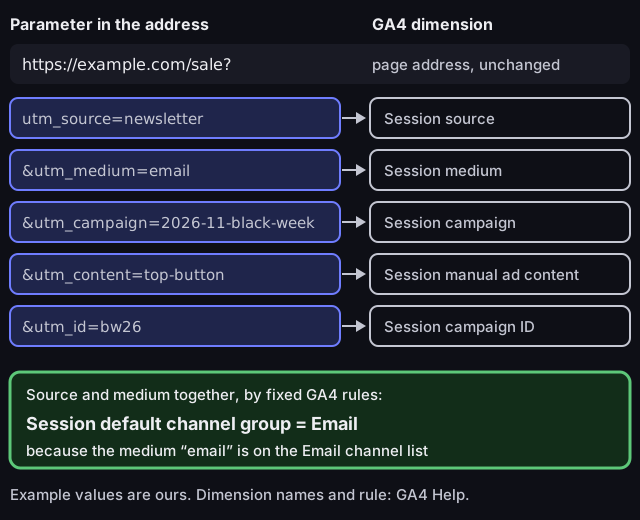
Anatomy of a link with UTM parameters
each parameter goes into a separate session dimension, and source and medium determine the channel
Source: Google Analytics Help, articles 10917952, 9143382 and 9756891, read on 13 October 2026; example values ours
Figure description
The link https://example.com/sale broken down into parameters. utm_source=newsletter goes to the Session source dimension, utm_medium=email to Session medium, utm_campaign=2026-11-black-week to Session campaign, utm_content=top-button to Session manual ad content, utm_id=bw26 to Session campaign ID. From source and medium GA4 works out Session default channel group: Email, because the medium email is on the list of rules for the Email channel. The values in the example are ours.
How GA4 assigns a channel: the rule that utm_medium depends on
GA4 works out the channel (Email, Organic Social, Display and the rest) from the source and medium values using fixed rules that you cannot change. Google says: “Channel definitions aren't case sensitive and can't be edited” (Default channel group, read on 13 October 2026). If the values you typed match no rule, the traffic goes to the Unassigned channel: “the value Analytics uses when there are no other channel rules that match the event data”.
Selected rules from the same page that apply to manually tagged links:
|
Channel |
Condition in GA4 |
|---|---|
|
|
source or medium is |
|
Organic Social |
medium is |
|
Paid Social |
source on the list of social sites and medium containing |
|
Display |
medium is |
|
Referral |
medium is |
|
SMS |
source or medium is exactly |
|
Affiliates |
medium is |
|
Audio |
medium is |
|
AI Assistant |
medium is exactly |
|
Organic Search |
medium is exactly |
Google publishes the lists of sites (social networks, search engines, video, shopping) as a downloadable sheet, not in the page text, so check that your source is on the list if a rule depends on it.
The dictionary is shorter than most guides suggest. We counted the literal medium values in the rules on the Default channel group page (our count, 13 October 2026): Organic Social has six, Display five, Email four, Referral three, and Organic Search, SMS, Affiliates, Audio and AI Assistant one each. Paid channels, Organic Video and Mobile Push Notifications have no list, only a pattern. Any other value depends on whether the source is on a site list.
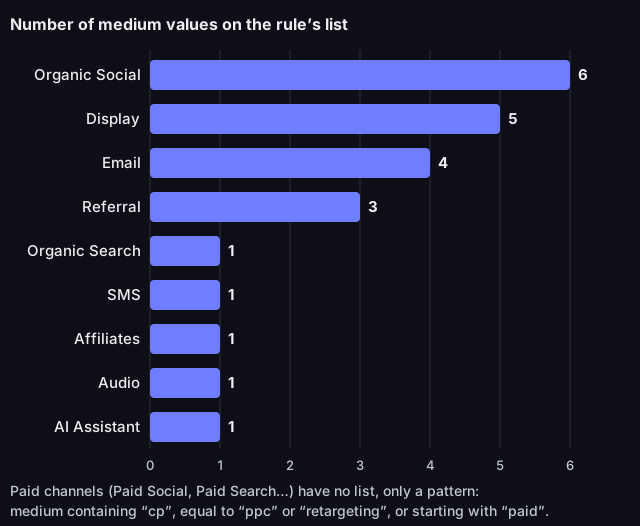
How many utm_medium values each GA4 channel recognises literally
number of medium values on the rule's list, default channel group
Source: Google Analytics Help, Default channel group (answer 9756891), read on 13 October 2026; count ours
Figure description
Bar chart. Organic Social: 6 medium values, Display: 5, Email: 4, Referral: 3, Organic Search: 1, SMS: 1, Affiliates: 1, Audio: 1, AI Assistant: 1. 23 values in total. The paid channels have no list, only a pattern: medium containing cp, equal to ppc or retargeting, or starting with paid.
These rules produce concrete traps:
- `newsletter` as the medium is not on the Email list. With a source that is not on any list (for instance
newsletteragain), that traffic ends up in Unassigned.utm_source=newsletter&utm_medium=emailworks because of the medium. - `mail` looks close enough, but only the four Email spellings count.
- `sponsored`, `promoted` or `ads` do not match the paid-channel pattern, which catches
cpc,ppcand anything starting withpaid, such aspaid-social. A medium that matches it lands in Paid Social when the source is on the list of social sites, otherwise in Paid Other.sponsoredwith a social source ends up in Organic Social. - `qr` and `print` belong to no rule. A QR code on a flyer tagged
utm_medium=qrwith a source outside the lists (sayflyer) lands in Unassigned unless you build your own channel group.
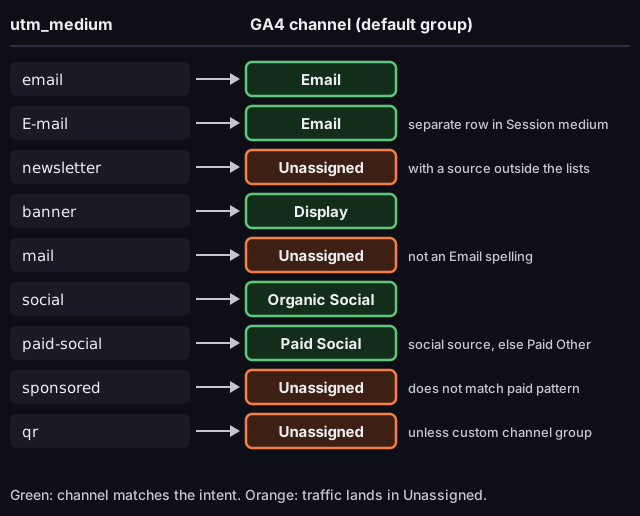
utm_medium value and the resulting GA4 channel
default channel group; with a source outside the site lists
Source: Google Analytics Help, articles 9756891 and 10917952, read on 13 October 2026
Figure description
Diagram of medium value and the channel it lands in. email: Email. E-mail: Email, but a separate row in the Session medium dimension. newsletter: Unassigned with a source outside the lists. banner: Display. mail: Unassigned, not an Email spelling. social: Organic Social. paid-social: Paid Social when the source is on the list of sites, otherwise Paid Other. sponsored: Unassigned, does not match the paid pattern. qr: Unassigned unless you build a custom channel group.
A mistake in the medium produces no error or warning. The link works and the visit is in GA4, but in another channel, and you usually notice only in the report, often after the campaign.
Two rules do not follow from the medium you typed. A campaign name containing shop or shopping triggers the shopping channel rules; Google does not say in which order it evaluates rules, so you cannot predict whether a campaign with the medium email called summer-shop stays in Email. Avoid that word unless you promote a shop, and check the report. And when the referrer is an AI assistant, GA4 sets the medium to ai-assistant itself; that channel, as Google notes, “excludes Google’s AI Overviews and AI Mode”.
Letter case and (not set): two kinds of mess in a UTM report
Channel rules ignore letter case but parameter values do not, so the channel report can look right while the campaign report is split. Google's page on parameters says: “Parameter values are case sensitive, e.g. utm_source=google is different from utm_source=Google” (10917952). The channel rules, as quoted above, are not case sensitive (9756891). Google also advises: “Use lowercase as a standard practice”.
In practice: one team writes utm_medium=Email, another utm_medium=email. Both land in the Email channel, so the channel chart hides the problem, but Session medium shows two rows, and Facebook and facebook in Session source are two sources to add up by hand. To find them, open a report with Session source and Session medium and look for rows that differ only in letter case.
(not set) is the second kind of mess, and not a GA4 error: the parameter the report shows did not arrive with the link, most often utm_campaign. The cure is a fixed set of parameters for every link.
A UTM naming convention for your organisation
A naming convention is one table that everyone who builds links knows, instead of the advice “be consistent”. We propose the set of rules below; each follows from the GA4 rules described above or from how a web address looks:
|
Rule |
Good |
Bad |
Why |
|---|---|---|---|
|
Lowercase only |
|
|
values are case sensitive, channels are not, so the campaign report splits |
|
|
|
|
a medium outside the rules usually ends up in Unassigned |
|
|
|
|
the source answers “where from?” |
|
|
|
|
campaigns sort chronologically and do not merge across years |
|
|
|
|
a month later nobody remembers what “test1” was |
|
One separator: hyphen or underscore |
|
|
two spellings are two rows in the report |
|
No spaces or accented characters |
|
|
in an address they turn into percent codes ( |
|
No personal data |
|
a recipient's email address |
UTM values end up in reports and in an address that anyone can see |
A rule with a reason is easier to keep in a team. For accented characters the reason is readability; GA4's documentation does not forbid them.
A convention needs a register: a spreadsheet with one row per link, holding the full address, the parameter values, the date and the person responsible. It lets you check a new link against existing ones and reconstruct what a campaign from a year ago meant. Google's official Campaign URL Builder is enough to assemble the address.
The price of this convention is that the medium dictionary is narrow. To tell print apart in GA4 (say with the medium qr), you have to build a custom channel group, which does not change the default group; otherwise that traffic lands in Unassigned.
UTM tags in internal links: why not
Do not add UTM tags to links between pages of your own site: they distort the source of later visits. Google shows this in its article on traffic-source dimensions (read on 13 October 2026): a user arrives from a paid ad (google / cpc), clicks a link with the UTM value internal_promotion during the visit, and the session stays attributed to google / cpc. The change comes later: “Sessions initiated by direct entrance are attributed to the UTM values for that user”. When the user returns from a bookmark or types the address, that visit gets the internal link's values instead of counting as direct traffic.
The result: an “internal promotion” campaign collects visits it did not generate and direct traffic shrinks. To measure clicks on your own banners and buttons, use GA4 events, not UTM parameters.
Internal UTM tags usually arrive by copying: the newsletter address pasted into a home-page banner, a post address into the footer. Search your content and templates for the string utm_, and leave plain page addresses in internal links; keep UTM tags for links that lead to your site from outside.
UTM tracking with a short link and a QR code
A long link with UTM tags looks bad in a text message, on a slide or on a flyer. A short link solves that without losing the parameters, as long as the UTM tags are in a place from which the shortener passes them on. DVN Links redirects with a 302, so every click goes through the shortener and is counted. The parameters reach the destination page in two ways:
- On every plan: paste the full address, UTM tags included, as the destination of the short link. The redirect leads to the stored address in full.
- From the Starter plan: enter the source, medium and campaign in the link details in the dashboard, after the link has been created (the dialog for creating a link has no such fields). Through the API, also available from the Starter plan, you can pass a
utmobject with five fields when you create a link:source,medium,campaign,termandcontent. On every redirect DVN Links appends the non-empty fields to the destination address. If the same parameter is already in the address, the field wins; other parameters stay unchanged. Changing the fields affects later clicks, and the short address stays the same. Plans are compared on the pricing page.
A third way does not work: parameters appended to the short address, for example qrln.pl/sale?utm_source=x, stay in the shortener. DVN Links records them and shows them under campaigns in the dashboard, but redirects to the stored address without them, so GA4 never sees them and the two campaign views can differ.
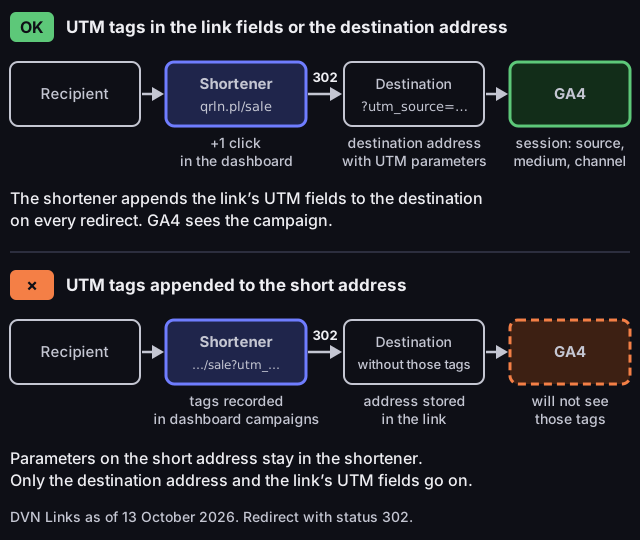
How UTM tags reach GA4 through a short link
DVN Links, 302 redirect, as of 13 October 2026
Source: DVN Links redirect code, as of 13 October 2026
Figure description
Two lanes. The top lane, correct: the recipient clicks the short link qrln.pl/sale, the shortener adds one click in the dashboard and redirects with a 302 to the destination page with UTM parameters, taken from the destination address or from the link's UTM fields, which the shortener appends on every redirect; GA4 records a session with source, medium and channel. The bottom lane, wrong: the recipient clicks a short address with ?utm_source appended; the shortener records those parameters in dashboard campaigns but redirects to the address stored in the link without them, so GA4 does not see them.
A QR code is the same case without a keyboard: nobody retypes an address from a flyer, and the scan does not tell GA4 the visit came from print. With no UTM tags and no referring site, GA4 attributes such a visit to direct traffic; Google defines the Direct channel as the source (direct) with the medium (not set) or (none) (9756891). We have not confirmed in any primary source whether a phone's camera app passes on a referring site; a UTM tag in the link removes that unknown. A short link also gives a less dense code than a long address encoded directly. You can make a code for a short link in the QR generator.
Before you print, check the limits: on the free plan a link expires after 30 days (paid plans have no expiry unless you set one), and once the monthly click allowance is used up (1,000 on the free plan) links keep working, but clicks over the limit are hidden in statistics until you move to a higher plan (pricing).
How to check a tagged link before you send it
A mistake in the medium usually shows up only after the campaign, while checking takes a minute. Before sending:
- Click the link the way the recipient will (the short one, if that is what you send) and wait for the page to load. The address bar should show the UTM parameters; with DVN Links UTM fields, it shows the values from the fields rather than those in the destination address.
- Read the values. Lowercase only, one separator, no accented characters, no duplicated parameter.
- Compare the medium with the rule table. If it is not there and you have no custom channel group, the traffic will most likely land in Unassigned.
- After the first clicks, compare the campaign in the shortener's dashboard with the Session campaign dimension in GA4. If the shortener has clicks but GA4 has no campaign, go back to step 1.
What the shortener counts and what GA4 counts
A shortener answers the question “how many times was the link clicked?”, GA4 answers “what did people do after arriving on the site?”, and the numbers from the two tools do not have to agree. The shortener records a click at the redirect, before the destination page loads. GA4 records a visit only once the page has loaded and the tag has run; a session ends, according to Google, by default “after 30 minutes of user inactivity” (About sessions), so two clicks a short time apart can make a single session. Someone who closes the tab before the page loads is in the shortener but not in GA4.
For a business in the EU there is a second reason: cookie consent. In what Google calls basic consent mode, its tags do not load until the visitor answers the consent banner, and if the visitor declines, “no data is transferred to Google at all” (consent mode overview, read on 13 October 2026). The click recorded at the redirect does not depend on that tag. We have no source on the size of the gap, so we give no figure.
The DVN Links statistics panel shows, for your links:
- total clicks, clicks today and in the last 7 days, and a daily chart,
- devices (bots as a separate entry), browsers, operating systems and countries,
- UTM campaigns as source / medium / campaign, from the link fields or from parameters appended to the short address,
- the domains the click came from (no referring site: “Direct”), and the ten most clicked links.
The panel has no unique clicks (it counts every click), no date filter and no way to exclude bots from the total. How far back history goes depends on the plan (features, pricing).
For the click-through rate of a link (clicks divided by impressions), take clicks from the shortener and impressions from the tool that displayed the link: the mailing system, the ad platform, the post's statistics. The shortener does not know how many people saw the link.
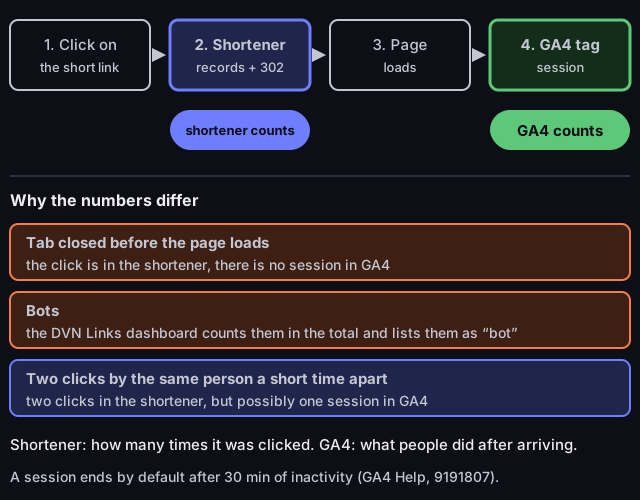
What the shortener counts and what GA4 counts
from the click to the session
Source: Google Analytics Help, About sessions (answer 9191807), read on 13 October 2026; DVN Links statistics panel, as of 13 October 2026
Figure description
Diagram in four steps: a click on the short link, the shortener records the click and redirects with a 302, the destination page loads, the GA4 tag records a session. The shortener counts at step two, GA4 at step four. Differences: a tab closed before the page loads is in the shortener but not in GA4; bots are counted in the total by the DVN Links dashboard and shown separately; two clicks by the same person a short time apart are two clicks in the shortener and possibly one session in GA4, because a session by default ends after 30 minutes of inactivity.
A gap between the numbers is information in itself. If the shortener shows far more clicks than GA4 shows sessions, check how many clicks are bots, then whether the destination page has the GA4 tag and the UTM tags reach the address bar. If GA4 shows the campaign but the shortener has almost no clicks, someone most likely sent the full address and bypassed the short link.
Frequently asked questions
Are UTM tags and UTM parameters the same thing?
Yes. “UTM tag” is the everyday name for a parameter such as utm_source added to the address; Google's documentation lists nine of them.
Does letter case matter in UTM parameters?
Yes, for values: utm_source=google and utm_source=Google are two sources in reports. The channel comes out the same, because channel rules ignore case. Write everything in lowercase.
Where does (not set) in a campaign report come from?
The link did not have the parameter the report shows, most often utm_campaign. Google recommends setting all relevant parameters if you set even one.
How many UTM parameters do I have to set?
Always utm_source, utm_medium and utm_campaign, according to Google. Choose the medium from the GA4 channel rules, otherwise the traffic most likely lands in Unassigned.
Does a short link remove UTM tags?
Not in DVN Links: tags in the destination address or in the link's UTM fields reach the page on every redirect. Only parameters appended to the short address itself are not passed on.
Already have an address with UTM tags? Shorten it in DVN Links and generate a QR code for it right away; the shortener will then count the clicks, and you will see the campaign in GA4.