Google Maps link: share a place, directions or a QR code
How to get a Google Maps link that opens the right place rather than a bare pin, build a directions link by hand, and turn either into a QR code that still works after printing.
A Google Maps link takes three taps to get: find the place or drop a pin, tap its name at the bottom of the screen, tap Share. The catch is that "location" means three different things — a place (a venue, a shop, a side entrance), the route to that place, and where you are right now. Each needs a different link, and each shows the recipient something different: a place card with a name and opening hours, a bare pin on a map, or turn-by-turn navigation. Below is what each of those addresses actually carries according to Google's own documentation, what we found when we tested 159 real maps.app.goo.gl share links, and how much paper a QR code needs for each of them.
How to get a Google Maps link on a phone or a computer
The quickest Google Maps link comes from the Share button on a place card: you get a short link that opens the same place for whoever receives it. Google's help centre describes the same steps for Android and iPhone (Google Maps Help, Share a map or location, read 21 Oct 2026):
- Open the Google Maps app.
- Search for a place or drop a pin — "Touch and hold the map to drop a pin."
- At the bottom, tap the place's name or address.
- Tap Share and choose the app you want to send it with — a messenger, text message or email.
On a computer it works the same way. For directions: plan the route, click Share, then "Send a link" and "Copy link". For a section of the map, open the menu in the top left and choose "Share or embed map". The same dialog offers "Embed a map" with an HTML snippet — that puts a map on a web page, which is a different job from sending a link.
The difference between searching for a place and dropping a pin matters more than it looks. Search for a museum by name and you share the place itself, with a card where the recipient finds its address and details. Press and hold next to the building and you share a point, not an organisation. A point is the right choice for a back entrance, a meeting spot in a car park or a clearing in a forest. For a business, a venue or a restaurant, search for the name.
The link you get from Share looks like https://maps.app.goo.gl/ followed by a 17-character code — 41 characters in all. We checked what happens when someone opens one, on a sample of 159, further down.
Place or bare pin: what the recipient sees
A Google Maps link built from coordinates shows a pin with no place name, while a link with the name and address opens the place card — and Google itself recommends the second. The Maps URLs documentation shows this with Lumen Field stadium in Seattle: searching by latitude and longitude alone produces a map where "there is a pin in the map, but no additional place information is provided on the map or in the side panel" (Google, Maps URLs — Get started, read 21 Oct 2026). The same page advises that "if you are trying to definitively link to a specific establishment, the place ID is the best guarantee that you will link to the right place."
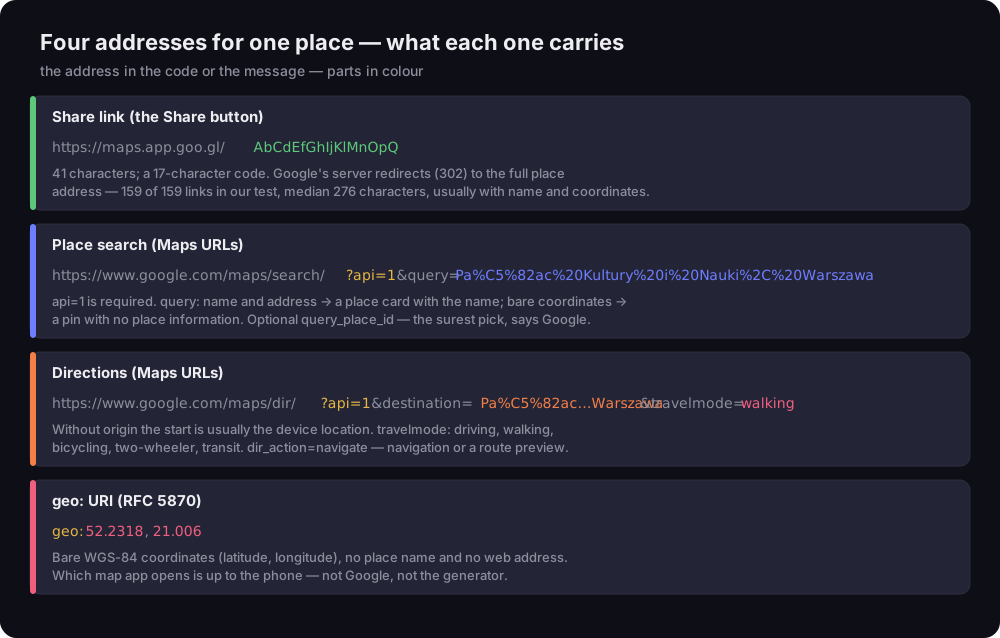
Four addresses for one place — what each one carries
share link, place search, directions and geo: — parts of each address labelled
Source: Google Maps URLs (read 21 Oct 2026), RFC 5870; DVN Links test, 21 Oct 2026
Figure description
Diagram of four addresses. Share link: https://maps.app.goo.gl/ plus a 17-character code, 41 characters in all; Google's server redirects it with a 302 to the full place address — 159 of 159 links in our test, median 276 characters, usually with name and coordinates. Place search: https://www.google.com/maps/search/?api=1&query= plus the encoded name Pałac Kultury i Nauki, Warszawa; api=1 is required, name and address give a place card, bare coordinates a pin with no place information, optional query_place_id. Directions: /maps/dir/?api=1&destination= and travelmode=walking; without origin the start is usually the device location; modes driving, walking, bicycling, two-wheeler, transit; dir_action=navigate. geo:52.2318,21.006 per RFC 5870 — bare WGS-84 coordinates with no name; the phone picks the map app.
In practice there are three ways to make a link point to a place rather than a spot:
- The Share link from a place card. In our test, 128 of 159
maps.app.goo.gllinks led to a/maps/place/address — a place card with a name. This is the easy route when you have the phone in hand. - A name and address in the
queryparameter. Google's recommended format isquery=PLACE_NAME,ADDRESS, for example "Pałac Kultury i Nauki, Warszawa". If the name exists more than once in town, add the street. - A place ID in
query_place_id. No doubt about which place you mean — but you have to look the ID up first, which is awkward without developer tools. For most people a name with an address is enough.
When are coordinates better? When the place has no name or address that would find it: a rear door, a gate to a car park, a pitch at an open-air fair. Then a bare pin is exactly what you want. Google also has Plus Codes for this — "a simple digital address" that, according to Maps Help, lets you "identify different entrances to the same building" (Google Maps Help, Plus Codes, read 21 Oct 2026). The example on that page: JJXX+HR8, Seattle.
One note for businesses: the place card with reviews and opening hours is your Google Business Profile. If you want reviews from that card rather than directions to it, you need a different link — see our piece on the Google review link.
Google Maps directions link: dir/?api=1 and travel mode
A Google Maps directions link starts with https://www.google.com/maps/dir/?api=1 plus a destination — the recipient sees the route from wherever they are. This is what people searching for a "google directions link" want: not the place, but the way to it. The Maps URLs documentation lists the parameters:
api=1— required in every Maps URL; without it the address is not guaranteed to work as described.destination— the end point: a name with an address, an address, or coordinates. Optionallydestination_place_id.origin— the start. Leave it out and Maps uses the "most relevant starting location, such as device location, if available". For an invitation or a business website that is what you want: everyone gets directions from where they are.travelmode—driving,walking,bicycling,two-wheelerortransit. Without it, "the Google Map shows one or more of the most relevant modes".dir_action=navigate— starts turn-by-turn navigation or a route preview, depending on whether the start point is known.waypoints— stops along the way: "up to three waypoints supported on mobile browsers, and a maximum of nine waypoints supported otherwise".
An example for guests walking from the metro:
1https://www.google.com/maps/dir/?api=1&destination=Pa%C5%82ac%20Kultury%20i%20Nauki%2C%20Warszawa&travelmode=walkingA business with a "How to find us" button can use the same address as a plain link — no embedded map, no Google Cloud account. If most visitors come by public transport, set travelmode=transit; if they drive, driving. Add dir_action=navigate with care: on a phone it starts navigation or a route preview straight away, which makes sense on a sign at a car park entrance but not on an invitation someone reads at home a week before the event.
Mind the encoding. The documentation says you "must encode the comma as %2C", spaces as %20 or +, and the pipe character used between waypoints as %7C. Browsers encode accented letters for you, but if you assemble the address by hand in a spreadsheet or a template, it is easy to slip. Why some characters in an address have to become percent codes is explained in our piece on the URL, and how to encode spaces, plus signs and accented letters in parameters — in our guide to the query string. The limit is 2,048 characters, so an ordinary destination is nowhere near it.
None of this needs an API key or an account. Google says plainly: "You don't need a Google API key to use Maps URLs", and the syntax is the same on every platform. On Android and iPhone the link opens the Google Maps app if it is installed; if not, Google Maps opens in the browser.
One thing we noticed while testing: a request with an iPhone browser's user agent and no Google cookies, sent from Poland, got a 302 to consent.google.com — the cookie consent page — on all three api=1 addresses we checked. Someone without the Maps app who has not used Google in that browser before will most likely see the consent screen first and the map second. That is not a broken link; it is the route Google sends a browser without stored consent through, at least from the EU country we tested from.
Google Maps QR code: a link, geo: or a short link
A Google Maps QR code can hold a link to a place, a link to directions or bare coordinates in geo: form — and that choice cannot be changed after printing. A QR code is a written-down address, not a pointer you can move later. Whatever is in it stays on the paper.
Our QR code generator gives you two routes. The Website type takes any of the addresses in this article: a share link, an api=1 search or a dir route. The Location type writes two numbers into the code — latitude and longitude — as geo:52.2318,21.006. That is the identifier defined in RFC 5870: coordinates in the WGS-84 reference system (RFC 5870, read 21 Oct 2026). It carries no place name and no web address.
What does a phone do with a geo: code? To be straight about it: we have not tested this on phones. The RFC defines the notation, not which app the camera opens — that is up to the operating system and the default map app. Google's documentation describes how Maps URLs behave, not geo: codes. If you want to be sure the recipient sees Google Maps and a place card, encode a link, not coordinates. For a code that has to work on every phone, print a proof and scan it with an iPhone and an Android phone.
The short link from the Share button comes with a history that people printing codes often ask about: Google wound down its goo.gl shortener — it has not taken new links for years, and links that showed no activity in late 2024 stopped working after 25 August 2025. Maps links are not affected. Already in its July 2024 announcement Google wrote: "Note that goo.gl links generated via Google apps (such as Maps sharing) will continue to function", and its 1 August 2025 update added that all other actively used links are preserved too (Google for Developers Blog, read 21 Oct 2026). The story of goo.gl itself, and what it teaches about depending on a shortener, is in our guide on how to shorten a link.
We checked it ourselves. We collected 159 public maps.app.goo.gl links from GitHub repositories and sent each one a single request without following the redirect — what a phone does at the first step.
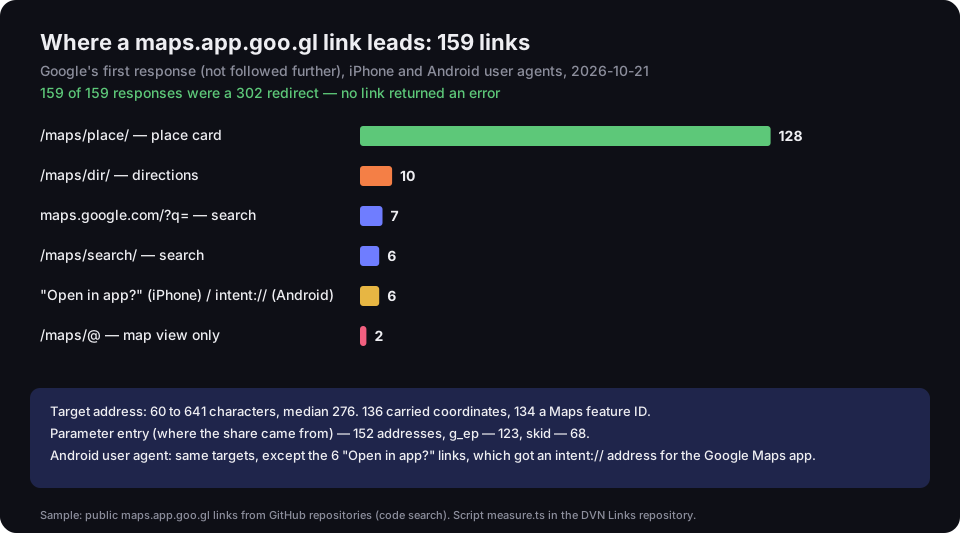
Where a maps.app.goo.gl link leads: 159 links
Google's first response, iPhone and Android user agents, 21 Oct 2026
Source: DVN Links test, 21 Oct 2026; sample — public links from GitHub code search; script measure.ts
Figure description
Bar chart. All 159 maps.app.goo.gl links answered with a 302 redirect. Targets: /maps/place/, place card — 128; /maps/dir/, directions — 10; maps.google.com/?q=, search — 7; /maps/search/ — 6; an Open in app? page on iPhone or an intent:// address on Android — 6; /maps/@, map view only — 2. Target address 60 to 641 characters, median 276. 136 addresses carried coordinates, 134 a Maps feature ID; parameter entry 152, g_ep 123, skid 68. With an Android user agent the targets were the same, except the 6 Open in app? links, which got an intent:// address for the Google Maps app.
What this tells you:
- None of the 159 links returned an error. Every one answered with a 302 redirect, as Google promised.
- The short link is only a wrapper. Behind it is a full address of 60 to 641 characters (median 276). 136 of the 159 carried coordinates, 134 a Maps feature ID, and 152 an
entryparameter that Google uses to mark where the share came from. - Six links behaved differently on phones. With an iPhone user agent they first went to an "Open in app?" page; with an Android user agent, to an
intent://address that Android uses to open the Google Maps app. We do not know what decides this. The other 153 got the same kind of address with an Android user agent as with an iPhone one. We compared a desktop user agent on the first 30 links only: 29 had the same path as with an iPhone one.
How much space a QR code with a Maps link needs
The longer the address in a QR code, the more modules it has and the bigger the print — a full place address needs twice the paper of a short link. We worked this out with the qrcode library our generator uses, at a 0.396 mm module (the smallest module GS1 specifies for codes read by phones) and with a four-module quiet zone around the code.
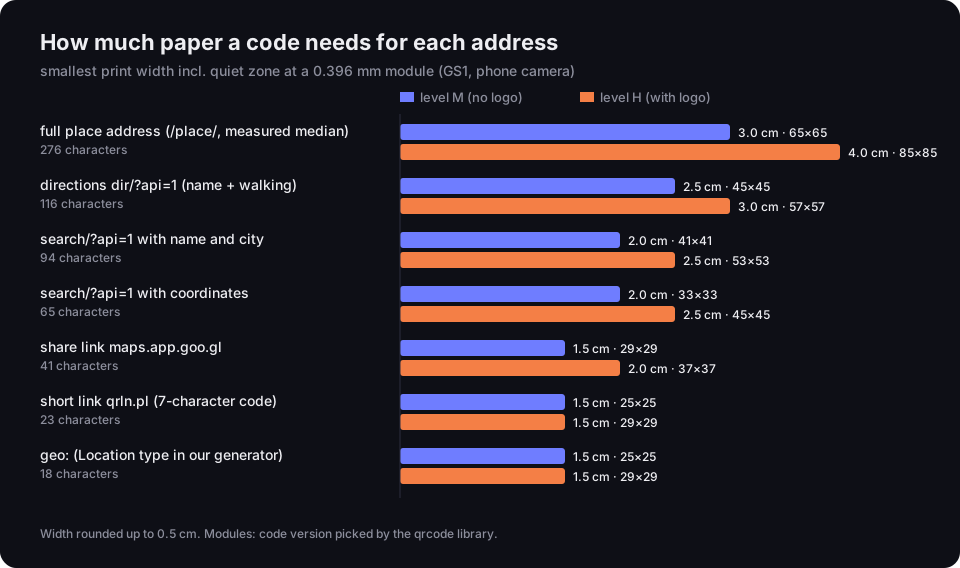
How much paper a code needs for each address
smallest print width incl. quiet zone, 0.396 mm module, levels M and H
Source: DVN Links calculation with the qrcode library, 21 Oct 2026; 0.396 mm module — GS1 General Specifications
Figure description
Bar chart of print widths. Full /place/ address at the measured median length, 276 characters: level M 3.0 cm, 65 by 65 modules; level H 4.0 cm, 85 by 85. Directions with name and walking mode, 116 characters: M 2.5 cm, 45 by 45; H 3.0 cm, 57 by 57. Search with name and city, 94 characters: M 2.0 cm, 41 by 41; H 2.5 cm, 53 by 53. Search with coordinates, 65 characters: M 2.0 cm, 33 by 33; H 2.5 cm, 45 by 45. Share link maps.app.goo.gl, 41 characters: M 1.5 cm, 29 by 29; H 2.0 cm, 37 by 37. Short link qrln.pl, 23 characters: M 1.5 cm, 25 by 25; H 1.5 cm, 29 by 29. geo:, 18 characters: M 1.5 cm, 25 by 25; H 1.5 cm, 29 by 29.
The longest option is the full /maps/place/… address you see in the browser bar after opening a place on a computer. At the median length from our test (276 characters) the code has 65×65 modules and needs 3 cm of width at level M, or 4 cm at level H, which we use when there is a logo in the middle. The same place as a share link is 29×29 modules and 1.5 cm. A dir/?api=1 route with a place name sits in between at 2.5 cm.
The practical takeaway: do not paste the address from the browser bar into a generator. Use the Share button, or build a short search or dir address with the name. On a poster it makes no difference; on a business card, a ticket or a sticker on a door, it does. How code size translates into scanning distance, and what else stops a code from reading, is covered in can't scan a QR code; the general rules are in our guide on how to make a QR code.
Without logging in, and on the Free plan, our generator puts the DVN Links logo in the middle of the code and the caption dvnlinks.pl under it, so it encodes at level H. The code is static: the address in it stays there for good, and the generator does not redirect anything along the way.
When the place changes: a short link on the invitation or the door
If a code with directions will hang for months, put a short link in it whose destination you can change in the dashboard — then a move does not mean a reprint. Every Google address described above is fixed in the code. The venue changes its entrance, the restaurant moves across the street, the organiser shifts the meeting point — and the printed code keeps leading to the old spot.
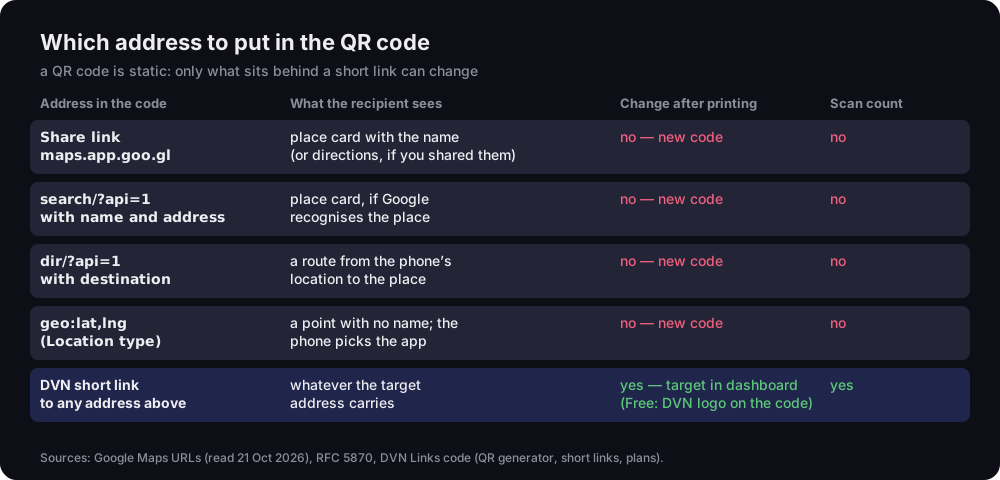
Which address to put in the QR code
what the recipient sees, whether you can change it after printing, whether you can count scans
Source: Google Maps URLs (read 21 Oct 2026), RFC 5870, DVN Links code (QR generator, short links, plans)
Figure description
Table of five options. Share link maps.app.goo.gl: place card with the name, or directions if you shared them; change after printing no, new code needed; scan count no. search/?api=1 with name and address: place card if Google recognises the place; change no; scans no. dir/?api=1 with destination: a route from the phone's location to the place; change no; scans no. geo:lat,lng, Location type: a point with no name, the phone picks the app; change no; scans no. DVN short link to any of the above: whatever the target address carries; change yes, target in the dashboard, on the Free plan the code carries the DVN logo; scan count yes.
A short link works like a relay: the code holds the shortener's address, such as qrln.pl/abc1234, and the shortener passes the visitor on — to a share link, a search or a route. You change the destination in the dashboard on every plan, Free included, and the printed code starts leading to the new place immediately. You also get a click count, so you know how many people scanned the code on the invitation or the door. How this looks on an invitation, where directions are one of several buttons, is shown in our wedding QR code guide.
A word on the Free plan: a link there does not expire, but the code carries the DVN logo and the account has 1,000 clicks a month. For an invitation without the logo, or a sticker meant to gather more traffic, you need a paid plan — the code there has no logo and you set the expiry date yourself. Plans are compared on the pricing page.
A short link also does something no single Google address can: send iPhones and Android phones to different maps. On Pro and above you can add a device rule to a smart link — iPhone to Apple Maps, Android to Google Maps, desktop to the browser version. Since iOS 18.4 Apple has unified map URLs such as https://maps.apple.com/directions?destination=… (Apple, Adopting unified Maps URLs, read 21 Oct 2026); on older system versions that format may not work, so check it on a phone before you print. Two caveats: we recognise the device from the browser's user agent, so an iPad whose Safari presents itself as a Mac falls under the desktop rule; and someone who has Google Maps on their iPhone and prefers it will still be sent to the Apple Maps address.
Live location sharing — what a link cannot do
A link and a QR code point to a fixed place; they cannot carry where you are right now. When people ask how to share a location, they often mean something else: letting another person see where they are now, on the way to a meeting. That is a separate Google account feature, Location Sharing. Google describes it as a feature "that helps you share your real-time location from devices with people you choose in a Google app or service", and notes that "the Location Sharing setting is off by default" (Google Account Help, Location Sharing, read 21 Oct 2026).
The difference matters for QR codes. A code on a door, a flyer or an invitation always points to the same place, wherever you happen to be. There is no such thing as a code that shows a person's current position — and that is a good thing, because a code printed once would share the location with everyone who scanned it. Live sharing is something you switch on in the app, for specific people and for a set time, and switch off when you choose.
So if you want someone to find you in a crowd or follow your journey, use Location Sharing in Maps. If you want someone to arrive at a particular place, send a link to the place or the route, as above.
Frequently asked questions
Open the place in Google Maps, tap Share and copy the maps.app.goo.gl link. Paste it into the QR code generator as the Website type and download the code. Instead of the share link you can use https://www.google.com/maps/search/?api=1&query= with the place's name and address. Before printing a run, print a proof and scan it with two phones.
Plan the route in Maps and tap Share, or build https://www.google.com/maps/dir/?api=1&destination= with the destination's name and address. Without origin, every recipient gets directions from their own location, if their phone shares it. Set the mode with travelmode, for example walking or transit.
Yes. Google wound down the goo.gl shortener and switched off unused links, but said that links created in Google apps, such as Maps sharing, will keep working. In our test on 21 October 2026, all 159 maps.app.goo.gl links we checked answered with a redirect to Maps.
A location code (geo:) holds only coordinates — no place name, no opening hours, no reviews — and which map app opens depends on the phone. A code with a Google Maps link opens the place card or the route in the Maps app if it is installed, or in the browser. For a business, a venue or a restaurant, pick the link; coordinates make sense for a spot with no name or address.
Turn on Location Sharing in the Google Maps app and choose who can see where you are. It is a Google account feature and is off by default. A place link or a QR code cannot do this — they always point to a fixed place.
Printing directions on an invitation, a flyer or a door? Give the code a short link — if the place changes, you fix it in the dashboard, not at the printer. Create an account and see how many people scan your code.