How to shorten a link without losing your click statistics
How to shorten a link in a minute, why a link shortener should redirect with 302 rather than 301, where to add UTM parameters and what the goo.gl shutdown teaches.
How to shorten a link? You paste a long address into a shortener, pick a domain and, if you like, a readable alias, and you get a short address that redirects to the original. It takes a minute. What matters more than the shortening itself is the code the shortener redirects with: it decides whether every click reaches your statistics and whether you can change the target of a link you have already printed. The HTTP specification allows a browser to remember a permanent redirect, a 301 (RFC 9110, §15.4.2), so later clicks bypass the shortener; DVN Links answers with a 302.
How to shorten a link in a minute
Shortening a link comes down to three decisions: the destination address, the domain and the alias. The shortener does the rest. In DVN Links it works like this:
- Create an account and log in to the dashboard.
- Start a new link and paste the full destination address, including
https://. For a campaign, paste the address with UTM parameters already added; the section on statistics explains the alternative. - Choose a domain. The list depends on your plan: the free plan uses qrln.pl, Starter adds dvnlinks.pl, and from Pro upwards you also get the shortest, dvn.dev.
- Optionally enter an alias, your own ending instead of a random code. Aliases are available from the Starter plan; the free plan gives you a random code.
- Confirm and copy the short address. A QR code is created for every link at the same time.
It works the same way for a web page, a form, a file or a product in a shop. The shortener accepts http and https addresses and sends everyone who clicks the short address there; it changes the address only to append UTM parameters you set on the link.
Copy the destination address from the browser bar rather than retyping it: the shortener stores exactly what you paste, typos included.
An alias may contain only unaccented letters (a–z, A–Z) and digits, with no spaces or hyphens, and cannot start with a zero or consist of digits alone. Its minimum length depends on the plan, and words such as admin, login and qr are reserved. Write aliases in lower case: the shortener compares codes character by character, so dvn.dev/Promo and dvn.dev/promo are different links, and someone copying from paper will rarely guess which letter was a capital.
Two limits are worth knowing. On the free plan a link expires after 30 days. Plans also have a monthly click limit; past it, links keep working, but clicks over the limit are hidden in statistics until you move to a higher plan.
What happens when someone clicks a shortened link
A short link is an HTTP redirect, and the redirect code decides whether the shortener sees every click. The browser asks the shortener's server for dvn.dev/promo, the server records the click and replies with a 3xx code and the destination address, and the browser moves straight on to that address.
The click, step by step
In DVN Links the exchange has five steps (as of 16 October 2026). DNS turns the domain (qrln.pl, dvnlinks.pl or dvn.dev) into the address of our server, which looks the link up by code and domain: it must be active and not expired. If there is no such link or it is switched off, the server answers with a 302 to the home page; if it has expired, with a 302 to a page saying so. If the owner has gone past the plan's monthly click limit, it still redirects to the destination and records the click as hidden in statistics; on the free plan, from four times the limit, the visitor confirms on our interstitial page. Otherwise it records the click (time, device, system, browser, country, referrer, UTM parameters; the IP address only as a hash) and, without waiting for the write to finish, answers with a 302 and the destination address. Last, the browser opens the destination page, and only there can the Google Analytics tag count the visit.
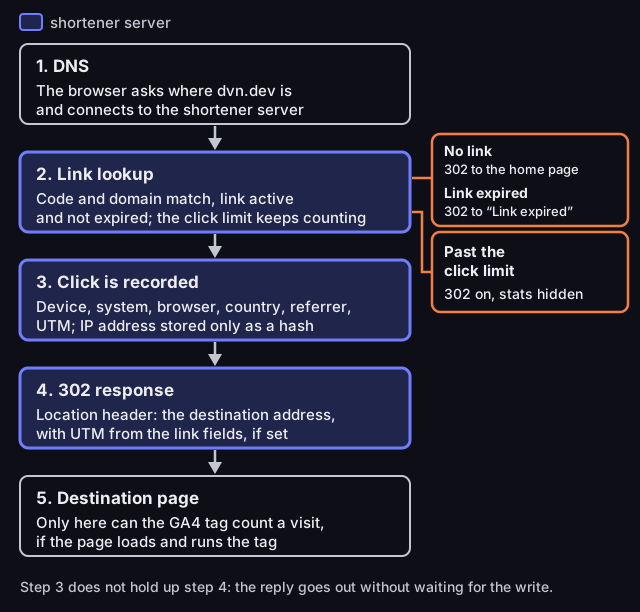
What happens when someone clicks a short link
five steps from click to destination page, with two branches
Source: DVN Links redirect code, as of 16 Oct 2026
Figure description
Diagram in five steps. 1. DNS: the browser asks where dvn.dev is and connects to the shortener server. 2. Link lookup: code and domain match, the link is active and not expired; the click limit keeps counting. Branches: no link gets a 302 to the home page; an expired link gets a 302 to the “Link expired” page; past the click limit, a 302 to the destination with the click hidden in statistics. 3. Click is recorded: device, system, browser, country, referrer, UTM; the IP address is stored only as a hash. 4. A 302 response with a Location header, the destination address with UTM from the link fields if they are set. 5. Destination page: only here can the GA4 tag count a visit, if the page loads. Step 3 does not hold up step 4.
The shortener therefore also counts people who close the tab while the destination loads, and recording statistics does not slow the redirect down.
There are several redirect codes, and the HTTP specification (RFC 9110) describes them like this:
- 301 – moved permanently. The response is "heuristically cacheable" (§15.4.2): a browser may remember it even if the server gave no caching instructions.
- 302 – found (temporary). The client "ought to continue to use the target URI for future requests" (§15.4.3), so on the next click it asks the original address again, here the shortener.
- 307 and 308 are the counterparts of 302 and 301 that forbid the browser from changing the request method; 308 is also "heuristically cacheable" (§15.4.8–9). For an ordinary click on a link, 307 therefore behaves like 302 and 308 like 301.
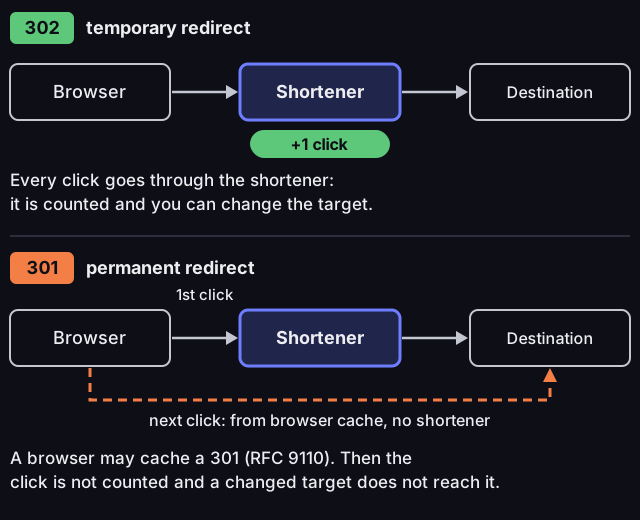
Redirect 302 vs 301 in a link shortener
Source: RFC 9110 §15.4.2–3 (IETF, 2022); DVN Links redirect code, as of 13 Oct 2026
Figure description
Diagram with two lanes: browser, shortener, destination page. The 302 lane, temporary redirect: every click goes through the shortener, which adds one click; the click is counted and the link target can be changed. The 301 lane, permanent redirect: the first click goes through the shortener, but the browser may cache the 301 response (RFC 9110), so the next click goes from the browser cache straight to the destination page, bypassing the shortener; that click is not counted and a change of target does not reach that browser.
For a shortener this has a simple consequence. If it answers with a 301, a browser that has clicked the link once may go straight to the target on the next click. The shortener never sees that click, so it never reaches the statistics. Worse, if you change the link's target, that browser keeps going to the old address. "May" matters here: the specification permits caching a 301 but does not require it, so the problem is easy to miss: everything works in testing, but repeat clicks are missing from the statistics.
DVN Links redirects every short link with a 302, including an address where no link exists. The trade-off lies in how Google treats redirects: according to the Google Search Central documentation, 301 and 308 redirects are a signal to the search engine about which address is canonical, while 302 and 307 are not. For a short link this does not matter, because it is not meant to appear in search results: it is the destination page that ranks, not the address leading to it.
Our own rule: a permanent page move gets a 301 or 308, because browsers and Google should remember the new address (as with changed article addresses on this blog); an address that should count clicks and be repointable gets a 302 or 307.
Shortened links, statistics and UTM
A shortener counts clicks on a link, Google Analytics 4 counts visits to a page, and these are two different measurements; UTM parameters connect them only if they reach the destination page. The shortener records the click at the redirect, before the destination page loads; GA4 sees a visit only once the page has loaded and the tag has run. The numbers need not match, and that is not a fault in either tool.
The dashboard shows clicks over time and breaks them down by device, operating system, browser, country, referring site and UTM campaign (source / medium / campaign). It counts total clicks, not unique people. How long history is kept depends on the plan (details on the features and pricing pages). There is no date filter: the chart covers at most the last 90 days, while the breakdowns cover all the history your plan keeps. To compare campaigns from two months, tell them apart by the name in utm_campaign, not by date.
You can pass UTM parameters to the destination page in two ways. On every plan, add them to the destination address before you shorten it: DVN Links redirects to the stored address, so utm_source, utm_medium and utm_campaign arrive intact. From the Starter plan (pricing) you can also enter the source, medium and campaign in the link details in the dashboard or in the utm object in the API. On every redirect DVN Links appends them to the destination address, and if the same parameter is already in the address, the value from the field wins. Changing the fields applies to subsequent clicks with the same short address.
Parameters appended to the short address (dvn.dev/promo?utm_source=…) work differently: the dashboard records them at click time and shows them under campaigns, but does not pass them to the destination page, so GA4 will not see them.
Two things in the GA4 documentation on URL parameters most often skew reports: "Parameter values are case sensitive", so Newsletter and newsletter are two different sources in a report, and missing parameters end up as (not set). We cover naming conventions and reading campaigns in GA4 in our article on UTM parameters.
UTM lengthens the destination address, not the short link
The short link does not carry UTM parameters; they stay in the destination address or in the link fields. In our example an article address with three UTM parameters is 117 characters and without them 53. The short link is 21 characters with an alias and 23 with the seven-character random code that DVN Links assigns on the Free and Starter plans when you enter no alias (higher plans get a shorter one).
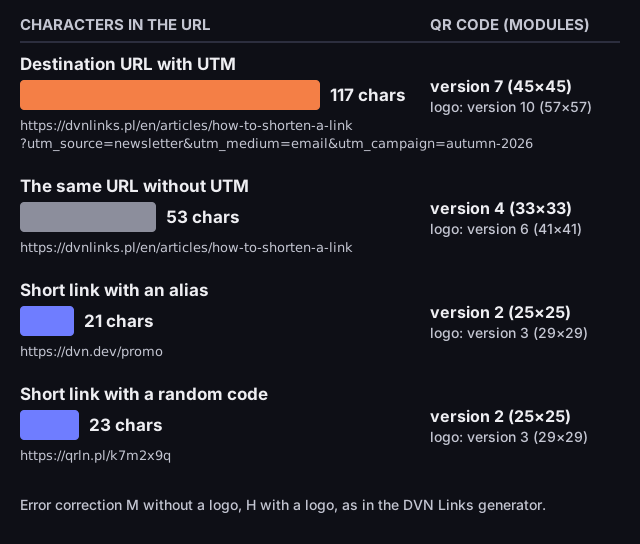
URL length and QR code size
characters in the address and QR code version (modules per side)
Source: our own calculation, qrcode library 1.5.4 (the one the DVN Links generator uses), error correction M without a logo and H with a logo, 13 Oct 2026
Figure description
Bar chart with four addresses. Destination address with UTM, https://dvnlinks.pl/en/articles/how-to-shorten-a-link?utm_source=newsletter&utm_medium=email&utm_campaign=autumn-2026: 117 characters, QR code version 7 (45 by 45 modules), version 10 (57 by 57) with a logo. The same address without UTM: 53 characters, version 4 (33 by 33), version 6 (41 by 41) with a logo. Short link with an alias, https://dvn.dev/promo: 21 characters, version 2 (25 by 25), version 3 (29 by 29) with a logo. Short link with a random code, https://qrln.pl/k7m2x9q: 23 characters, version 2 (25 by 25), version 3 (29 by 29) with a logo. Error correction M without a logo, H with a logo.
Length matters wherever an address has to be encoded. A QR code holding the full address with UTM came out as version 7 in our calculation, 45 by 45 modules, against version 2, 25 by 25, for the short link. At the same print size, counting the mandatory four-module margin, the modules of the short-link code are larger by a factor of about 1.6 (53 against 33 modules across) and easier to scan. In the DVN Links generator a logo raises the error-correction level and enlarges both codes, to versions 10 and 3, but the difference remains. A code made from a short link also counts scans and lets you change the target later.
Is a URL shortener safe
A shortener is not dangerous in itself, but it hides the destination domain, which tells the recipient most about where they will land. Before the click they see only the shortener's domain.
As a recipient you therefore have one rule: after clicking, check the address in the browser bar before you type anything in. Logos and page design are easy to copy; the address bar shows which site the browser has actually opened.
The scale of abuse is smaller than the reputation of shorteners suggests. Maggi and colleagues analysed 24.9 million short URLs from 622 services, collected in 2010–2012, and concluded that "only a relatively small fraction of users ever encountered malicious short URLs" (Maggi et al., WWW 2013). The data is more than a decade old: a reference point, not a picture of today.
For the sender, safe shortening comes down to a few habits. Use a readable alias that says what is behind the link. State the shortener's domain in the same message. Choose a shortener that checks destination addresses, because you share its domain with every other sender. When you create a link, DVN Links checks the destination with a content filter and a query against a list of known threats, and rejects an address flagged as dangerous. That check applies at the moment the link is created: it does not guarantee that the destination page will not change later.
Checklist before you send
A minute before sending is enough to catch most mishaps. Six points are for you as the sender, two you can pass on to recipients.
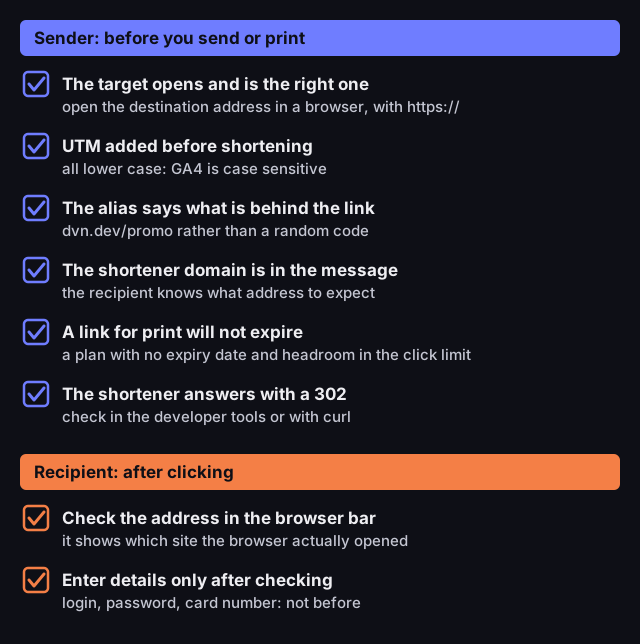
Safe link shortening: a checklist
six points for the sender, two for the recipient
Source: Google Analytics documentation on URL parameters; DVN Links code, as of 13 Oct 2026
Figure description
Checklist. Sender, before sending or printing: 1. the target opens and is the right one, so open the destination address in a browser, with https; 2. UTM added before shortening, all in lower case because GA4 is case sensitive; 3. the alias says what is behind the link, for example dvn.dev/promo rather than a random code; 4. the shortener's domain is in the message so the recipient knows what address to expect; 5. a link for print will not expire, so use a plan with no expiry date and keep headroom in the click limit; 6. the shortener answers with a 302, which you can check in the developer tools or with curl. Recipient, after clicking: 7. check the address in the browser bar, which shows which site the browser actually opened; 8. enter login, password or card details only after checking the address.
You can check point six with the curl command from the section on choosing a shortener. In DVN Links such a call counts as a click and uses one of the plan's monthly clicks: harmless once, but a script that checks links every few minutes will distort the statistics.
What if a shortener disappears: the goo.gl lesson
A short link works only as long as the service behind it does. Google's goo.gl showed that even the largest operator can switch one off, over several years and in stages.
Google announced the first stage on 30 March 2018 in a post about the move to Firebase Dynamic Links (Google Developers Blog, 30 Mar 2018). From 13 April 2018, anonymous and new users could no longer create links in the goo.gl console; from 30 May 2018 the same applied to new projects using the API; and on 30 March 2019 Google shut down the console and the API. No new goo.gl links have been possible since.
The second stage concerned links that already existed. On 18 July 2024 Google announced that goo.gl links would stop responding after 25 August 2025 (Google Developers Blog, 18 Jul 2024, updated 1 Aug 2025). From 23 August 2024 some links showed a warning page, and in late 2024 links with no activity began redirecting to a deactivation notice (Google gives no exact day). On 1 August 2025 the plan changed: actively used links stay and keep working, and the shutdown on 25 August 2025 was to cover inactive links only.
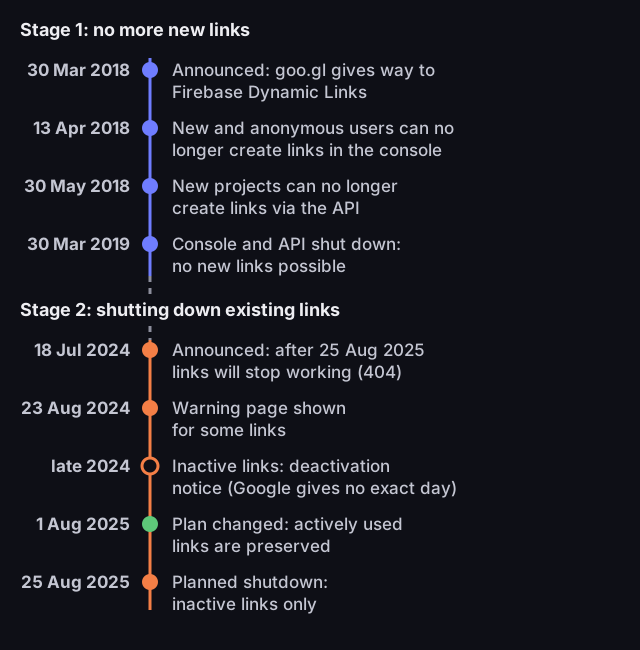
The goo.gl shutdown, 2018–2025
dates from Google announcements
Source: Google Developers Blog, posts of 30 Mar 2018 and 18 Jul 2024 (updated 1 Aug 2025)
Figure description
Timeline in two stages. Stage 1, no more new links: 30 Mar 2018 announcement that goo.gl is giving way to Firebase Dynamic Links; 13 Apr 2018 new and anonymous users can no longer create links in the console; 30 May 2018 new projects can no longer create links via the API; 30 Mar 2019 console and API shut down, no new links possible. Stage 2, shutting down existing links: 18 Jul 2024 announcement that links will stop working (404) after 25 Aug 2025; 23 Aug 2024 warning page for some links; late 2024 links without activity redirect to a deactivation notice, Google gives no exact day; 1 Aug 2025 plan changed, actively used links are preserved; 25 Aug 2025 planned shutdown, limited to inactive links.
The lesson applies above all to links you cannot swap out: on a leaflet, packaging or in a QR code. Before printing one, check who runs the shortener and how it earns its money, what happens to links when your plan ends or they expire, and whether you can change the target when the destination page moves.
For DVN Links: links run on domains we operate (qrln.pl, dvnlinks.pl and dvn.dev), so they depend on us, as goo.gl links depended on Google. On the free plan a link expires after 30 days, so for print you need a paid plan, where a link has no expiry date until you set one. You can change the target of any link in the dashboard, and thanks to the 302 the change applies to every subsequent click. From the Starter plan you can also export your links through the API.
How to choose a link shortener
A good shortener is recognised by how it redirects and what happens to your links in a few years, not by the length of the short address. Prices and limits change often, so the table leaves them out; compare them on the providers' own sites.
|
Criterion |
What to look for |
Why |
|---|---|---|
|
Redirect code |
302 or 307 |
A browser may cache 301 and 308, so repeat clicks vanish from the statistics and a changed target never reaches that browser |
|
Changing the target |
Whether you can edit the target after creating the link |
You cannot swap out a printed link, only change where it leads |
|
Statistics |
What is counted and how long history is kept |
A shortener sees clicks that GA4 does not, and the other way round |
|
Operator and fate of links |
Who runs the service, when links expire, what happens when a plan ends |
goo.gl was wound down from 2018 to 2025 |
|
Target checking |
Whether the shortener rejects addresses on threat lists |
You share the domain with other senders |
|
Domain |
Short and recognisable to your audience |
It is all the recipient sees before clicking |
|
API |
Whether you can create and fetch links programmatically |
With dozens of links, clicking through a dashboard by hand invites mistakes |
You can check any shortener's redirect code yourself. In the browser, open the developer tools, go to the "Network" tab and click the short link: the first request shows the code. From the command line, one command prints just the response code without following the redirect:
1curl -s -o /dev/null -w '%{http_code}\n' https://dvn.dev/yourcodeA 302 means every click passes through the shortener; a 301 or 308 means browsers may cache it and bypass the shortener on later visits.
An API matters when there are many links. In DVN Links it is available from the Starter plan (pricing): you authenticate with an API key, create links with a destination, domain, alias and utm object, and fetch your list in pages of at most 100 per request. Plan limits apply as in the dashboard.
Frequently asked questions
What is bit.ly?
bit.ly is the domain of the Bitly shortener, one of many services that work as this article describes. You can check which code any link uses with the command in the previous section.
Does a shortened link expire?
It depends on the service and the plan. In DVN Links a link on the free plan expires after 30 days; on paid plans it does not expire unless you set a date yourself. When the plan's monthly click limit is used up, links keep working; clicks over the limit show in statistics after you move to a higher plan. An expired link leads to a DVN Links page saying that the link has expired.
Can you change the target of a shortened link?
In DVN Links, yes, in the link details in the dashboard. The change takes effect from the next click, because a 302 redirect is not remembered by the browser. With a shortener that answers with a 301, browsers that have already clicked the link once may keep going to the old address.
301 or 302 for a shortened link?
302 (or 307). A short link should count clicks and be repointable to another target, and with a 302 the browser returns to the shortener every time. Keep 301 and 308 for permanent page moves.
Why does the shortener show a different click count from GA4?
They measure different things. The shortener counts requests at the redirect; GA4 counts visits where the page loaded and ran the tag. A tab closed before loading is seen only by the shortener, a visit that skips the short link only by GA4.
Does Google's link shortener (goo.gl) still work?
New goo.gl links cannot be created since 30 March 2019. According to Google's update of 1 August 2025, actively used links keep working, and the shutdown on 25 August 2025 was to cover inactive ones only.
Already have a short link? Turn it into a QR code in the QR generator: the code then points to the short link, so you can change the target later without printing a new code.