Query string: URL parameters, encoding and redirects
A query string is the part of a URL after the ?. How parameters are built and encoded, why + becomes a space, and what survives a redirect.
A query string is the part of a URL from the ? to the #, or to the end of the address. It carries data for the page — a site search term, a sort order, a page number — and for analytics: UTM parameters, an ad click identifier. In https://shop.example.com/search?q=jacket&sort=price the query string is q=jacket&sort=price, two URL parameters. The overall structure of an address is covered in our article on what a URL is. This one goes deeper: how a query string is encoded, what different languages make of it, what is left of it after a redirect and how it behaves on a short link. Every case shown in the figures we measured ourselves on 21 October 2026 — on the real code of our link shortener, in two browsers and on nine public websites.
Query string — what it is made of
A query string starts at the first question mark in the URL and ends at the hash or the end of the address. The URI specification defines it like this: „The query component is indicated by the first question mark ("?") character and terminated by a number sign ("#") character or by the end of the URI” (RFC 3986, §3.4). The same section allows a slash and a further question mark inside it as plain data — so ?return=/basket?step=2 is a valid address.
The key=value pairs joined by & are not required by that specification. The RFC only mentions them as a habit: query components often carry information „in the form of "key=value" pairs”. The pair format is defined by the WHATWG URL Standard as application/x-www-form-urlencoded — a way to encode „a list of tuples, each consisting of a name and a value” (WHATWG URL Standard). It is the format of HTML forms, which over time became the default way of writing parameters in any URL. Google recommends the same in its guidelines for site owners: = between key and value, & between pairs, and several values for one key separated by, for example, a comma (Google Search Central, URL structure).
In practice a query string is made of four kinds of element:
key=valuepairs —sort=price;- repeated keys —
tag=a&tag=b, two values of the same parameter; - keys without a value —
flagorflag=; many servers treat these as two different things; - encoded characters —
%20,%2B,+— more on these in the next section.
Why are they called "GET parameters"? Because of forms. An HTML form sent with the GET method has no request body — the browser turns its fields into name–value pairs and puts them in the address as the query string. The HTML specification calls this step „Mutate action URL”: the pairs go through the application/x-www-form-urlencoded serializer and the result is set as the query of the form's address (HTML Living Standard, form submission). "Set" is meant literally: a query string already written into the action attribute of a GET form is replaced by the form's fields, not extended. To carry a fixed parameter through an on-site search, add it as a hidden field, not in action.
The fragment after # is not part of the query string and never reaches the server. The server gets the path and the query string; the fragment stays in the browser, which uses it to scroll the page or hands it to scripts. That is why a parameter written after the hash — …/jackets#reviews?utm_source=email — never reaches the server or your analytics.
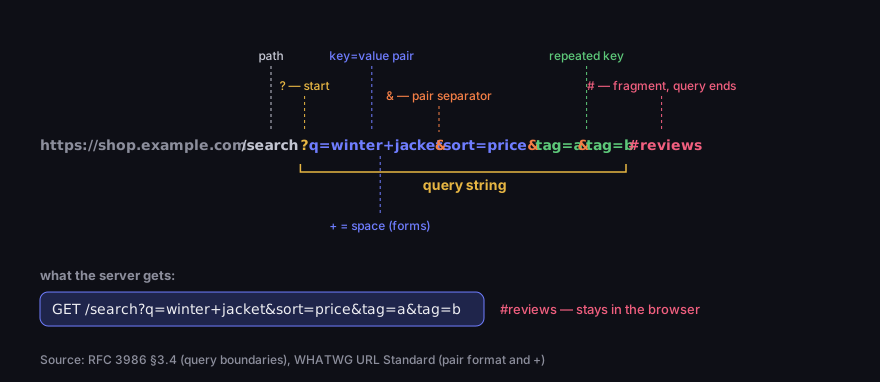
Anatomy of a query string
from the question mark to the hash; the fragment stays in the browser
Source: RFC 3986 §3.4, WHATWG URL Standard; read 21 Oct 2026
Figure description
The URL https://shop.example.com/search?q=winter+jacket&sort=price&tag=a&tag=b#reviews, labelled. The question mark opens the query string and the hash closes it. Inside are four key=value pairs joined by &: q=winter+jacket, where the plus stands for a space, sort=price and tag twice, a repeated key. Below: the server receives GET /search?q=winter+jacket&sort=price&tag=a&tag=b, while #reviews stays in the browser.
URL parameter encoding: spaces, plus signs and non-ASCII letters
Not every character may appear in a query string as it is. Characters with a special meaning in a URL (&, =, #, ?) and everything outside basic ASCII are written as % followed by two hexadecimal digits. A letter such as é becomes more than one such group, because it is first turned into UTF-8 bytes — é is %C3%A9. Percent-encoding in full, and Punycode for domain names, are covered in our article on what a URL is; here we stay with the one trap that breaks the most parameters: the space and the plus sign.
A space can be written two ways: %20 or +. The plus as a space comes from the form format. The parser in the WHATWG URL Standard does it explicitly: „Replace any 0x2B (+) in name and value with 0x20 (SP)” (WHATWG URL Standard, parsing). The other direction is the same — the browser's URLSearchParams object „will encode U+0020 SPACE as U+002B (+)” (WHATWG, URLSearchParams). The specification makes no secret of its opinion: the application/x-www-form-urlencoded format is „in many ways an aberrant monstrosity”, the product of years of accidents and compromises rather than good design.
The consequence: if a value must contain a literal plus, encode it as %2B. Otherwise the parser turns it into a space. MDN warns about this using base64 strings, which often contain +: „The URLSearchParams constructor interprets plus signs ( + ) as spaces, which might cause problems” (MDN, URLSearchParams). A signature sig=ab+cd reaches the script as ab cd and verification fails. A phone number tel=+353… loses its plus. In our measurement every parser read n=1%2B1 correctly as 1+1 — because the plus was encoded.
A practical rule: build query strings with a function that encodes for you — URLSearchParams in JavaScript, http_build_query in PHP, urlencode in Python — rather than by gluing text together. A function will not forget the & in a product name or the plus in a phone number.
Repeated keys and arrays
Different servers read the same query string differently — and this is not theory. We ran one string through three parsers — Python with two settings: q=a+b&q=c%20d&tag[]=x&tag[]=y&flag&n=1%2B1. The figure below shows the result.
For the repeated key q, URLSearchParams.get returns the first value, a b — as the specification requires, which says to return „the value of the first tuple whose name is name” (WHATWG, get). Only getAll returns every value. PHP's parse_str (and $_GET) keeps the last one, c d. Python's parse_qs returns a list of both. One URL, three languages, three different answers to "what is q?".
Brackets in a name are a PHP convention: from tag[]=x&tag[]=y PHP builds an array called tag. To JavaScript and Python it is simply a key named tag[], brackets included. A key without a value, flag, comes out of URLSearchParams and PHP as an empty string, while Python's parse_qs drops it by default — it only appears with keep_blank_values=True.
If you design the parameters of your own site, a simple rule avoids these differences: each key appears once, and several values are separated by commas — colour=black,navy rather than colour=black&colour=navy. Google gives the comma as an example of a character that does not clash with URL syntax. Every parser then reads a single value, and you split it into a list yourself, in one place. Replace keys without a value with an explicit =1 or =yes — every language reads flag=1 the same way.
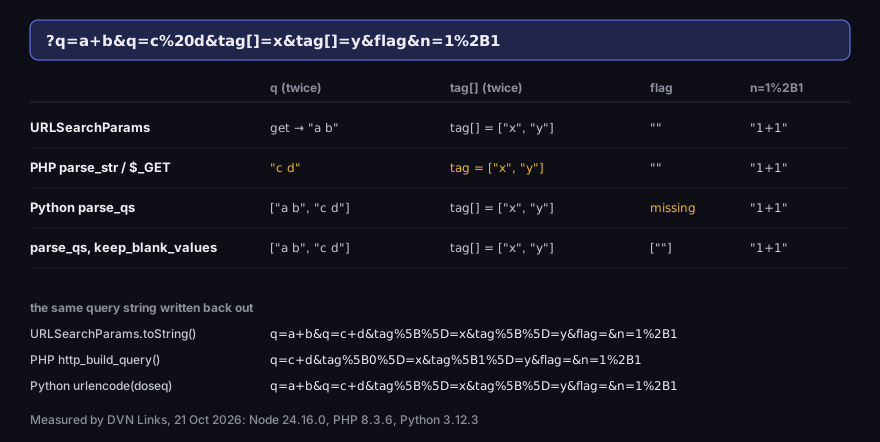
One query string, four readings
q=a+b&q=c%20d&tag[]=x&tag[]=y&flag&n=1%2B1 — Node 24, PHP 8.3, Python 3.12
Source: DVN Links measurement, 21 Oct 2026 (Node 24.16, PHP 8.3.6, Python 3.12.3)
Figure description
Table from our measurement. URLSearchParams: get('q') returns a b, the key tag[] has values x and y, flag is an empty string, n is 1+1. PHP parse_str: q is c d, the last value, tag is an array x, y, flag an empty string, n 1+1. Python parse_qs: q is a list of a b and c d, tag[] a list x, y, flag missing, n 1+1. With keep_blank_values flag is a list holding an empty string. Written back out: URLSearchParams gives q=a+b&q=c+d&tag%5B%5D=x&tag%5B%5D=y&flag=&n=1%2B1, PHP q=c+d&tag%5B0%5D=x&tag%5B1%5D=y&flag=&n=1%2B1, Python the same as URLSearchParams.
The lower part of the figure shows a second problem: writing back out. Any library that reads a query string and writes it out again does so its own way. URLSearchParams turns %20 into +, brackets into %5B%5D and flag into flag=. PHP loses the first value of q and numbers the array. For most sites this makes no difference, but a cryptographically signed URL (for example a link to a cloud file with a signature in a parameter) stops working after such a rewrite. If your code only adds a parameter, do not rebuild the whole query string while doing it.
In JavaScript, reading and building look like this:
1const url = new URL('https://shop.example.com/search?q=winter+jacket&tag=a&tag=b')2url.searchParams.get('q') // 'winter jacket' — the plus read as a space3url.searchParams.getAll('tag') // ['a', 'b']4url.searchParams.set('sort', 'price') // adds or replaces a single key5url.toString() // ...?q=winter+jacket&tag=a&tag=b&sort=priceQuery string and redirects: what gets through and what is lost
On a redirect the browser carries the fragment over by itself, but not the query string. Parameters survive only if the server that redirects writes them into the Location header. This is the most common reason UTM tags and click identifiers disappear: a site moves visitors from http:// to https://, or from the bare domain to www, and drops everything after the question mark on the way.
The rule for the fragment is written into the HTTP specification. If Location has no fragment of its own, the browser „MUST process the redirection as if the value inherits the fragment component” — the redirect inherits the original address's fragment (RFC 9110, §10.2.2). The section says nothing of the kind about the query. We tested it in Chromium 145 and Firefox 146: a local server answered 301 from /stara to /nowa ("old" and "new"), and the browser opened /stara?utm_source=test#opinie.
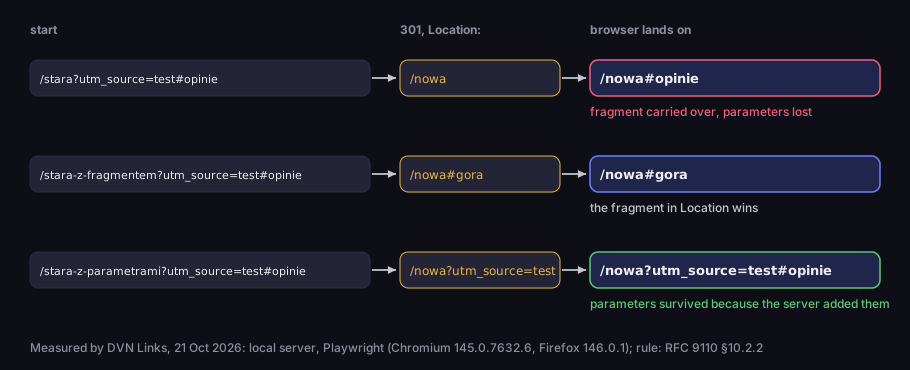
What survives a 301 redirect
Chromium 145 and Firefox 146 — identical result
Source: DVN Links measurement (local server, Playwright), 21 Oct 2026; rule: RFC 9110 §10.2.2
Figure description
Three cases, always starting from /stara?utm_source=test#opinie. First: the server answers 301 with Location: /nowa, the browser lands on /nowa#opinie — fragment carried over, parameters lost. Second: Location: /nowa#gora, the browser lands on /nowa#gora — the fragment in Location wins. Third: Location: /nowa?utm_source=test, the browser lands on /nowa?utm_source=test#opinie — the parameters survived because the server added them.
Both browsers behaved the same way: the fragment came through, the parameters were lost unless the server added them to Location itself. When Location has its own fragment, that one wins.
What does this look like on real sites? We opened nine public websites as http://domain/?utm_source=dvn-test&gclid=test and followed the redirects one step at a time. On six the parameters reached the final page; on three they were lost — on onet.pl at the very first hop to https://www., on wikipedia.org only at the third, and on europa.eu at the redirect to the language selection page. This is one day's measurement from one location: sites change their rules, and some answer a browser differently from a script.
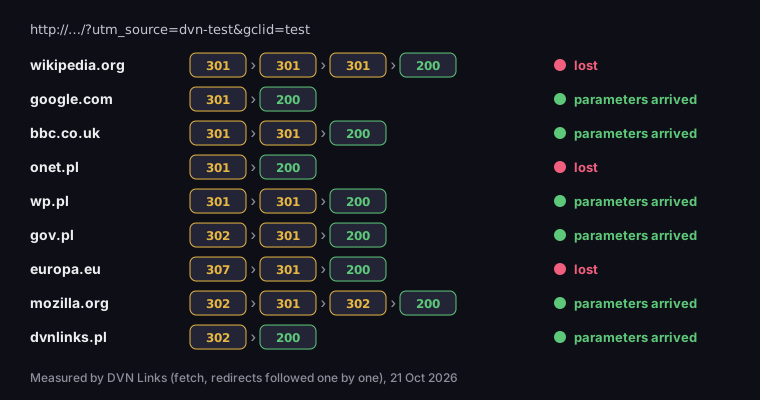
Do parameters survive the redirect from http://?
9 sites, http://domain/?utm_source=dvn-test&gclid=test
Source: DVN Links measurement (fetch, hop by hop), 21 Oct 2026
Figure description
Response codes in order. wikipedia.org: 301, 301, 301, 200 — parameters lost. google.com: 301, 200 — arrived. bbc.co.uk: 301, 301, 200 — arrived. onet.pl: 301, 200 — lost. wp.pl: 301, 301, 200 — arrived. gov.pl: 302, 301, 200 — arrived. europa.eu: 307, 301, 200 — lost. mozilla.org: 302, 301, 302, 200 — arrived. dvnlinks.pl: 302, 200 — arrived. Six of nine in total.
You can check your own site without tools: type its address with ?utm_source=test added and look at the address bar once the page has loaded. If the parameter is gone, one of the hops dropped it — but the address bar will not tell you which. curl will, printing the status code and Location header of every hop separately:
1curl -sIL "http://yourdomain.com/?utm_source=test&gclid=test" | grep -iE "^HTTP|^location"Each location: line is one hop. Look for the first one without utm_source=test — that is the rule to fix. It usually lives in the server or CDN configuration (the redirect to https:// or to www) and rewrites the address to a fixed value, without the part after the question mark. Check inner pages too, not only the home page: ads and QR codes rarely point at the home page, and rules for paths often differ from rules for the domain. If your site redirects in JavaScript, curl will not see it — then the browser's address bar is all you have.
How to set up a domain redirect that keeps parameters, and how 301, 302, 307 and 308 differ, is covered in our article on HTTP 302 vs 301. What a lost parameter means for Google Ads is explained in the article on the gclid.
Parameters on a short link — ten measured cases
A DVN Links short link forwards the click's query string to the destination by default. If someone opens qrln.pl/offer?utm_source=instagram, the shortener redirects them with a 302 to the destination with utm_source=instagram added. This works on every plan. In your account settings you choose whether new links forward parameters, and you can change it on each link — the option is called "Pass link parameters (UTM, gclid) on to the destination". Links created before the option existed forward them too. How a shortener works in general, and why it uses 302, is covered in our guide on how to shorten a link.
We measured the mechanics on the function that computes the redirect address in our code. Ten cases, results in the figure:
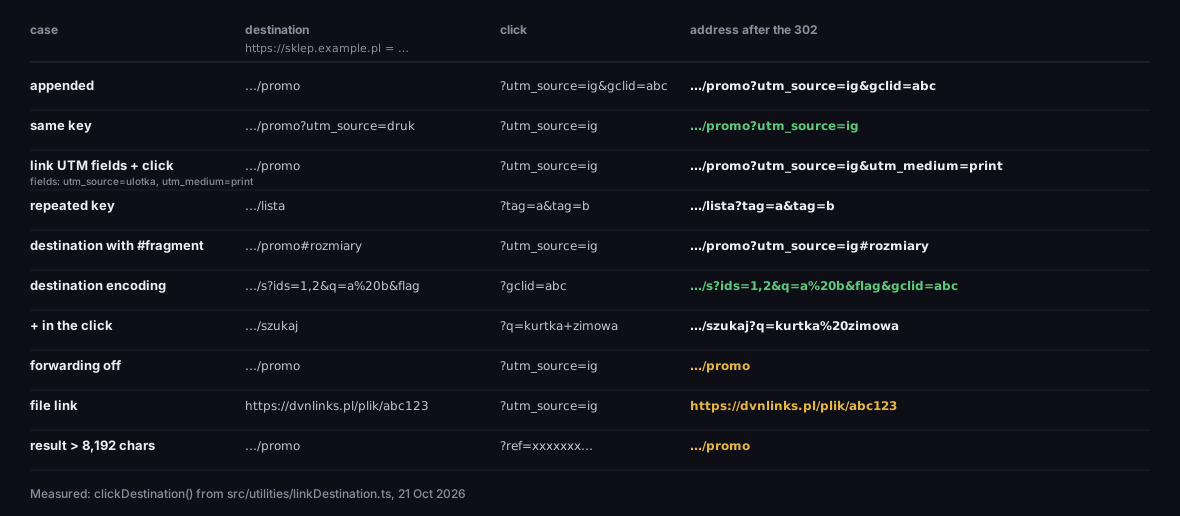
Parameters on a short link: ten measured cases
destination + click → address after the 302 redirect
Source: DVN Links measurement, clickDestination() in src/utilities/linkDestination.ts, 21 Oct 2026
Figure description
Table, destination on sklep.example.pl. Appended: destination /promo, click ?utm_source=ig&gclid=abc, result /promo?utm_source=ig&gclid=abc. Same key: destination /promo?utm_source=druk, click ?utm_source=ig, result /promo?utm_source=ig. Link UTM fields utm_source=ulotka and utm_medium=print plus a click ?utm_source=ig: result /promo?utm_source=ig&utm_medium=print. A repeated key ?tag=a&tag=b passes unchanged. Destination with #rozmiary: the parameter goes before the fragment. Destination encoding: /s?ids=1,2&q=a%20b&flag with a click ?gclid=abc gives /s?ids=1,2&q=a%20b&flag&gclid=abc — the destination query byte for byte. Plus in the click: ?q=kurtka+zimowa arrives as q=kurtka%20zimowa. Forwarding off, a file link and a result longer than 8,192 characters: the destination without the click's parameters.
What follows from it:
- On the same key, the click wins. The destination
/promo?utm_source=drukopened with?utm_source=iggivesutm_source=ig. The click's value is fresher — it says where this particular visitor came from. - The link's UTM fields lose to the click, but stay when the click does not set them. A link with the fields
utm_source=ulotkaandutm_medium=printopened with?utm_source=iggivesutm_source=ig&utm_medium=print. UTM fields in the link details are available from the Starter plan. - The destination's query stays byte for byte.
ids=1,2&q=a%20b&flagcomes out exactly the same, withgclidadded at the end — the comma, the%20and the key without=are not rewritten. That matters for signed URLs and for servers that tellflagfromflag=. - Repeated keys arrive complete, and parameters go before the destination's
#fragment. - The click's own parameters are re-encoded.
?q=kurtka+zimowaarrives asq=kurtka%20zimowa— every server reads both as a space. If a parameter you add must contain a literal plus, encode it as%2B. - Three exceptions where the click's parameters do not go through: forwarding switched off, a link to a file uploaded to DVN Links (the file does not read them anyway), and a result longer than 8,192 characters. In the last case the parameters are dropped silently and the redirect still works — a working link matters more than complete data.
Forwarding also covers smart links: rule destinations (for example a separate address for iPhones) and A/B test variants get the same parameters. When a visitor passes through one of our intermediate pages — on a password-protected link, or on a Free account link far past its monthly limit — the parameters travel with them and reach the destination once they confirm.
The shortener's statistics record only three of the click's parameters: utm_source, utm_medium and utm_campaign. utm_term, utm_content, gclid and the rest reach the destination, but you will not see them in the DVN Links dashboard — your analytics will. With forwarding off it is the other way round: the click's UTM tags reach the shortener's statistics but not GA4, so the two views can differ. All link features are compared on the features page.
URL parameters, Google and GA4
Parameters on their own do not hurt a page in Google. Too many of them do, because each combination is a separate address for the same content. Google says: „Overly complex URLs, especially those containing multiple parameters, can cause problems for crawlers by creating unnecessarily high numbers of URLs that point to identical or similar content on your site” (Google Search Central, URL structure). Typical sources are sorting and filters on category pages — Google lists them among the causes of duplicates, adding that „Some duplicate content on a site is normal and it's not a violation of Google's spam policies” (Google Search Central, canonicalisation). Session IDs, it advises, belong in cookies, not in the URL. The answer to duplicates is a canonical URL and fewer parameters: „shorten URLs by trimming unnecessary parameters (meaning, parameters that don't change the content)”.
If you come across advice to "configure parameters in Search Console", it is out of date. Google retired the URL Parameters tool in 2022 and gave its reason: „only about 1% of the parameter configurations currently specified in the URL Parameters tool are useful for crawling” (Google Search Central Blog, 28 March 2022). Since then the crawler learns parameters by itself: „you don't need to do anything to specify the function of URL parameters on your site”.
GA4 reads campaign parameters from the query string. Google's help lists utm_id, utm_source, utm_medium, utm_campaign, utm_source_platform, utm_term, utm_content, utm_creative_format and utm_marketing_tactic — the last two are not yet shown in GA4 reports; their order in the URL does not matter, and values are case-sensitive — utm_source=google is not the same as utm_source=Google (GA4 Help). What each one means and how to name campaigns is covered in our article on UTM parameters; consistent values are easy to build in the UTM builder, which assembles the query string with a parser rather than by gluing text.
A less known limit: the page address the GA4 tag sends as page_location may be at most 1,000 characters — „the page_location parameters must be 1,000 characters or fewer” (GA4 Help, collection limits). The limit applies to collection by tag and SDK; server-to-server requests follow different rules. A long query string with several click identifiers, UTM tags and filters can exceed it. If your reports show truncated addresses, check the length of the parameters first.
What not to put in a query string
More people and programs see a query string than you might think — so do not put passwords, tokens, document numbers or email addresses in it. OWASP describes this as a class of vulnerability of its own: data in URL parameters ends up „in browser history, server logs, and third-party monitoring tools”, and „Simply using HTTPS does not resolve this” (OWASP, Information exposure through query strings). HTTPS encrypts the address in transit, not in the browser history or the logs of the server that receives it. For the same reason an API key goes in a header, not in the URL — see our guide to API keys.
One thing works in your favour: the Referer header. The browsers' default policy, strict-origin-when-cross-origin, sends only the site's origin to another domain — no path and no query string (MDN, Referrer-Policy). A page can change that policy with a header or a <meta> tag, so this is a default, not a guarantee.
On a short link there is one more thing to think through. Parameter forwarding passes on any parameter someone adds to your short address — including ones you do not expect. If a link leads to an app or a dashboard that acts on its parameters (for example, sets the return address after login), switch forwarding off on that one link. For marketing campaigns, leave it on. More on judging a link before you click is in our guide is this link safe?.
Frequently asked questions about query strings
The query string is the whole part of the address from ? to # or the end. A parameter is one key=value pair inside it. ?q=jacket&sort=price is one query string with two parameters.
With new URL(location.href).searchParams. get('q') returns the first value, getAll('tag') all of them. Remember that + will be read as a space.
Not on their own. What hurts is multiplying addresses for the same content through sorting, filters and session IDs. A canonical URL and removing parameters that do not change the content help. Parameter settings in Search Console no longer exist — Google learns them by itself.
Not by themselves. On a redirect the browser carries over only the fragment after #; the parameters must be added by the server that redirects. In our measurement 3 of 9 public websites lost them on the way. A DVN Links short link forwards them by default.
Because the HTML form format, used to read parameters, treats + as a space. Encode a literal plus as %2B.
There is no single limit — it depends on the browser, the server and every intermediary on the way; the length of the whole URL is covered in our article on what a URL is. Two thresholds are certain: GA4 accepts a page_location of up to 1,000 characters, and our shortener does not add the click's parameters when the result would exceed 8,192 characters.
Not to GA4 — Google's help explicitly allows UTM parameters in any order. Usually not to other systems either, with one exception: repeated keys, where some read the first value and others the last.
Adding UTM tags to short links in a bio, a text message or a QR code? Create an account and check on your own link with ?utm_source=test added what reaches the destination. You can build the query string with UTM parameters without an account in the UTM builder.