HTTP 302 vs 301: redirect codes, Google and caching
HTTP 302, 301, 303, 307 and 308 explained — what Google and browsers do with each, why a 301 is hard to undo, and how to avoid redirect chains.
An HTTP 302 is the server saying "this lives somewhere else for now": instead of a page it sends back another address, and the browser goes there on its own. Its permanent sibling, the 301, looks the same on the wire but behaves very differently afterwards. A browser may remember a 301 and skip the server entirely on the next visit, and Google treats it as a signal that the new address should replace the old one in search results. A 302 gets neither treatment, which is exactly why it is the right answer for anything you might change again. Below we compare 301, 302, 303, 307 and 308 using the HTTP specification and Google's documentation, show our own test of when Chromium and Firefox remember a redirect, a real redirect chain on one of our domains, and ready-made rules for Apache, nginx and Next.js.
What an HTTP redirect is and how it works
A redirect is a response with a 3xx status code and a Location header holding the new address. The browser never shows that response — it immediately sends a second request to the address in the header. To the user it looks as if they had typed the new address in the first place, at most a fraction of a second later.
The HTTP specification describes 302 Found like this: the target resource "resides temporarily under a different URI", and since the redirection might change, the client "ought to continue to use the target URI for future requests" (RFC 9110, §15.4.3). The 301 Moved Permanently is the opposite: the resource has been assigned "a new permanent URI" and future references "ought to use one of the enclosed URIs" (RFC 9110, §15.4.2). That word "permanent" has two consequences covered below: the same specification calls a 301 "heuristically cacheable", so a browser may store it even when the server gave no instructions, and a search engine may swap the old address for the new one in its results.
If you came here from Google Search Console, where the Page indexing report lists "Page with redirect", that is not an error. Search Console explains that this is a non-canonical URL that redirects to another page, so it will not be indexed itself, while the target URL is judged separately (Search Console, Page indexing report). After a site move that list should grow — those are old addresses correctly pointing to new ones. What counts as an error is a "redirect error": a chain that is too long, or a loop, more on which below.
HTTP 302 vs 301, 303, 307 and 308: how they differ
The five redirect codes differ along two lines: whether the move is permanent, and whether the browser may change the request method along the way. The second matters for forms and APIs, where a POST request carries data.
The history is messy. Browsers used to turn POST into GET when following 301 and 302 redirects, and the specification admits it: prevailing practice "eventually converged on changing the method to GET", so 307 and 308 were added later to mark method-preserving redirects unambiguously, and 301 and 302 were adjusted to allow a POST to be redirected as a GET (RFC 9110, §15.4). Hence the note on the 301: "For historical reasons, a user agent MAY change the request method from POST to GET", and if that is not wanted, 308 can be used instead (RFC 9110, §15.4.2).
In short:
- 301 Moved Permanently — permanent; the method may change to GET; the browser may remember it.
- 302 Found — temporary; the client should keep using the original address (RFC 9110, §15.4.3).
- 303 See Other — for after a form submission: it is "primarily used to allow the output of a POST action to redirect the user agent to a different resource" (RFC 9110, §15.4.4). MDN adds the practical reason: refreshing the result page does not re-trigger the operation (MDN, Redirections).
- 307 Temporary Redirect — temporary like 302, but the browser "MUST NOT change the request method" (RFC 9110, §15.4.8).
- 308 Permanent Redirect — permanent like 301, method kept; also "heuristically cacheable" (RFC 9110, §15.4.9).
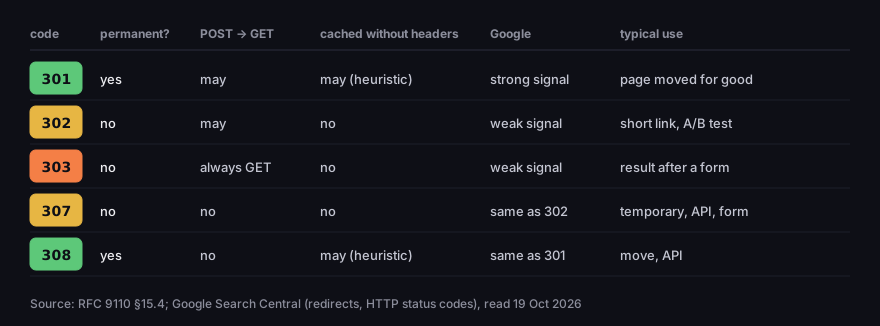
3xx redirect codes — how they differ
permanence, method change, browser cache, Google
Source: RFC 9110 §15.4; Google Search Central, read 19 Oct 2026
Figure description
Table of five codes. 301: permanent yes, POST to GET may happen, cached without headers may (heuristic), Google strong signal, page moved for good. 302: permanent no, POST to GET may happen, cached no, Google weak signal, short link and A/B test. 303: no, always GET, cached no, weak signal, result after a form. 307: no, method kept, cached no, Google same as 302, temporary, API, form. 308: yes, method kept, cached may (heuristic), Google same as 301, move, API.
When someone simply clicks a link, the method is always GET, so a 307 then behaves like a 302 and a 308 like a 301. The difference shows up with forms and APIs: a 301 or 302 after a POST may reach the destination as a GET, without the data. If you are moving an address that applications send data to — an API endpoint, or the address a form posts to — use 308 or 307 so the request arrives unchanged. The other codes an API returns day to day — 2xx and 4xx — are covered in our guide to REST APIs.
The 303 is for the opposite case, where switching to GET is the point. The classic example is an order form. The server accepts the POST, saves the order and answers 303 with the address of a "thank you" page. The browser opens that page with GET, so a refresh shows the confirmation instead of submitting the order a second time.
301 vs 302 and Google
To Google, a permanent redirect is a signal about which address is canonical. Google Search Central puts it plainly: permanent redirects show the new target in search results, temporary ones show the source page. With 301 and 308, Googlebot follows the redirect and the indexing pipeline uses it as a signal that the target should be canonical; with 302, 303 and 307 it follows too, but does not take that signal from it (Google Search Central, redirects). Elsewhere Google calls the 301 a strong signal and the 302 a weak one, and says it treats 307 as equivalent to 302 and 308 as equivalent to 301 (Google Search Central, HTTP status codes).
SEO blogs argue over whether a 302 passes "link juice", and some claim a 301 passes "90–99%" of it. Google's documentation contains neither those percentages nor that split — it talks about a canonical signal, strong or weak. Do not base decisions on numbers nobody has published.
The documentation boils down to four practical rules:
- Permanent only if you will not undo it. Google advises using permanent redirects "when you're sure that the redirect won't be reverted" (Google Search Central).
- Keep redirects for a long time. For site moves Google recommends keeping them "for as long as possible, generally at least 1 year" (Google Search Central, site moves).
- Do not redirect everything to the home page. The same guide warns that redirecting many old URLs to one irrelevant page, such as the home page, might be treated as a soft 404. A page removed without a successor should return 404 or 410 — details in our article on 404 errors.
- Redirect on the server. Google says to use JavaScript redirects only if you cannot do server-side or meta refresh redirects (Google Search Central).
Why a 301 is hard to undo: the browser cache
A 301 is "heuristically cacheable" (RFC 9110, §15.4.2). That means a browser may store the response and go straight to the new address next time, even though the server never said for how long. The caching specification lets a cache pick an expiry time on its own in that case, giving 10% of the time since the Last-Modified date as a typical setting; if the server did provide an explicit expiry, heuristics must not be used (RFC 9111, §4.2.2). The specification allows this but does not require it — so we checked what real browsers do.
A local server answered with a redirect in eight variants, and Chromium 145 and Firefox 146 (driven by Playwright, each variant in a fresh profile) opened the same address three times: the second visit right after the first, the third 70 seconds later. The server counted how many requests reached it. We ran the test three times and got the same result each time.
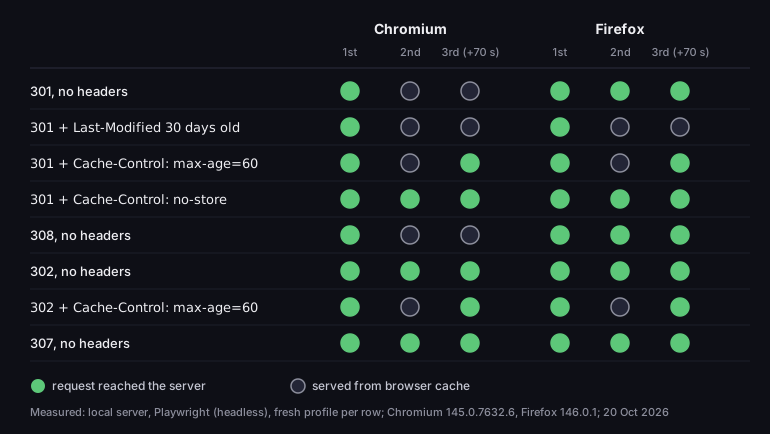
Does the browser ask the server again? A redirect test
three visits to the same address; green — the request reached the server
Source: DVN Links test, local server, Playwright (headless), Chromium 145.0.7632.6 and Firefox 146.0.1, 20 Oct 2026
Figure description
Test results, three visits: the first, a second right after and a third 70 seconds later. Chromium 145: 301 and 308 with no headers — second and third visit served from browser cache. 301 with a 30-day-old Last-Modified — also from cache. 301 and 302 with Cache-Control max-age=60 — second from cache, third to the server. 301 with no-store, 302 and 307 with no headers — every visit to the server. Firefox 146: 301 and 308 with no headers — every visit to the server. 301 with Last-Modified — second and third from cache. max-age=60 — second from cache, third to the server. no-store, 302 and 307 — every visit to the server.
What this shows:
- Chromium remembered 301 and 308 with no headers at all and did not ask the server once, up to the third visit 70 seconds later. We did not measure longer periods.
- Firefox without headers asked the server every time, but when the 301 carried a
Last-Modified30 days old, it remembered it just like Chromium — in line with the heuristic RFC 9111 allows. A caveat: Playwright runs its own patched build of Firefox; we did not test regular Firefox, so do not assume it will not remember a 301. - An explicit
Cache-Controlwon in both browsers.max-age=60meant one minute of caching,no-storemeant none. That applies to the 302 too: withmax-age=60both browsers cached a temporary redirect. - 302 and 307 without headers were never cached.
The practical takeaway: if you are not sure a move is final, start with a 302, or give the 301 a short Cache-Control: max-age, and switch to an open-ended 301 only once everything works. The reverse goes for addresses meant to change: a temporary redirect should carry no cache headers, or browsers will remember it too.
What happens when you undo a 301
It is tempting to fix a 301 mistake with a redirect going the other way. We tested what a visitor who had already been there sees. First, /a answered 301 to /b with a Last-Modified header, which makes both browsers remember it. Then we "undid" the change: /a serves a page again and /b sends a 302 back to /a.
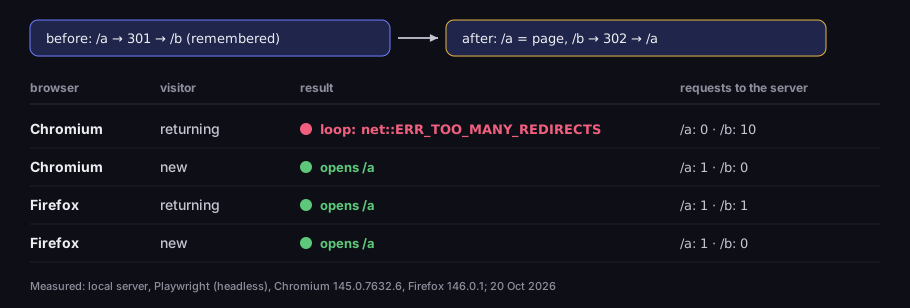
Undoing a 301 — a redirect back ends in a loop
the same address after the server rules changed, returning and new visitors
Source: DVN Links test, local server, Playwright (headless), Chromium 145.0.7632.6 and Firefox 146.0.1, 20 Oct 2026
Figure description
Before: /a answered 301 to /b and the browser remembered it; after: /a serves a page and /b sends a 302 back to /a. Chromium, returning visitor: a loop, error net::ERR_TOO_MANY_REDIRECTS, the server got 10 requests for /b and none for /a. Chromium, new visitor: opens /a. Firefox, returning visitor: opens /a after one request for /b and one for /a. Firefox, new visitor: opens /a.
New visitors noticed nothing. The returning visitor in Chromium got stuck in a loop: the browser took the /a to /b hop from its cache, the server sent /b back to /a, and so on ten times until Chromium gave up with a "too many redirects" error. It never sent a single request for /a. Firefox in the same situation asked the server for /a again and opened the page. The lesson: you cannot undo a cached 301 with a redirect back. It is safer to keep a working page at the new address, or move the content once more, to a third address.
Setting up a 301 redirect in .htaccess and nginx
The most common mistake with a 301 in Apache is leaving out the code. The Redirect directive without a status argument gives a temporary redirect: "If no status argument is given, the redirect will be "temporary" (HTTP status 302)" (Apache, mod_alias). The same goes for RewriteRule with the [R] flag: with no code given, Apache sends a 302 (Apache, RewriteRule flags). So write the code out:
1# .htaccess (Apache) — one address, permanently2Redirect permanent /old-address https://example.com/new-address3 4# the same with mod_rewrite; without R=301 it would be a 3025RewriteEngine On6RewriteRule ^old-address$ https://example.com/new-address [R=301,L]7 8# a page removed with no successor — 410 instead of a redirect9Redirect gone /finished-promotionRedirect matches the start of the path and appends whatever came after the matched part to the new address (Apache, mod_alias) — so a rule for /blog also moves /blog/article. In nginx, redirects are set with the return directive, which takes a URL for codes 301, 302, 303, 307 and 308 (nginx, rewrite module):
1# nginx — a whole domain to a new address, keeping path and parameters2server {3 server_name old-domain.com www.old-domain.com;4 return 301 https://new-domain.com$request_uri;5}The $request_uri variable is the "full original request URI (with arguments)" (nginx, core module). Leave it out and every subpage lands on the new domain's home page, while parameters such as UTM tags or gclid get lost on the way — what that means for Google Ads reports is covered in our article on gclid. On a redirect the browser itself carries over only the fragment after #, not the parameters; our browser and public-site measurements are in the article on the query string. What a URL is made of, and which part does what, is explained in our article on URLs.
In Next.js, redirects live in next.config in the redirects() function. Watch the naming: permanent: true gives a 308 and false a 307, not 301 and 302 (Next.js, redirects). For Google it makes no difference, since it treats 308 as 301:
1// next.config.mjs2export default {3 async redirects() {4 return [{ source: '/old-address', destination: '/new-address', permanent: true }]5 },6}That is how we redirect renamed articles on this blog: the old address answers 308 and leads to the new one in a single hop, which we check with curl after every such change goes live.
Domain redirects, HTTPS and www
Every page should have one address, and the other variants — with http://, with www, or on an old domain — should point to it with a permanent redirect. MDN gives this as a common case: a site lives at www.example.com, but visiting example.com should work too (MDN, Redirections). These are moves you will not undo, so 301 or 308 is the right choice.
For a full site move, Google recommends an order: first a URL mapping — a list of which old address corresponds to which new one — then server-side redirects, and finally monitoring traffic on both the old and the new addresses. Internal links on the new site should be switched to the new addresses straight away, and redirects should go "to the final destination directly", without intermediate hops (Google Search Central, site moves). The same guide reminds you of links you do not fully control: social media profiles and ad campaigns need to point to the new landing pages too. A redirect saves the traffic, but every link that points straight to the new address saves the visitor a hop.
Put a domain redirect where requests are sure to arrive. A common mistake: the "www → no www" rule lives in the application code, but requests for the www address never reach the application — the server or hosting layer in front of it doesn't know that name and answers with an error (such as 503), so the rule never gets a chance to run. A domain redirect belongs in the layer that receives traffic first: the web server or the CDN.
We checked how big sites handle it. On a visit over http://, seven of the ten we tested answer first with a 301, the rest with a 302 or 307, and they take one to three hops to reach the final page.
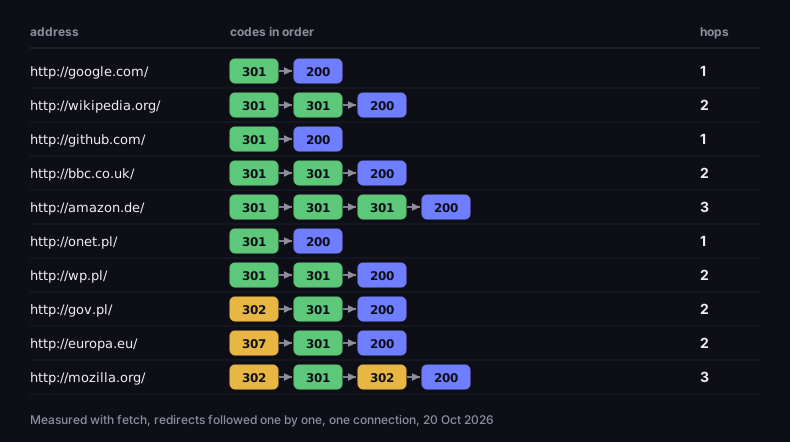
How big sites redirect a visit over http://
codes in order from http://domain/ to the final page
Source: DVN Links measurement (fetch, hop by hop), 20 Oct 2026
Figure description
Ten sites. google.com: 301, 200 — one hop. wikipedia.org: 301, 301, 200. github.com: 301, 200. bbc.co.uk: 301, 301, 200. amazon.de: 301, 301, 301, 200 — three hops. onet.pl: 301, 200. wp.pl: 301, 301, 200. gov.pl: 302, 301, 200. europa.eu: 307, 301, 200. mozilla.org: 302, 301, 302, 200 — three hops.
Redirect chains and loops
Every hop in a chain is another request and another wait. Google recommends keeping chains short, "ideally no more than 3 and fewer than 5", because chained redirects add latency and not all browsers support long chains (Google Search Central, site moves). Google's crawler follows up to ten hops by default (Google Search Central). A loop — a redirect that comes back to where it started after a few hops — ends in an error: the specification requires clients to detect such loops (RFC 9110, §15.4), and Search Console reports it as a redirect error.
Chains grow on their own, because every layer adds its own hop: the CDN sends http to https, then www to the bare domain, then the application adds a language version. That is exactly what happened to us. On 19 October 2026, http://www.dvn.dev/ with a short code that does not exist took four hops, because the application sent visitors to /pl and the language module then added a 307 to /. We removed that hop. Today the chain looks like this:
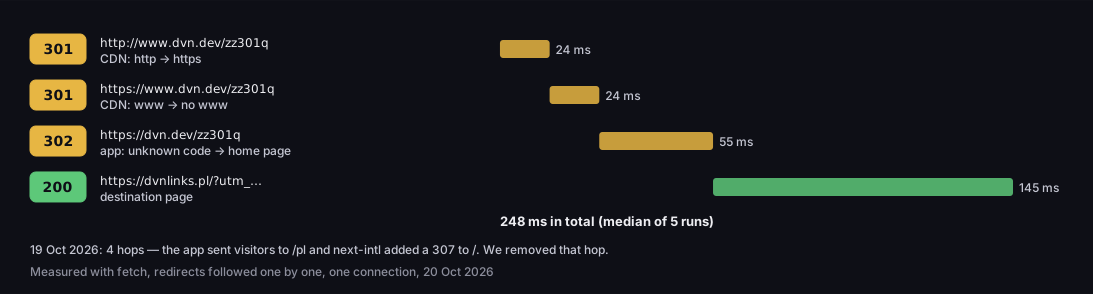
A redirect chain — three hops before the page starts
http://www.dvn.dev with a code that does not exist, time per hop
Source: DVN Links measurement (fetch, hop by hop, median of 5), 20 Oct 2026
Figure description
A chain of four responses. 301 from http://www.dvn.dev to https://www.dvn.dev — CDN, http to https, 24 ms. 301 from https://www.dvn.dev to https://dvn.dev — CDN, www to no www, 24 ms. 302 from dvn.dev to the dvnlinks.pl home page with UTM parameters — app, unknown code, 55 ms. 200 — destination page, 145 ms. 248 ms in total, median of 5 runs. On 19 Oct 2026 the same address took 4 hops.
The destination page itself takes longest; each redirect hop cost between 24 and 55 milliseconds in our test — not much, but that is time the visitor spends looking at a blank screen. The first two hops are separate rules on the CDN; a single rule sending http://www straight to https:// without www would cut the chain by one hop.
You can check a chain with curl, which shows the code and Location header of every hop:
1curl -sIL http://www.dvn.dev/zz301q | grep -iE '^(HTTP|location)'Without a terminal: open your browser's developer tools, go to the Network tab, tick "Preserve log" and visit the address. Each hop shows up as its own row with the code in the Status column.
When to use a 302 instead of a 301
A temporary redirect is right wherever the destination is meant to change, or the old address should stay the one people and search engines remember.
- Short links and QR codes. A short link should count every click and be re-pointable after printing, so a shortener should answer 302. Why, and what goes wrong with a 301, is covered in how to shorten a link. DVN Links redirects short links with a 302 and no cache headers, and you change the destination in the dashboard — more on the features page.
- A/B tests. Google says a test that redirects users from the original URL to a variation should use a 302, not a 301 (Google Search Central, website testing). How this works in practice is shown in our article on smart links.
- A time-limited campaign — an address for a promotion that will later go back to its old place or lead somewhere else.
- A form — after a POST, show the result at another address with a 303.
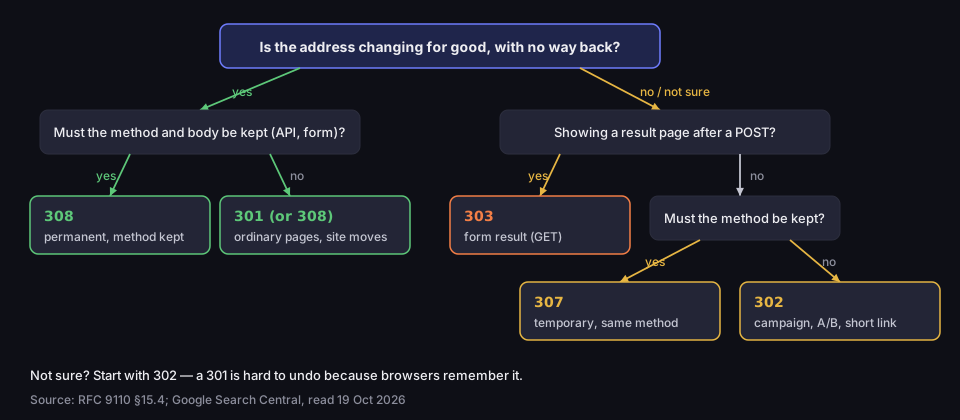
Which redirect code to use
decision tree based on RFC 9110 and Google's documentation
Source: RFC 9110 §15.4; Google Search Central, read 19 Oct 2026
Figure description
Decision tree. Is the address changing for good, with no way back? Yes: must the method and body be kept, for example in an API or form? Yes — 308, permanent with the method kept; no — 301 or 308, ordinary pages and site moves. No or not sure: are you showing a result page after a POST? Yes — 303. No: must the method be kept? Yes — 307; no — 302: campaign, A/B test, short link. Tip: if unsure, start with 302, because browsers remember a 301.
Frequently asked questions
A temporary redirect: the server says the resource is at another address for now, and the client should keep using the original address in future (RFC 9110). Browsers follow it automatically, and without cache headers they do not remember it — in our test neither Chromium nor Firefox did.
301 (or 308) when the address changes for good and the old one should disappear from search results — a site move, a new URL structure, a switch to HTTPS. 302 (or 307) when the redirect is temporary or the destination will change (Google Search Central).
A temporary redirect like 302, but the browser must not change the request method, for example from POST to GET (RFC 9110). Google treats a 307 the same as a 302.
Google treats a 301 as a strong signal that the target should be canonical and shows the new address in search results instead of the old one (Google Search Central). The documentation does not say how much of the old address's "value" a redirect passes on, nor does it promise that rankings stay the same.
Google recommends as long as possible, generally at least a year (Google Search Central). Links to old addresses in emails, on other sites and in bookmarks do not disappear with the move.
Run curl -sIL with the address, or use your browser's developer tools, on the Network tab with "Preserve log" ticked. Look at the code and Location header of each hop, and at how many hops separate the first address from the page that answers 200.
Need an address you can re-point after printing? A DVN Links short link answers with a 302, so you change the destination in the dashboard and the flyer and QR code stay the same. You can create an account here.