One time link: password, click limit or expiry date?
A one time link, a password-protected link or an expiring link — what each one stops, how to set it up, who really uses up a single-use link, and what none of them can do.
A one time link is a short link with a click limit of 1: the first person gets through, everyone after that does not. It sits alongside two other locks that are often lumped together as a "secure link" — a password and an expiry date. A password decides who gets through, a click limit how many, an expiry date until when. The most common problem with a one time link has nothing to do with attackers: it gets used up by bots that open it before the recipient does — link previews in messaging apps, mail scanners, link checkers. Below is how to set each lock in DVN Links, what a visitor actually sees, what our test on a local copy of the service showed, and what none of these locks can do.
Password, click limit and expiry date: how they differ
A password, a click limit and an expiry date block different things and open for different people — so first decide what you are protecting the link from. All three work on the same short link and the same QR code: adding a password or a limit changes neither the address nor a printed code. In DVN Links all three are available from the Starter plan, trial included.
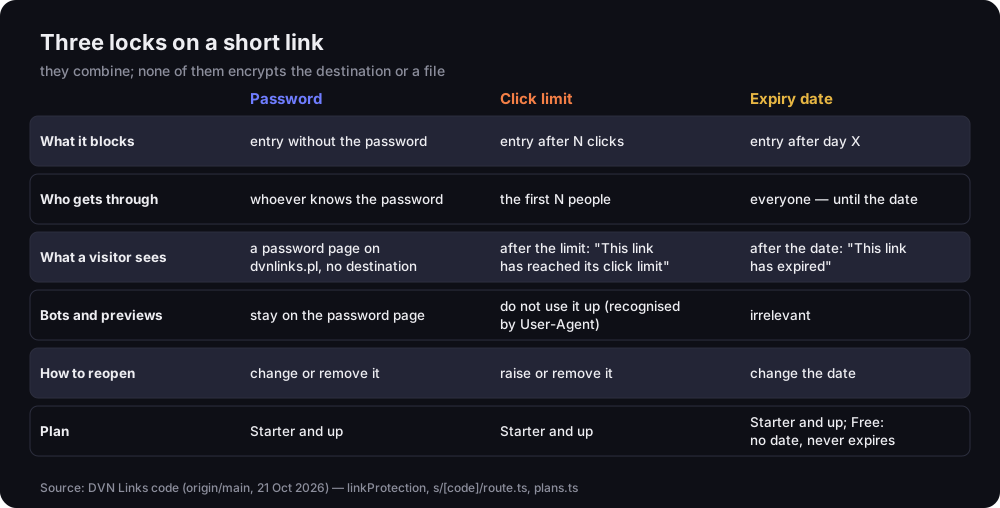
Three locks on a short link
what each blocks, who gets through, what a visitor sees, bots, reopening, plan
Source: DVN Links code (origin/main, 21 Oct 2026)
Figure description
Table of three locks. Password: blocks entry without the password; whoever knows it gets through; the visitor sees a password page on dvnlinks.pl with no destination; bots and previews stay on the password page; reopen by changing or removing it; Starter plan and up. Click limit: blocks entry after N clicks; the first N people get through; after the limit a This link has reached its click limit page; bots recognised by User-Agent do not use it up; reopen by raising or removing the limit; Starter and up. Expiry date: blocks entry after day X; everyone gets through until the date; after it a This link has expired page; bots irrelevant; reopen by changing the date; Starter and up, while on the Free plan a link does not expire and no date can be set.
In short:
- A password stops everyone who does not know it — people, bots and previews. The visitor lands on a form on our dvnlinks.pl domain and learns the destination only after entering the password.
- A click limit lets the first N people through, after which the link stops leading anywhere. Bots we recognise do not use it up.
- An expiry date lets everyone through until a set moment. On the Free plan you cannot set one — links do not expire; the date field starts with Starter.
The locks combine. A password with a limit of 1 is the closest thing to what people mean by "a one time link for one person": only someone with the password gets through, and only once. In the dashboard you set it all in the "Password and click limit" section when creating or editing a link — a file link too. On the Free plan the section is visible but locked, with a link to pricing. Other paid features are on our features page.
Password-protected link: how it works and how to set it
A password-protected link sends everyone — a person, a bot, a preview — to a password page first, and that page does not reveal where the link goes. Clicking the short link ends in a 302 redirect to dvnlinks.pl/en/password (/haslo in Polish). Its address carries only the link's code and domain, never the destination. We checked this on a local copy of the service: the password page contained neither the destination address nor a single script, and the response had X-Robots-Tag: noindex, nofollow and Cache-Control: no-store — search engines will not index it and the browser will not cache it.
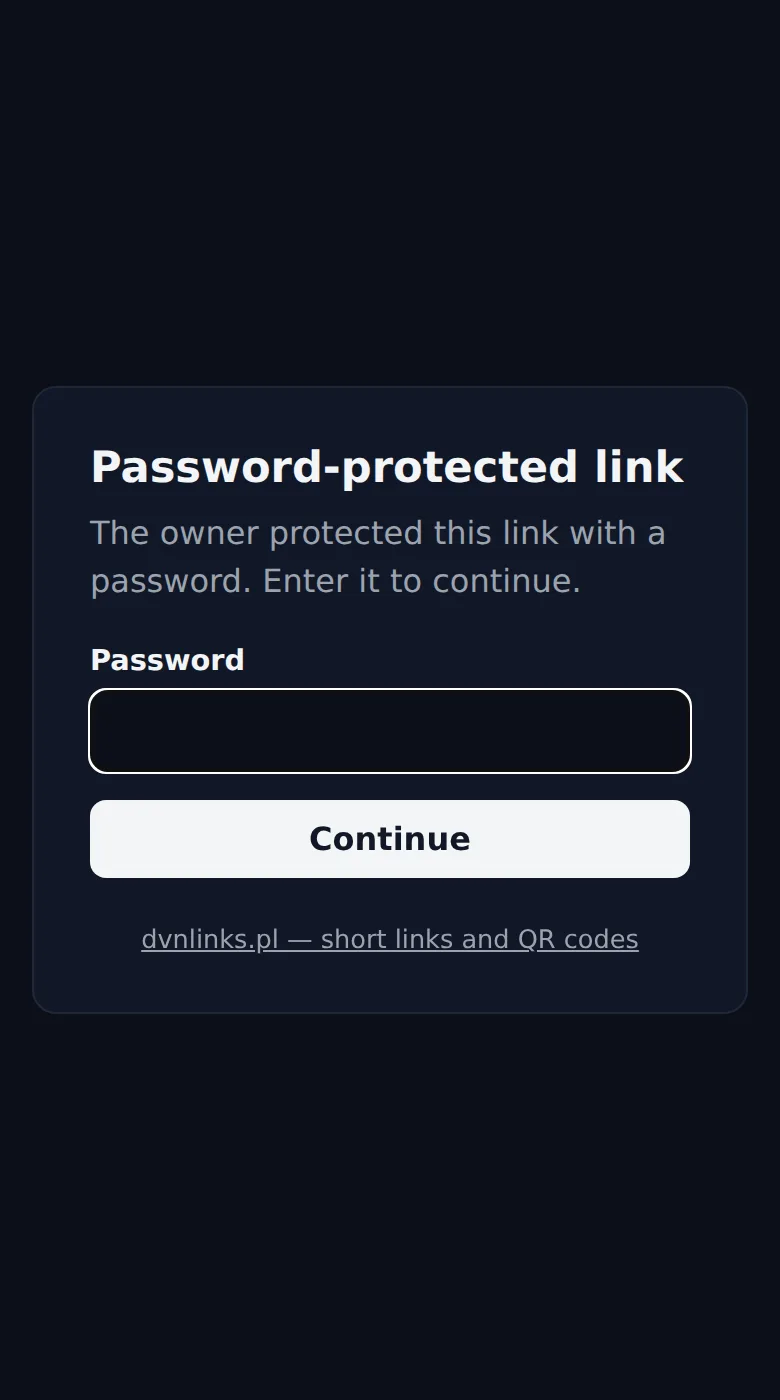
The password page on a phone
dvnlinks.pl/en/password — a form with no scripts and no destination
Source: screenshot from a local DVN Links instance, 21 Oct 2026
Figure description
Phone screenshot in dark mode: a card headed Password-protected link, the sentence The owner protected this link with a password. Enter it to continue, a Password field, a Continue button and a link dvnlinks.pl — short links and QR codes. The page does not show where the link leads.
To set a password: open the link in the dashboard (or create a new one), type the password in "Password and click limit" and save. It must be 4 to 128 characters long. You change or remove it in the same place. The short link and the QR code stay the same, so you can add a password to a link that is already on a poster. Password and click limit are also available in the API (password and max_clicks), which comes with the Starter plan.
What happens to the password once saved? We do not keep it. We store only a salted scrypt hash — in our test database it looked like scrypt$16384$8$1$<salt>$<key>, and the password itself was nowhere in the link's record. That follows OWASP's advice that "it is critical for an application to store a password using the right cryptographic technique" (OWASP Authentication Cheat Sheet, read 21 Oct 2026). The upshot for you: we cannot remind you of a password. If you forget it, set a new one.
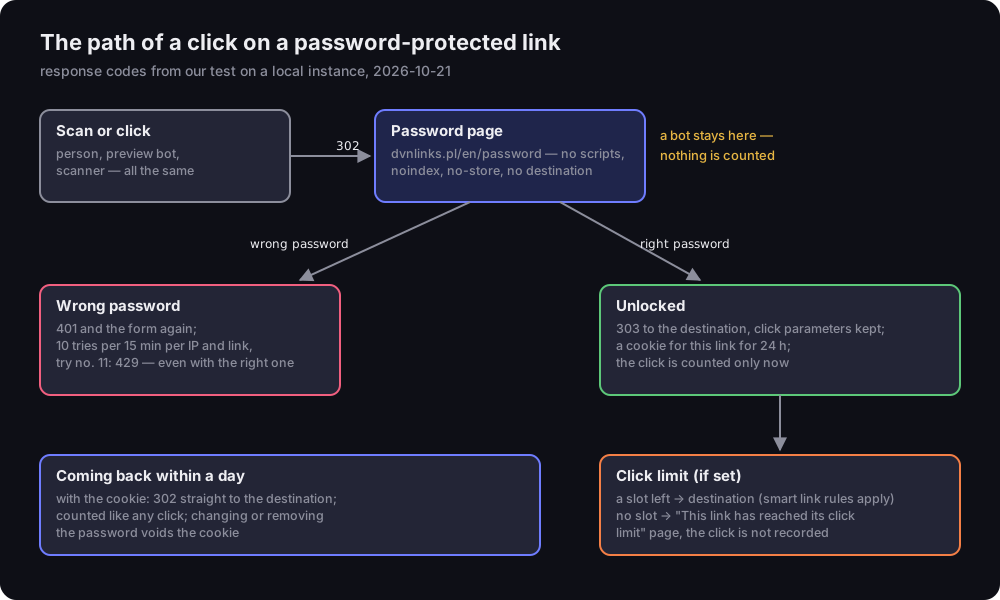
The path of a click on a password-protected link
response codes from our test on a local instance, 21 Oct 2026
Source: DVN Links test on a local instance with a throwaway database, 21 Oct 2026; script measure.ts
Figure description
Diagram. A scan or click — person, preview bot and scanner alike — gets a 302 to the password page dvnlinks.pl/en/password, with no scripts, noindex, no-store and no destination; a bot stays here and nothing is counted. Wrong password: 401 and the form again; 10 tries per 15 minutes per IP and link; try number 11 gets a 429, even with the right password. Right password: 303 to the destination with click parameters kept, a cookie for this link for 24 hours, the click counted only now. Then the click limit, if set: a slot left leads to the destination and smart link rules apply; no slot means the This link has reached its click limit page and the click is not recorded. Coming back within a day with the cookie: 302 straight to the destination, counted like any click; changing or removing the password voids the cookie.
What we measured along the way:
- A wrong password returns 401 and the same form with a message. We accept 10 tries per 15 minutes from one IP address on one link — every try sent counts, the right password included. In our test the eleventh try got a 429 ("Too many attempts") — even though by then we had typed the right password. Tries turned away like this do not extend the block: a slot frees up 15 minutes after each accepted try. Throttling attempts is the standard defence against guessing; OWASP describes it as a mechanism "to prevent an attacker from making too many attempts at guessing a password".
- The right password returns a 303 to the destination and a cookie valid for 24 hours (in the test:
Max-Age=86400), separate for each link. Anyone coming back within a day skips the form. Changing or removing the password voids cookies issued before. - The click counts only after the password. Statistics, the plan's monthly click allowance and the link's click limit see a visitor who passed the form — not a bot, and not someone who gave up on the password page.
- Click parameters carry through. We opened the link with
?utm_source=newsletteradded, and after the password we landed on the destination with the same parameter. What happens to parameters across redirects in general is covered in our guide to the query string. Smart link rules apply too — the password is checked before them.
One rule on your side: send the password through a different channel from the link. If the link goes by email, give the password by text message or in person. And never append the password to the address (?password=…) — OWASP warns that data in URL parameters leaks through the Referer header, server logs, browser history and cache, and that "simply using HTTPS does not resolve this vulnerability" (OWASP, Information exposure through query strings in URL, read 21 Oct 2026).
One time link: a click limit of 1
A one time link is a short link with a click limit of 1: the first person gets through, everyone else lands on a page saying the link has reached its click limit. You set the limit in the same section as the password — any whole number from 1. The dashboard shows how much is used ("1 of 1 used"), and the link details say "Limit used up" once the clicks run out.
After the limit, a visitor sees our page "This link has reached its click limit" in their language. It says plainly that the owner set a limit and it has been reached, and tells the owner the link works again once the limit is raised or removed. A click after the limit is not recorded in statistics or counted towards the plan's monthly allowance. The counter does not reset when you change the limit: go from 1 to 2 and the link lets one more person through; drop the limit below the clicks already used and the link expires at once.
The hardest part of a click limit is invisible in the dashboard: what happens when several people click at the same moment. A counter that "reads how many are left, then writes one more" has a gap — two requests can both read "1 left" and both get through. So in our case the database decides, in one conditional write: "add one click if the counter is below the limit". We tested it by sending 20 or 50 requests at once to a single link.
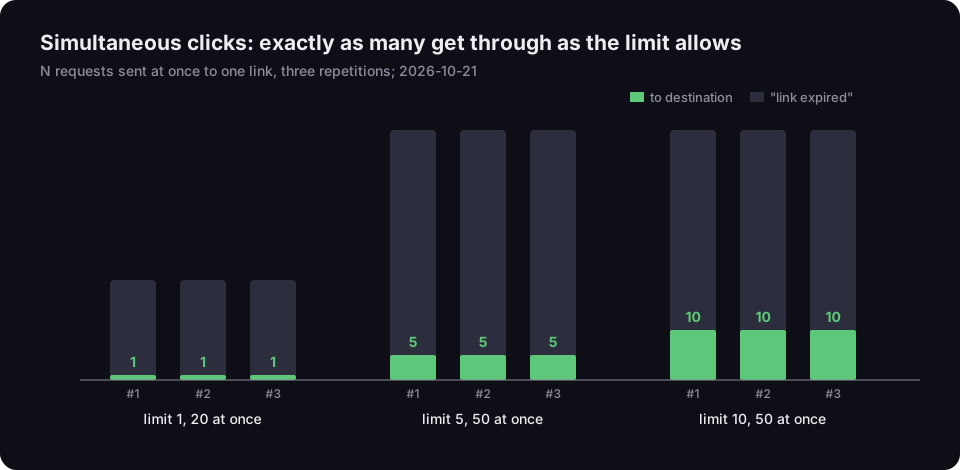
Simultaneous clicks: exactly as many get through as the limit allows
N requests at once to one link, three repetitions, 21 Oct 2026
Source: DVN Links test on a local instance with a throwaway database, 21 Oct 2026; script measure.ts
Figure description
Bar chart. Limit 1 and 20 requests at once: in each of three repetitions 1 reached the destination and the other 19 got the link expired page. Limit 5 and 50 at once: 5 to the destination every time, 45 expired. Limit 10 and 50 at once: 10 to the destination every time, 40 expired.
In all nine runs exactly as many requests reached the destination as the limit allowed, and the counter in the database stopped at the limit. That is not a given with every shortener. Linkly, which also offers a one time link as a limit of 1, honestly warns in its help that "a second click within 10 seconds of the first may occasionally get through" (Linkly, One-time links, read 21 Oct 2026). That is a trait the service describes itself, not a criticism — but for a link to one prize or one place on a list, the difference counts.
A limit is useful beyond "one time". An offer for the first 100 people, 30 places on a free webinar, material for one training group — anywhere the number of visits is a resource meant to run out.
Who uses up a one time link before the recipient does
A one time link is most often spoiled not by people but by bots: link previews in messaging apps, mail scanners and link checkers that open the address before the recipient. This follows from how the web is built. RFC 9110, the HTTP specification, calls GET and HEAD "safe" methods: the client "does not request, and does not expect, any state change on the origin server". The point of the distinction is "to allow automated retrieval processes (spiders) and cache performance optimization (pre-fetching) to work without fear of causing harm" (RFC 9110, §9.2.1, read 21 Oct 2026). A link that gets used up by an ordinary open breaks that assumption — so any robot that "just takes a look" can burn it.
Who opens links before a person does? Messaging apps that show a page preview: Slack does it with a robot that identifies itself as Slackbot-LinkExpanding (Slack, Robots, read 21 Oct 2026). Business email: Microsoft Defender for Office 365 says that with Safe Links on, "URLs are scanned prior to message delivery" (Microsoft Learn, Safe Links, read 21 Oct 2026). Microsoft does not say which User-Agent or which method it uses — so we do not know what that scanner looks like from our side.
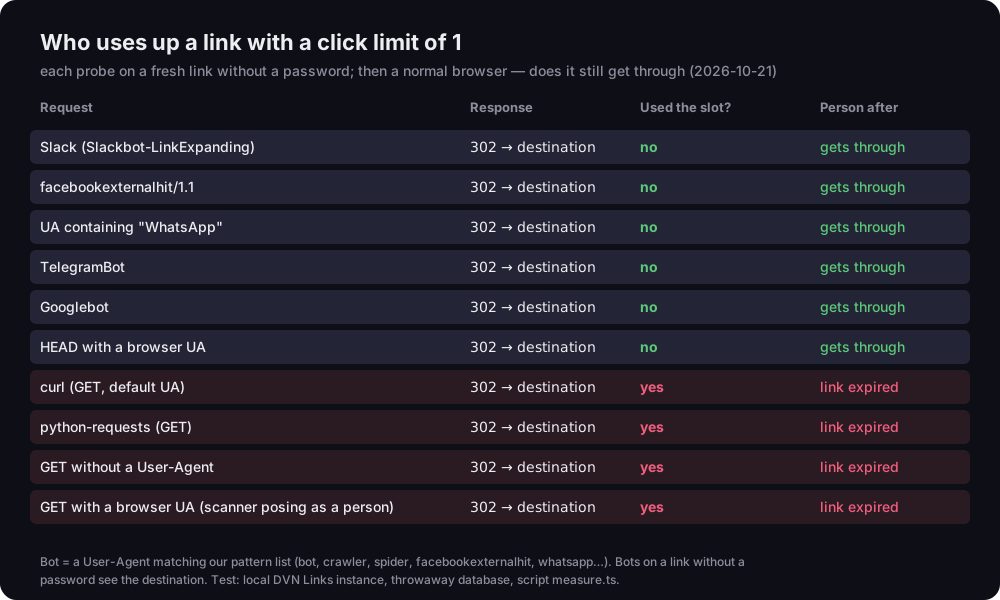
How we deal with it: the click limit counts only people. To us a bot is a request whose User-Agent header matches a list of patterns — bot, crawler, spider, facebookexternalhit, whatsapp, telegrambot and a few search engine names. We checked what that means in practice: for each probe we created a fresh link with a limit of 1, sent one probe request, then opened the link with an ordinary browser.
Who uses up a link with a click limit of 1
each probe on a fresh link without a password; then a normal browser
Source: DVN Links test on a local instance with a throwaway database, 21 Oct 2026; script measure.ts
Figure description
Table of ten probes; each got a 302 to the destination. Did not use the slot, and a person got through afterwards: Slackbot-LinkExpanding, facebookexternalhit/1.1, a User-Agent containing WhatsApp, TelegramBot, Googlebot, a HEAD request with a browser User-Agent. Used the slot, and a person afterwards saw the link had expired: curl with its default header, python-requests, a GET with no User-Agent, a GET with a browser User-Agent, i.e. a scanner posing as a person. Bots on a link without a password see the destination; only a password stops them.
The result has three parts:
- Recognised bots do not use up the limit. Slackbot, facebookexternalhit, a header containing "WhatsApp", TelegramBot and Googlebot got their redirect, and a person after them got through normally. Note: this tests headers we set ourselves. We did not check which header every messaging app sends today on every phone.
- A HEAD request uses up nothing. Link checkers often only ask "does this address work" with the HEAD method. We answer it the same as a GET but without counting a click — nothing goes into statistics or the limit, even when the header looks like a browser.
- A robot we do not recognise counts as a person. curl, python-requests, a request with no User-Agent at all and a scanner posing as a browser each used the only slot, and the person after them saw the limit page. A mail scanner that pretends to be Chrome is, to a server, indistinguishable from a human.
There is a fourth point that is easy to miss: on a link without a password, a recognised bot sees the destination. It does not use a click, but it is redirected to where the link leads — that is how a preview works. If that matters, there is one piece of advice: add a password. Then every robot, recognised or not, stops at the password page. In our test Slack's bot still landed on the form after someone else had unlocked the link, and the counter did not move. A limit of 1 plus a password is the only setup in which a one time link really means "the first person who knows the password".
Expiring link and the Free plan
An expiry date switches a link off for everyone at a set moment, and on the Free plan there is none: a link does not expire. From Starter up you set the date yourself — or set none, and the link does not expire either. On Free, the missing date field is a feature of the plan: the limits there are 1,000 clicks a month per account and the DVN logo on the code. When a short link expires and what that means for print is covered in our guide on how to shorten a link, and the life of a Free link is shown in getting started with DVN Links.
What does a visitor see after the date? A 302 redirect to our "This link has expired" page in their language, with a hint for the visitor (if the link was on a flyer, ask the business that printed it) and one for the owner. When a link has run out of clicks, the page carries a different heading — "This link has reached its click limit" — so nobody goes looking for a date that never existed.
Why a redirect to a page rather than a 410 status? RFC 9110 describes 410 (Gone) as a sign that the resource "is no longer available at the origin server and that this condition is likely to be permanent", and gives the example of "limited-time, promotional services" (RFC 9110, §15.5.11, read 21 Oct 2026). For a robot that is the right answer. But a short link is usually opened by a person who scanned a code on paper — and a bare error tells them nothing. The page tells them what happened and what they can do. The difference between 404 and 410, and when each makes sense, is in our piece on the 404 error.
What a password-protected link cannot do
A password-protected link guards access to an address, not the content behind it — it encrypts neither the destination nor a file nor anything on the other side. That distinction matters, because "password-protected link" sounds like a safe, and it is not one.
What it will not do:
- Encrypt the destination. The target address is stored in our database as plain text — it has to be, so the server can redirect to it. The password makes sure nobody without it learns that address.
- Hide the destination from someone with the password. Whoever gets through sees the destination in the address bar and can pass it on — with no password and no limit.
- Protect a file after unlocking. If the password sits on a link to a file uploaded to DVN Links, it protects the short link. The file itself has a
/plik/…address that is visible after unlocking: anyone who gets it opens the file without the password. How a file behind a code works is covered in QR code for PDF. - Replace a secrets vault. To hand over an account password, an API key or a document number, you need a tool that encrypts the message on the sender's side and destroys it after reading — the "one time secret link" kind of service. A link shortener is not that tool.
- Judge whether the destination is safe. A password does not check the target page. How to assess someone else's link before you click is covered in how to check if a link is safe.
One more point about plans: if you move from Starter down to Free, passwords and limits on existing links stay and keep working. A password is a promise made to the people who received the link, so it does not vanish with the subscription. On the lower plan you can remove it but not change it or set a new one — the dashboard then says your plan no longer lets you change the password, but it still protects the link.
Which lock to choose
Pick the lock by what worries you: strangers — a password; too many people — a limit; going stale — a date. In practice:
- Material only for course participants, clients or group members — a password. Give it out in the session or in a separate message.
- An offer for the first N people, a limited pool of places — a click limit. No need to watch the counter; the link closes itself.
- A campaign until a set day — an expiry date.
- A file or recording for one person — a password and a limit of 1. The password stops previews and scanners, the limit stops it being passed on after the first open.
- An account password, a key, personal data — none of the above. That is a job for a secrets vault, not a shortener.
For comparison, here is how other shorteners describe these features in their help pages (read 21 Oct 2026). Dub has an expiry date with an address the visitor is sent to afterwards, and a password, both "only available on Pro plans and above"; its help says nothing about a click limit (Dub, Link expiration, Dub, Password-protected links). Short.io has password protection "starting from the Pro plan" and expiry dates (Short.io, Password protection). Linkly has a click limit and a one time link as a limit of 1. Bitly's help could not be read with our tools, so we make no claims about password protection there. Prices vary and change — compare them at the source. Our plans are on the pricing page.
Frequently asked questions
Create a short link on the Starter plan or above and set the click limit to 1 in "Password and click limit". The first person reaches the destination; everyone after sees the limit page. Recognised bots do not use up the limit, but a scanner posing as a browser does. If one specific person should open it, add a password too.
Yes, from the Starter plan, trial included. The visitor sees a form on dvnlinks.pl and learns the destination only after entering the password. It can be 4 to 128 characters; we store only its hash, and after the right password the visitor can come back without the form for 24 hours.
A "This link has expired" page in their language, with a hint on what to do next. When the link has used up its clicks, the page talks about the limit, not a date. The owner reopens the link by changing the date or raising or removing the limit.
If the robot identifies itself with a header we recognise as a bot — no; in our test Slackbot, facebookexternalhit and TelegramBot did not use up the limit. A robot posing as a browser is counted as a person. A password stops every robot at the form, so for a one time link it is the surest protection.
No. A password-protected link guards access to an address but does not encrypt what is behind it, and anyone with the password can pass the destination on. Passwords, keys and sensitive data belong in a secrets vault that encrypts the message on the sender's side and deletes it after reading.
Sending material only to selected people? Give the link a password or a click limit — the QR code stays the same. Plans with all three locks are on the pricing page, and you can create an account here.