404 Not Found: what it means and how to fix it
A 404 Not Found means nothing lives at that address. What visitors can do, how site owners fix it, and how to keep printed links and QR codes from going dead.
A 404 Not Found means the server is up and answered, but found no page at that particular address. So the message does not say the internet is broken or that something is wrong with your phone. It says the link leads nowhere: someone moved or deleted the page, the address has a typo, or the promotion it pointed to ended long ago. For a visitor it is a dead end you can usually get out of in seconds. For a site owner it is a signal that somewhere out there — in search results, in an email, on a flyer or in a QR code on packaging — there is an address that no longer takes anyone anywhere. Below we explain what the code means according to the HTTP specification, how Google treats it, when a 410 or a redirect is the better answer, and what to do about a dead link you cannot fix because it has already been printed.
What "404 Not Found" means
A 404 is the server's answer to a request for an address where nothing lives. The HTTP specification defines it like this: the server "did not find a current representation for the target resource or is not willing to disclose that one exists" (RFC 9110, §15.5.5). The second half is deliberate — a server that wants to hide the existence of a page someone is not allowed to see may answer 404 instead of 403 (RFC 9110, §15.5.4).
What a 404 does not say matters more. The same specification notes that it does not indicate whether the missing page is gone temporarily or for good. If the server knows the page is gone permanently, it should rather answer 410 Gone (RFC 9110, §15.5.5). In practice, then, 404 is the default answer: "not here, and I don't know if it's coming back."
The first digit tells you whose side the problem is on. 4xx codes are request errors — the client asked for something the server cannot provide. MDN describes the HTTP 404 as a "client error response" and adds that links leading to a 404 page are often called "broken or dead links" (MDN, 404 Not Found). 5xx codes are something else: a failure on the server, which could not handle the request at all. With a 404 the server is working fine — it just has nothing to show. That is why a 404 page usually looks like the rest of the site, menu and footer included, while a 500 often shows a bare error message. In an API the same classes of codes tell a program what to do next — our guide to REST APIs shows how that works in practice.
Calling it a "404 error" is shorthand, really. For the server it is not a failure but an honest answer. The error is the link that leads there.
Where 404s come from
Pages disappear for mundane reasons. The most common ones:
- a changed address without a redirect — someone edits an article's title and the CMS quietly changes the slug; the old address in Google, in emails and in links from other sites now leads nowhere;
- a deleted page — a discontinued product, a closed job ad, an old news item;
- a typo in the address — in an email link, a social post or a printout; the last one is the hardest to fix;
- an expired promotion — the HTTP specification even gives it as a typical example of something that disappears on purpose (RFC 9110, §15.5.11);
- a site move — new CMS, new domain, new URL structure, and redirects that are missing or cover only some of the pages.
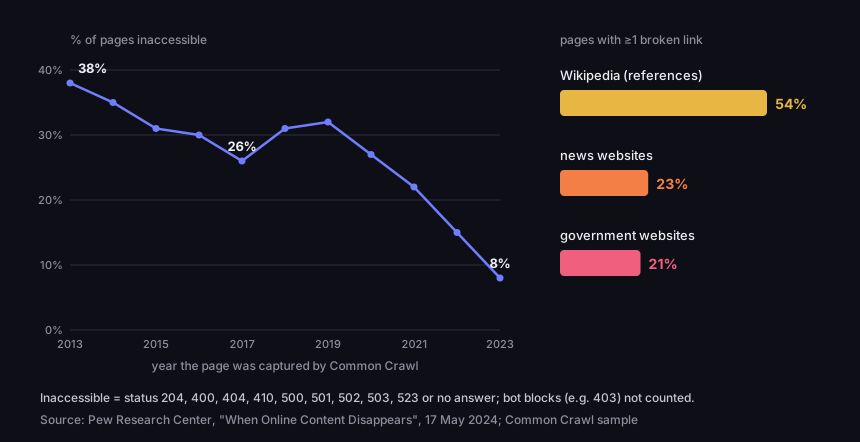
The scale is larger than intuition suggests. In October 2023, Pew Research Center checked pages from a Common Crawl sample captured between 2013 and 2023. A quarter of them were no longer accessible: 38% of pages from 2013 and 8% of pages from 2023 (Pew Research Center, 2024). The same report found at least one broken link on 23% of news pages, 21% of government pages and 54% of Wikipedia pages in their references section. Two caveats. First, this is not a cross-section of the whole web: the 2013–2023 pages are a random sample from the Common Crawl archive, the government pages come from US .gov domains, and Wikipedia means its English-language edition. Second, Pew only counted a page as inaccessible if it returned one of nine error codes or did not answer at all. Pages that turned the bot away with some other code were not counted as inaccessible — for the same reason our link monitoring does not raise an alarm on a 403, more on that below.
How many pages vanished — share inaccessible in October 2023
by the year the page was captured by Common Crawl, 2013–2023; alongside, pages with at least one broken link
Source: Pew Research Center, "When Online Content Disappears", 17 May 2024
Figure description
Line and bar chart. Share of pages inaccessible in October 2023 by year captured: 2013 — 38%, 2014 — 35%, 2015 — 31%, 2016 — 30%, 2017 — 26%, 2018 — 31%, 2019 — 32%, 2020 — 27%, 2021 — 22%, 2022 — 15%, 2023 — 8%. Bars: pages with at least one broken link — Wikipedia (references) 54%, news websites 23%, government websites 21%. Inaccessible means status 204, 400, 404, 410, 500, 501, 502, 503, 523 or no answer.
It shows even more clearly where a link was meant to be a permanent citation. In a study published in 2014, Jonathan Zittrain's team at Harvard checked URLs cited in law journals and US Supreme Court opinions: more than 70% of the URLs in the journals and 50% in the opinions no longer led to the information originally cited (Harvard Law School, Zittrain, Albert, Lessig). Not all of that was 404s: the authors also counted links that still worked but no longer held the cited content, or held changed content (Harvard Law Review Forum, 2014). The lesson is the same, though: a link nobody looks after stops working sooner or later.
What to do when you see a 404
If you hit a 404 as a visitor, it is almost certainly not your fault, and refreshing will not help — the server will give the same answer the second time. A few simple steps do help:
- Check the address bar. A typo, an ending cut off when copying, a full stop or bracket stuck to a link from a message — these are common causes. We explain what an address is made of, and which part does what, in our article on URLs.
- Cut the address back to the domain. Delete everything after the first slash following the domain name and go to the home page; from there you can usually reach the content through the menu or the site search.
- Search for the page title. If you know the article's title or the product name, search for it together with the site's name — the page may have moved to a new address.
- Try an archive. Web archives such as the Wayback Machine keep copies of some pages. Not every page is there and a copy may be old — it is a last resort, not a guarantee.
- Tell the owner. Especially if the link came from a flyer, packaging or a QR code — the owner often has no idea their print leads nowhere.
QR codes are a separate case. If the code does not scan at all — the camera does not see it, or nothing happens — the problem is in the print: size, contrast, distance. We cover that in can't scan a QR code. If the code scans but opens a 404 page, the camera did its job — what failed is the address stored in the code or the page it points to. Scanning again or using another phone will not change that.
If the page does not open at all — a timeout, a certificate error, a 502 or 503 — that is a different situation from a 404: the server is down or cannot be reached. How to tell whether it is down for everyone or just you is covered in our guide is this site down?.
404, 410 or soft 404: what Google sees
To Google, 404 and 410 mean the same thing: the content is not there. Google Search Central says plainly that all 4xx errors except 429 are treated the same — the URL is removed from the index if it was indexed, and newly encountered 404 pages are not processed at all. Crawling of such a URL gradually slows down (Google Search Central, HTTP status codes). The exceptions are 429 and the 5xx codes: to a crawler they mean "the server is overloaded or failing", so Google temporarily slows down rather than dropping pages.
SEO blogs often claim a 410 "removes a page from the index faster" than a 404. Google's documentation says nothing of the kind, and its line about treating all 4xx codes the same rather suggests otherwise. The difference between 404 and 410 is one of meaning: 410 says the resource is gone on purpose and probably for good (RFC 9110, §15.5.11). The specification adds that there is no need to mark everything that disappeared as gone, and that a server which does not know whether the condition is permanent should answer 404. MDN illustrates 410 with exactly that — an expired promotion (MDN, 410 Gone).
The real problem is the soft 404. It is a page that looks like an error but is served with status 200, "all good". Search Console puts it this way: the page returns a user-friendly "not found" message but not a 404 response code, and Google recommends returning a 404 for pages that truly are not found (Search Console, Page indexing report). A soft 404 also shows up when a page is empty or only contains an error message (Google Search Central).
The second source of soft 404s is less obvious: redirecting lots of old addresses to the home page. In its guide to site moves, Google asks you not to do it, because it confuses users and "might be treated as a soft 404 error" (Google Search Central, site moves). The same guide says removed pages on the new site should return a 404 or 410.
The page is gone — what the server should answer
decision tree based on RFC 9110 and Google's documentation
Source: RFC 9110 §15.5.5 and §15.5.11; Google Search Central, read 19 Oct 2026
Figure description
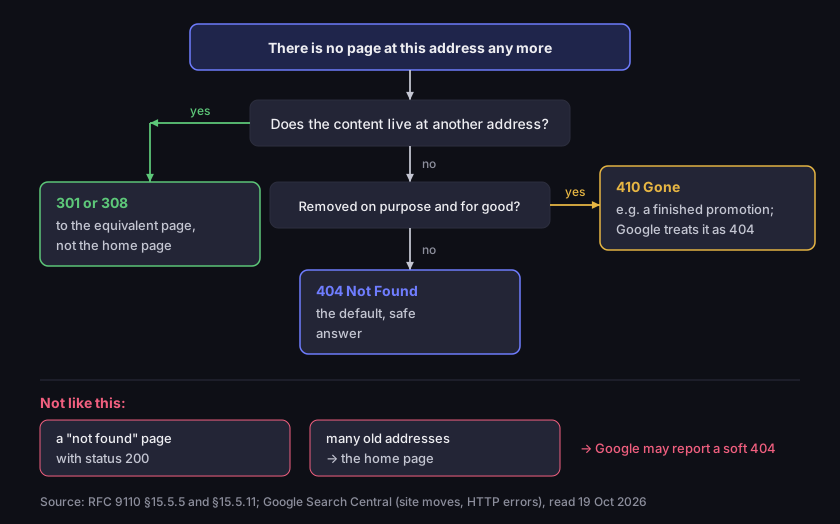
Decision tree. There is no page at this address any more. Does the content live at another address? Yes: a 301 or 308 redirect to the equivalent page, not the home page. No: was it removed on purpose and for good? Yes: 410 Gone, for example a finished promotion; Google treats it as a 404. No or not sure: 404 Not Found, the default, safe answer. Below, two mistakes: a not found page served with status 200, and many old addresses redirected to the home page — Google may report both as soft 404s.
Do 404s hurt your rankings? Google answered that back in 2011: 404 errors are "a perfectly normal part of the web" — the internet changes, old content dies, and a page that dies should ideally return a 404 (Google Search Central Blog, 2011). In the same post Google says it prefers a proper 404 or 410 to a soft 404. The damage, then, is not the code itself but what you lose: traffic from links that pointed to the vanished address, and visitors who bounced off an empty page.
How to fix a 404 on your own site
The fix starts with one question: what happened to the content? If it lives at another address, set up a permanent redirect — 301 or 308 — from the old address to the new one. Search Console says exactly that: if a page has moved, use a 301 redirect to the new location; if it was removed without a replacement, a 404 is not a problem (Search Console). Redirect to the equivalent page, not to the home page: an article to the article's new address, a product to its successor or its category. Which redirect code to choose and how to set it up on a server is covered in our article on HTTP 302 vs 301.
If the content is gone and has no successor, leave the 404, or — when you know it is deliberate and permanent — answer 410. Do not try to "rescue" such addresses with a redirect to the home page: the visitor was looking for something specific and lands on a page without it, and Google may count that as a soft 404.
Look after the error page itself. A good 404 page does three things: it returns a real 404 status (not 200), it says in plain words that the page is not there, and it offers a way on — the menu, a search box, links to the main sections. Most CMSs let you set it in the theme; on an Apache server you point to it in the .htaccess file (MDN). You can check the status with curl -I and the address, or in your browser's developer tools, on the Network tab.
You will find dead addresses on your own site in Google Search Console, in the Page indexing report: "Not found (404)" lists URLs the crawler visited and got a 404, and "Soft 404" lists error pages served with 200. The same report shows redirect errors — chains that are too long and loops (Search Console). Search Console also notes there is no way to tell Googlebot to forget a URL for good — it will just visit it less and less often. A few old 404s in the report are nothing to worry about.
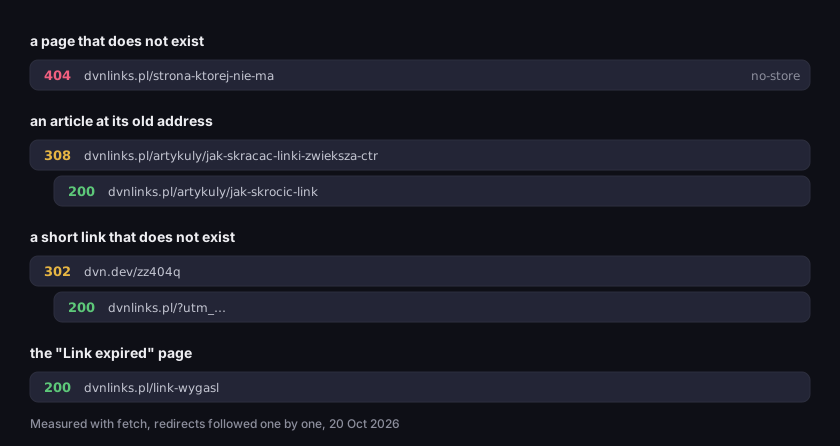
Here is what it looks like on our side. We measured what our addresses answer in four situations: a page that never existed, an article at its old address, a short link with a code that does not exist, and the page for expired links.
No page vs no link — what our own addresses answer
each hop separately, HTTP status and address
Source: DVN Links measurement (fetch, hop by hop), 20 Oct 2026
Figure description
Four measurements. A page that does not exist, dvnlinks.pl/strona-ktorej-nie-ma: 404 with a no-store header. An article at its old address, dvnlinks.pl/artykuly/jak-skracac-linki-zwieksza-ctr: 308 to the new address, then 200. A short link that does not exist, dvn.dev/zz404q: one 302 redirect to the dvnlinks.pl home page with UTM parameters, then 200. The Link expired page: 200.
The missing page gets a real 404, and the renamed article gets one 308 redirect straight to the new address, no chain. Short links behave differently, as the next section explains.
Dead links in print and in QR codes
A link in an email can be corrected and sent again. A link on a flyer, poster, package or the QR code on a business card cannot — the print is already out there. If the code holds a page's full address and that page disappears, every scan ends in a 404 until you reprint. A typical story: the code on a flyer leads to a summer sale page, the sale ends, someone tidies up the site and deletes the page, and the flyers are still sitting on shop counters.
The fix is a layer in between: a short link between the print and the destination page. The code stores the short address, and the short link redirects to the real page. When the destination disappears, you change the short link's destination in the dashboard and the printed code starts leading somewhere new. In DVN Links a short link redirects with a 302, a temporary redirect, so browsers do not remember the old destination and the change applies to every following scan. Why a shortener should answer 302 rather than 301 is explained in how to shorten a link.
Two things worth knowing about what our shortener does when a link leads nowhere:
- An expired link does not give a 404. From the Starter plan you can give a short link an expiry date. Anyone who opens it afterwards gets a 302 redirect to our "Link expired" page, which answers 200 and explains what happened. Without a date set, a link has no expiry on any plan.
- A code that does not exist does not give a 404 either. If someone types or scans a code that is not there, we answer with a single 302 redirect to the site's home page, tagged
utm_campaign=not_found— so our analytics show how many such visits there are and which domain they came from. Google says that redirecting many addresses to the home page may be treated as a soft 404. We do it knowingly: a short address has no search ranking to lose, and a person who scanned a broken code lands on a working page instead of a blank error.
Before you print anything, scan the code from a test print with your phone and open the page all the way — do not just check that the camera recognises the code. You can make a QR code in our QR code generator; if it should go through a short link, create the link first and put its address in the code.
A printed QR code, a destination that returns 404 — what monitoring does
timeline from the real DVN Links monitoring logic
Source: simulation on the DVN Links monitoring functions (nextHealth, isDue), 20 Oct 2026
Figure description
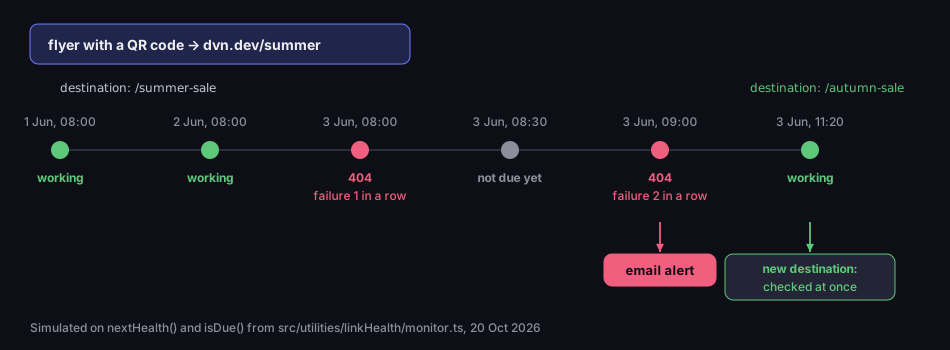
Timeline. A flyer with a QR code points to the short link dvn.dev/summer, which points to /summer-sale. 1 June, 08:00 and 2 June, 08:00: daily check, the page works. 3 June, 08:00: the page returns 404, first failure in a row, no alert. 08:30: not due for a check yet. 09:00: 404, second failure in a row — an email alert. 11:20: the owner changes the destination to /autumn-sale; the new address is checked at once and works; the printed code leads to the new page.
How a bot checks whether a link is alive (and why not after one failure)
Changing the destination only helps if you know it needs changing. That is why DVN Links has link monitoring from the Pro plan: once a day it checks the destination of every active short link and emails you when the page stops working. Business and Enterprise add a weekly report. The Free and Starter plans do not include monitoring — see the pricing page for details and the features page for a description. One caveat: monitoring watches the destinations of your short links, not the links on your website — it is not a broken link checker that crawls your site. It also only checks a link's default destination, not the destinations of rules or A/B variants, and it skips links to files we host ourselves.
Building it meant settling a few questions that any link checker has to answer:
- HEAD first, GET if refused. The monitor first asks with the HEAD method — headers only, without downloading the page. Some servers handle HEAD differently from a normal visit, so on a 403, 405 or 501 we ask again with GET.
- Redirects hop by hop, five at most. Each hop is checked separately, including whether it leads into a private network. A sixth hop in a row counts as "too many redirects". The limit of five echoes an earlier version of the HTTP specification, which recommended it; the current one reminds developers that some clients may still have such a fixed limit (RFC 9110, §15.4).
- 401, 403 and 429 are not a dead page. Many sites keep bots out: they require a login, reject unknown software or rate-limit requests. Such an answer says something about the bot, not the page — a person in a browser would see it fine. We mark it as "cannot be checked" and send no alert. Pew Research Center took the same care: it only counted a page as inaccessible on nine error codes, because many sites actively prevent automated data collection (Pew Research Center).
- A broken page means 404, 410, other 4xx and 5xx errors, a domain that does not exist, an invalid certificate, a refused connection, or no answer within 10 seconds. If the final address is on Google Safe Browsing's list, monitoring marks it as unsafe — what that list catches is covered in how to check if a link is safe.
We tested this on the real monitoring function, pointing it at a test server that answered in thirteen different ways.
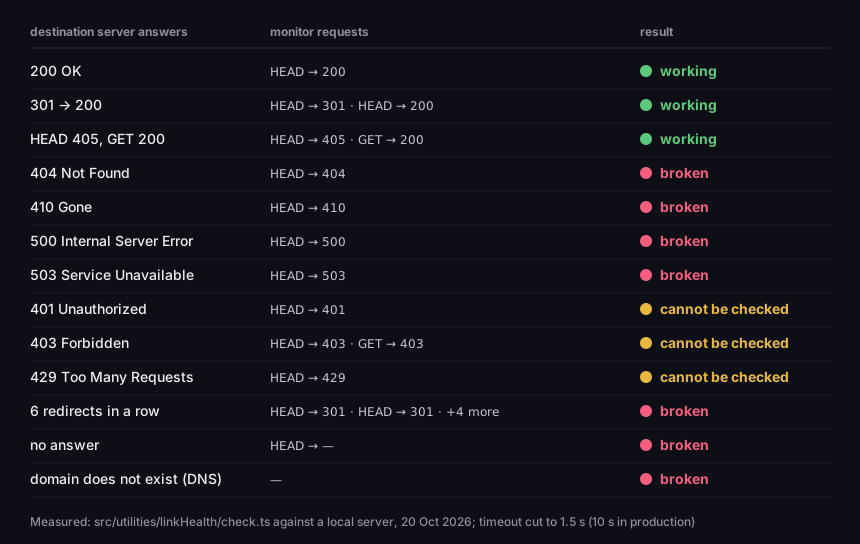
How link monitoring judges a destination's answer
13 answer variants, the monitor's requests and the result
Source: DVN Links measurement — the monitoring check function against a local test server, 20 Oct 2026
Figure description
Table of thirteen variants. 200 OK: one HEAD request, working. 301 to a page with 200: two HEAD requests, working. HEAD 405, GET 200: HEAD then GET, working. 404, 410, 500 and 503: one HEAD request, broken. 401 and 429: one HEAD request, cannot be checked. 403: HEAD and GET, cannot be checked. Six redirects in a row: six HEAD requests, broken (too many redirects). No answer: broken (timed out). Domain does not exist: no HTTP request, broken.
The last decision was when to raise the alarm. One failed check is not enough: the server may have been restarting, or the network may have hiccupped. So when a page fails, the monitor checks it again an hour later and only emails you after the second failure in a row. The exception is the unsafe state — we tell you about that straight away. When you change a link's destination, the new address does not wait for the daily slot — it goes into the queue at once, monitoring runs every five minutes — and its history starts from zero. We send at most one email a day, grouping every link with a problem, and after a fix, an email saying the page works again. In the dashboard each link shows a status dot: working, cannot be checked, broken, or unsafe.
Frequently asked questions
That the server is working but found no page at that address. The code does not say whether the absence is temporary or permanent, and it does not mean the server has failed — it is the answer to a request for an address that does not exist (RFC 9110).
Not by themselves. Google calls 404 errors a normal part of the web and removes such URLs from its index (Google Search Central Blog). What you lose is the traffic from links that pointed to the vanished address — if the content lives elsewhere, set up a 301 redirect.
The same as on a computer: check the address, cut it back to the domain, search for the page. If the address came from a QR code, your phone read it correctly — the error is in the address or on the site, so the best thing is to tell whoever owns the code.
410 when you know the page is gone on purpose and for good, for example after a promotion has ended. When in doubt, 404. For Google both codes work the same way (Google Search Central).
On your own site — in Google Search Console, in the Page indexing report, under "Not found (404)". For the short links and QR codes you have shared or printed, DVN Links link monitoring watches them from the Pro plan — see pricing.
Printing a QR code? Give it a short link with monitoring — you will hear about a 404 before a customer reports it. Plans with monitoring are on the pricing page, and you can create an account here.