Mailto link: subject, body, CC and line breaks done right
A mailto link opens a new e-mail with the address, subject and body filled in. How to write one to RFC 6068, why a space is %20 and a line break %0D%0A, and how to make a QR code that opens a ready e-mail.
Mailto is a URI scheme that opens a new message in an e-mail program instead of a web page. The simplest link looks like this: <a href="mailto:[email protected]">Write to us</a>. Click it and the mail app opens a draft with the recipient filled in. You can add a subject and body, several recipients and a copy — and that is where the mistakes many guides repeat creep in: a space written as +, a line break as %0A, a second question mark halfway through the link. Below is the syntax as the RFC 6068 standard defines it, a measurement of what a subject and body cost in a QR code, and the situations where a mailto link simply does not work. You can make a QR code that opens a ready e-mail in the QR code generator, E-mail type.
Mailto: what it is and what happens on click
A mailto link sends nothing. It opens a draft, and a person decides whether to send it. RFC 6068, the standard that defines the scheme, puts it plainly: with an ordinary web address the browser talks to a server straight away, whereas with mailto “the client creates a message to the designated address with the various header fields set as default. The user can edit the message, send the message unedited, or choose not to send the message” (RFC 6068, §3). In its security section the standard adds that a mail client should not send a message based on a mailto link without first showing the user the full message and asking for approval (RFC 6068, §7).
MDN, Mozilla's developer documentation, describes the same thing from the page's side: you can create links or buttons that, when clicked, open a new outgoing e-mail message rather than a page, using the mailto: scheme in the href attribute (MDN, Creating links).
Which program opens the draft depends on the device. On an iPhone a mailto link launches the Mail app's compose sheet, and if Mail is not installed the system shows a warning — that is how Apple's archived developer documentation describes it (Apple, Mail Links). It is an archive page last updated in 2017, so read it as the principle, not a description of today's screens. On Android the developer documentation recommends mailto: precisely so that a message is handled by an e-mail app rather than a messaging or social app (Android Developers, Common intents). On a computer the link opens the system's default mail program — or nothing, if none is set up. That case gets its own section below.
Mailto link syntax: address, several recipients, CC, BCC
A mailto link has a simple grammar: mailto:, then recipients separated by commas, then optional fields. The first field follows a ?, every further one an & (RFC 6068, §2). A full example: mailto:[email protected],[email protected][email protected]&subject=Offer%20for%202027&body=Hello%20there
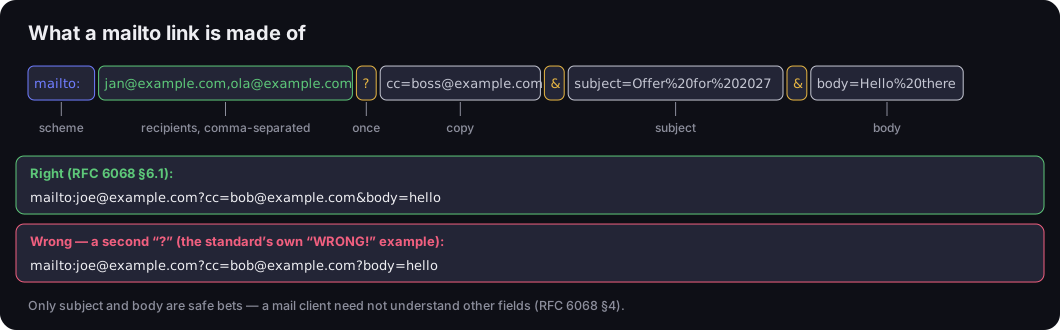
What a mailto link is made of
the parts of a link, plus the standard's right and wrong examples
Source: RFC 6068, §2, §4 and §6.1
Figure description
A mailto link split into parts: mailto: is the scheme; [email protected],[email protected] are the recipients, comma-separated; the question mark appears once; [email protected] is a copy; an ampersand separates fields; subject=Offer%20for%202027 is the subject; body=Hello%20there is the body. Below, the correct example from RFC 6068 §6.1: mailto:[email protected][email protected]&body=hello. The standard's wrong example, marked WRONG: mailto:[email protected][email protected]?body=hello, with a second question mark. Caption: only subject and body are safe bets.
The most common mistake is the second question mark. The standard shows it as a wrong example: mailto:[email protected][email protected]?body=hello is labelled “WRONG!”, and the correct version uses &body=hello (RFC 6068, §6.1). One rule: ? appears once, before the first field.
Three more rules from the standard help with links to several people:
- List several recipients with commas before the
?. The standard also allows ato=field among the parameters, but marks it NOT RECOMMENDED because mail clients handle it differently and some ignore it (RFC 6068, §2). - Do not repeat a field. Two
cc=fields in one link behave differently from program to program — the standard says link creators should not do it. Several addresses in copy go into one field, comma-separated. - Do not bank on
ccandbcc. Under the standard, a link's creator cannot expect the mail client to understand more than the subject and the body, and To, Cc and Bcc values do not necessarily turn into matching message headers (RFC 6068, §3–4).
You do not need to encode the e-mail address. Some guides tell you to write @ as %40 — the RFC 6068 grammar allows a plain @ in the address. Encode only characters that mean something in the link: an address with an & in it, such as Mike&[email protected], becomes mailto:Mike%[email protected] in the standard's own example.
Subject and body: encoding characters
Subject and body have to be percent-encoded: every character that cannot appear in an address is replaced by % and two hexadecimal digits. %20 is a space (RFC 3986, §2.1). Every guide says that much. The devil is in three characters: the space, the line break and the accented letter.
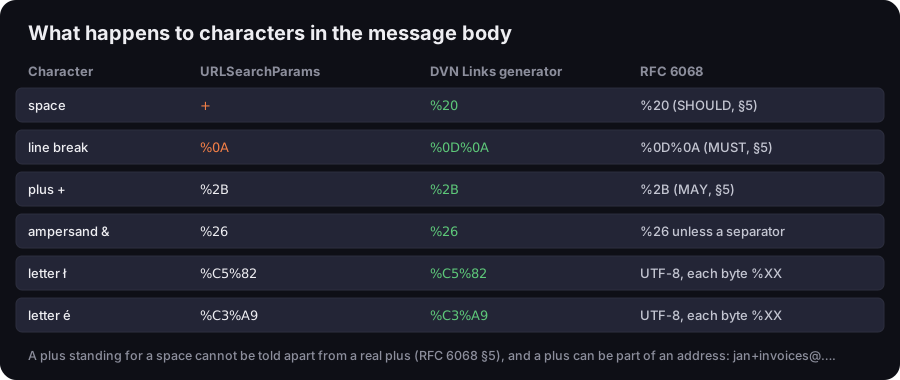
What happens to characters in the message body
the URLSearchParams function, our generator and what RFC 6068 requires
Source: RFC 6068 §5, values computed with the DVN Links generator's function, 20 Oct 2026
Figure description
Table of six characters. Space: URLSearchParams gives a plus, our generator %20, RFC 6068 says %20. Line break: URLSearchParams gives %0A, the generator %0D%0A, RFC requires %0D%0A. Plus: %2B everywhere, RFC allows %2B. Ampersand: %26 everywhere, RFC requires %26 unless it is a separator. Letter ł: %C5%82. Letter é: %C3%A9 — RFC: UTF-8, each byte encoded. Caption: a plus standing for a space cannot be told apart from a real plus, and a plus can be part of an address.
Space: %20, not a plus
Browser forms and common functions for building query strings (URLSearchParams in JavaScript) write a space as +. In a web address that works; in a mailto link, not always. The standard explains why: a + standing for a space cannot be distinguished from a real + in a mailto link. So when producing mailto links, all spaces should be encoded as %20, and a plus may be encoded as %2B. The RFC adds that + is often part of an e-mail address to mark a subaddress, as in [email protected] (RFC 6068, §5).
We tripped over this ourselves. Our QR code generator builds its parameters with URLSearchParams, which gives + for a space — a mail app might show the subject as “Price+enquiry”. So the generator replaces every + with %20. That replacement is safe, because URLSearchParams has already turned any real plus in the text into %2B, so it never becomes a space. A neat detail: the browser does exactly the same when an HTML form submits with a mailto action — the HTML specification says to replace plus signs with %20, having first turned every line break into a CR LF pair (WHATWG HTML, form submission).
Line break: %0D%0A, not %0A
Under RFC 6068 a line break in the message body MUST be encoded as %0D%0A — a carriage return followed by a line feed (RFC 6068, §5). Guides often give %0A. Many mail programs accept it, but since the standard says MUST, a link that follows it is the safer bet. Do not put line breaks in the subject at all — the standard says they should not appear in fields other than the body.
We fixed this in our generator too. A text box in the browser returns line breaks as a bare \n, which URLSearchParams turns into %0A. Since the fix, the generator first turns every line break into a \r\n pair, so the QR code carries %0D%0A, as the standard requires. The price: every line break is six characters in the code.
Accented letters: six characters for one
The standard says characters outside ASCII are written in UTF-8 and each byte is then percent-encoded (RFC 6068, §2). An accented letter is two bytes in UTF-8, so é becomes %C3%A9 and ü becomes %C3%BC — six characters instead of one. A subject such as “Réclamation” comes out as R%C3%A9clamation. In a link on a web page that hardly matters; in a QR code it does, as you will see below. There is more on special characters in addresses in our piece on what a URL is.
Also encode characters that mean something in the link: & in the body as %26 (otherwise the mail app thinks a new field starts), ? as %3F, # as %23. In JavaScript encodeURIComponent does it; by hand, paste the text into any URL-encoding tool.
Mailto in HTML: href, buttons, WordPress
In HTML a mailto link is an ordinary <a> element with the address in its href attribute. MDN says links that open the user's e-mail program use the mailto: scheme (MDN, the a element), and the field values must be URL-encoded, spaces and non-printing characters such as tabs and carriage returns included (MDN, Creating links).
1<a href="mailto:[email protected]?subject=Price%20enquiry&body=Hello%20there">Write to us</a>Note the &. The & character is reserved in HTML, so inside an attribute it has to be written as the & entity — the mailto standard shows this in its own example (RFC 6068, §6.1). Browsers usually forgive a bare &, but an HTML validator will flag it.
A mailto “button” is the same link with different styling. In WordPress and page builders such as Elementor, you type the whole link starting with mailto: into the button's link field — the builder turns it into the href. If the field will not accept a link with parameters, add an HTML block and write the <a> tag by hand.
A form with action="mailto:" is a different story. The HTML specification describes what the browser does with such a form: it collects the fields, encodes them and opens the mail program (WHATWG HTML). The data never reaches your server, only a draft e-mail the visitor still has to send. That is not a contact form in the usual sense — the two are compared further down.
Where else mailto works: e-mail signatures, PDFs, documents
A mailto link is an ordinary hyperlink, so it works wherever links work. In an e-mail signature, put it on the address or on text such as “Write to our sales team”. In a word-processor document or a PDF, insert it like any web link — type the whole string, mailto: included, into the address box.
Whether a click in a PDF opens a message depends on two things: whether the PDF reader opens links at all, and whether the device has a mail program. We have not tested every reader, so the only advice we stand behind is this: click the link in the finished file, on a computer and on a phone, before you send the document on.
QR code for e-mail: mailto inside the code
A QR code can open a ready e-mail — it simply holds a mailto link. ZXing, the project behind a widely used barcode-reading library, advises encoding a full mailto:address rather than a bare address, so that readers recognise it as e-mail; a reader should then open a blank message to that address (ZXing, Barcode Contents). ZXing also mentions MATMSG, a format introduced by NTT DoCoMo, but our generator uses plain mailto.
In the QR code generator pick the E-mail type and fill in three fields: e-mail address, subject and message body. The generator takes one address, a subject of up to 200 characters and a body of up to 1,000 — limits of our form, not of the standard. Several recipients, CC or BCC cannot be set in the generator; for those, write the link in HTML by hand. You download the code as a PNG without creating an account.
Before you type a long body, look at the chart. We measured how the code grows with the same function that builds the code's content in the generator and the same library that draws it. The example message is in Polish, so it shows what accented letters and line breaks do.
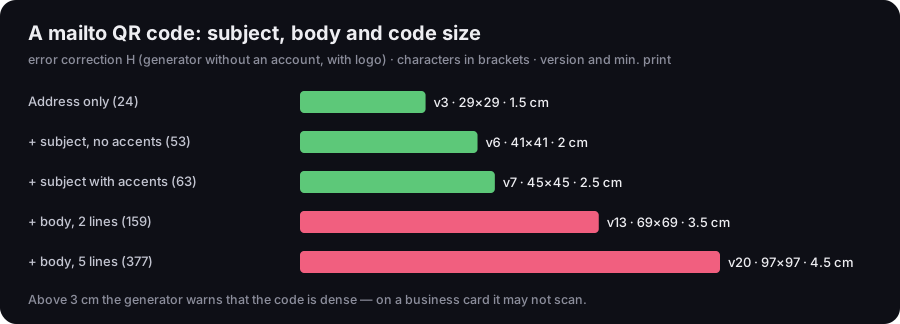
A mailto QR code: subject, body and code size
error correction H, characters in the code, QR version and minimum print width
Source: DVN Links calculation, generator function and qrcode library 1.5.4, minimum module 0.396 mm per GS1, 20 Oct 2026
Figure description
Bar chart of five variants of a code for [email protected] at error correction H. Address only, 24 characters: version 3, 29×29 modules, print from 1.5 cm. With a subject without accents, 53 characters: version 6, 41×41, 2 cm. With a subject with accents, 63 characters: version 7, 45×45, 2.5 cm. Plus a two-line body, 159 characters: version 13, 69×69, 3.5 cm. Plus a five-line body, 377 characters: version 20, 97×97, 4.5 cm. Above 3 cm the generator warns that the code is dense.
The address [email protected] alone is 24 characters and the smallest code: version 3, 29×29 modules at error correction H, which is what the generator gives you without an account (it adds a logo). A subject with accented letters takes the code to version 7. A two-line body with accents (a greeting and one sentence) comes to 159 characters and version 13. A five-line body of 188 characters — a complaint with an order number — encodes to 377 characters and makes the code version 20: 97×97 modules. Taking GS1's minimum module of 0.396 mm, that code needs to be printed 4.5 cm wide, white border included; the generator warns about a dense code above 3 cm.
The lesson: keep the body short in a QR code. A subject that says what it is about and a single sentence are enough — the person can add the rest. How code density affects print, and what else to check before a file goes to the printer, is covered in our guide on how to make a QR code. If the code should save your address to the phone's contacts rather than open an e-mail, you need a different type — a vCard contact, described in our piece on business cards with a QR code.
Before printing, scan the code with two phones — ideally an iPhone and an Android — and open the message in the mail app your customers use. Check that a subject with accented letters looks right and that the body breaks into lines as you intended. The generator encodes characters to the standard, but how the message is displayed depends on the phone's mail app, which neither you nor we control.
A mailto QR code is static: the address, subject and body live in the code itself. You cannot change them after printing, and since a scan goes through no server, nobody can count how many people scanned it — us included.
When mailto fails
A mailto link has three weak spots, and it pays to know them before you hang all of your website's contact on it.
No mail program. The link hands the job to the device's mail program. If there is none, or it is not set up, a click may do nothing — on an iPhone without Mail the system shows a warning (Apple, Mail Links). Android's documentation describes the case where no app on the device can handle such a request (Android Developers). A typical case is an office computer where mail runs in the browser: the mailto link tries to open a program nobody uses.
Webmail. Gmail or Outlook in a browser handle mailto only if the browser knows to pass such links to them. The HTML specification provides a mechanism for registering scheme handlers, and mailto is on the list of schemes a site may register (WHATWG HTML, custom scheme handlers). Whether the visitor has done so is out of your hands.
Bots harvest addresses. The standard warns that mailto links on public web pages expose addresses for harvesting — every address in the link, including those in bcc. A blind copy is not shown to the recipients in the To field, but the address is visible in the page's source (RFC 6068, §7). Put a private address in bcc and anyone can read it in the page source.
No guaranteed length. RFC 6068 sets no maximum length for a mailto link, and we found no primary source that sets one for mail programs. The numbers that circulate in guides usually concern web addresses in browsers, not e-mail. The safe approach is simple: a short subject, a short body, and longer details in the reply you send.
Mailto link or contact form
Mailto wins on simplicity, a form on predictability. The choice depends on whether it matters more that contact works for everyone or that you build nothing behind it.
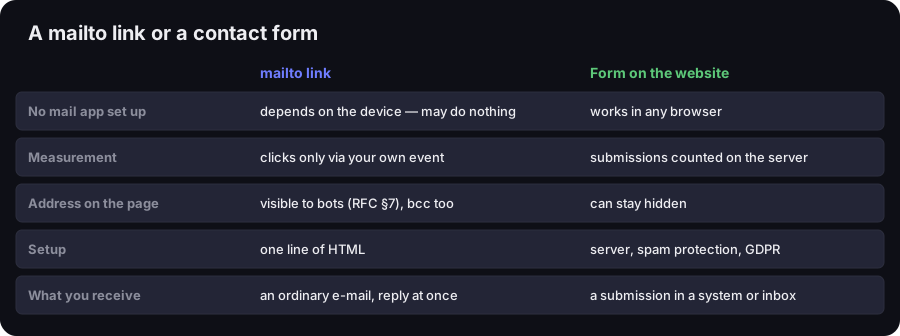
A mailto link or a contact form
five criteria
Source: RFC 6068 §7, Apple and Android documentation; DVN Links comparison
Figure description
Comparison table. No mail app set up: mailto depends on the device and may do nothing; a form works in any browser. Measurement: mailto only via your own event; a form counts submissions on the server. Address on the page: with mailto visible to bots, bcc too; with a form it can stay hidden. Setup: mailto is one line of HTML; a form needs a server, spam protection and GDPR compliance. What you receive: with mailto an ordinary e-mail you can reply to at once; with a form a submission in a system or inbox.
Our rule: mailto for pages and documents where contact is a side feature — a signature, a PDF quote, a simple company page, a code on a poster. Customers usually have mail on their phone anyway, and you get an ordinary e-mail you can answer with one click. A form where contact is the point of the page — quote requests, service tickets, bookings. A form works without a mail program, can require fields, and keeps the address out of the page source. You pay in upkeep: someone has to run a server or a service, protect the form from spam and handle the data in line with the GDPR.
Often the best answer is both: a form as the main route and, next to it, a visible address with a mailto link for people who would rather write themselves. If your customers message more than they e-mail, consider a chat link instead — see our guide to the WhatsApp link.
Can you track mailto clicks?
A click on mailto leads to no page, so it leaves no trace in ordinary statistics. You can only measure it on your own website, with your own event.
A DVN Links short link will not help here: short links accept only http and https addresses and reject mailto:. That is deliberate — we only redirect to schemes a browser handles safely after a redirect. The short-link statistics described in the DVN Links features therefore cover links to pages, not to e-mail. A mailto QR code gives no scan count either, because the phone reads it without any server involved.
And Google Analytics 4? GA4's enhanced measurement describes an “outbound clicks” event: a click on a link that leads away from the current domain to another website (Google Analytics Help). That documentation says nothing about mailto links. If you want to count clicks on your address, set up your own event — for example in Google Tag Manager, on clicks of links starting with mailto: — and check in DebugView that it arrives.
Compare that with links to pages: a link in a newsletter or on a flyer that leads to a page can carry UTM parameters, and you will see the campaign in your analytics. How to set them is in our guide to UTM parameters, and you can add them with the UTM builder. They are no use for mailto.
Frequently asked questions
In HTML, write <a href="mailto:[email protected]">link text</a>. Add a subject after a question mark: mailto:[email protected]?subject=Your%20subject. Write spaces in the subject as %20 and accented letters UTF-8 encoded.
The first field after ?, every further one after &: mailto:[email protected]?subject=Subject&body=Message. A second question mark is a mistake the RFC 6068 standard shows as a “WRONG!” example. Write a line break in the body as %0D%0A.
Usually the device has no mail program set up, or mail runs in a browser that has not been set to handle mailto links. The link hands the job to a mail program — if there is none, nothing can open the message.
Yes, if the PDF reader opens links and the device has a mail program. You insert it like a link to a web page, with the full mailto: in the address field. Before you send the file, click the link on a computer and on a phone.
Yes. The code holds a mailto: link with the address, subject and body. In our generator that is the E-mail type — free, no account, PNG file. Keep the body short, because every accented letter and every line break makes the code bigger.
Make a QR code that opens a ready e-mail
The E-mail type in the QR code generator — address, subject and body encoded to RFC 6068, no account needed.