vCard QR code: data in the code or a link in the code
A vCard QR code on a business card can carry the whole contact or a link to a page with the details. How much room each takes on the card, what to enter and when the link stops working.
A vCard QR code on a business card carries one of two things: your contact details written into the code, or a link to a page where those details are. That choice decides how much room the code takes on the card and how long it keeps working. We measured it on real codes: a contact with the seven fields of our generator needs at least 34 mm of print width, a short link 15 mm. On a card whose short side is 55 mm, that is the difference between a code in the corner and a code taking most of the height. We count from a module of 0.396 mm (GS1 General Specifications); the calculation is ours, of 14 October 2026, on the qrcode 1.5.4 library that our generator uses.
vCard QR code: data in the code or a link in the code
Two questions decide the variant: will any detail change before you hand out all the cards, and will a code with your fields fit on the card? If the answer to the first is "yes" or to the second "no", you need a link.
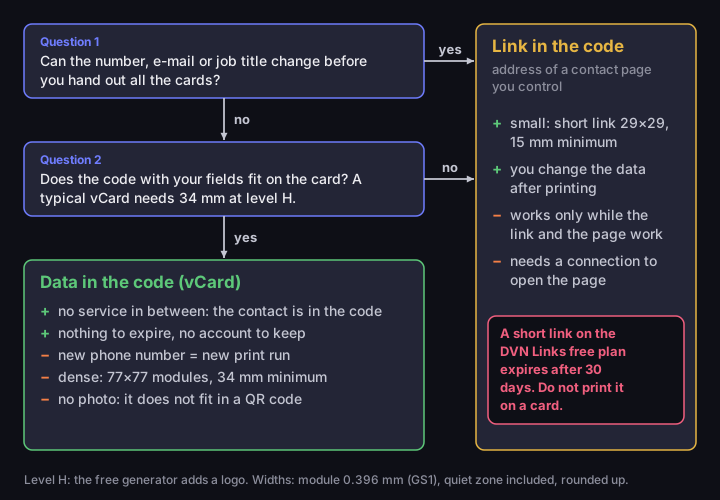
Data in the code or a link in the code
two questions and the price of each answer
Source: our calculation, qrcode library 1.5.4, 14 Oct 2026; DVN Links plan limits as of 14 Oct 2026
Figure description
Decision diagram. Question 1: Can the number, e-mail or job title change before you hand out all the cards? If yes, put a link in the code. If no, question 2: Does the code with your fields fit on the card? A typical vCard needs 34 mm at level H. If no, put a link in the code; if yes, put the data in the code. Data in the code (vCard): no service in between: the contact is in the code; nothing to expire, no account to keep; new phone number = new print run; dense: 77×77 modules, 34 mm minimum; no photo: it does not fit in a QR code. Link in the code, the address of a contact page you control: small: short link 29×29, 15 mm minimum; you change the data after printing; works only while the link and the page work; needs a connection to open the page. A short link on the DVN Links free plan expires after 30 days. Do not print it on a card.
Data in the code is a business card in the vCard format. The code holds text with a name, phone number and the remaining fields, and the phone reads it from the image alone. No server sits in between, so nothing expires and you keep no account or web page alive. The price is density and permanence: every field adds tens of bytes, and a code printed with a number you change in six months is only fit for the bin. The generator says so under the form: "This is a static code — the data lives in the code itself, so it cannot be changed once printed."
A link in the code is the address of a page with your details — a "Contact" page on the company site, a profile you maintain — or a short link that redirects to it. The code is small because it carries a few dozen characters, and you correct the details on the page, not in print. The price is dependence: the code works as long as the address does, and with a short link also as long as the service and the plan behind it.
What does a person see after scanning a vCard? The wiki of ZXing, an open-source library for reading codes, says the reader should open a new address book entry populated with the data and ask whether to save it (ZXing, Barcode Contents). That is a recommendation for app developers, not a description of a phone camera. Apple's scanning instructions list websites, apps and tickets, not contacts (Apple Support); the Pixel camera help says only that it shows a "bubble or link" (Pixel Camera Help). We found no documentation of how a system camera handles a contact, or whether it can without a connection. Before ordering, scan a test print on an iPhone and an Android phone with the network off, and check that accented characters survive.
How much room a vCard QR code takes on a business card
The size of the code follows from the number of bytes in it, not from a designer's taste. More characters mean a higher version and more modules — single squares — on the same piece of card. We calculate the smallest print width as (modules + 8) × 0.396 mm: eight modules are the quiet zone, four per side, and 0.396 mm is the smallest module for phone-scanned codes in the GS1 General Specifications. That is a requirement for retail packaging, not a general QR standard, but we found no better reference. How to work it out for any content is in Minimum QR code size.
We take the card as 85 × 55 mm, which Printkeg's print guide gives for most of continental Europe; it adds that the United Kingdom typically follows and Scandinavia often uses 90 × 55 mm (Printkeg). This is print-shop custom, not a standard: we found none defining a business card. The nearest standardised size is ID-1, the format of bank cards and identity documents (TD1 in ICAO travel documents), 85.6 × 53.98 mm (ICAO Doc 9303, part 5), so conclusions for a 55 mm short side hold almost unchanged.
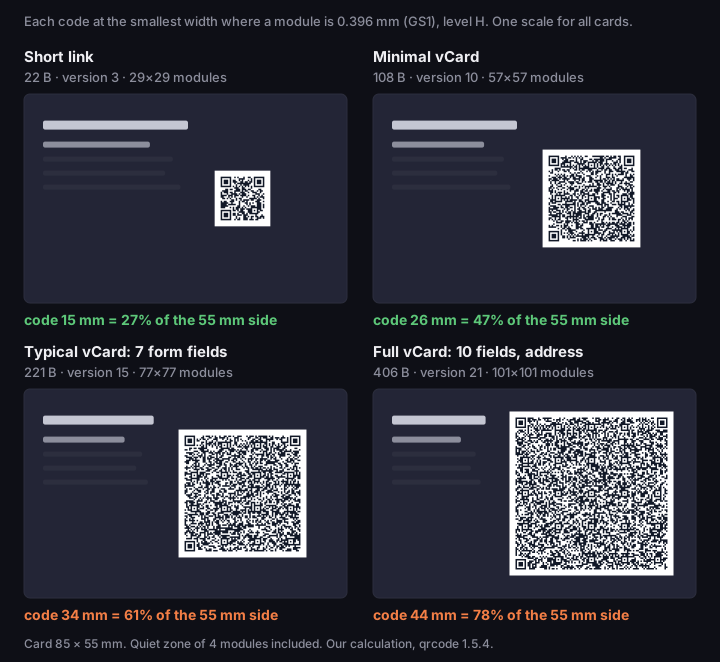
Four QR codes on a business card, to scale
85 × 55 mm card, level H, each code at the smallest size with a 0.396 mm module
Source: our calculation, qrcode library 1.5.4, 14 Oct 2026; minimum module — GS1 General Specifications
Figure description
Four business cards 85 × 55 mm drawn at the same scale, each with a real QR code at error correction level H, printed at the smallest width at which one module measures 0.396 mm, the GS1 minimum. Short link: 22 bytes, version 3, 29×29 modules, at least 15 mm wide, 27% of the card's short side; Minimal vCard: 108 bytes, version 10, 57×57 modules, at least 26 mm wide, 47% of the card's short side; Typical vCard: 7 form fields: 221 bytes, version 15, 77×77 modules, at least 34 mm wide, 61% of the card's short side; Full vCard: 10 fields, address: 406 bytes, version 21, 101×101 modules, at least 44 mm wide, 78% of the card's short side. Quiet zone included. Our calculation, qrcode 1.5.4.
A typical vCard from our generator — first name, surname, company, job title, phone, e-mail and website — is 221 bytes. At error correction level H it gives a version 15 code, 77 × 77 modules, which needs at least 34 mm, or 61% of the card's short side. A minimal vCard with a name and phone number is 108 bytes and 26 mm; a short link is 22 bytes and 15 mm (our calculation, qrcode 1.5.4, 14 October 2026, module per GS1).
Why level H? The free generator always puts a logo in the middle, and a logo covers modules, so it encodes at the highest error correction level. At level M the same vCard is 61 × 61 modules and 28 mm, at L 53 × 53 and 25 mm, but a lower level leaves less reserve for dirt and glare.
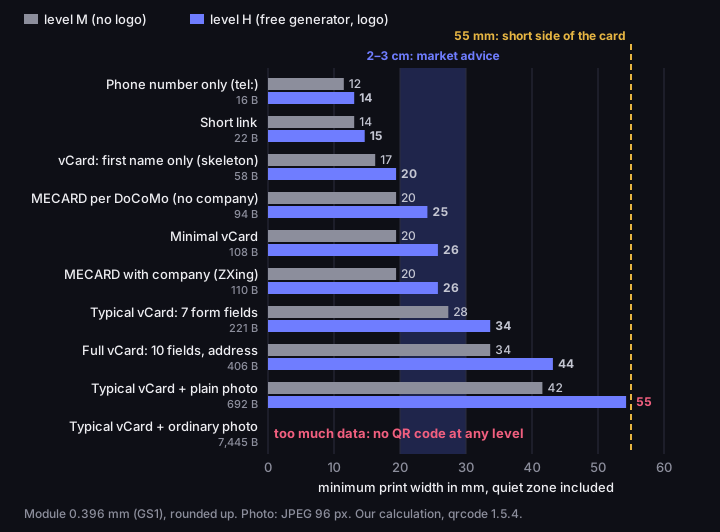
Minimum print width of a contact QR code
mm with quiet zone, 0.396 mm module, levels M and H
Source: our calculation, qrcode library 1.5.4, 14 Oct 2026; minimum module — GS1 General Specifications
Figure description
Bar chart: the smallest print width in millimetres, quiet zone included, at which one module reaches the GS1 minimum of 0.396 mm, at levels M and H. Phone number only (tel:) (16 B): M 12 mm, H 14 mm; Short link (22 B): M 14 mm, H 15 mm; vCard: first name only (skeleton) (58 B): M 17 mm, H 20 mm; MECARD per DoCoMo (no company) (94 B): M 20 mm, H 25 mm; Minimal vCard (108 B): M 20 mm, H 26 mm; MECARD with company (ZXing) (110 B): M 20 mm, H 26 mm; Typical vCard: 7 form fields (221 B): M 28 mm, H 34 mm; Full vCard: 10 fields, address (406 B): M 34 mm, H 44 mm; Typical vCard + plain photo (692 B): M 42 mm, H 55 mm; Typical vCard + ordinary photo (7445 bytes): does not fit in a QR code at any level. Shaded band: 20 to 30 mm, the size range a vCard QR guide recommends regardless of content. Dashed line: 55 mm, the short side of an 85 × 55 mm business card. Our calculation, qrcode 1.5.4.
The shaded band in the chart is advice from guides: Uniqode recommends a vCard code between 20 × 20 and 30 × 30 mm (Uniqode). For a typical vCard at level H that gives a module of 0.24 to 0.35 mm, below the GS1 minimum across the whole range. This is our calculation, not a scan test, but it shows that a fixed size chosen by eye is too small for a full contact.
The generator does this sum for you: when a code needs more than 3 cm of print, it shows a warning with the minimum size, rounded up to half a centimetre. A typical card from the generator without an account, that is with the DVN Links logo and at level H (221 characters, 34 mm), gets 3.5 cm. Before you type your details, read the size for your fields from the chart or work it out from the formula.
What is inside a vCard QR code: the vcf file, versions 3.0 and 4.0
A vCard QR code carries exactly the text that is saved in a .vcf file, the contact file you export from a phone or a mail program. The only difference is the carrier: a vcf file has a name, a QR code has only the content.
The vCard format has two versions in use. Version 3.0 is RFC 2426 of September 1998; version 4.0 is RFC 6350 of August 2011, which formally replaced it. In 4.0 UTF-8 is the only character set, a PHOTO is always a URI (including the data: form), and lines longer than 75 octets, that is bytes, are folded without splitting multi-byte characters. Version 3.0 speaks of lines longer than 75 characters and allows a photo embedded as binary data in base64.
Our generator makes vCard 3.0. We assume the contacts apps in iOS, Google and Outlook read it without special handling; that is a design decision, not a device test. We fold lines at 75 bytes without splitting a character such as "é" or "ø", meeting the stricter rule of 4.0, and end each line with CRLF, as version 3.0 requires: RFC 2426 (section 2.6) takes the separator from RFC 2425 (section 5.8.1). If someone claims 4.0 works worse on Android, ask for the source; we found none, so 3.0 is caution, not proof.
Version 3.0 also has a fixed cost. RFC 2426 requires three fields: "The vCard object MUST contain the FN, N and VERSION types" (RFC 2426, section 1). Add the BEGIN:VCARD and END:VCARD markers, and a card with only a first name is already 58 bytes before you type a phone number.
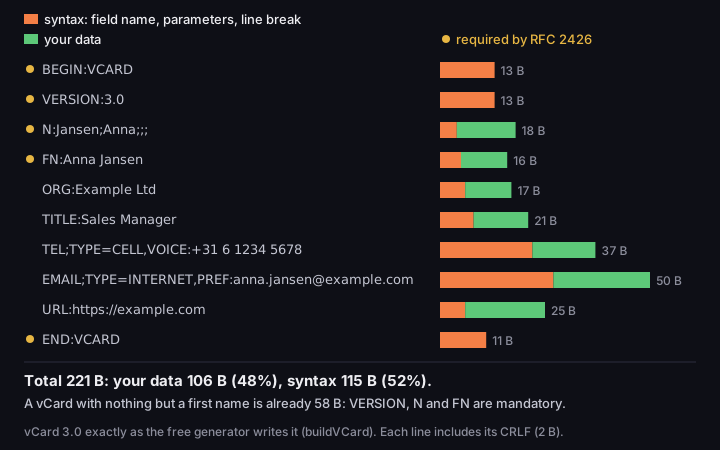
What a vCard costs, line by line
typical vCard 3.0 from the generator, syntax and data in bytes
Source: our calculation for a vCard from the DVN Links generator, 14 Oct 2026; required fields — RFC 2426
Figure description
Bar chart of the 10 lines of a typical vCard 3.0 from the free generator, each split into syntax and data, in bytes: BEGIN 13 B (data 0 B), required; VERSION 13 B (data 0 B), required; N 18 B (data 14 B), required; FN 16 B (data 11 B), required; ORG 17 B (data 11 B); TITLE 21 B (data 13 B); TEL 37 B (data 15 B); EMAIL 50 B (data 23 B); URL 25 B (data 19 B); END 11 B (data 0 B), required. Total 221 bytes: data 106 B, syntax 115 B. A vCard with only a first name is 58 bytes, because RFC 2426 requires VERSION, N and FN.
Of the 221 bytes of a typical card, only 106 are your data. The other 115 are syntax: field names, semicolons, start and end markers and, above all, type parameters. The prefix EMAIL;TYPE=INTERNET,PREF: alone takes 25 bytes, more than the 23-byte example address, and TEL;TYPE=CELL,VOICE: takes 20 bytes for a 15-byte number; the line break adds 2 bytes to each.
Accented characters are a separate matter. Version 3.0 lets you declare the character set only in a MIME header — "Character set can only be specified on the CHARSET parameter on the Content-Type MIME header field" (RFC 2426, section 5) — and a QR code has no such header. Our generator writes UTF-8 with no declaration. Whether a phone camera shows "é" or "ø" in a surname correctly, we did not check; scan a test code first.
MECARD: a shorter format, but no company or job title
MECARD is a compact alternative to vCard, but it lacks two fields a business card needs. ZXing says of vCard that it "proves a bit verbose for use in 2D barcodes" and points to a format popularised by the Japanese operator NTT DoCoMo (ZXing, Barcode Contents). Instead of headers and parameters MECARD uses one line: MECARD:N:Jansen,Anna;TEL:…;EMAIL:…;URL:…;;.
By our calculation, a MECARD with a name, phone, e-mail and website is about 94 bytes — fewer than a vCard with only a name and phone number, which is 108. At level H that is 25 mm against 34 mm for a typical vCard, which also carries a company and job title. The figures are approximate, because they depend on the writing rules: we escaped the colon in the web address with a backslash, as DoCoMo requires, but wrote the number with "+31", although the specification allows only digits, # and \* (NTT DOCOMO, 2013 archive).
The catch is in the fields. The DoCoMo specification for i-mode phones lists name, phone, e-mail, note, birthday, address, website and nickname — no company or job title (NTT DOCOMO, 2013 archive). ZXing reads a company field, ORG, as its own extension (ZXing, AddressBookDoCoMoResultParser). With a company, MECARD grows to about 110 bytes and 26 mm, but there is nowhere for a job title. We found no documentation of how the iPhone and Android cameras treat MECARD. Treat it as a curiosity, not a recommendation; our generator makes vCard.
Photo, address, LinkedIn: what to keep out of the code
Put in a business card QR code only what someone will use from the contact, because every field costs millimetres. The photo costs the most.
vCard 3.0 lets you embed a photo in the PHOTO field as base64 (RFC 2426, section 3.1.4). We checked what that means. An ordinary 96 × 96 pixel JPEG is 5,186 bytes, and in a vCard with the other fields the card grows to 7,445 bytes; the qrcode library then refuses to build a code at any level, because there is too much data for any QR code. Even a single-colour image whose JPEG is 317 bytes makes a version 28 code, 129 × 129 modules, which at level H needs 55 mm — the whole short side of the card. That is our calculation of 14 October 2026; leave the photo on the page your link leads to. SlideModel's generator omits the photo for the same reason: it would push the code "into denser, harder-to-scan territory" (SlideModel).
An address, a second phone number and a LinkedIn profile cost less, but still a lot: a full vCard with them is 406 bytes, 185 more than a typical one, and needs 44 mm at level H — almost four fifths of the short side. RFC 6350 also reserves fields starting with X-, such as X-SOCIALPROFILE, for "experimental use" (RFC 6350, section 3.3), so do not count on every contacts app saving them.
That is why the "Contact card" form in our generator has seven fields: first name (the only required one), surname, job title, company, phone, e-mail and website. With more, the code would stop fitting on a card at a sensible size.
A link in the code: the 30-day trap on a printed card
A link in the code is only as durable as the address it leads to, and a short link on the free plan will not outlive a stack of business cards. In DVN Links the code of a short link holds the short address, for example https://qrln.pl/aB3xK9, and you can change the destination in the dashboard after printing. How a short link and a redirect work is described in the article on types of QR codes.
The problem is the free plan. A short link created on it expires 30 days after creation, and you cannot switch that off. After expiry the code on your card leads to our page saying the link has expired. A card sits in a wallet for months and nothing on the code changes, so you will not notice. The free plan also allows 1,000 clicks a month per account; after that links do not redirect until the month ends. On paid plans a link has no expiry date unless you set one. These values come from our plan configuration as of 14 October 2026; see the pricing page for current plans.
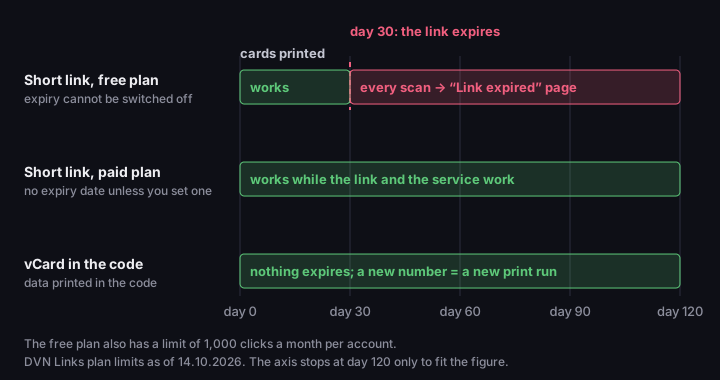
A printed card and a 30-day link
timeline of 120 days from printing, three code variants
Source: DVN Links plan configuration, 14 Oct 2026
Figure description
Timeline from the day the cards are printed, in three tracks. Short link, free plan (expiry cannot be switched off): works (days 0–30), every scan → “Link expired” page (days 30–120). Short link, paid plan (no expiry date unless you set one): works while the link and the service work (days 0–120). vCard in the code (data printed in the code): nothing expires; a new number = a new print run (days 0–120). The free plan also allows 1000 clicks a month per account. DVN Links plan limits as of 14 October 2026.
So you have two safe routes with a link. The first: encode the address of your own contact page directly. Such a code works as long as your domain does and depends on no shortener. Every character of the address enlarges the code like a vCard field, so choose a short address without parameters. The second: a short link on a paid plan, which does not expire and lets you change the destination if you move the page.
Every code that goes through someone else's server works only while that server handles it. Uniqode says so plainly: "The code stays active as long as your Uniqode subscription is active" (Uniqode). Check what happens to the code when you stop paying. A vCard in the code has no such risk.
How to make a vCard QR code in the generator
You can make a vCard QR code in the DVN Links QR generator without an account. Choose the "Contact card" type and fill in the fields. Only the first name is required; enter the rest only if someone will use it. Job title and company together cost 38 bytes; if they are printed on the card anyway, leave them out. For a small code, keep first name, surname, phone and e-mail.
The generator shows a preview with the logo in the middle and reminds you that the code is static. Static means two things: it does not expire and does not depend on our server, but it does not count scans and its data cannot be changed after printing. Download the PNG and place it on your card design at a size no smaller than the one in the chart for your fields.
Before ordering a print run, make a test print at the final size, on the final paper, and scan it with two phones. Check whether the code reads from the distance at which someone naturally holds a card, whether the phone offers to save the contact, and whether accented letters are correct. What to do when a code will not scan is covered in Minimum QR code size.
For the link variant, use the "Website" type and paste your contact page address, or create an account and shorten the link; the code is then in the dashboard, next to the link.
What guides get wrong about vCard QR codes
Most guides skip the fact that size depends on content. Two claims from top results, corrected.
A fixed size of 20 × 20 to 30 × 30 mm and "level L is perfect for vCard QR Codes" (Uniqode). At level L a typical vCard at 20 mm gives a module of 0.33 mm, below the GS1 minimum; only from 25 mm does it reach 0.41 mm. Level L also repairs the least damage, and our free generator, which always adds a logo, encodes at H.
A sample vCard 3.0 with the parameter N;CHARSET=UTF-8: (QuickChart). RFC 2426 removed the CHARSET parameter from the vCard body: "The [VCARD] CHARSET type parameter has been eliminated" (RFC 2426, section 5).
vCard QR code: frequently asked questions
How big should a QR code on a business card be?
It depends on the content. At level H a short link needs at least 15 mm, a vCard with a name and phone number 26 mm, and one with the seven fields of the generator 34 mm — at a 0.396 mm module according to GS1, quiet zone included. This is our calculation; always check a test print.
Does a vCard QR code work without internet?
The data is in the code itself, so no server is needed to read it. Whether a phone camera offers to save the contact without a connection is not documented by the manufacturers; check on an iPhone and an Android phone in flight mode.
Can I change the data after printing?
Not in a vCard code: a new number means a new print run. With a link you change the data on the page, and with a short link also the destination in the dashboard. On the free plan a short link expires after 30 days.
Make a code with your contact in the generator
Enter only the fields someone will really use — each costs millimetres on the card. If you prefer a link in the code, choose a plan on which short links do not expire for print.