How to add a link to Instagram story and see who tapped it
You add a link to an Instagram story with the Link sticker. The steps, why the sticker may be missing, which URL to paste and how to count visits — in Instagram, in your short link statistics and in GA4.
How to add a link to Instagram story? With the Link sticker: in the story editor you open the stickers, choose „Link”, paste the URL and place the sticker on your photo or video. Since 27 October 2021, Instagram has offered this to every account — its announcement speaks of „expanding the ability to add links in Stories to all accounts”, regardless of follower count (Instagram blog). Adding the link takes half a minute; the harder part is finding out how many people tapped it and what they did next, all the way to the report in Google Analytics 4.
How to add a link to Instagram story, step by step
Instagram described the steps in its 2021 announcement (Instagram blog), and its 2026 guide to Stories confirms the same pattern: stickers, „Link”, paste the URL (Instagram's guide):
- Create a story. Record or upload a photo or video — „Capture or upload content to your story”.
- Open the stickers. The guide points to „the smiley sticker icon in the top toolbar” of the editor.
- Choose the Link sticker. Paste the URL. You can change the sticker's text right away (more on that below).
- Place the sticker. Move it where you want it. The 2021 announcement added that tapping the sticker shows colour options — „tap on the sticker to see color variations”.
Then publish the story as usual; a viewer taps the sticker and goes to your address.
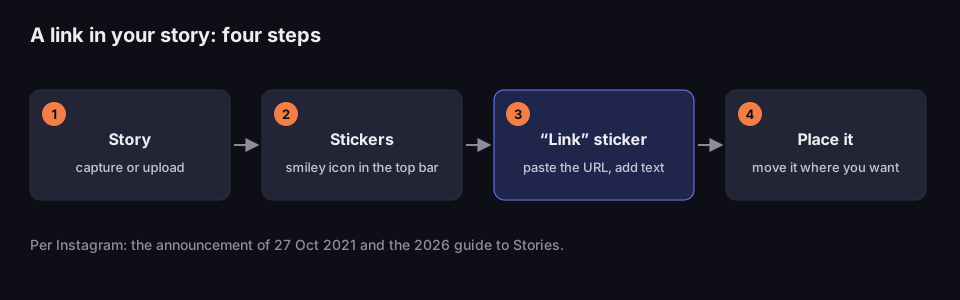
A link in your story in four steps
based on Instagram's 2021 announcement and its 2026 guide
Source: Instagram blog, „Expanding Sharing Links in Stories to Everyone”, 27 Oct 2021, and „How to Use Instagram Stories: Complete 2026 Guide”; read 17 Oct 2026
Figure description
Four numbered steps joined by arrows. 1. Story: capture or upload. 2. Stickers: smiley icon in the top bar. 3. Link sticker: paste the URL, add text — highlighted. 4. Place it: move it where you want. Below: per Instagram, the announcement of 27 Oct 2021 and the 2026 guide to Stories.
One caveat: Instagram redesigns its app from time to time, and details such as the confirm button or the sticker colours come only from the 2021 announcement. The icon may look different on your phone, but the principle has not changed — a link in a story is a sticker, not a separate button. If things look different from the figure, look for the sticker list in the story editor; „Link” is one of the stickers.
Your own text instead of the URL
By default, the sticker shows the web address. A few weeks after opening the sticker to everyone, Instagram added custom text — Social Media Today reported in December 2021 that when you add the sticker, „you'll be prompted to also add in custom text, of whatever you choose, for the link” (Social Media Today). Instagram had flagged this in its announcement: it wanted to make clear „what someone will see when they tap your link”. The 2026 guide confirms you can change the text and suggests phrases like „shop the look” or „read the recipe” (Instagram's guide).
Keep it short and specific — „Sign up”, „Today's menu”, „Read the full article” — so the people who tap are the ones who want what is on the other side, and your numbers show real interest.
No Link sticker? Here is why
The sticker is available to every account, with two exceptions Instagram named outright. It is not available to „new accounts and accounts that repeatedly share things like hate speech and misinformation” (Instagram blog). Instagram does not say how long an account counts as „new”.
If your account falls into neither group, check these in turn:
- App version. Update Instagram from your app store. An old version may lack newer features.
- Where you are looking. The Link sticker is in the sticker list of the story editor, next to polls and questions — not in your account settings.
- What you are publishing. The link sticker belongs to stories. Instagram's announcement only talks about stories — posts and reels follow other rules (more on that below).
- Community Guidelines. If your account has received a warning for breaking the rules, that may be the reason. Instagram points to its Community Guidelines.
Before the sticker, a link in a story meant the „swipe-up” gesture, which only some accounts had. On the day the sticker opened up, TechCrunch wrote that both features had been „historically limited to businesses and high-profile creators” (TechCrunch). The threshold you see in old guides was reported by 9to5Mac in June 2021: the feature was „limited to users who are verified or have over 10,000 followers” (9to5Mac). If a guide mentions that threshold, it predates October 2021.
Which link to paste into the sticker
The sticker accepts any address, but not every address gives you data afterwards. You have three options.
A plain page URL. The simplest, and the least informative. When someone taps the sticker, the page usually opens in Instagram's built-in browser. Whether GA4 learns where the visitor came from depends on whether that browser passes on the referring address — and that is out of your hands. If it does, GA4 recognises Instagram (instagram.com and l.instagram.com are on its list of social sites) and puts the visit in Organic Social — but together with visits from your bio, posts and messages, so you cannot tell the story apart. If it does not, the visit lands in Direct.
A URL with UTM parameters. You add utm_source, utm_medium and utm_campaign to the address — and GA4 knows the visit came from your story, whatever the browser does. How to choose the values is explained in UTM parameters: what they are, and you can put the URL together in the UTM builder. Watch the capitals: „Parameter values are case sensitive” (GA4 Help) — to GA4, Instagram and instagram are two different sources.
A short link. A URL with UTM tags gets long, and a sticker without custom text displays it. A short link hides the parameters and gives you a second counter: the shortener records the click before the landing page loads. With DVN Links, each click records the country, device, browser, operating system and referring address, if the browser sent one; bots are marked separately. How to make such a link is covered in how to shorten a link.
With short links, one question remains: where do the UTM tags go? The safest place is the destination URL or the UTM fields in the link's settings — then they reach the page on every click. You can also add them to the short URL itself, such as qrln.pl/abc?utm_source=instagram. Our shortener records them in its statistics (source, medium and campaign) and passes them on by default, so the landing page sees them, and GA4 after it. When the same parameter is both on the link and on the short URL, the value on the short URL wins. Forwarding can be turned off in the link's settings. Other shorteners behave differently, so tap the link before the story goes live and check that the UTM tags are in the page address. The UTM fields in the link's settings come with the Starter plan; on the Free plan, paste an address that already carries UTM tags into the shortener — it works the same way.
The page your sticker leads to
A sticker is a promise: „Autumn menu” means the menu, not the home page where people have to hunt for it — most of them would go back to Instagram. Check before you publish:
- The page matches the text. A „Sign up” sticker goes straight to the form, not to the „About us” page.
- Phone, not desktop. Open the address on your phone, ideally from inside Instagram — send it to yourself in a direct message and tap it. You will see the page the way your story's viewers will.
- Fast loading. Every second of loading means people who tapped the sticker but never saw the page. The shortener counts them; GA4 does not.
- A working link. A typo in the address wastes the story for a whole day. If the sticker holds a short link, you can fix a wrong destination in the shortener's dashboard without republishing the story.
How many people tapped your story link: Instagram's counter
Instagram counts taps on the sticker itself. In the developer documentation the counter is called link_clicks and is described as „The number of taps on links in your story” (Meta for Developers). The app shows similar data in story insights, but screen names change, so we stick to the documentation. One limit up front: Instagram's API only covers professional accounts — Meta gives access to data „for Instagram professional accounts, including business and creator accounts” (Meta for Developers). A third-party tool cannot pull statistics from a personal account.
The same document contains two things you should know before comparing numbers:
- 24 hours. „Story media metrics are only available for 24 hours” — through the API, story metrics are available for one day only. A tool that collects them automatically has to do so before the story expires. The stories reference says it again: „Stories are only available for 24 hours” (Meta for Developers).
- A threshold of five. „Story media metrics with values less than 5 return an error code” — if four people tapped your sticker, the API returns an error about too few viewers instead of a number. Small accounts often never see this figure in third-party tools.
A third point is easy to miss: stories reshared by others are not returned — „New stories created when a user reshares a story will not be returned” (same document). If someone reshares your story and their followers tap the link, those taps do not reach your link_clicks counter in the API.
Story traffic in GA4
GA4 knows nothing about stickers. It receives the page URL, perhaps a referring address, and assigns the visit to a channel by its own rules. The rules are set out in GA4 Help (GA4 Help, default channel group). Three of them matter for story traffic:
- Organic Social — when the source is on GA4's list of social sites, or when the „Medium is one of ("social", "social-network", "social-media", "sm", "social network", "social media")”.
- Paid Social — when the source is on the list of social sites and the medium looks paid: it contains „cp”, starts with „paid”, or is
ppcorretargeting. - Unassigned — „the value Analytics uses when there are no other channel rules that match the event data”.
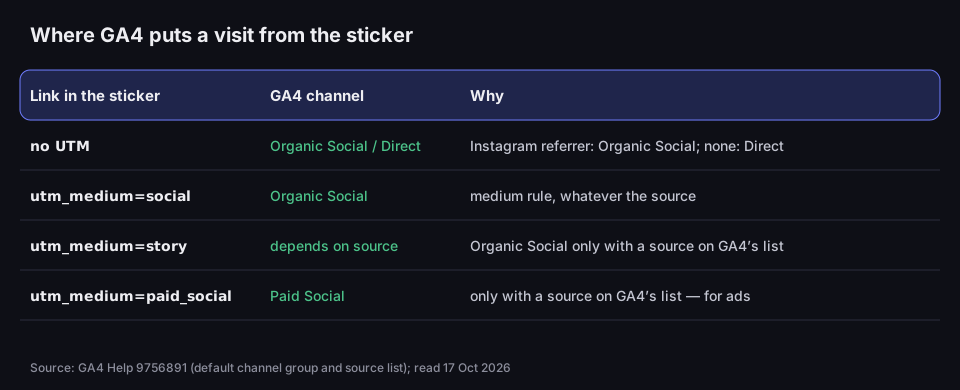
Where GA4 puts a visit from the sticker
the channel depends on the UTM medium, and without UTMs on the referrer
Source: GA4 Help 9756891 (default channel group and source list); read 17 Oct 2026
Figure description
Table. Link without UTM: Organic Social or Direct — Organic Social with a referrer from Instagram, Direct without one. utm_medium=social: Organic Social, a medium rule whatever the source. utm_medium=story: depends on the source, Organic Social only with a source on GA4's list. utm_medium=paid_social: Paid Social, only with a source on GA4's list, for ads.
In practice: for ordinary, unpaid stories, set utm_medium=social. That value alone sends the visit to Organic Social — you do not need to check whether your utm_source is on GA4's list. The popular choice utm_medium=story is risky: it is not on the list of social media values, so the channel then depends entirely on whether GA4 recognises the source. If you want to tell stories apart from posts, do it in utm_content, not in utm_medium.
Paid promotion of a story is a different matter: Meta ads append their own click identifier, fbclid, to the URL (Meta for Developers), and a medium with „paid” in it sends the visit to Paid Social. Keep those values away from organic traffic — otherwise your report shows an ad where there was none.
Three counters, three different numbers
The sticker, a short link and GA4 will show three different numbers. That is not a mistake: each measures something else, at a different moment.
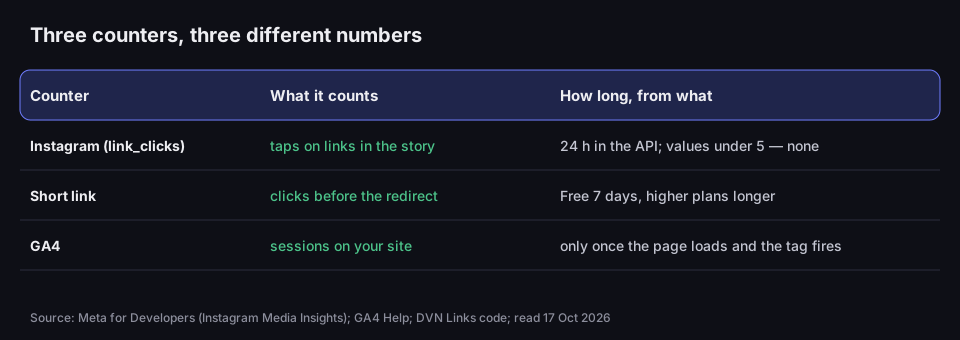
Three counters, three different numbers
Instagram counts taps, the shortener clicks, GA4 sessions
Source: Meta for Developers (Instagram Media Insights); GA4 Help; DVN Links code; read 17 Oct 2026
Figure description
Table of three counters. Instagram, link_clicks metric: taps on links in the story; 24 hours in the API, values under 5 are not returned. Short link: clicks before the redirect; Free plan statistics cover 7 days, higher plans longer. GA4: sessions on your site; only once the page loads and the tag fires.
- Instagram counts taps on the sticker.
- A short link counts requests: every tap that reached the shortener before the browser opened the landing page. It also separates out bots, meaning programs that open the address automatically.
- GA4 counts sessions — only when the page has loaded and the Google tag has fired. Someone who closed the browser while the page was loading, or declined analytics cookies, may not appear in GA4 at all.
So the numbers shrink along the way, and that is normal. If most visits vanish between the short link and GA4, though, check the landing page: does it load quickly on a phone, and is the GA4 tag on it at all? How to work out a click-through rate from numbers like these is explained in click-through rate (CTR).
Retention differs too. A story disappears after a day, and so do its API metrics. We keep short link statistics in DVN Links for 7 days on the Free plan and longer on paid plans. The Free plan also has a soft limit of 1,000 clicks a month per account: links keep working (far past the limit, through an interstitial page), but clicks over the limit do not show up in statistics. GA4 keeps data according to the property's settings. For a story that lives 24 hours, even 7 days is enough to collect the result.
A UTM plan for a series of stories
A single story rarely sells. More often it is a series: a teaser, the product, a reminder. To know afterwards which one worked, each gets its own utm_content, while the other parameters stay the same.
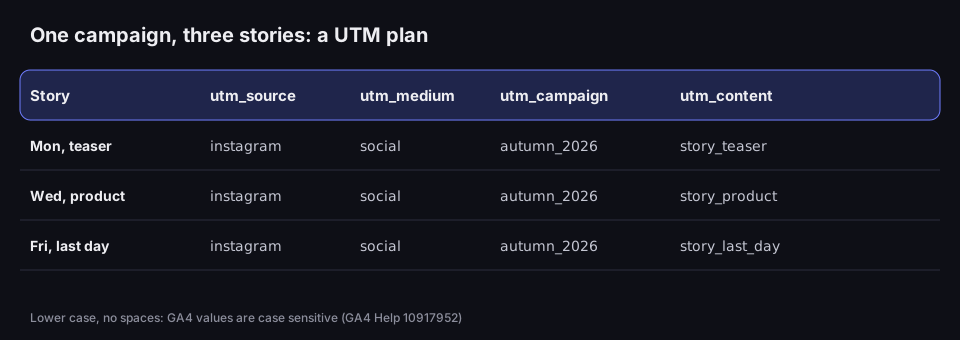
One campaign, three stories
shared source, medium and campaign; a different utm_content
Source: GA4 Help 9756891 and 10917952; read 17 Oct 2026
Figure description
UTM plan table. Monday, teaser: instagram, social, autumn_2026, story_teaser. Wednesday, product: instagram, social, autumn_2026, story_product. Friday, last day: instagram, social, autumn_2026, story_last_day. Below: lower case, no spaces, GA4 values are case sensitive.
A few rules that will save you tidying up your reports:
- Lower case everywhere.
instagram, notInstagramorIG. GA4 is case sensitive, so three spellings give you three rows. - No spaces or accented letters.
autumn_2026rather than „Autumn 2026”. Spaces and non-ASCII letters in a URL turn into strings starting with a percent sign (that is how URL encoding works, as explained in what is a URL) and look messy in reports. - One file with the names. A spreadsheet with columns for date, story, full URL with UTMs and short link. A week later nobody remembers whether it was
story_promoorpromo_story. - One short link per story. The shortener then shows clicks per story straight away, without waiting for GA4.
In the UTM builder you can see which GA4 channel a URL with your chosen medium will land in, before you paste it into the sticker.
Example: a café and a week with a new menu
A café launches its autumn menu and plans three stories: a teaser on Monday, a photo of the new cake on Wednesday, „last day of the discount” on Friday. Each story has a sticker reading „Autumn menu” and its own short link to the menu page, carrying the UTMs from the table above.
A week later the owner compares the results. The short link statistics show which story got the most clicks and from which devices. In GA4, in the traffic acquisition report, she filters for the autumn_2026 campaign and uses utm_content to see which story brought in people who stayed on the site longer.
Links in your bio and in posts
A story disappears after 24 hours. For a link that stays put on Instagram, use your profile. Since April 2023 you can add up to five links there; as 9to5Mac put it, „Only the first link will appear directly in the bio, while the remaining are hidden in a pop-up context menu” (9to5Mac). You add them by editing your profile. When five links are not enough and a page of buttons works better is covered in link in bio.
One caveat for profile links: a short link on the DVN Links Free plan expires after 30 days. In a story that lives for a day, that makes no difference; in a bio, where a link stays for months, use a plain URL with UTMs or a paid plan.
The measurement rules are the same as for the sticker: UTMs in the URL (with a different utm_content, such as bio) and ideally a separate short link, so profile visits are kept apart from story visits.
The link sticker is a story feature — that is the only way Instagram describes it. Clickable links in post captions were still a test in March 2026, limited to Meta Verified subscribers; an in-app message described by Engadget allowed up to 10 links a month (Engadget). In an ordinary post caption, write „link in bio”, or add a story with a sticker that points to both the post and the page. Away from Instagram — on a poster, a business card or a shop counter — a QR code shortens the way to your profile; how to make one is in Facebook QR code, which covers Instagram too.
Common mistakes with story links
What most often spoils the result:
- A link to your profile instead of a page. It takes nobody any further. Point the sticker at a specific page.
- A page that does not work on a phone. Almost every tap ends in a phone browser; check the page on a phone first.
- No UTMs. Without them, story traffic mixes with other channels in GA4.
- An untested short link. Not every shortener passes UTMs added to the short URL on. Tap the link before publishing and check that the parameters are in the landing page address.
- Reading API results a week later. Story metrics in the API vanish after 24 hours; save them earlier or rely on the short link and GA4.
Frequently asked questions
No. That threshold applied to the old swipe-up gesture. Since 27 October 2021 the link sticker has been available to every account, except new ones and those that break Instagram's rules.
Instagram's announcement does not say. Clarity suggests one: one story, one link. If you have more to show, make several stories, each with its own sticker and its own utm_content.
Instagram's announcement describes adding the sticker in the app. Scheduling tools have their own rules — check their documentation.
Instagram's announcement does not cover this. If the sticker holds a short link, you can change its destination in the shortener's dashboard — on every plan, Free included. The sticker and the story stay the same, and later taps go to the new address.
Because it counts taps, while GA4 counts sessions — only once the page loads, the tag fires and the visitor has not declined analytics cookies. A short link in between shows how many taps reached the redirect.
No. Instagram gives you a number of taps, and below five the API does not give even that. Short link statistics show devices, countries and browsers, not people. To find out who bought, you need your own site: a form, a basket or a discount code used only in the story.