Click through rate (CTR): formula, email CTR and what a good CTR is
Click through rate is the share of impressions that end in a click. How Google Ads, Search Console and email tools count it, how CTR differs from CTOR, and where bot clicks in email come from.
Click through rate (CTR) is the share of impressions that ended in a click. Google describes it as a ratio showing „how often people who see your ad or free product listing end up clicking it” (Google Ads Help). The formula is always the same: clicks ÷ impressions × 100%. The catch is that Google Ads, Search Console, YouTube, your email tool and a link shortener each count a different click and a different impression. A CTR only means something together with the name of its numerator and denominator — this article shows how each of these tools sets them, where clicks that no person made come from in email, and how to work out the CTR of a link in a channel that counts nothing on its own.
What is CTR and what is the formula
CTR is the ratio of two numbers from the same period and the same place:
CTR = clicks ÷ impressions × 100%
Google gives the formula word for word: „clicks ÷ impressions = CTR” (Google Ads Help). An example of our own: an ad was shown 2,000 times and got 70 clicks, so its CTR is 70 ÷ 2,000 = 0.035, or 3.5%. The same sum for an email: 1,200 delivered messages, 54 people clicked — 4.5%.
Some tools report the result as a fraction rather than a percentage. Google Analytics 4 shows organic CTR from Search Console so that 0.0588 means about 5.88% — „This metric is returned as a fraction” (GA4 help). If your report shows a CTR below 1 while your team talks about „six percent”, it is probably the same number written two ways.
Two rules hold in every tool:
- Numerator and denominator from the same period and source. October clicks divided by September impressions give no CTR at all.
- CTR describes effectiveness, not scale. 10% of 50 impressions is 5 clicks; 1% of 100,000 is a thousand. A decision needs both numbers.
A click and an impression mean something different in every tool
„Clicks ÷ impressions” sounds unambiguous until you ask what counts as a click and what as an impression. Each tool answers differently:
|
Tool |
Numerator (click) |
Denominator (impression) |
|---|---|---|
|
Google Ads |
ad clicks |
ad impressions |
|
Search Console |
clicks that send the user outside Google's results |
link impressions, including links off screen |
|
YouTube |
views after a thumbnail impression |
registered thumbnail impressions |
|
Email (click rate) |
delivered messages with at least one click |
delivered messages |
|
Email (CTOR) |
unique clickers |
unique opens |
|
Short link (DVN Links) |
every request to the link, bots included |
none — it has to come from the tool that showed the link |
Search Console counts an impression when a user „has seen (or potentially seen) a link to your site”. A link in the current set of results counts „whether or not the item is scrolled into view” — so also when it sat lower on the page than anyone scrolled (Search Console Help). Carousels and expandable elements are the exception: there the result usually has to be scrolled into view or expanded with a click. A click is any click that sends the user to a page outside Google Search, Discover or News. That is why organic CTR is often low: fewer people saw the result than the denominator suggests.
YouTube has its own measure: „Impressions click-through rate measures how often viewers watched a video after seeing a registered impression on YouTube”. According to the same page, half of all channels and videos have one between 2% and 10% (YouTube Help) — a wide range that shows there is no single „average” even within one platform.
A link shortener does not know the denominator at all. It knows how many times someone (or something) opened the short link, but not how many people saw it. The denominator has to come from wherever the link was shown: your email tool, the number of text messages sent, or the print run of a flyer.
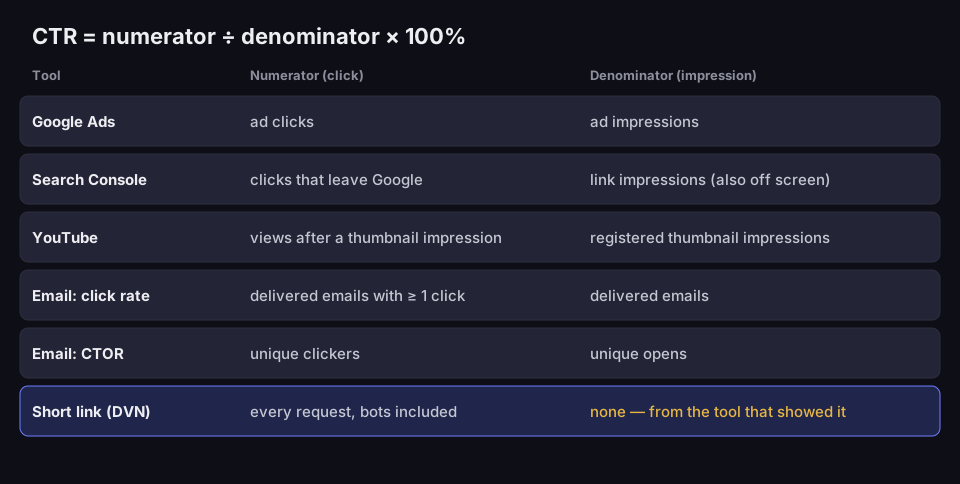
CTR numerator and denominator across tools
the same formula, a different click and a different impression
Source: Google Ads, Search Console and YouTube help, Mailchimp, Campaign Monitor, GetResponse, DVN Links code; read 16 Oct 2026
Figure description
Table: CTR equals numerator divided by denominator times 100 percent. Google Ads: ad clicks over ad impressions. Search Console: clicks that leave Google over link impressions, also off screen. YouTube: views after a thumbnail impression over registered thumbnail impressions. Email click rate: delivered emails with at least one click over delivered emails. Email CTOR: unique clickers over unique opens. DVN short link: every request, bots included; no denominator, it comes from the tool that showed the link.
Email click through rate: click rate, CTR and CTOR
In email, „CTR” in practice means three different numbers, and tools do not name them the same way. Before you compare your result with anything, check which one your report shows.
Click rate (email CTR). Mailchimp defines it as follows: „The click rate is a percentage that tells you how many delivered emails registered at least 1 click” (Mailchimp). Two details are easy to miss. The denominator is delivered messages, not sent ones — bounced addresses do not lower the result. The numerator is messages with a click, not all clicks: a recipient who clicked three links counts once. Campaign Monitor counts the same way — „the number of recipients who clicked is divided by the number of emails delivered” (Campaign Monitor).
CTOR (click-to-open rate). The same numerator, a different denominator: opened messages instead of delivered ones. GetResponse: „taking the number of unique clicks, dividing them by the number of unique opens” (GetResponse). CTOR answers another question: not „how many people on the list clicked”, but „how many of those who opened were convinced by the content”. According to GetResponse, a well-designed message has a CTOR „anywhere between 8-13%”.
Which measure for what:
|
You want to know |
Calculate |
|---|---|
|
How many recipients on the list responded |
click rate: emails with a click ÷ delivered |
|
Whether the content and layout of the email work |
CTOR: unique clickers ÷ unique opens |
|
How much traffic one link in the email brought |
clicks on that link (e.g. from a short link) |
Why CTOR is no longer reliable
CTOR divides by opens, and opens are measured by an invisible image — a tracking pixel — loaded when someone opens the message. Apple Mail Privacy Protection loads remote content, this pixel included, in the background and through two relays: „Protect Mail Activity downloads remote content in the background by default” (Apple). To the sender it looks like an open, although nobody read the message.
The result: there are more opens than there were people, so the CTOR denominator grows and the measure itself falls. Campaign Monitor writes plainly that because of such features „open rates and click-to-open rates (CTOR) will become less reliable” (Campaign Monitor), and Mailchimp adds that MPP and bot activity „can falsely inflate open and click metrics” (Mailchimp). If your list has many iPhone and Apple Mail users, base decisions on click rate, not on CTOR.
What is a good CTR? Benchmarks with a date and a method
Google gives no single number: „a good CTR is relative to what you're advertising and on which networks” (Google Ads Help). Benchmarks help, provided you know who calculated them, when and by which definition. For email there are two sources with a stated method:
- Mailchimp (data last updated in December 2023, campaigns to at least 1,000 subscribers): average click rate 2.62% for all users, 1.74% for e-commerce (Mailchimp Email Marketing Benchmarks). Mailchimp notes that the data on that page may differ from the data in its app.
- GetResponse (more than 4.4 billion messages sent in 2023, senders with at least 500 contacts): average CTR 3.25%, CTOR 8.62%. Its country table also lists Poland at CTR 5.38% and CTOR 14.12% (GetResponse Email Marketing Benchmarks).
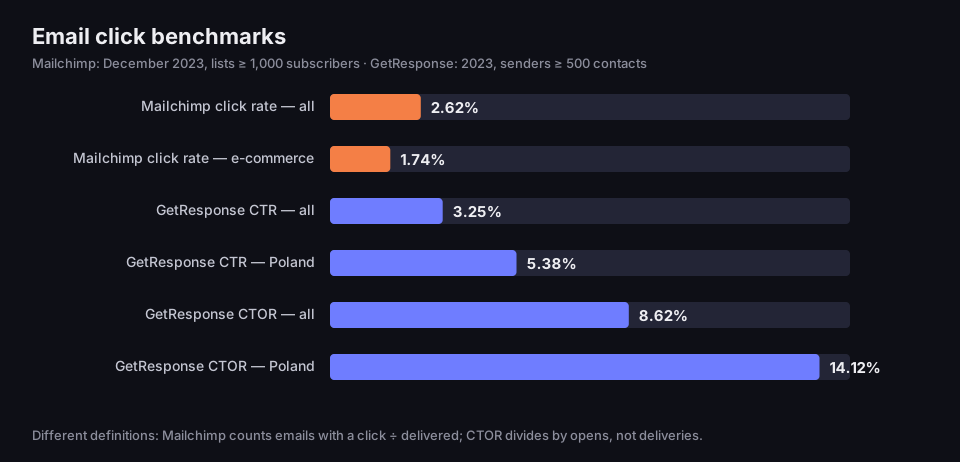
Email click benchmarks
two methods and two list thresholds — do not merge them into one average
Source: Mailchimp Email Marketing Benchmarks (data Dec 2023), GetResponse Email Marketing Benchmarks (data 2023); read 16 Oct 2026
Figure description
Bar chart of email click benchmarks. Mailchimp, December 2023, lists of at least 1,000 subscribers: click rate all users 2.62%, e-commerce 1.74%. GetResponse, 2023, senders with at least 500 contacts: CTR all 3.25%, Poland 5.38%; CTOR all 8.62%, Poland 14.12%. Caption: different definitions — Mailchimp counts emails with a click divided by delivered, CTOR divides by opens, not deliveries.
Why these numbers cannot be combined into one „market average”:
- Different list thresholds. Mailchimp counts campaigns to at least 1,000 subscribers, GetResponse senders with at least 500 contacts.
- Different denominators. The CTOR of 14.12% and the CTR of 5.38% in GetResponse's row for Poland describe the same messages; they differ only in what they divide by (GetResponse).
- Inconsistencies at the publishers themselves. GetResponse's country table gives an overall CTOR of 8.76%, its FAQ 8.62%; Mailchimp's FAQ on the same page gives a different open rate than its table. When you quote a benchmark, give the table row, the date and the publisher.
The best reference point is your own previous result, calculated the same way. A click rate rising from 2% to 3% on the same list (an example, not a benchmark) says more than any comparison with someone else's average.
For a comparison to make sense, keep three things fixed: the same list (or a similar segment of it), the same definition (click rate with click rate, not with CTOR) and a similar period — a campaign sent the week before the holidays reaches a different audience than one sent in mid-July. If you switch email tools, write down the last results from the old one and do not join them with the new ones on one chart, because the two systems may filter bots and count deliveries differently.
Clicks that no person made
CTR assumes that every click is a person. In email it is not. Mailchimp describes clicks „triggered by software systems designed to protect recipients, like security filters and privacy tools” — security scanners that „click your links to scan for threats, often before any human sees your email”. They click everything: „Security bots click every link, including your logo and the Unsubscribe button” (Mailchimp).
How many? According to Mailchimp's own tests, roughly 1 in 5 clicks are bots with basic detection, and once third-party data is added that number „can climb close to 50%” (Mailchimp). Mailchimp does not describe the method behind these tests, so treat this as a range given by one company, not a rule.
In organisations with Microsoft Defender for Office 365, Safe Links checks the URLs in messages before they are delivered: „URLs are scanned prior to message delivery”, and URLs without an established reputation are „detonated asynchronously in the background” (Microsoft Learn). When URL rewriting is on, the link in the message first goes through a Microsoft server (safelinks.protection.outlook.com) and is checked again at the moment of the click: „If rewriting is enabled, links are scanned on click”. Microsoft does not say which user agent it uses or whether every scan is a request to your link — so do not assume that every Outlook clicks every link.
Who filters such clicks out:
- Google Ads — invalid clicks are „filtered out of your campaign metrics”, and the advertiser is not charged for them (Google Ads Help).
- Email tools — it varies. Mailchimp says its filters „automatically screen out bot clicks across every report” (Mailchimp), and its help pages recommend excluding MPP and bot activity from reports (Mailchimp). In any other tool, check whether a bot filter is on and since when — otherwise you will compare results from before and after it was switched on.
- A link shortener — depends on the service. In DVN Links the server recognises bots by their user agent and labels them „Bot” in the statistics, but counts them in the total clicks, though not in the plan's monthly limit. A scanner that presents itself as an ordinary browser is not recognised.
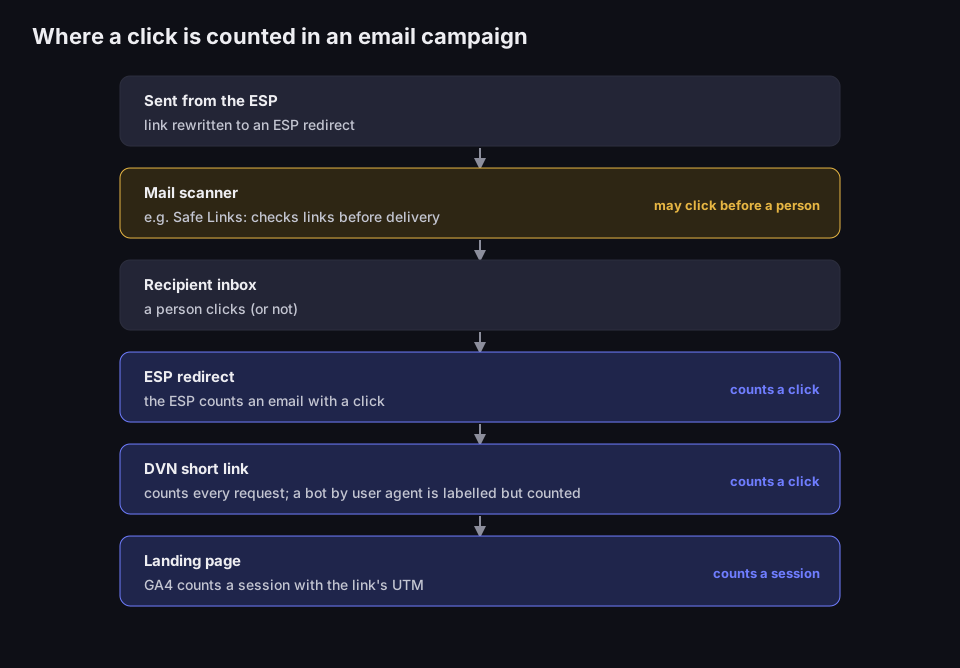
The path of a click in an email campaign
three places count the click, and a scanner may click before a person does
Source: Mailchimp (Bot clicks in email marketing), Microsoft Learn (Safe Links), DVN Links code; read 16 Oct 2026
Figure description
Diagram of the path of a click in an email campaign, top to bottom. Sent from the ESP: the link is rewritten to an ESP redirect. Mail scanner, for example Safe Links: checks the link before delivery and may click before a person. Recipient inbox: a person clicks or not. ESP redirect: the ESP counts an email with a click. DVN short link: counts every request; a bot recognised by user agent is labelled but counted. Landing page: GA4 counts a session with the link's UTM.
How to calculate the CTR of a link with a short link
A short link is useful where the channel does not count clicks itself: in a text message, a PDF, a presentation, on a flyer or in a profile bio. It gives you the numerator; the denominator you have to supply. The calculation in four steps:
- One link per channel. A separate short link for the newsletter, another for the text message, another for the flyer. If you prefer a single landing page, tell the channels apart with UTM parameters — how to do that is explained in UTM parameters: what they are, and you can put the link together in the UTM builder.
- The numerator from the dashboard. Take „Total clicks” for the campaign period.
- Subtract bots. In the „Devices” section, check the „Bot” row and subtract it from the total. In the screenshot below it is 11 of 132 clicks, or 8.3% — 121 remain.
- The denominator from the channel. The number of text messages sent, emails delivered, PDF downloads, flyers printed.
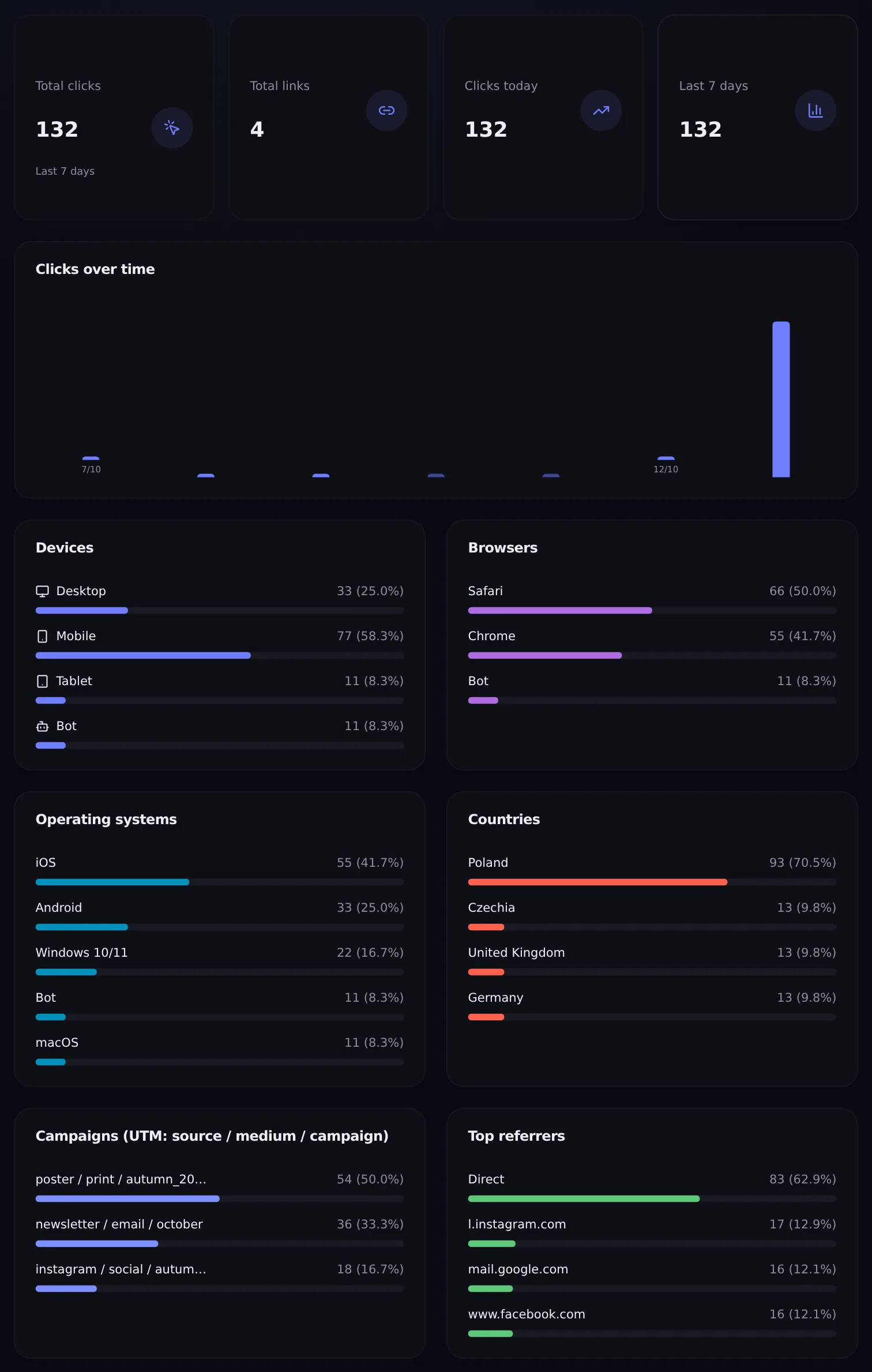
Statistics in the DVN Links dashboard
total clicks include bots — subtract the „Bot” row from Devices
Source: DVN Links dashboard, demo account, 13 Oct 2026
Figure description
Screenshot of the DVN Links statistics dashboard on a demo account. Total clicks: 132 over the last 7 days; 4 links. In the Devices section: Desktop 33, Mobile 77, Tablet 11, Bot 11, which is 8.3 percent. The same Bot row appears under browsers and operating systems. Below: UTM campaigns and top referrers.
An example of our own: 2,000 flyers with a QR code, 121 clicks after subtracting bots — about 6%. For QR codes this is only an approximation: you do not know how many flyers were actually picked up, and DVN Links does not tell a scan of the code from a click on the link — both open the same short address. How to prepare a code on a short link for print is covered in how to make a QR code.
The denominator in channels that count nothing
The hardest part of the sum is the denominator, because in these channels nobody calculates it for you. What to take as an „impression” — our summary:
|
Channel |
Denominator |
Watch out for |
|---|---|---|
|
Text message |
delivered messages from the SMS gateway report |
sent is not delivered; subtract invalid numbers |
|
PDF, offer, presentation |
number of sends or downloads of the file |
one file may reach several people, so the CTR comes out inflated |
|
Flyer, poster, packaging |
print run or number handed out |
you do not know how many people saw the code; it is a floor, not impressions |
|
Profile bio |
profile views from the platform's dashboard |
the platform counts views its own way; compare period with period |
In each of these channels the trend tells you most: the same link, the same way of counting the denominator, two consecutive campaigns. If a flyer's CTR fell from 6% to 3% with the same print run and the same distribution points, something changed — in the copy, the placement of the code or the audience. A single number without a comparison will not tell you whether a result is good.
One trap with UTM parameters: if you add them to the short address (qrln.pl/abc?utm_source=…), DVN Links records them in its own statistics but does not pass them on — only the UTM parameters saved in the link itself reach the landing page: in its UTM fields or in the destination URL. For GA4 to see the campaign, set UTM in the link, not in the address you send out.
Why the shortener shows more clicks than the email tool
Because they count different things. The email tool counts messages with a click: a recipient who clicked three times is one „click” in the click rate. The shortener counts every request — a repeat visit by the same person, a click from another device, a link preview in a messenger, and bots. The DVN Links dashboard does not show unique clicks; the API returns unique_visitors, the number of distinct IP hashes in the chosen period. For a comparison with the email tool this number is closer than total clicks, but it is not the same measure either. More on what each click records in getting started; why a shortener and GA4 show different numbers — in how to shorten a link.
Frequently asked questions
What is a good CTR?
There is no single number. Google writes that a good CTR depends on what you advertise and where. For email, the primary benchmarks are a 2.62% click rate (Mailchimp, December 2023) and a 3.25% CTR (GetResponse, 2023). The most useful comparison is your own previous result calculated the same way.
How do I calculate CTR?
Divide clicks by impressions from the same period and source and multiply by 100%. Example: 54 clicks on 1,200 delivered emails is 4.5%. Check what your tool treats as a click and an impression — the table above shows how Google Ads, Search Console, YouTube and email differ.
What is the difference between CTR and CTOR?
The denominator. CTR (click rate) divides clicks by delivered messages, CTOR by opened ones. CTOR tells you whether the content convinced those who opened, but Apple Mail Privacy Protection inflates opens, so CTOR comes out too low.
Does a short link increase CTR?
We found no study that shows it; figures like „short links raise CTR by X%” circulate in guides without a source. You can test it yourself with an A/B test: send half of the list a message with a short link and half with the full address, and compare the click rate in your email tool, not in the shortener.
Why is CTR in Search Console lower than in Google Ads?
Because Search Console counts an impression even when the link could have been seen but did not have to be — for example lower on the results page than someone scrolled. A larger denominator gives a lower CTR. Google Ads counts ad impressions by its own rules and filters out invalid clicks, so do not compare these numbers directly.
Want to count clicks from a channel that does not count them — a text message, a PDF or a flyer? Create a separate short link per channel; what the statistics dashboard shows is described on the features page, and how long statistics are kept on each plan — on the pricing page.