API key: what it is and how to keep it safe
An API key is a program's password to another program. How it differs from a token or JWT, how to send it, where to store it and how to rotate it after a leak.
An API key is a long, random string that one program uses to identify itself to another. You paste one when an online shop, a CRM or an invoicing tool asks for another service's "API key", and a developer puts one into code that talks to someone else's server. Whoever holds the key acts on behalf of its owner — so it needs protecting like a password, even though it is not a login password. This guide covers how a key differs from an OAuth token and a JWT, why it should never travel in a URL (we checked what ends up in a server log), what a key looks like inside the provider's system, where to keep it and how to replace it without downtime. The examples come from our own API, with requests sent to a local instance of the same code that runs in production.
What an API key is and what it is for
An API key identifies an application, not a person. When a shop integration creates short links in a URL shortener, the shortener's server has no idea who is at the keyboard — it sees the key and uses it to work out which account the request belongs to, what it may do and how many requests are left in the limit. That leads to the most important rule: anyone who gets hold of the key can do whatever your integration can.
OWASP, the application security community, puts the difference between a key and a login plainly: "OAuth is not authentication, and neither are API keys". API keys "should not be used for user authentication. They should only be used for API clients authentication" (OWASP API Security Top 10 2023, API2). A key says "this is integration X of account Y", not "this is Jane Smith".
Every provider has its own format and its own dashboard for creating keys — a Google Maps key looks and works differently from a URL shortener key. The security rules are shared, though. Google Cloud warns that publicly exposing a key can lead to "unexpected charges on your account or unauthorized access to your data" (Google Cloud, API keys best practices). With a paid API, a leaked key can also mean a bill.
You need a key wherever one program talks to another through a REST API. How such an API works — methods, URLs, status codes — is covered in our guide to REST APIs. This one is only about the key.
API key vs token, OAuth and JWT
API keys, OAuth access tokens, JWTs and passwords often get lumped together because they are all "a secret string". They differ in who they identify, who issues them and how long they live.
An OAuth access token is, in the words of the specification, "a string representing an authorization issued to the client" — a permission granted to an application, with a specific scope and duration, by the owner of the resource (RFC 6749, §1.4). A typical case: you sign in to an app with your Google account and allow it to read your calendar. The app gets a token that acts on your behalf, and only within the scope you agreed to.
A JWT (JSON Web Token) is a format, not a separate kind of permission: "a compact, URL-safe means of representing claims to be transferred between two parties" (RFC 7519). Inside is data written as JSON, signed or encrypted, optionally including an exp field with a time after which the token "MUST NOT be accepted". An OAuth token may be a JWT, but does not have to be.
An API key is simpler: a random string with no meaning, issued in the provider's dashboard for an application, valid until it is disabled or reaches its expiry date, if one was set.
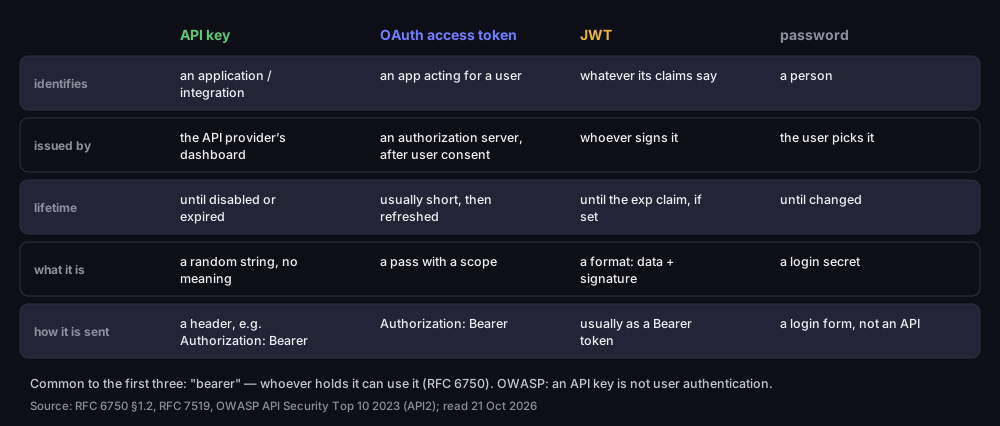
API key, OAuth token, JWT and password — how they differ
who they identify, who issues them, how long they live and how they are sent
Source: RFC 6750 §1.2, RFC 7519, OWASP API Security Top 10 2023 (API2); read 21 Oct 2026
Figure description
Four-column table. API key: identifies an application or integration, issued by the API provider’s dashboard, lives until disabled or expired, a random string with no meaning, sent in a header such as Authorization: Bearer. OAuth access token: an app acting for a user, issued by an authorization server after user consent, usually short-lived then refreshed, a pass with a scope, Authorization: Bearer. JWT: identifies whatever its claims say, issued by whoever signs it, lives until the exp claim if set, a format of data plus signature, usually sent as a Bearer token. Password: identifies a person, chosen by the user, lives until changed, a login secret, a login form rather than an API.
The first three share the word "bearer", which you will see in the Authorization: Bearer header. The specification defines a bearer token as one that "any party in possession of the token (a "bearer") can use", with no proof that they are its rightful owner (RFC 6750, §1.2). That is why OAuth tokens are kept short-lived: the RFC recommends that servers issue them for "one hour or less", which limits the damage of a leak (RFC 6750, §5.3). An API key usually lives much longer, which is exactly why it needs more discipline in storage.
How to send an API key: a header, not the URL
Send an API key in an HTTP header — usually Authorization: Bearer <key>, or in a provider's own header, such as Google's x-goog-api-key. Never in the URL, even though many APIs allow it — ours included, although we are retiring that option.
The specification is clear. Passing a token as a URL parameter "SHOULD NOT be used" unless it cannot go in a header or the request body, because a URL with a token is very likely to be logged (RFC 6750, §2.3). The RFC goes on to explain that browsers, web servers and other software "may not adequately secure URLs in the browser history, web server logs, and other data structures" (RFC 6750, §5.3). Google says the same about its keys: a key in a query parameter is exposed "to theft through URL scans" (Google Cloud), and OWASP lists sending tokens in the URL as an API vulnerability.
We checked what this looks like in practice. In front of a local instance of our API we put nginx as a reverse proxy, with its default log format, and sent the same request twice: once with a test key in the URL and once in a header.
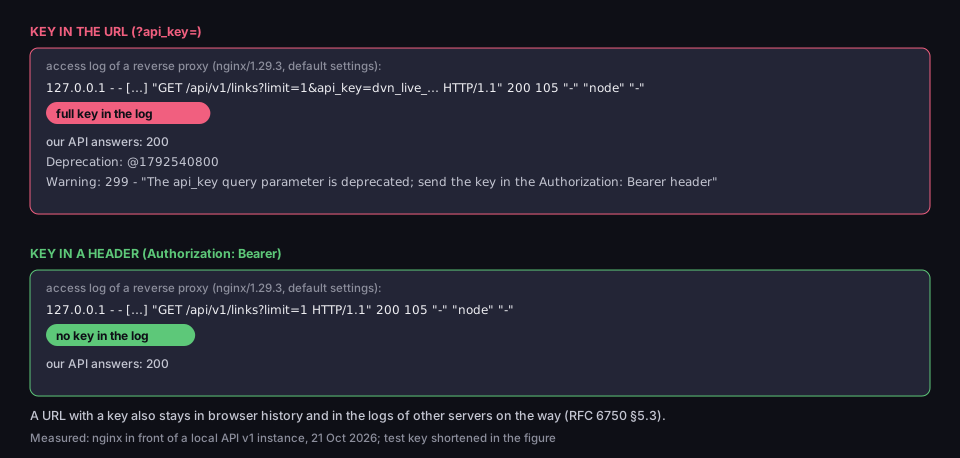
A key in the URL stays in the log, a key in a header does not
nginx access log in front of a local API instance; test key shortened in the figure
Measured: nginx 1.29.3 in front of a local API v1 instance, 21 Oct 2026
Figure description
Two panels. Key in the URL, ?api_key=: the access log of nginx 1.29.3 with default settings recorded the line GET /api/v1/links?limit=1&api_key= with the full key, status 200; our API answered 200 with the headers Deprecation: @1792540800 and a Warning: 299 about the api_key parameter being deprecated. Key in the Authorization: Bearer header: the log line GET /api/v1/links?limit=1 without the key, status 200.
The access log records the full request line, parameters included — and so the full key. The default log format does not record the Authorization header. Yet OWASP says secrets should "Never be logged", and a log can be read by anyone with access to the server. The same URL also stays in browser history if someone opens it by hand.
Our API has accepted the key in an ?api_key= parameter too. Since 21 October 2026 that method has been deprecated: requests with the key in the URL still work, so existing integrations do not break, but the response carries a Deprecation header with the date and a Warning asking you to move the key to the Authorization header. If your integration uses it, change it now. How a URL is built is covered in our guide to what a URL is, and what the part after the question mark does — in our guide to query strings.
How a provider stores an API key
A well-designed API key has two parts: a recognisable prefix and a random remainder that the provider stores only as a hash. We show this on our own keys, because we know the code from the inside.
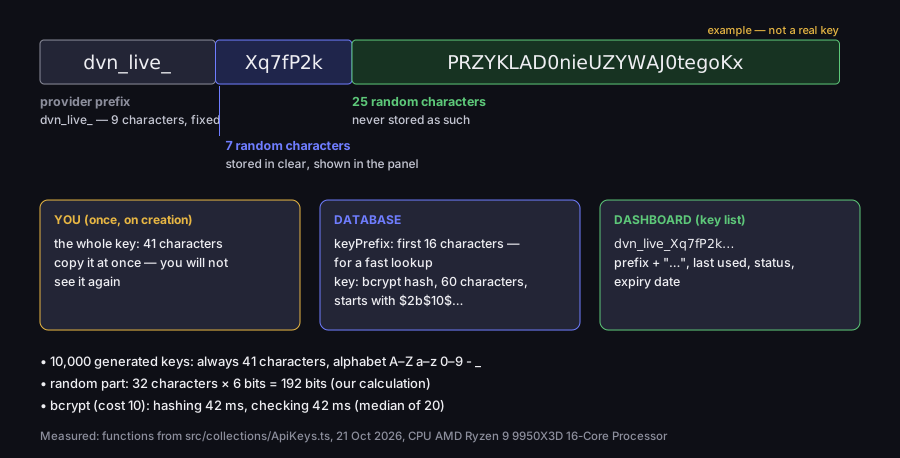
Anatomy of an API key — what you see and what the server stores
an example key in the DVN Links format; measured on 10,000 generated keys
Measured: functions from src/collections/ApiKeys.ts, 21 Oct 2026, CPU AMD Ryzen 9 9950X3D
Figure description
A key split into three parts: the provider prefix dvn*live* (9 characters, fixed), 7 random characters stored in clear and shown in the dashboard, and 25 random characters never stored as such. You see the whole key, 41 characters, once, on creation. The database stores keyPrefix, the first 16 characters for a fast lookup, and a 60-character bcrypt hash starting with $2b$10$. The dashboard shows the prefix with an ellipsis, last used, status and expiry date. 10,000 generated keys were always 41 characters from the alphabet A–Z, a–z, 0–9, hyphen and underscore. Random part: 32 characters times 6 bits, so 192 bits. Bcrypt at cost 10: hashing 42 ms, checking 42 ms, median of 20 runs.
Our key starts with dvn_live_, followed by 32 random characters from the base64url alphabet. We generated 10,000 keys with the same function the server uses: every one was 41 characters long. Each character of the random part carries 6 bits, so the key holds 192 bits of randomness — our calculation, not a measurement.
The prefix is not decoration. GitHub, describing how providers should design secrets so they can be detected in code, lists "a uniquely defined prefix" and "high entropy random strings" (GitHub, secret scanning partner program). The prefix also lets you find a stray key in a repository with a single search for dvn_live_.
The important part happens in the database. We do not store the full key. We store its first 16 characters (the prefix plus 7 random characters) and a bcrypt hash of the whole thing. A hash is one-way: it is easy to compute from the key, and impossible to turn back into the key. That is the difference between hashing and encryption — an encrypted key could be decrypted, a hashed one cannot. It is also why you see the key only once, right after creating it. Neither the dashboard nor customer support can show it again; if you lose it, you create a new one.
Why keep 16 characters in clear? Bcrypt is slow on purpose: in our measurement, checking one key took 42 ms. If the server had to compare an incoming key with the hash of every key in the database, a thousand keys would take about 42 seconds — our calculation from the measurement. The prefix narrows the search to one candidate, or a handful at most, and only those are checked with bcrypt. Before the server even touches the database, it rejects a malformed key: anything without the dvn_live_ prefix or with a length other than 41 gets 401 INVALID_API_KEY_FORMAT straight away.
That gives you a simple test for any API provider before you trust it:
- Does it show the key only once? If the dashboard can display the full key a week later, the provider stores it in a readable form — which means it could also be stolen from its database.
- Can you have several active keys? Without that, every key change means downtime for your integration.
- Can you disable a key with one click? After a leak, minutes count, not a support ticket.
- Can a key expire and have narrower permissions? That limits the damage when every other safeguard fails.
The click-by-click steps for creating a key in our dashboard are in the API keys documentation.
Where to store an API key (and where never to)
Where you keep a key decides who can read it. From worst to best:
|
Where |
Who can read the key |
Verdict |
|---|---|---|
|
website or mobile app code |
every user — browser developer tools are enough |
never |
|
a file in a repository (even a private one) |
anyone with access to the repository, forever — it stays in Git history |
never |
|
a |
anyone with access to the server or computer |
acceptable locally, during work |
|
an environment variable on the server |
every process on the machine; it may end up in logs and memory dumps |
when nothing better is possible |
|
a secrets manager (e.g. a cloud vault) |
only the service and the people you grant access to |
the goal |
The two worst places rule themselves out. Google Cloud: do not put keys in client code or in a repository, because "API keys hardcoded in the source code or stored in a repository are open to interception or theft"; a client application should send its request to your own server, which adds the key (Google Cloud). A key removed from a repository in a later commit is still in the history — GitHub's own scanning covers "your entire Git history on all branches" (GitHub, secret scanning), and so can anyone who clones the repository.
The middle of the table is more interesting. Guides often treat an environment variable as the gold standard. OWASP is more careful: environment variables "are generally accessible to all processes and may be included in logs or system dumps", so using them "is therefore not recommended unless the other methods are not possible" (OWASP, Secrets Management Cheat Sheet). That advice sits in the section on containers and does not make variables bad — they are better than code and worse than a secrets manager. If your platform has a secrets manager, use it.
Two safety nets are worth having wherever you keep the key. OWASP recommends turning on secret detection on the developer's side — in the editor or "via pre-commit hook", before anything reaches the repository. GitHub offers push protection, which blocks pushes that contain a secret "before they reach your repository" (GitHub, push protection). For public repositories, GitHub runs secret scanning automatically and for free.
API keys in integrations: one key per tool
When several tools use the same API, each one should get its own key. A single shared key pasted into a shop, an automation spreadsheet and a colleague's script means that after a leak you do not know where it leaked from, and disabling it stops all three integrations at once.
Before pasting a key into someone else's tool, ask three questions:
- What does this tool actually need? If it only reads statistics, it should not be able to delete data. Where the provider lets you choose a scope, pick the narrowest one.
- What will I call the key? The name in the dashboard should say where the key went — "Shop, link export" rather than "key 2". A year later nobody remembers which key is where.
- When should it expire? A key for a test or a one-off campaign does not need to live longer than a few weeks.
In our dashboard you set the name and expiry when you create a key, and the key list shows each key's prefix, last use and status. The one-key-per-tool rule has one cost with us: all of an account's keys share the same request limit, as described below.
API key scopes, limits and expiry
A key can carry restrictions that reduce the damage if it leaks: a scope of permissions, a request limit and an expiry date. Google advises adding restrictions to keys, because "you can limit the ways an API key can be used, reducing the impact of a compromised API key" (Google Cloud).
Scopes. A key that only reads statistics should not be able to delete data. Our API checks five scopes: links:read, links:write, stats:read, cards:read and cards:write. A key without the required scope gets 403 INSUFFICIENT_PERMISSIONS — in our test, a key with only links:read could not create a link. To be clear: a key created in our dashboard currently gets all five scopes, and you cannot pick a narrower one there.
Limits. A provider counts requests per key or per account and, over the limit, answers 429 Too Many Requests, optionally with a Retry-After header saying how long to wait (RFC 6585, §4). Our limits depend on the plan and apply to the whole account — all keys share one pool:
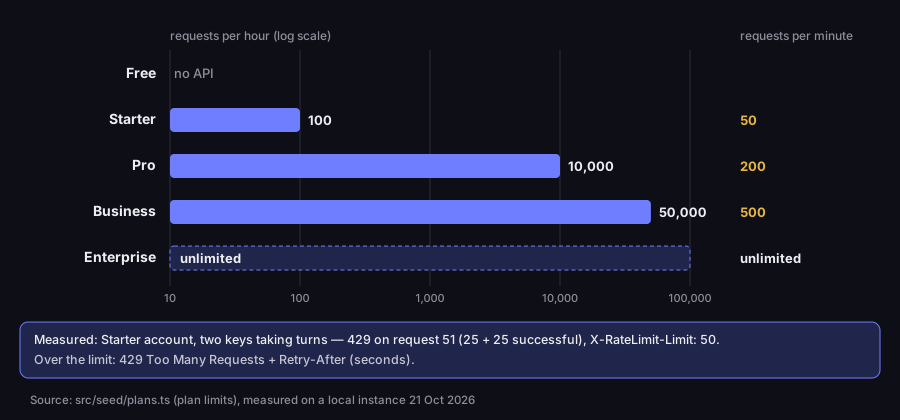
Our API limits by plan — per account, not per key
requests per hour (log scale) and per minute; measured with two keys
Source: src/seed/plans.ts (plan limits); measured on a local instance, 21 Oct 2026
Figure description
Bar chart. Free: no API. Starter: 100 requests per hour and 50 per minute. Pro: 10,000 per hour and 200 per minute. Business: 50,000 per hour and 500 per minute. Enterprise: unlimited. Measured: a Starter account, two keys taking turns — a 429 on request 51, after 25 successful requests with each key, X-RateLimit-Limit 50. Over the limit: 429 Too Many Requests and Retry-After in seconds.
We tested this with two keys of one Starter account, used in turn: the refusal came on request 51, after 25 successful requests with each key. A second key does not double the limit. Limit details are on the pricing page.
Expiry. OWASP recommends creating secrets so that they "expire after a defined time where possible" (OWASP). A key with an expiry date stops working on its own, even if everyone forgets about it. In our dashboard you choose the expiry when you create a key: no expiry, 30, 90 or 365 days. A key past its date gets 401 API_KEY_EXPIRED — that is what a request returned with a test key whose date we set in the past.
How to rotate an API key without downtime, and what to do after a leak
Regular key rotation means a stolen key works only briefly. OWASP: "You should regularly rotate secrets so that any stolen credentials will only work for a short time", and secrets that are no longer needed or may have been exposed must be revoked (OWASP). Google describes rotation as three moves: create a new key, switch the application over, delete the old one (Google Cloud). You can swap a key without a minute of downtime if the provider lets you keep two active at once — with us, up to 10 active keys per account:
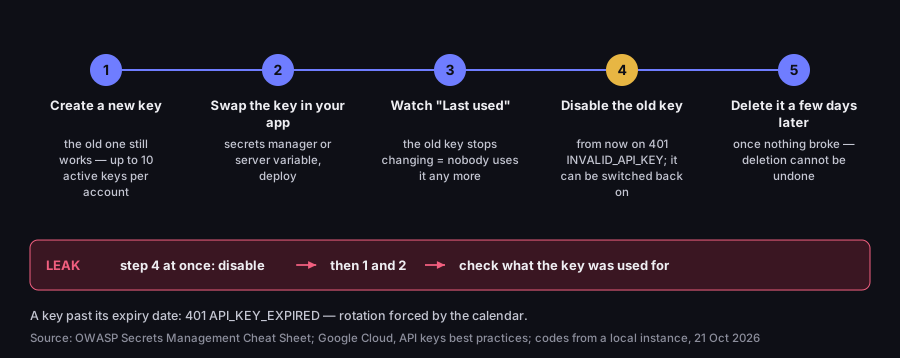
Rotating an API key without downtime — and the shortcut after a leak
five steps in the DVN Links dashboard; status codes from a local instance
Source: OWASP Secrets Management Cheat Sheet; Google Cloud, API keys best practices; codes from a local instance, 21 Oct 2026
Figure description
Five-step timeline. 1. Create a new key; the old one still works, up to 10 active keys per account. 2. Swap the key in your app, in a secrets manager or server variable, and deploy. 3. Watch Last Used; when it stops changing for the old key, nobody uses it any more. 4. Disable the old key; from then on 401 INVALID_API_KEY, and it can be switched back on. 5. Delete it a few days later once nothing broke; deletion cannot be undone. After a leak: step 4 at once, then 1 and 2, and check what the key was used for. A key past its expiry date: 401 API_KEY_EXPIRED.
Step three is easy to skip, and it is the one that prevents downtime. The Last Used column in the dashboard updates with every request made with that key. If, after the deployment, the old key still shows "Today", a script or a second server you forgot about is still using it. Disabling instead of deleting gives you a way back: a disabled key gets 401 INVALID_API_KEY, but one switch turns it back on if something stops working.
A leak reverses the order. If a key ended up in a public repository, in a screenshot or in a message sent to the wrong place, do not wait for the new key to be deployed. Disable it at once — a break in the integration is cheaper than someone else's requests on your account. Then create a new key, deploy it and check what happened on the account while the key was exposed. Deleting the file from the repository is not enough, because the key stays in the history — it has to be revoked.
Do not paste your key into pages reached from an unexpected email "from your provider" either. A request for your key, or to sign in through a link in a message, is classic phishing; how to assess such a link before you click is covered in our guide to checking whether a link is safe.
Frequently asked questions
A program's password to another program: a long, random string that identifies an application and its account with the provider. Whoever holds it acts on the owner's behalf, so you protect it like a password.
In the provider's dashboard — never by yourself. With us: Dashboard → Settings → API Keys → Create Key, a name, an expiry, then copy the key at once, because you will not see it again. The API is available from the Starter plan and during the 7-day trial of a new account. The first request with a key is shown in getting started.
Not always. An API key is long-lived and tied to an application; an OAuth access token usually lives briefly and acts for a user, within the scope they agreed to. Both are often sent in the same Authorization: Bearer header, because both are "bearer" credentials — anyone who has them can use them.
Disable it at once, create a new one, deploy it and check what happened on the account. Removing the key from your code is not enough — it stays in Git history.
Technically you often can, but you should not: a URL with a key stays in server logs and browser history (RFC 6750 §5.3). In our API that method is deprecated, and such responses carry Deprecation and Warning headers.
Want to try it yourself? Sign up, create a key in your settings and send your first request — every endpoint is described in the interactive documentation at /api/reference. The full list of what the service does is on the features page.