REST API explained with a real, working example
What a REST API is, from Fielding's six constraints to methods, status codes, rate limits and pagination — shown on a live API with real responses.
A REST API is the way one program talks to another over HTTP — the same protocol your browser uses to fetch web pages. The URL points to a resource, such as one link in a URL shortener; the HTTP method says what to do with it (GET reads, POST creates, DELETE removes); and the server answers with a status code and data, usually JSON. REST itself is neither a protocol nor a library. It is an architectural style that Roy Fielding described in his doctoral dissertation in 2000. This guide starts with REST at the source: Fielding's six constraints, and why their author says most "REST APIs" are not REST at all. Then it moves to practice on the working API of the DVN Links shortener — real requests and responses, which requests are safe to retry, what 401, 403 and 429 mean, and how a rate limit behaves, measured request by request.
What an API is, and what makes it a REST API
An API (application programming interface) is a contract between programs: which questions one program may ask another, how to phrase them and what comes back. A user interface is for people — buttons and forms. An API is for software. When an online shop fetches a parcel status from a courier, or a mailing tool creates a short link for every newsletter, it does so through the provider's API, without anyone clicking through a dashboard.
On the web, APIs usually run over HTTP, and that is where the word REST comes in. MDN, the reference maintained by Mozilla, describes the situation honestly: HTTP APIs in general are colloquially called RESTful APIs, although "they don't necessarily adhere to all REST constraints", and beginners can assume a REST API is an HTTP service that can be called with standard web libraries and tools (MDN, REST). That is a good working definition. "Restful" means the same in practice: an API designed along REST principles, at least as far as the rest of the industry applies them.
In Postman's 2025 survey of more than 5,700 developers, architects and executives, 93% of respondents use REST (Postman, 2025 State of the API Report). These are statements of use, not a share of traffic — one team can use several styles at once.
REST API constraints: Fielding's six rules
REST is a set of constraints that Fielding places on the architecture of a networked system. Its central idea is the resource: "The key abstraction of information in REST is a resource" — anything that can be named, from a document to an image (R. Fielding, dissertation, ch. 5). In a link shortener's API the resource is a link, and its name is the address /api/v1/links/{id}. There are six constraints, and each can be checked against a real API:
- Client–server. The interface separates the client from data storage, so both sides can change independently. Fielding stresses that the separation lets components "evolve independently". Our integrations know nothing about the dashboard or the database — they see URLs and JSON.
- Stateless. Every request must carry everything the server needs to understand it, and "cannot take advantage of any stored context on the server"; session state stays with the client. That is why our API has no login and no session: the key travels with every request.
- Cache. Data in a response must be labelled as reusable or not. Our OpenAPI specification comes back with
Cache-Control: public, max-age=3600, but responses with link data carry no label at all — so this one is met only in part. - Uniform interface. For Fielding, this is what sets REST apart from other styles most clearly. It consists of four constraints: identification of resources, manipulation of resources through representations, self-descriptive messages, and "hypermedia as the engine of application state", HATEOAS for short.
- Layered system. A component cannot see beyond the layer it talks to directly. Responses from dvnlinks.pl carry the header
server: cloudflare— a CDN sits between the client and our server, and the client does not need to know. - Code on demand. The server may extend the client by sending code to run. Fielding calls it "an optional constraint" — the only optional one. We do not use it.
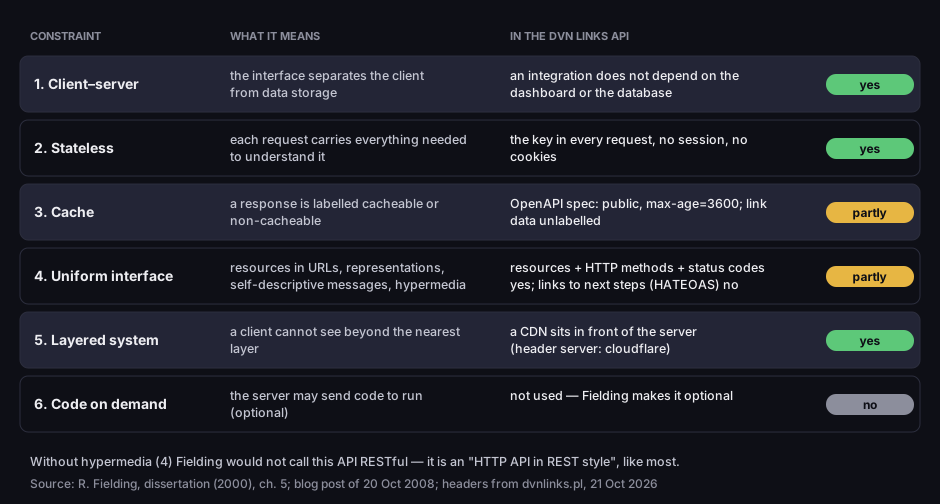
Fielding's six REST constraints — and how our API measures up
what each constraint means and whether the DVN Links API meets it
Source: R. Fielding, dissertation (2000), ch. 5; blog post of 20 Oct 2008; headers from dvnlinks.pl, 21 Oct 2026
Figure description
Table of six constraints. Client–server: the interface separates the client from data; ours yes. Stateless: every request carries everything; ours yes, the key in every request. Cache: a response is labelled cacheable or not; ours partly, the OpenAPI spec with public, max-age=3600, link data unlabelled. Uniform interface: resources, representations, self-descriptive messages, hypermedia; ours partly, no HATEOAS. Layered system: ours yes, a CDN in front, header server: cloudflare. Code on demand: optional, ours no.
The fourth constraint is where almost every "REST API" falls short. HATEOAS means that a server's response contains links to the next possible steps, and the client follows them the way a person follows links on a web page, instead of knowing URLs from the documentation. Fielding wrote a separate post about it in 2008. It opens with "I am getting frustrated by the number of people calling any HTTP-based interface a REST API" and concludes that if the engine of application state is not driven by hypertext, "then it cannot be RESTful and cannot be a REST API" (R. Fielding, 20 Oct 2008).
Our API does not meet that condition: a response with a link does not say where to edit or delete it — the program knows those URLs because it read the documentation. In Fielding's strict sense, it is an "HTTP API in REST style", like most interfaces that use the name. That does not get in the way of an integration, but it explains the recurring "is it really REST?" debate.
Anatomy of a request and a response
Every REST API call is a pair of HTTP messages: a request and a response. A request has four parts:
- the method — what to do (
GET,POST,PATCH,DELETE); - the resource URL — what to do it to (
/api/v1/linksis the collection of links,/api/v1/links/{id}is one link); how a URL is built, including the parameters after the question mark, is covered in our guide to what a URL is; - headers — data about the request: who is asking (
Authorization) and the format of the body (Content-Type: application/json); - the body — data to store, usually empty when reading.
A response has a status code (three digits), headers and a body. This is what creating a short link looks like in our API — the request and response recorded on a local instance of the same code that runs in production:
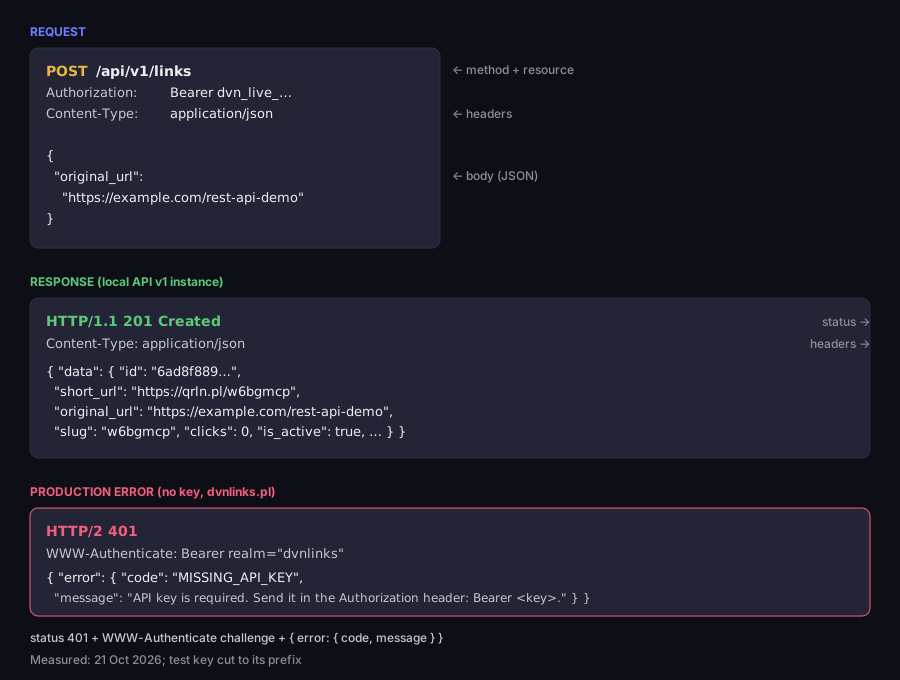
Anatomy of a REST API call — request, response, error
POST /api/v1/links on a local instance; a 401 from production, without a key
Measured: local API v1 instance and dvnlinks.pl, 21 Oct 2026; test key cut to its prefix
Figure description
Request POST /api/v1/links with the headers Authorization: Bearer dvn*live*… and Content-Type: application/json and the body {"original_url": "https://example.com/rest-api-demo"}. Response HTTP 201 Created, Content-Type: application/json, a data body with id, short_url on the qrln.pl domain, original_url, slug, clicks 0 and is_active true. Below, the production response from dvnlinks.pl without a key: HTTP 401, header WWW-Authenticate: Bearer realm="dvnlinks", an error body with code MISSING_API_KEY and a message about the Authorization header.
Two things in this figure apply to any API. First, responses have a fixed shape: data always in a data object, an error always in error with code and message. A program checks the status code, then error.code — a stable identifier, unlike the message written for humans. A validation error adds details.field. Sending {"original_url": "not-a-url"} returns 400 VALIDATION_ERROR with "field": "original_url".
Second, a 401 is more than a number. The HTTP specification says a server sending 401 "MUST send a WWW-Authenticate header field" with at least one challenge, that is, a description of how to authenticate (RFC 9110, §15.5.2). Our API returns WWW-Authenticate: Bearer realm="dvnlinks", and adds error="invalid_token" when a key is rejected — malformed, unknown, disabled or expired. We checked this in production on 21 October 2026, with no key and with a malformed one.
HTTP methods: which requests can be retried
HTTP methods differ not only in what they do but also in whether a request may be sent twice. That matters when the connection drops before the client reads the response: you do not know whether the server got round to doing anything.
The HTTP specification defines two properties. A safe method is one whose semantics are "essentially read-only" — the client expects no change on the server; GET is one (RFC 9110, §9.2.1). An idempotent method is one where several identical requests have the same effect as one. The RFC lists PUT, DELETE and the safe methods, and explains why the distinction exists: such a request "can be repeated automatically if a communication failure occurs before the client is able to read the server's response" (RFC 9110, §9.2.2).
Guides sometimes say that "PUT and PATCH are idempotent". The PATCH specification says otherwise: "PATCH is neither safe nor idempotent", although a PATCH request can be written so that it is (RFC 5789, §2). We sent each request twice in a row to a local instance of our API:
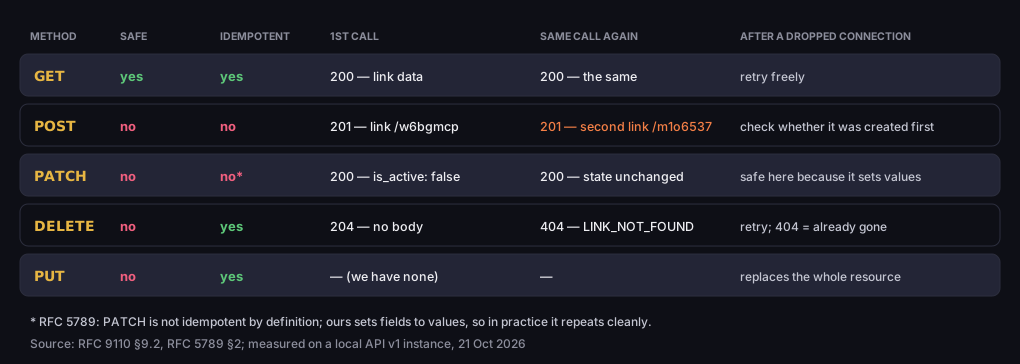
Which request can be retried — HTTP methods and our measurement
first and second identical call on a local API v1 instance
Source: RFC 9110 §9.2, RFC 5789 §2; measured on a local API v1 instance, 21 Oct 2026
Figure description
Table. GET: safe yes, idempotent yes; 200 with link data, again 200 the same; retry freely. POST: no, no; 201 and a new link, again 201 and a second, different link; check whether it was created first. PATCH: no, not by definition; 200 is_active false, again 200 with the state unchanged; safe here because it sets values. DELETE: no, yes; 204 with no body, again 404 LINK_NOT_FOUND; retry, 404 means already gone. PUT: no, yes; we have none.
DELETE is the interesting one. The second call returns a different code (404 instead of 204), yet the method is idempotent — because idempotency is about the effect on the server, not the response. After one call or two, the link is gone, so a client that retries DELETE after a dropped connection and gets a 404 can treat the job as done.
POST is the opposite. Two identical requests created two different links with different addresses. If the connection drops after you send a POST, a blind retry can leave a duplicate. It is safer to fetch the list of links first (GET /api/v1/links) and check whether a link to that URL already exists. Our PATCH sets fields to specific values ("is_active": false), so repeating it does no harm, but that is a property of our implementation, not of the method — a PATCH that appends an item to a list would append it twice.
The Idempotency-Key header tries to fix the POST problem: the client gives the request a unique identifier, and a server that sees it a second time does not repeat the operation. The IETF draft describes it as a way to make non-idempotent methods "such as POST or PATCH" fault-tolerant (draft-ietf-httpapi-idempotency-key-header-07). It is a draft that expired on 18 April 2026, though, not a standard. Our API does not support it, so the "check first" rule stands.
REST API status codes
The status code is the first thing a program should check: it says whether the call worked and, if not, which side the problem is on. 2xx means success, 4xx an error in the request, 5xx an error on the server. These are the ones you will meet in our API:
|
Code |
When, in our API |
What to do |
|---|---|---|
|
200 |
a read ( |
read |
|
201 |
|
store its |
|
204 |
|
nothing |
|
400 |
validation error ( |
fix the request; do not resend it unchanged |
|
401 |
no key, wrong format, unknown, disabled or expired key |
check the key; retrying will not help |
|
403 |
key lacks the permission ( |
use a key with the right scope |
|
404 |
the resource does not exist, e.g. already deleted ( |
check the |
|
409 |
the chosen link slug is taken ( |
pick another |
|
429 |
rate limit exceeded |
wait |
The difference between 401 and 403 is often confused. 401 means "I don't know who you are" — the key is missing or invalid. 403 means "I know who you are, but you may not do this". In our test, a key with only the links:read scope got 403 INSUFFICIENT_PERMISSIONS when it tried to create a link. Scopes, and how to choose them for an integration, are covered in the guide to API keys.
Two groups of codes have their own guides. Redirects — 301, 302, 307 and 308 — are covered in 301 vs 302 redirects; what matters for APIs is that a 301 or 302 may turn a POST into a GET. The 404 and 410 codes, including when to use which, are covered in 404 Not Found.
Rate limits and 429: doing it right
A public API caps the number of requests so that one client cannot crowd out the others. There is a dedicated code for going over: 429 Too Many Requests means the user has sent "too many requests in a given amount of time", and the response may include a Retry-After header saying how long to wait (RFC 6585, §4). Retry-After is either a date or a number of seconds (RFC 9110, §10.2.3).
Our API has two limits per account: hourly and per-minute. On the Starter plan that is 100 requests an hour and 50 a minute; on Pro, 10,000 and 200; on Business, 50,000 and 500. All of an account's keys share the same limit. Why two? An hourly limit alone lets a client burn the whole hour in a few seconds; the per-minute limit spreads traffic out. Both use a sliding window: the server looks at the last minute and the last hour, not at clock hours.
We tested it on a fresh Starter account: 60 GET /api/v1/links requests one after another, then a wait as long as the server asked, then more requests until the next refusal.
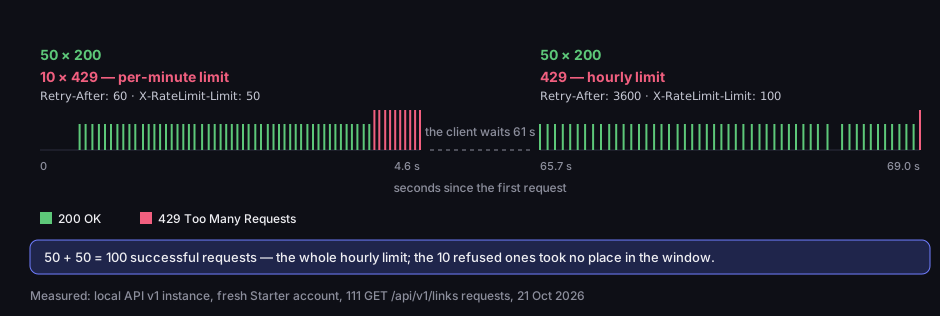
Rate limits in practice — Starter plan, 50 per minute and 100 per hour
111 GET /api/v1/links requests on a fresh account, local instance
Measured: local API v1 instance, fresh Starter account, 21 Oct 2026
Figure description
Timeline. The first 50 requests within about 4 seconds: 200 OK. The next 10: 429, per-minute limit, headers Retry-After: 60 and X-RateLimit-Limit: 50. The client waits 61 seconds. Then 50 requests 200 OK and a 429 at the hourly limit, Retry-After: 3600, X-RateLimit-Limit: 100. In total 50 plus 50, so 100 successful requests — the whole hourly limit; the 10 refused ones took no place in the window.
The measurement shows three practical things. First, with a 429 our API sends Retry-After plus the X-RateLimit-Limit, X-RateLimit-Remaining and X-RateLimit-Reset headers. A normal successful response does not carry them, so do not rely on them to track usage as you go. Second, our Retry-After gives the full length of the window: 60 seconds for the per-minute limit and 3,600 for the hourly one. That is on the generous side — in a sliding window a slot can free up sooner — but a client that obeys it will always land in an open window.
Third: a refused request does not use up the limit. After 50 successful and 10 refused requests, the pause was enough for another 50 to get through — 100 in total, the whole hourly limit — and the next request got a 429 with Retry-After: 3600. Retrying before Retry-After has passed does not cost you any of the limit, then, but it does not speed anything up either: it usually ends in another 429 and only adds traffic. The right response to a 429 is to read Retry-After, wait, and only then send the request again.
Pagination: page numbers or a cursor
A list of resources rarely fits in one response, so an API splits it into pages. There are two approaches, and our API uses both, each where it fits.
The list of links uses page numbers. The page and limit parameters (1 to 100, default 20) go in the part of the URL after the question mark, e.g. GET /api/v1/links?page=2&limit=50, and besides data the response has a pagination object with page, limit, total_pages, total_items and has_more. When has_more is false, you are done. It is simple, and enough, because a list of links changes rarely.
The event stream — clicks and scans — grows all the time, and page numbers would break it. A comment in our code explains why: with offset paging, a new event arriving between two pages "shifts everything down", and the caller silently re-reads or skips a row. So events are paged with a cursor: the response returns next_cursor, an encoded timestamp and ID of the last event, and the next request asks for everything after it. The result stays stable however many events arrive in the meantime.
The rule: page numbers for collections that do not shift; a cursor for streams that a program reads from start to finish.
REST vs SOAP vs GraphQL
REST is not the only way to build an API, but it is the most common one. Postman's 2025 survey shows what teams use — respondents could pick several answers:
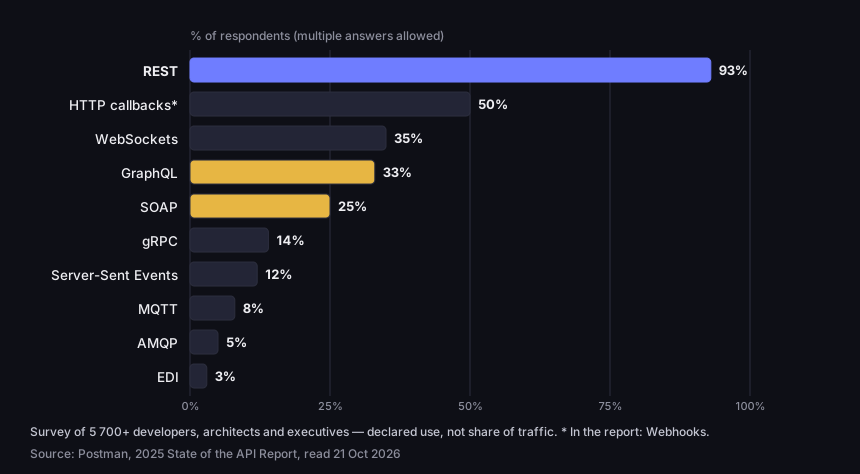
Which API styles teams use (Postman 2025)
share of respondents, multiple answers allowed
Source: Postman, 2025 State of the API Report, read 21 Oct 2026
Figure description
Bar chart. REST 93%, HTTP callbacks sent by the server 50%, WebSockets 35%, GraphQL 33%, SOAP 25%, gRPC 14%, Server-Sent Events 12%, MQTT 8%, AMQP 5%, EDI 3%. A survey of over 5,700 developers, architects and executives; declared use, not share of traffic.
The three styles most often compared differ in fundamental ways:
|
Feature |
REST |
SOAP |
GraphQL |
|---|---|---|---|
|
What it is |
an architectural style (Fielding, 2000) |
a messaging protocol (W3C) |
a query language (GraphQL specification) |
|
Message |
a representation of a resource, usually JSON |
an XML envelope ( |
response most often in JSON |
|
Who shapes the response |
the server |
the server, per the contract |
the client describes the data it needs |
|
Interface description |
OpenAPI |
WSDL (an XML language for services) |
GraphQL schema |
According to the W3C, SOAP is "a lightweight protocol intended for exchanging structured information in a decentralized, distributed environment" (W3C, SOAP 1.2). It uses XML technologies: every message is an envelope (Envelope) with an optional header and a body, and a service is described in WSDL, an XML language for describing web services (W3C, WSDL 2.0). It is still in use — 25% of respondents in the Postman survey use it.
GraphQL is "a query language designed to build client applications", in which the client describes the data it needs (GraphQL specification, September 2025). In REST, the server sets the shape of the response and you get the whole resource; in GraphQL you list exactly the fields you want, including from several related objects at once. 33% of respondents use it.
Some guides claim REST is "X% faster" than SOAP — we found no measurement behind it. The practical choice is simpler: REST for a public API used by many teams and tools; SOAP when the system you connect to requires it; GraphQL when a client needs to combine many resources flexibly.
For HTTP APIs, the standard description format is OpenAPI: a specification that lets people and programs discover a service's capabilities "without requiring access to source code, additional documentation, or inspection of network traffic" (OpenAPI Specification 3.1.0). Our API has such a file, version 3.1.0, and the interactive documentation below is built from it.
Your first call: a URL shortener REST API
Our API lets you create, read, update and delete short links and fetch their QR codes and statistics. It is available from the Starter plan, and during the 7-day trial of a new account; you cannot create a key on the Free plan. Plan details are on the pricing page.
There are three steps. First, sign up and, under Settings → API Keys, click Create Key. The server shows the key only once. Then send a request with the key in the Authorization header:
1curl -i -X POST https://dvnlinks.pl/api/v1/links \2 -H "Authorization: Bearer $DVN_API_KEY" \3 -H "Content-Type: application/json" \4 -d '{"original_url": "https://example.com/offer"}'The -i option shows the status code and response headers. Expect 201 and a data object with a short_url field. Finally, read the link you have just created, using its id:
1curl https://dvnlinks.pl/api/v1/links/LINK_ID \2 -H "Authorization: Bearer $DVN_API_KEY"Keep the key in a variable, not in the command itself, so it stays out of your shell history. The older way of passing the key in the URL (?api_key=) still works but is being retired: such responses carry Deprecation and Warning headers, because a URL with a key ends up in logs. Why that is dangerous, and how to store a key, is covered in the guide to API keys; the click-by-click steps are in the API keys documentation.
Every endpoint is described in the OpenAPI 3.1.0 specification and in the interactive documentation at /api/reference, where you can send requests straight from your browser. The same steps in the dashboard, from sign-up to the first link, are in getting started; there is also an introduction to the API in the documentation. What the API does not do: it does not push click notifications to your server, does not create bio pages or QR codes that lead to files, and has no bulk operations — each link is a separate request. The full feature list is on the features page.
Frequently asked questions
A contract through which one program uses another: which questions it may ask and what comes back. On the web, usually over HTTP.
An API built on REST principles: resources have their own URLs, operations are HTTP methods, and the server keeps no session state. In practice "RESTful" and "REST API" mean the same thing — an HTTP API in REST style — although by Fielding's definition neither is fully REST without hypermedia.
SOAP is a W3C protocol with an XML envelope and a contract in WSDL; REST is a style built on HTTP, usually with JSON. Choose SOAP when the system you connect to requires it.
No. Fielding talks about representations of a resource, and their format is a media type: "The data format of a representation is known as a media type" (ch. 5). JSON is a convention, not a requirement — the same API could return XML or CSV.
That you sent too many requests in a given time. Read the Retry-After header and wait that many seconds; retrying at once usually just gets another 429.
Want to see a REST API at work on your own account? Sign up, generate a key and create a link with one curl command — the API is available from the Starter plan and during the trial.