QR code menu: page, PDF or short link — and the price list rules
A QR code menu on the table opens your menu on the guest's phone. What to encode so a price change does not mean new stickers, and why the code should not replace the printed price list.
A QR code menu is a code on the table, the counter or the door that opens your menu on a guest's phone. The code itself takes a minute in the QR code generator, no account needed. Before you print it on every table, though, make two decisions that digital-menu vendors rarely mention. First, what sits behind the code — a web page, a PDF or a short link — because that decides whether a price change means editing a page or printing new stickers for every table. Second, whether the code can replace the printed menu. The price display rules we have read ask for price lists handed to guests and posted on the premises, and say nothing about phones — so here a QR code menu is an addition to the card, not a replacement.
QR code menus and price display rules
We found no EU-wide rule on how restaurants display prices; it is set nationally. Two examples show what such rules ask for.
Ireland. The Retail Prices (Food in Catering Establishments) Display Order 1984 requires a price notice "either immediately outside or immediately inside each entrance" open to the public, placed so that it is "clearly visible and easily accessible" to people using the entrance (S.I. No. 213/1984). The Competition and Consumer Protection Commission confirms the Order applies to restaurants and cafés, and adds that "Restaurants and cafés must display prices on menus" and that without individual menus "a clear display such as a blackboard must be visible in the room" (CCPC, restaurants and cafes). According to the CCPC, the price list must also show any minimum charge, service charge (and whether it is included) and cover charge.
Poland. A 2022 regulation on price display requires restaurants to give guests enough price lists before taking the order, to post a price list in a publicly accessible place inside or outside the venue, and to state the full dish name and the quantity each price refers to (Dz.U. 2022 item 2776, § 9).
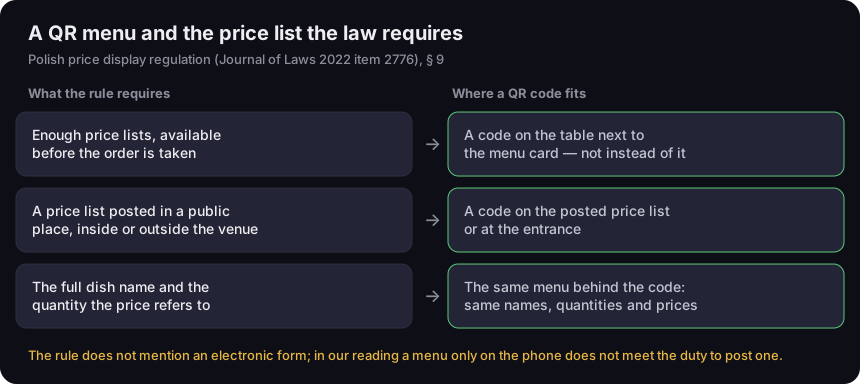
A QR menu and the price list the law requires
the Polish rule as an example, and where a QR code fits
Source: Polish regulation on price display of 19 Dec 2022 (Journal of Laws 2022 item 2776), § 9; read 17 Oct 2026
Figure description
Three rows, the rule's requirement on the left and the place for a QR code on the right. Enough price lists, available before the order is taken — a code on the table next to the menu card, not instead of it. A price list posted in a public place, inside or outside the venue — a code on the posted price list or at the entrance. The full dish name and the quantity the price refers to — the same menu behind the code, with the same names, quantities and prices. Footer: the rule does not mention an electronic form; in our reading a menu only on the phone does not meet the duty to post one.
Does a menu opened with a QR code count as a menu "available before the order"? Neither text mentions an electronic form — they neither allow it nor rule it out. One detail in the Polish regulation is telling: for services provided only at the customer's premises, § 11 says the price list is given in written or electronic form. The regulation names the electronic form there and not in the restaurant section. Its general part (§ 3) also allows a price label that "may take the form of an electronic display" — but that is a screen in the venue, visible to everyone, not a menu on the guest's phone. We found no regulator guidance that settles whether a phone-only menu is enough. In our reading, in both countries a QR code does not fulfil the duty to post a price list, because a menu on a phone is not posted anywhere.
Hence our advice, which does not depend on how that question is settled: the QR code as an extra, the menu card and the posted price list as the basis. A code on the table next to the card helps guests who prefer reading on their phone, want a bigger font or want to see photos. A guest without a phone or signal gets the card, and the price list by the door stays whatever happens to the codes.
This is not just theory. In Poland, the Trade Inspection can fine a business up to PLN 20,000 for failing to display prices, and up to PLN 40,000 for three or more breaches within 12 months (Polish Act on informing about prices, art. 6). Inspections of restaurants are regular, and most of the irregularities they find concern price lists.
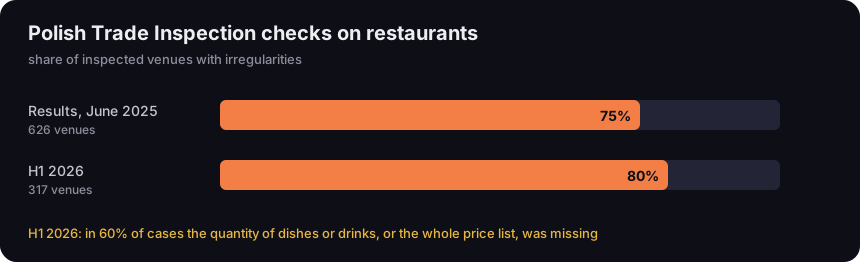
Polish Trade Inspection checks on restaurants
share of inspected venues with irregularities
Source: UOKiK (Polish competition and consumer authority), releases of 18 Jun 2025 and 31 Jul 2026; read 17 Oct 2026
Figure description
Bar chart. Results published in June 2025: 626 venues inspected, 75 per cent with irregularities. First half of 2026: 317 venues, 80 per cent with irregularities. Note: in the first half of 2026, in 60 per cent of cases the quantity of dishes or drinks, or the whole price list, was missing.
In results published in June 2025, Polish inspectors checked 626 venues and found irregularities in 75% of them, mostly in price display: a missing price list or missing quantities (UOKiK, June 2025). In the first half of 2026 they visited 317 venues and 80% had irregularities; in 60% of cases quantities of dishes or drinks were missing, or there was no price list at all (UOKiK, July 2026). A QR code menu does not fix this by itself. Done well, it can help: a menu page makes it easy to add the quantity to every item and keep prices in line with the card.
Wherever you are in the EU, check your national price display rules before you take the printed menus off the tables.
Web page, PDF or short link: what to encode
A QR code holds an address. The address you choose decides two things: how the menu looks on a phone, and what happens when you change it. There are three common options.
A menu page on your website — say yourrestaurant.com/menu. This is the option we recommend most often. A web page fits the phone screen, so guests do not have to zoom. Above all, the address stays the same when the content changes: you raise prices, add a seasonal dish, remove what has run out — and the code on the table still leads to the current version. A code with such an address is static and free: it does not expire, has no limits and does not depend on any service in between. The only condition is a website where you can edit the menu page yourself.
A PDF file — the easiest start, since the menu already exists as a print file. It has two drawbacks. First, a PDF keeps its print layout, so on a phone people have to zoom and scroll. Second, and more important: a new file usually means a new address. Upload the new menu to your site as a new file and it lands under a different name or path — while the old code keeps opening the old menu with old prices, or an error page if you delete the old file. Every price change then means a new code and a new print for every table.
Google Drive can be an exception. A file shared as "Anyone with the link" opens without signing in to a Google account (Google Drive Help, sharing), and "Manage versions" lets you upload a new version into the same file instead of creating a new one (Google Drive Help, file versions). The help page does not say outright that the link stays the same, so scan the code after every swap and check what opens. Older versions may also be deleted after 30 days — fine, since guests will not see old prices, but do not treat Drive as your menu archive. A code for any file — a price list, a manual, a photo — and what happens to it when you swap the file is covered in QR code for PDF.
A short link — the code holds an address on our domain that redirects to the menu. You change the redirect target in the dashboard: the autumn PDF today, the Christmas one next month, or a new web page. The code on the table stays the same. It suits menus that live in PDFs with a new name every season, or venues without a website. On paid plans (from Starter) you can also upload the PDF menu to us: the short link and the code then open the file, and a new menu goes in with "Replace file" — the link and the printed code stay the same. PDFs and images (JPG, PNG, WEBP) up to 25 MB per file are accepted; Starter holds 5 files, 50 MB in total. A short link also counts: every scan is recorded as a click, so you see how many guests actually open the menu on their phone. There is one important limitation on the free plan, covered in the next section.
For the general difference between a static code and a code with a short link, see our guide on how to make a QR code.
Changing the menu and prices without new stickers
The code stays on the table for months; the menu changes — seasons, supplier prices, new dishes, the end of a promotion. Before printing codes for every table, check what happens at the first menu change.
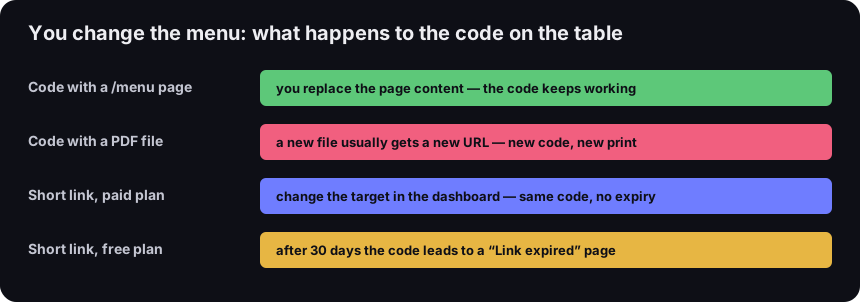
You change the menu: what happens to the code on the table
four situations after a menu change
Source: DVN Links short link plans and features, as of 17 Oct 2026
Figure description
Four rows. Code with a /menu page: you replace the page content and the code keeps working. Code with a PDF file: a new file usually gets a new URL, so a new code and a new print. Short link on a paid plan: change the target in the dashboard, same code, no expiry. Short link on the free plan: after 30 days the code leads to a Link expired page.
The last row matters most. On the free plan a short link expires 30 days after it is created, and the date cannot be changed. After that, the code on the table leads to our "Link expired" page instead of the menu. A free short link is fine for a test or a one-off event, not for tables. A code that has to work for months needs a paid plan, where links do not expire — see pricing.
If you do not want to pay for a short link, the option without expiry is a code pointing to a /menu page on your own website. It costs only what the website costs, and a price change needs no new code.
A separate case is moving the page itself — a new website or a new domain. All printed codes with the old /menu address stop working unless the old site redirects the old address to the new one. Ask whoever builds the new site to set up that redirect before the old one goes offline — usually a small configuration change that saves every card on every table. Scan one of the old codes after the move to check it still opens the menu.
Two things to know about a short link on a paid plan:
- The click limit is soft. Every plan has a monthly click limit, but past it the link still redirects to the menu — the guest at the table notices nothing. Clicks over the limit are recorded and show up in statistics after you move to a higher plan. Bots do not use up the limit. (On the free plan, at four times the limit, guests would first see an intermediate page with a "Continue" button — one more reason not to put a free link on tables.)
- Statistics show whether guests use the code at all. Each click is recorded with country, device and browser. Make separate short links for the table code and the door code and you will see which one gets scanned. Statistics will not tell you whether the guest ordered anything — only that the menu was opened.
How to make a QR code menu, step by step
- Put the menu at a stable address. Ideally a
/menupage on your website. If the menu is a PDF, decide whether to encode the file address, a short link to it, or a short link to a file uploaded to us (see above). - Check the menu on a phone. Open the address on a phone, not a computer. Can you read it without zooming? Does every item show the quantity and price, as on the card?
- Make the code in the generator. Open the QR code generator, choose "Website", paste the menu or short link address and download the 1,000-pixel PNG. The free generator puts our logo in the middle and uses the highest error correction level (H), so the code reads despite the covered centre.
- Design the table card or sticker. The code, one line above it — "Menu on your phone: scan with your camera" — and the menu address in text below it for those who prefer typing.
- Print a test and scan it at a table. With two different phones, in the light the room has in the evening. Only then print for every table.
- Write down what is in the code. In one place — even a note on your phone — record the address in the codes, the print date and, for a short link, which account it lives in. A year later, when the website or the manager changes, that note saves guesswork.
How big to print it and where to put it
A menu address is usually short, so the code is sparse — few modules, the small squares — and copes well with small print. We measured four typical addresses with the library our generator uses, at level H (the free generator with a logo) and a minimum module of 0.396 mm. That is the value GS1's packaging standard gives for QR codes scanned with a phone — more in our guide to minimum QR code size.
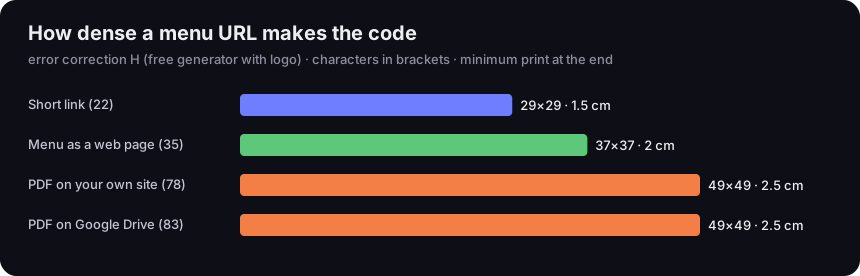
How dense a menu URL makes the code
error correction H, characters in brackets, minimum print at the end
Source: our calculation, qrcode 1.5.4 library, 4-module quiet zone, minimum module 0.396 mm (GS1); sample addresses
Figure description
Bar chart. Short link (22 characters): 29 by 29 modules, 1.5 cm. Menu as a web page (35): 37 by 37, 2 cm. PDF on your own website (78): 49 by 49, 2.5 cm. PDF on Google Drive (83): 49 by 49, 2.5 cm.
None of these addresses needs more than 2.5 cm. That is the minimum for a code scanned up close — and a table code is scanned at arm's length. A code 3–4 cm wide gives plenty of margin, fits on a small card next to the condiments and does not take over the table. A code at the entrance or in the window, scanned from the pavement, has to be proportionally bigger; the distance rule is in our guide to minimum QR code size.
Where to put the code:
- On the table, next to the card. A stand, a folded card or a sticker. On a table that gets wiped, laminate the sticker — a dirty or scratched code reads worse.
- At the entrance and in the window. Next to the posted price list, for passers-by who want a look before coming in. Here the code complements the posted list rather than replacing it.
- Takeaway and delivery. On a flyer in the bag — a menu code with the phone number for orders.
Tables often carry other codes too: guest Wi-Fi and a review link. Each code holds one thing, so they are always separate codes, clearly labelled so guests know which they are scanning. How to make a guest network code is in our guide to the WiFi QR code; how to get a review link is in our guide to the Google review link.
What the menu behind the code should include
The menu behind the code is the same menu, just on a phone. It needs what price rules expect from a price list: full dish names, the quantities the prices refer to, and the prices themselves — matching the printed card and what the till charges. A mismatch between the phone menu and the table card is exactly the kind of thing inspectors write up.
A few more things that make guests' lives easier:
- Service and other charges. If you add a service charge or a packaging fee, state it clearly in the menu, not in small print at the end. Irish rules, for example, require the price list to show any service charge and cover charge.
- Allergens. EU law requires allergen information even for food sold without packaging, and lets member states adopt national rules on how it is provided (Regulation (EU) No 1169/2011, art. 44). Ireland, for example, requires it in writing: the Food Safety Authority of Ireland says customers must have the information before buying without having to ask, next to each dish or in a clearly visible place on the premises, in hard copy or electronic format (FSAI, allergen information for non-prepacked food). The guidance does not mention QR codes. A phone menu is a good place to show allergens next to each dish, but check what your national rules say about the form before relying on it alone.
- Readability. Large type, good contrast, no app download and no consent pop-up covering the whole menu.
- Last updated. One line — "menu valid from…" — at the bottom helps staff and guests.
Who will not scan the code
A QR code menu suits most guests, not all. Some have no phone on them or a flat battery. Some cannot or will not scan codes. Some get poor signal inside, especially in basements and thick-walled buildings. And for someone with poor eyesight, small PDF text on a phone can be harder than a large printed card.
Three habits help:
- A card on request, no questions asked. Staff hand a card to anyone who asks, ideally offering it first. The code is for those who prefer their phone.
- A web page, not just a PDF. Text on a web page can be enlarged on a phone and read aloud by a screen reader. A PDF made for printing often handles this less well.
- Guest Wi-Fi alongside. If signal is weak in the room, a guest network code on the same card solves it — as a separate code with its own label.
One more thing: a guest who scans the code should not land on a page that asks them to sign in, install an app or give an email address before seeing prices. A menu code should open the menu.
Frequently asked questions
The price display rules we have read ask for price lists available before ordering and a list posted at the entrance or elsewhere on the premises, and say nothing about phones. The safe setup: the QR code as an extra, a card for anyone who asks, and a posted price list. Check your national rules.
A code with a web address made in the generator does not expire — it works as long as the page does. A short link on the free plan expires 30 days after it is created; on paid plans short links do not expire.
A code to your menu page is free in the generator, no account needed. A short link without expiry is paid — you need it if you want to change where the code points (a new PDF every season, say) or count scans. Paid plans also let you upload the PDF menu to us and replace it without changing the code.
A web page: easier to read on a phone, and you change the content at the same address. A PDF is quicker to start with, but a new file usually has a new address, so it needs either a new code or a short link — on paid plans also one with an uploaded file you can replace.
With a code holding a fixed address, only from your own website's statistics. With a short link, every scan is recorded in the dashboard as a click with country and device.
The free generator puts the DVN Links logo in the middle. A short link's code in the dashboard can go without a logo on paid plans, and your own logo comes with the Business and Enterprise plans. A centre logo always forces the highest error correction level, which with short menu addresses makes no practical difference.
No. One code to a menu page with a language switch at the top is enough. Two codes labelled by language also work, but they take more room on the table and are easy to mix up.
Make a code for your menu
QR code generator, Website type — no account, 1,000 px PNG for print.