QR code for YouTube: which link to encode before you print
A QR code for YouTube takes two minutes to make. The hard part is choosing the link — video, moment, channel or playlist — and knowing what happens to the code when you change your @handle or hide a video.
A QR code for YouTube is a code that opens your video, channel or playlist when someone scans it with a phone. You can make one in the QR code generator without an account, in about two minutes. How the code looks matters less than you might think. What matters is the link you put in it: in an ordinary QR code the address is fixed, so once the flyer, sticker or box is printed you cannot change it. Below: which link to use for a video, a moment, a channel and a playlist, what a @handle or privacy change does to the code, and when a short link beats the YouTube address.
QR code for YouTube: make one in two minutes
A YouTube QR code is a plain code holding a web address. You do not need a special "YouTube" type in the generator — the "Website" type and the right link are enough:
- Copy the link. Under the video, click "Share", then "Copy". YouTube's help describes exactly this: the button copies a link to the video that you can paste somewhere else (YouTube Help, share videos and channels). For a channel, copy the address from the browser bar while you are on the channel page.
- Paste it into the generator. Open the generator, choose "Website" and paste the link. The preview appears straight away.
- Download the print file. The generator saves a PNG 1,000 pixels wide. If the code is too dense to fit in 3 cm, a warning with the minimum print size appears under the preview — typical YouTube addresses do not get there; the minimums are below.
- Scan it with two phones. Ideally an iPhone and an Android phone, from the screen and from a test print. The iPhone camera recognises a code with a website and shows a link at the bottom of the screen that you tap (Apple, scan a QR code).
The free generator puts our logo in the middle and, to keep the code readable with its centre covered, uses the highest error correction level (H). That adds a few modules — the small squares — which with YouTube addresses does not matter, as the numbers below show. How a logo affects a code is covered in our guide to the QR code with logo.
If all you need is a code for your channel, you may not need a generator at all. The YouTube app has its own QR code for sharing a channel (9to5Google). It covers channels, though — for a particular video or moment you need a generator. Scan it before you print and check which address it opens: if it is the @handle address, everything below about handle changes applies to it.
The general rules — content types, static codes, short links — are in our guide on how to make a QR code.
Which link to encode: video, moment, channel or playlist
YouTube has several kinds of address, and each behaves a little differently once printed. Before you paste anything into the generator, decide what the code should open.
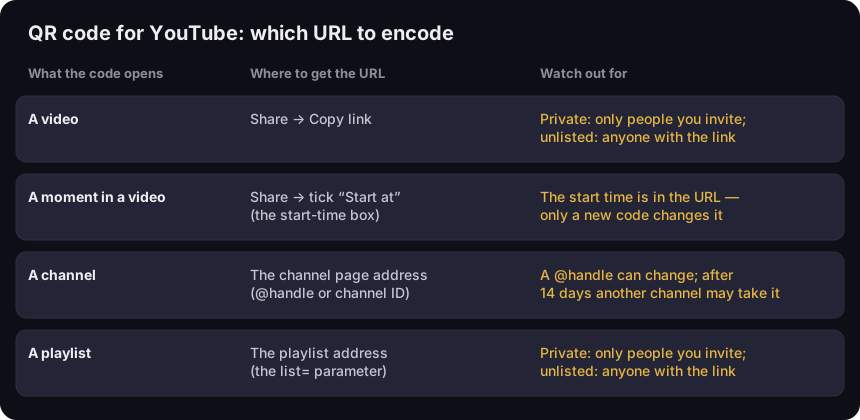
QR code for YouTube — which URL to encode
what the code opens, where to get the URL, what to watch out for
Source: YouTube Help (sharing, handles, video and playlist privacy), read 17 Oct 2026
Figure description
Three-column table. A video: Share, Copy link; a private video is visible only to people you invite, an unlisted one to anyone with the link. A moment in a video: Share and tick Start at; the start time is part of the URL, so only a new code changes it. A channel: the channel page address with the @handle or the channel ID; a @handle can change, and after 14 days another channel may take the old one. A playlist: the address with the list parameter; private only for invited people, unlisted for anyone with the link.
A video. A video address usually takes one of two forms: the long youtube.com/watch?v=… or the shorter youtu.be/…. Both open the same video, because what matters in each is the video ID — after v= or after the slash. Copy the link with the "Share" button rather than from the address bar: the address bar easily carries extras you did not mean to include, such as the playlist you came from.
A moment in a video. If the code should open a specific point — the recipe at minute three, the one feature a customer asks about — tick the start-time box in the share window and enter the time. YouTube's help puts it like this: check the box and enter the start time, and the link points to that part of the video (YouTube Help, sharing). The start time goes into the address, so a code made from that link carries it alongside the video ID. If you later trim the intro and the key moment moves by a minute, the code still opens the video at the old time. Only a new code, or a short link, changes that.
A playlist. A playlist address contains a list= parameter with the playlist ID. Copy the address bar while watching a video inside a playlist and you usually get both IDs, so the code opens that video with the playlist alongside. For the playlist itself, copy the playlist page address.
A channel. This is where the choice matters most, because a channel has two kinds of address. It gets its own section.
Channel QR code: @handle or channel ID
Every YouTube channel has a handle, a name starting with @. YouTube's help explains that your handle automatically becomes the channel's URL, in the form youtube.com/@name (YouTube Help, handles). It is a convenient address: short, readable and easy to print under the code.
But a handle can change — YouTube's help says you can change it twice within 14 days. What happens to the old address is spelled out too: YouTube holds your previous handle for 14 days in case you want to switch back, and during that period the old and the new URL both work. After that, the handle becomes available for other users to select (YouTube Help, change your handle). YouTube also reserves the right to change, reclaim or remove a handle at any time (YouTube Help, handles).
For a printed code, that is a real difference. A code with youtube.com/@old-handle keeps working for two weeks after the change and may then start opening the channel of whoever takes the handle. It may never happen, but it is out of your control, and printed boxes stay in circulation for years.
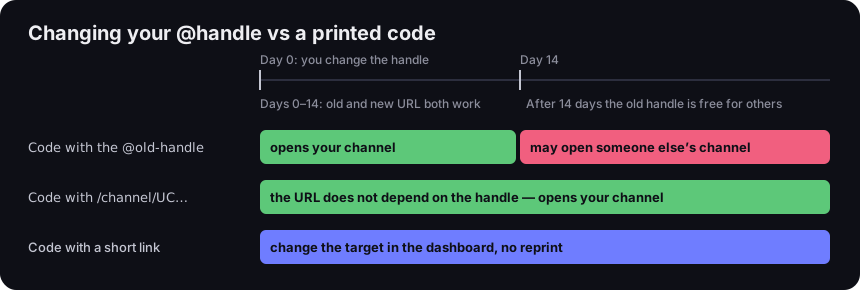
Changing your @handle vs a printed code
what the code opens in the 14 days after the change and later
Source: YouTube Help — changing your handle and channel URLs, read 17 Oct 2026; DVN Links short links
Figure description
Timeline from the day the handle changes. On days 0–14 the old and new URL both work; after 14 days the old handle is free for others. Code with the @old-handle: opens your channel until day 14, then may open someone else's channel. Code with /channel/UC…: the URL does not depend on the handle and opens your channel throughout. Code with a short link: change the target in the dashboard, no reprint.
The second kind of address does not depend on the handle. Every channel has a standard URL with its unique channel ID, the letters and numbers at the end of the URL (YouTube Help, channel URLs). YouTube's example is youtube.com/channel/UCUZHFZ9jIKrLroW8LcyJEQQ. It is less readable, but a handle change does not touch it.
Older custom URLs (youtube.com/c/name) and legacy username URLs (youtube.com/user/name) still work — YouTube redirects them to the handle-based URL — so old codes with them need no replacing. New custom URLs can no longer be set up.
Our advice:
- Print that must last (packaging, signage, a large batch of business cards) — the channel ID address, or a short link whose target you can change in the dashboard.
- Short-lived print (a slide for one conference, a poster for one event) — the @handle address, if you do not plan to change it.
- Planning to rename the channel — change the handle first, print second.
Private, unlisted, deleted: what the person scanning will see
A QR code knows nothing about privacy settings. It holds an address, and YouTube decides what to show when that address is opened. YouTube's help distinguishes three settings (YouTube Help, video privacy):
- Public — anyone can watch the video.
- Unlisted — anyone with the link can watch and share it. It does not show up in the Videos tab of your channel or in YouTube search results — unless someone adds it to a public playlist.
- Private — only you and the people you choose can see it.
Two rules follow. First, a private video does not work in a code for customers: anyone not on your list cannot watch it. Second, unlisted does not mean hidden from people who have the code. The code is a link, so anyone who scans the box, the flyer, or a photo of the flyer posted online can watch. An unlisted video suits product instructions you would rather not show on your channel next to everything else — but it is not a way to protect content. Playlists have the same three settings: public and unlisted ones can be shared by link, private ones cannot (YouTube Help, playlist privacy).
The third case is a deleted video. The code still opens the same address, but there is no video behind it. A corrected version uploaded as a new video has its own address, so the old code will not lead to it. This happens a lot with instructions and product videos: version 2 of the video means a new code on the next print run. Unless the code held a short link from the start.
How small can you print a YouTube QR code
YouTube addresses are short, and the length of the address decides how many modules the code has and how small it can be printed. We measured eight typical addresses with the library our generator uses, at level H (the free generator with a logo) and a minimum module of 0.396 mm. That is the value GS1's packaging standard gives for QR codes scanned with a phone — more on it in our guide to minimum QR code size.
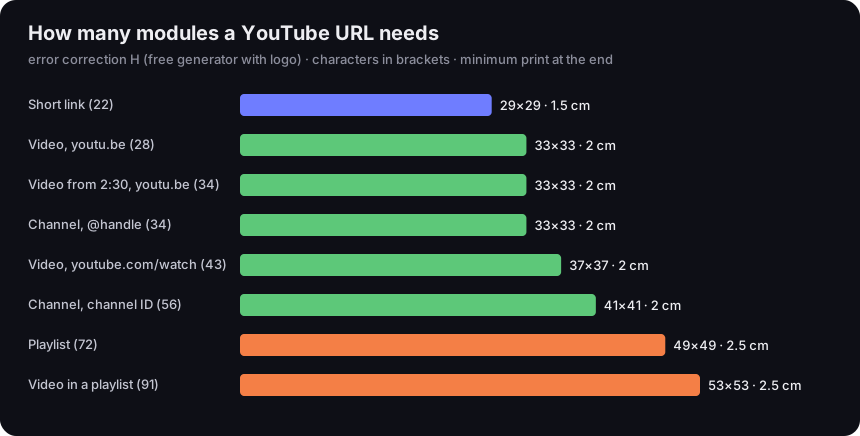
How many modules a YouTube URL needs
error correction H, characters in brackets, minimum print at the end
Source: our calculation, qrcode 1.5.4 library, 4-module quiet zone, minimum module 0.396 mm (GS1); sample IDs of real length
Figure description
Bar chart. Short link (22 characters): 29 by 29 modules, 1.5 cm. youtu.be video (28): 33 by 33, 2 cm. youtu.be video with a start time (34): 33 by 33, 2 cm. Channel with @handle (34): 33 by 33, 2 cm. watch?v= video (43): 37 by 37, 2 cm. Channel ID /channel/UC (56): 41 by 41, 2 cm. Playlist (72): 49 by 49, 2.5 cm. Video inside a playlist (91): 53 by 53, 2.5 cm.
The longest address — a video opened inside a playlist, 91 characters — gives a 53×53 code with a minimum print size of 2.5 cm. The channel ID address is longer than the @handle one, yet the code only grows from 33 to 41 modules and the minimum print size stays the same. The takeaway is simple: with YouTube you do not need to pick an address for the sake of code size. You pick it for what it should open a year from now.
The minimum print size is the floor for a code scanned up close — a business card or a box held in the hand. A code on a slide or poster is scanned from a few metres away and must be proportionally bigger; the distance rule is in the same minimum QR code size guide.
A few habits help more than centimetres:
- Label the code. "Watch the assembly video (3 min)" says more than a YouTube logo next to the code — whoever sees it knows what they will get.
- Leave space around it. The blank margin (quiet zone) is part of the code. Do not squeeze the code into a corner right at the edge of the box.
- Test glossy film first. Reflections around the code can get in the way of reading it, so check a test print under ordinary light.
A YouTube link in the code, or a short link
A common tip says: shorten the link so the code gets smaller. With YouTube it hardly matters — a short link (22 characters) gives a 29×29 code instead of 33×33 for a youtu.be address, and the minimum print drops from 2 to 1.5 cm. A short link makes sense for other reasons: you can change the target after printing and count the scans.
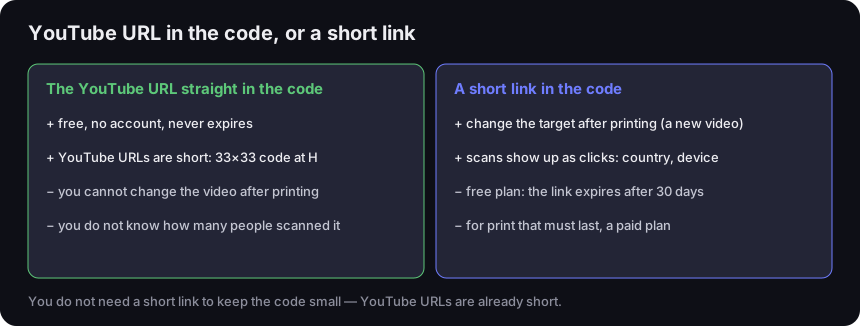
YouTube URL in the code, or a short link
pros and cons of each option
Source: our calculation (chart above); DVN Links short link plans and features, as of 17 Oct 2026
Figure description
Two columns. The YouTube URL straight in the code: plus — free, no account, never expires; plus — YouTube URLs are short, a 33 by 33 code at H; minus — you cannot change the video after printing; minus — you do not know how many people scanned it. A short link in the code: plus — change the target after printing, for example to a new video; plus — scans show up as clicks with country and device; minus — on the free plan the link expires after 30 days; minus — print that must last needs a paid plan. Footer: you do not need a short link to keep the code small, YouTube URLs are already short.
The YouTube address straight in the code is free and durable. The code does not depend on any service in between — it works as long as the video or channel at that address exists. It does not expire and has no limits. But it is static: after printing you cannot change the video, and you will not know how many people scanned the code.
A short link in the code works differently: the code holds an address on our domain, which then redirects to YouTube. You can change the redirect target in the dashboard at any time — on every plan, including the free one. When you record a new version of the instructions, you swap the address and the same code on the box leads to the new video. Each scan is recorded as a click with country, device and browser, so with one link per placement you can see whether the box or the business card brings more viewers.
Two things to know before you print:
- On the free plan a short link expires 30 days after it is created, and that date cannot be changed. After that, the code leads to our "Link expired" page instead of the video. Fine for a slide at one conference. For packaging or flyers you need a paid plan, where links do not expire.
- The monthly click limit is soft. Past the limit, the link still redirects to the video — the code does not stop working. Clicks over the limit are recorded, but they show up in statistics only after you change plan. On the free plan, once traffic exceeds four times the limit, the person scanning first sees a "Link temporarily limited" page with a "Continue" button. Bots do not use up the limit.
So which one? Video final, no scan counts needed — paste the YouTube address in, for free. Long-lived print while the video may change, or several placements to compare — a short link on a plan without expiry. The same choice comes up with other social platforms, as we explain in our guide to the Facebook QR code.
Where a YouTube QR code makes sense, and where it does not
A QR code takes someone from paper or a screen to a video. It works best where the video answers a question that comes up right there:
- Packaging and product manuals. A video on assembly, first use or cleaning. This is where a code to a specific moment is most useful — and where the video changes most often, because a new product version comes out. For packaging, consider a short link without expiry.
- Business cards and company print. A code to your channel or to the one video that best shows what you do. Business cards are printed in batches that last years, so the choice between @handle and channel ID matters most here.
- A presentation slide. A code to a video you will not have time to play. Leave it up long enough for people to get their phones out, and make it big — it is scanned from several metres away.
- Teaching and training materials. A code to a particular moment in a lecture, or to a playlist with the whole course. If the materials are only for participants, remember the difference between unlisted and private.
- Event posters. A code to a trailer or recap. These live briefly, so a @handle address or a free short link is usually enough.
A QR code inside a YouTube video works less well: someone watching on a phone cannot scan their own screen, so a link in the description or a card in the video serves them better. It makes sense only for viewers on a TV or computer.
Before you print: a checklist
A YouTube code rarely fails because it was generated badly — it fails because something changed on YouTube, or the address was wrong from the start. Before printing, check:
- Privacy setting. The video or playlist is public or unlisted — not private.
- Type of address. For a video, the "Share" link, without a stray playlist from the address bar. For a channel, a deliberate choice between @handle and channel ID.
- Start time. If the code should open a moment, open the link and check that the video starts in the right place.
- Planned changes. If in the coming months you will change the handle, record a new version of the video or move the channel — encode a short link without expiry.
- Size and label. At least the minimum from the chart above, bigger when scanned from a distance, with one line saying what the code opens.
- Test on a print. Two different phones, a test print at the final size and on the final material.
Frequently asked questions
A code with a YouTube address made in the generator does not expire — it holds only the address and works as long as there is a video or channel behind it. What expires is a short link on the free plan: 30 days after it is created.
Only if the code holds a short link — then you change the target in the dashboard. A code with the YouTube address written into it cannot be changed; you need a new code and a new print.
That is up to the phone, not the code. The code contains an ordinary YouTube address; the system may open it in the YouTube app if it is installed, or in the browser.
A code with a YouTube address is free in the generator, with no account. You pay only for a short link without expiry, if you want to change the target and count scans — see pricing.
The app has its own QR code for sharing a channel. It is a good option if the channel is all you need. Before printing, scan it and check which address it opens — if it is the @handle address, the same 14 days apply after a handle change as to any other code.
A code holds one address. To show several videos, encode a playlist address — then you add and remove videos on YouTube and the code stays the same. The other route is a short link whose target you switch to whichever video is current.
The free generator puts the DVN Links logo in the middle of the code. A short link's code in the dashboard can go without a logo on paid plans, and your own logo comes with the Business and Enterprise plans. A logo always forces a higher error correction level, so the code has more modules — details in our guide to the QR code with logo.
Make a code for your video
QR code generator, Website type — no account, 1,000 px PNG for print.