EAN 128 (GS1-128) vs Code 128: what is the difference
EAN 128, now GS1-128, is Code 128 with an FNC1 and Application Identifiers for SSCC labels. Code sets A/B/C, Code 39 measured against Code 128, and the GS1-128 size limits.
EAN 128 — today called GS1-128, and also known as UCC/EAN-128 — is a Code 128 barcode that starts with an extra FNC1 character and carries data tagged with Application Identifiers (AIs): a pallet's SSCC, a GTIN, an expiry date, a batch number. Plain Code 128 looks almost identical but carries any text you like — letters, digits and keyboard symbols — which is why it ends up on warehouse labels, order numbers and parcels. To a person they are the same stripes; to a warehouse system they are different codes. Below: how Code 128 is built, why digits take half the room, how much wider Code 39 is — measured on files from our barcode generator — and how to make a valid GS1-128 for a logistic label. What a barcode is in general, and the main types, is covered in our guide what is a barcode.
What is Code 128
Code 128 is a variable-length 1D barcode in which every character is 11 modules wide: three bars and three spaces. The symbology is specified in ISO/IEC 15417:2007, which covers its characters, encoding, dimensions and decoding algorithms (IEC Webstore, ISO/IEC 15417:2007, read 19 Oct 2026). The standard is paid, so we take the details from the GS1 General Specifications, which describe Code 128 as the basis of GS1-128: a character is "three bars (dark bars) and three spaces (light bars), each one, two, three, or four modules in width", the stop character is 13 modules, the length is variable, the barcode reads in both directions and the check character is mandatory (GS1 General Specifications, Release 26.0, §5.4.1, read 19 Oct 2026).
A module is the width of the narrowest bar. In files from our generator, Code 128 has a 0.33 mm module and a 10-module quiet zone on each side of the bars — what GS1 requires for GS1-128 (ibid., §5.4.4.2). This is SKU-001234 split into its characters; we read the split from the bars of the SVG file and checked it against the check character:
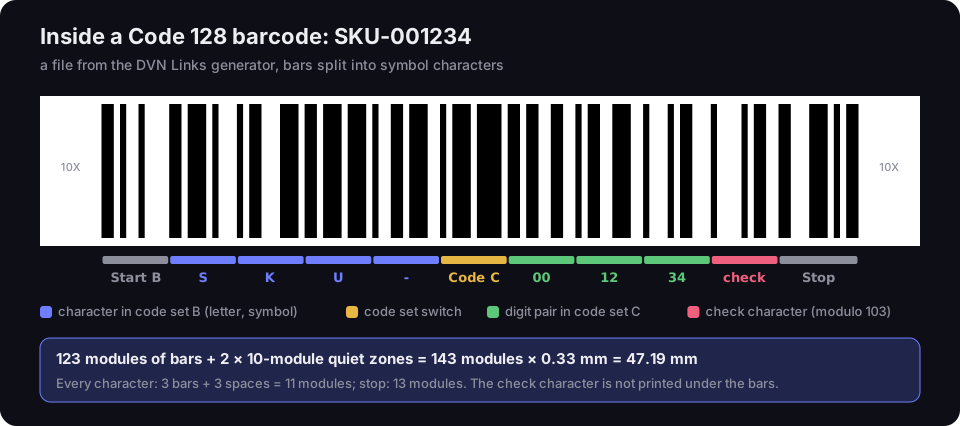
Inside a Code 128 barcode: SKU-001234
a file from the DVN Links generator, 0.33 mm module; bars split into symbol characters
Source: DVN Links generator file, decoded by script with the Code 128 character table, 20 Oct 2026; character structure — GS1 General Specifications R26.0, §5.4
Figure description
A Code 128 barcode for the text SKU-001234 from the DVN Links generator, with bands marking each symbol character underneath. A 10-module quiet zone, the Start B character, the letters S, K, U and a hyphen in code set B, a Code C character switching to code set C, the digit pairs 00, 12 and 34, the check character and the Stop character, then a 10-module quiet zone. Summary: 123 modules of bars plus two 10-module quiet zones is 143 modules, or 47.19 mm at a 0.33 mm module. Every character has 3 bars and 3 spaces, 11 modules in all; the stop has 13 modules.
GS1 gives the formula for GS1-128 as (11N + 46) modules, where N is the number of symbol characters including code set switches (ibid., §5.4.7.2). Plain Code 128 has no FNC1 after the start, so the same formula gives (11N + 35) modules of bars. For SKU-001234, N = 8 (four characters in set B, a switch and three digit pairs): 123 modules, which is what we measured in the file.
Code sets A, B and C: why digits take half the room
Code 128 has three code sets, and set C packs two digits into one character — so a run of digits comes out almost half as long. GS1 describes them as follows: set A holds capital letters, digits, punctuation and control characters (ASCII 0–95), set B upper- and lower-case letters with digits and symbols (ASCII 32–127), and set C the hundred digit pairs 00 to 99, "two data digits per symbol character" (GS1 General Specifications R26.0, §5.4.3.3). A barcode can switch sets in the middle; to keep the barcode shortest, GS1 recommends switching to set C at four or more digits in a row (ibid., §5.4.7.6).
So the "Code 128A", "Code 128B" and "Code 128C" people search for are not three barcodes but three character sets of one symbology. Scanners read them all. Generators — ours included, built on the bwip-js library — pick the sets themselves: for SKU-001234 it started in set B and switched to C before 001234. Had it stayed in set B, the bars would be 145 modules instead of 123: 47.85 mm instead of 40.59 mm.
With digits only, the gap is wider still. We measured the bar width for the strings 1234567890… from 4 to 20 digits long — in Code 128 with set C (the way the generator draws it), in Code 128 forced to set B, and in Code 39:
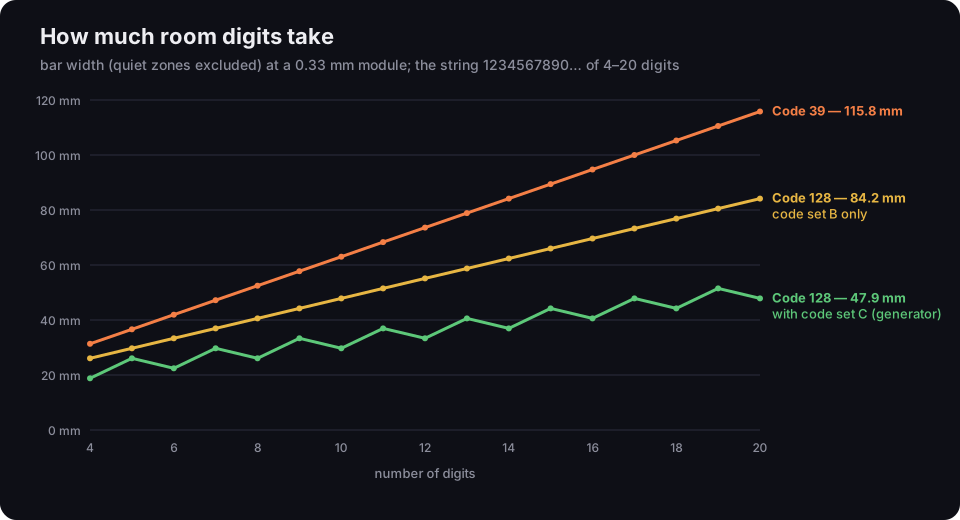
How much room digits take
bar width without quiet zones, 0.33 mm module; strings of 4–20 digits
Source: our measurement of DVN Links generator files and the bwip-js 4.11.4 library, 20 Oct 2026
Figure description
A line chart of bar width in millimetres against the number of digits, from 4 to 20, at a 0.33 mm module. Code 39 rises evenly from 31.35 mm at 4 digits to 115.83 mm at 20. Code 128 in code set B only rises from 26.07 to 84.15 mm. Code 128 with code set C, as the generator draws it, rises from 18.81 to 47.85 mm, but in steps: an odd number of digits gives a longer barcode than the next even number, for example 5 digits 26.07 mm and 6 digits 22.44 mm.
Three takeaways:
- Set C nearly halves a long number. At 20 digits the bars are 47.85 mm in set C and 84.15 mm in set B alone. The same digits take 115.83 mm in Code 39.
- An odd digit count costs a character. Five digits (26.07 mm) take more room than six (22.44 mm), because one digit has no partner and goes in set B, with an extra switch character. If you design your own numbering, use an even number of digits.
- Letters take a full character each. Set C only helps with runs of digits; text like
ZAM-2026-0042comes out longer than the same number of digits.
The modulo 103 check character
The last character before the stop is a check character, which the scanner recomputes on every read. GS1 describes the algorithm: the start character has weight 1 and the following characters weights 1, 2, 3 and so on; each value is multiplied by its weight, the products are added up, and the remainder of dividing the sum by 103 is the check character's value (GS1 General Specifications R26.0, §5.4.7.5.1). The check character is not printed in the text under the bars — it "SHALL NOT be shown in the human readable interpretation" (ibid.). The generator calculates it and the scanner verifies it; you never deal with it. That is also why a "Code 128" font in a spreadsheet isn't enough on its own: something has to add the start character, calculate the check character and add the stop.
Code 128 vs Code 39: measured in millimetres
The same text takes 1.24 to 2.02 times more room in Code 39 than in Code 128 — most of all when it is digits only. Code 39 (ISO/IEC 16388:2023, IEC Webstore) knows 43 characters: digits, capital letters, space and the six symbols - . $ / + % (BWIPP, Code 39, read 19 Oct 2026). It has no lower case and no set for digit pairs, and its check digit is optional. We measured SVG files from our generator (quiet zones included, 20 Oct 2026) for five typical texts:
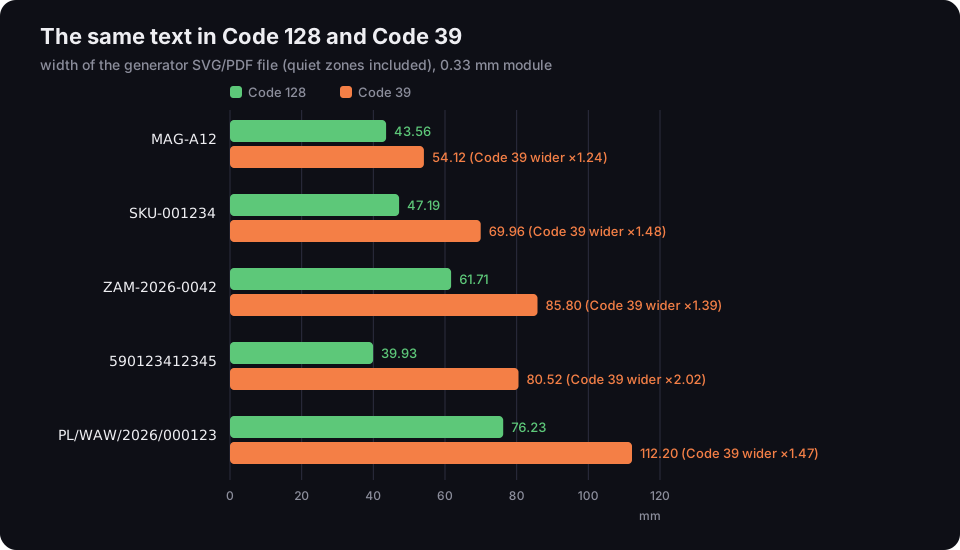
The same text in Code 128 and Code 39
width of the generator SVG/PDF file including quiet zones, 0.33 mm module
Source: our measurement of DVN Links generator files, 0.33 mm module, 20 Oct 2026
Figure description
A bar chart of file widths in millimetres for five texts, a pair of bars for Code 128 and Code 39. MAG-A12: 43.56 and 54.12 mm, Code 39 1.24 times wider. SKU-001234: 47.19 and 69.96 mm, 1.48 times. ZAM-2026-0042: 61.71 and 85.80 mm, 1.39 times. 590123412345: 39.93 and 80.52 mm, 2.02 times. PL/WAW/2026/000123: 76.23 and 112.20 mm, 1.47 times.
In our files the gap is smallest for a short text with letters (MAG-A12, a factor of 1.24) and largest for digits only (590123412345, a factor of 2.02), where Code 128 uses set C. Blog comparisons usually just say "Code 128 is denser"; the measurement shows that on a typical warehouse label it means roughly 10 to 40 mm of width.
So when Code 39? When an existing system or an industry specification requires it. BWIPP lists asset and inventory labels, LOGMARS military markings (MIL-STD-129) and vehicle identification numbers (VINs) among its uses (ibid.). In a new setup where you choose the symbology, Code 128 gives a shorter barcode and lower-case letters.
A common mistake: "Code 39 is limited to 43 characters" confuses the size of the character set with the length of the barcode. We had no access to the text of the standard, so we don't state a length limit. Our generator accepts up to 43 characters in Code 39 and up to 80 in Code 128 — our own limit so the barcode fits a label, not a requirement of the standard.
Code 128 vs EAN-13
EAN-13 carries only a GTIN from GS1 and is for the till; Code 128 carries any text and is for everything except the till. EAN-13 has a fixed length of 13 digits, the last being a modulo 10 check digit, and GS1 assigns the number. Code 128 has a variable length, takes letters and has no meaning in retail — a shop till has no idea what to do with SKU-001234. If a product is going on a shop shelf, it needs an EAN-13 with a GS1 number; where to get one and how the check digit works is in our piece on the EAN code. The till is changing too: GS1 wants checkouts to read the GTIN from 2D barcodes as well by the end of 2027 — what that means for the EAN-13 is in our article on Sunrise 2027.
EAN 128 (GS1-128): Code 128 with FNC1 and Application Identifiers
GS1-128 is Code 128 that begins with a start character followed by FNC1; a barcode without that pair is "never" GS1-128. GS1 puts it plainly: "a Code 128 symbol, which begins with one of the GS1-128 symbology double character start patterns, is always a GS1-128 barcode; a Code 128 symbol, which does not begin with this start pattern, is never a GS1-128 barcode" (GS1 General Specifications R26.0, §5.4.3.7). By agreement between AIM and GS1, FNC1 right after the start is reserved exclusively for the GS1 system (ibid., §5.4).
After FNC1 come the Application Identifiers: two to four digits that say what the data after them means. (00) means "18 digits of SSCC follow", (01) "a 14-digit GTIN", (17) "an expiry date as YYMMDD", (10) "a batch number of up to 20 characters" (GS1 General Specifications R26.0, Table 3-1). Variable-length fields such as the batch are closed by another FNC1 when a further field follows (ibid., §7.8.4). GS1 assigns GS1-128 the symbology identifier ]C1 (GS1, 1D barcodes for general distribution, read 19 Oct 2026), which tells the receiving system it is GS1 data to be split into fields.
To show what FNC1 does, we drew the same 20 digits twice in the generator: as plain Code 128 and as GS1-128 with an SSCC. The number uses the 952 prefix, which GS1 reserves for examples.
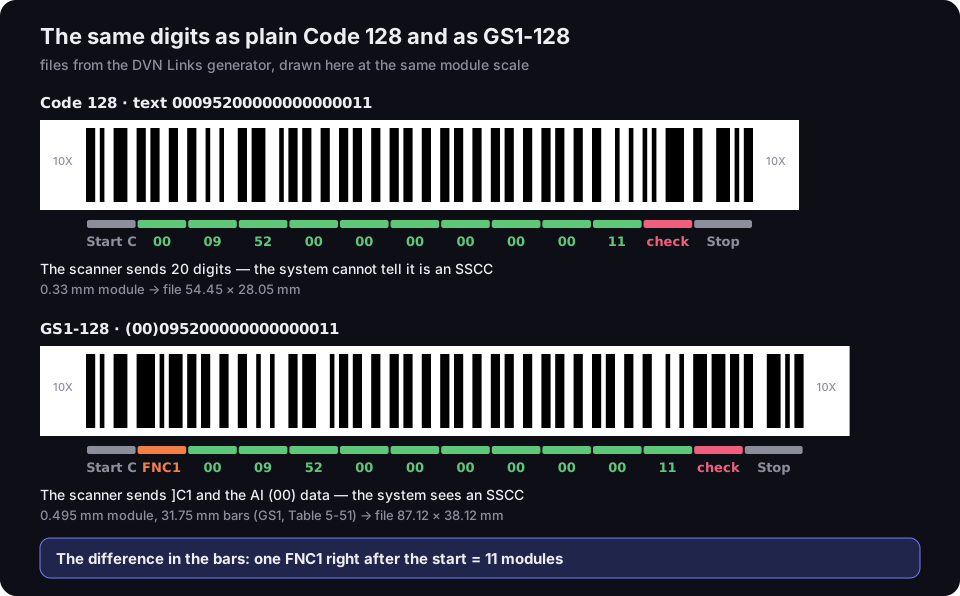
The same digits as plain Code 128 and as GS1-128
files from the DVN Links generator, here at the same module scale; SSCC with the example prefix 952
Source: DVN Links generator files, decoded by script, 20 Oct 2026; FNC1 and ]C1 — GS1 General Specifications R26.0, §5.4
Figure description
Two barcodes with the same twenty digits 00095200000000000011, each with its symbol characters read from the bars underneath. Plain Code 128: Start C, ten digit pairs from 00 to 11, the check character and Stop; the scanner sends 20 digits and the system cannot tell it is an SSCC; file 54.45 by 28.05 mm at a 0.33 mm module. GS1-128 for (00)095200000000000011: Start C, FNC1, the same digit pairs, the check character and Stop; the scanner sends ]C1 and data with Application Identifier 00, and the system sees an SSCC; file 87.12 by 38.12 mm at a 0.495 mm module with 31.75 mm bars. The difference in length is one FNC1 character, 11 modules; the check character differs too.
The GS1-128 has one more character — 156 against 145 modules of bars — and a different check character, because FNC1 shifts the weights of the characters after it. To a system they are completely different data. That is why typing (00)… into a plain Code 128 field doesn't produce GS1-128: you get a barcode with brackets as text, which the system won't recognise as AIs.
EAN-128 and UCC-128 are the symbol's old names, from the time when the European EAN and the American UCC were separate organisations — they merged into GS1 in 2005 (GS1, How we got here, read 19 Oct 2026). GS1 now calls it GS1-128.
SSCC labels: the GS1 logistic label
A GS1 logistic label marks a pallet or carton with an SSCC encoded in GS1-128, so anyone in the supply chain can scan it. GS1 is unambiguous: "the mandatory data carrier used to represent individual logistic units is the GS1-128 barcode symbology", and the SSCC is "the single mandatory element for all GS1 Logistic Labels" (GS1 General Specifications R26.0, §2.2.1 and §6.6.3). An SSCC is always 18 digits with AI (00) (ibid., §1.3.5 and Table 3-1). GS1 Poland adds that an SSCC "is created from the company's GS1 prefix" (GS1 Poland, SSCC, read 19 Oct 2026, our translation) — to issue your own SSCCs, your company has to be a GS1 member. How to build the SSCC itself, how many numbers a GS1 prefix gives you and where the label goes on a pallet is covered in our article on the SSCC barcode.
A label is more than one barcode: usually human-readable text, a barcode with the SSCC, and often a second barcode with the GTIN, count, batch or date. GS1 allows fields to be combined in one barcode or split across several — logistic labels "are often constructed using multiple rows of barcode" (ibid., §7.8.6.3).
GS1-128 in the generator: how to enter AI data
In our generator GS1-128 is an extra barcode type (the generator opens on EAN-13 by default): you type the data the way the text under the bars reads, and the generator adds the FNC1 characters. For example (01)05901234123457(17)271231(10)LOT7 — the AI in brackets, its value straight after, no spaces. The generator accepts ten AIs, the most common ones on logistic labels:
|
AI |
Meaning |
Format (GS1) |
What the generator checks |
|---|---|---|---|
|
(00) |
SSCC — logistic unit number |
18 digits |
length and check digit |
|
(01) |
product GTIN |
14 digits |
check digit; pads GTIN-8/12/13 with zeros to 14 |
|
(02) |
GTIN of contained trade items |
14 digits |
as (01); not together with (01) |
|
(10) |
batch or lot |
up to 20 characters |
GS1 character set, length |
|
(11), (13), (15), (17) |
production, packaging, best-before, expiry date |
YYMMDD |
a valid date; day 00 = end of month |
|
(21) |
serial number |
up to 20 characters |
GS1 character set, length |
|
(37) |
count of items in the unit |
up to 8 digits |
digits, length; not together with (01) |
The formats come from the AI table in the GS1 General Specifications (R26.0, Table 3-1), and the forbidden pairs from the table of invalid pairs: a GTIN of contained items (02) does not sit next to a GTIN (01), and a count (37) applies only to contained items, not to (01) itself (ibid., Table 4-4). The generator doesn't add check digits — for GS1-128 type the full number, and if the check digit is wrong it tells you what it should be. It doesn't check fields GS1 requires together, such as (02) with (00) and (37), because they may sit in another barcode on the same label. AIs outside the list, such as net weight (310n) or a purchase order number (400), are rejected.
The generator also reorders fields: fixed-length ones (SSCC, GTIN, dates) go before variable-length ones (batch, serial number, count), keeping the order you typed within each group. GS1 recommends this because it "usually results in a shorter linear barcode" (GS1 General Specifications R26.0, §7.8.6.3) — a fixed-length field needs no FNC1 separator.
GS1-128 files come at GS1's dimensions for logistic units: a 0.495 mm module, 31.75 mm bars and 10-module quiet zones (GS1 General Specifications R26.0, Table 5-51). That sets a practical limit: the whole barcode including quiet zones can't exceed 165.10 mm, and the data can't exceed 48 characters, counting AIs and FNC1 separators (ibid., §5.4.4.3). At a 0.495 mm module, the length limit is 333 modules — at most 24 symbol characters, by our calculation from the (11N + 46) formula plus quiet zones. A digit pair is one character and so is a letter, so letters use up the room faster. The generator works out the length before drawing and rejects a barcode that wouldn't fit. Here is what that means in practice:
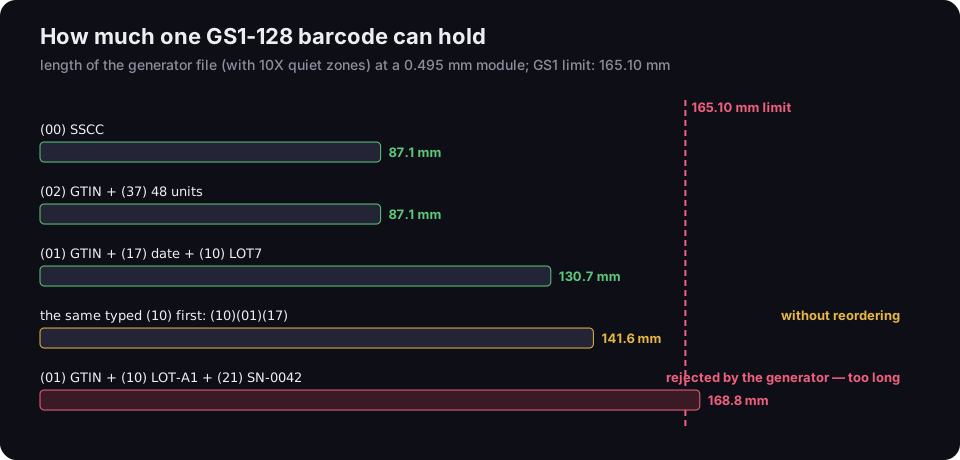
How much one GS1-128 barcode can hold
length of the generator file including quiet zones, 0.495 mm module; GS1 limit 165.10 mm
Source: our measurement of DVN Links generator files, 20 Oct 2026; limit and module — GS1 General Specifications R26.0, §5.4.4.3 and Table 5-51
Figure description
A bar chart of GS1-128 barcode lengths from the generator at a 0.495 mm module, with a line at the 165.10 mm limit. An SSCC alone with AI 00: 87.1 mm. A GTIN of contained items with AI 02 and a count of 48 with AI 37: 87.1 mm. A GTIN with AI 01, an expiry date with AI 17 and batch LOT7 with AI 10: 130.7 mm. The same content typed batch first, without reordering: 141.6 mm. A GTIN, batch LOT-A1 and serial number SN-0042: 168.8 mm, over the limit — the generator rejects such a barcode.
An SSCC on its own takes 87.12 mm, and a GTIN with a date and a short batch 130.68 mm. With the batch first, the barcode would be 141.57 mm: reordering saved almost 11 mm. A GTIN with a batch and a serial number containing letters goes over the limit (168.79 mm) — that content has to be split into two barcodes, such as the GTIN with the batch in one and the serial number in the other.
The generator draws the GS1-128 barcode, not the whole label: it doesn't issue SSCCs (you create those from your GS1 company prefix) and doesn't lay out text, a logo or several barcodes on a sheet. You place the SVG or PDF file in your label software or send it to the printer.
What plain Code 128 is for
Plain Code 128 is for identifiers outside the GS1 system — anywhere the number only means something in your own system. BWIPP, the library our generator is built on, lists carrier tracking numbers and warehouse, bin, inventory and asset labels as typical uses, and points to GS1-128 for data in AI format (BWIPP, Code 128, read 19 Oct 2026). In practice:
- warehouse locations —
A-03-12on a rack; - SKUs and catalogue numbers — your own product codes in the warehouse system;
- order and document numbers —
ZAM-2026-0042on a picking list, so the picker scans it instead of typing it; - fixed assets and tools — an inventory number on a laptop or a drill;
- serial numbers — your own, issued within your company.
When not to use Code 128: a product for a shop shelf (EAN-13 with a GS1 number) and a pallet for a retailer (GS1-128 with an SSCC). Then the barcode has to mean the same thing to the recipient, so GS1 sets both the number and the symbology.
How to generate a Code 128 barcode
In the barcode generator you choose Code 128, type your text and see a preview straight away; the PNG downloads free, without an account.
- Choose the type Code 128 (or GS1-128, if the barcode goes on a logistic label with AIs).
- Type the text. Code 128 takes printable ASCII characters (codes 32–126) — unaccented letters, digits, space and keyboard symbols — up to 80 characters. If you type "ł" or "ś", the generator lists the characters it can't encode; replace them with plain letters. BWIPP explains that readers interpret data as ISO/IEC 8859-1 by default (ibid.), and letters like these aren't in that character set, so they wouldn't reach the system correctly anyway.
- Download the file. PNG is free. Vector SVG and PDF files for print come with the Starter plan and above. The files have a 0.33 mm module (GS1-128: 0.495 mm) and include the quiet zones — don't crop them. Which format to send the printer is compared in SVG, PDF or PNG for print.
Many barcodes at once: bulk mode
From the Pro plan you paste up to 100 values, one per line, and download a single PDF with one barcode per page or a ZIP of SVG files. Blank lines are skipped. All barcodes in a batch are of one type. Every line is checked before drawing; if even one is invalid, the generator creates no file and lists the invalid lines by number. A spreadsheet column can simply be copied and pasted. The generator doesn't import CSV files or lay barcodes out on a label sheet: the PDF with one barcode per page goes into your label software or label printer. Plans and prices (excluding VAT) are on the pricing page, and all features on the features page.
Frequently asked questions
They are character sets of one symbology, not three barcodes. A has capital letters and control characters, B upper- and lower-case letters, C digit pairs. A barcode can switch sets in the middle, and the generator picks them to keep the barcode as short as possible.
No. EAN 128 (UCC/EAN-128) is the old name of GS1-128 — a Code 128 that begins with an FNC1 character and carries data with Application Identifiers. According to GS1, a barcode without FNC1 after the start is never GS1-128, even if the text under it has brackets.
It marks a logistic unit — a pallet or an outer carton — with an SSCC encoded in GS1-128, so everyone in the supply chain scans it and reads the same number. The SSCC is the label's only mandatory element; the number is built from the company prefix issued by GS1 — step by step, check digit included, in our article on the SSCC barcode.
Not by default. Readers interpret the data as ISO/IEC 8859-1, which lacks many Central European letters such as "ł", "ś" or "ő". Our generator accepts only ASCII characters 32–126 in Code 128 and shows which characters need replacing.
A barcode font alone isn't enough: Code 128 needs a start character, a modulo 103 check character and a stop character, which a font can't calculate by itself. It is simpler to copy the column from the spreadsheet into the generator's bulk mode (Pro plan and above) and download a ready PDF or SVG files.